A Community discussion forum for Halo Custom Edition, Halo 2 Vista, Portal and Halo Machinima
|
 Home
Home Search
 Register
 Login
Login Member List
 Recent Posts
| »Forums Index »Halo Custom Edition (Bungie/Gearbox) »Halo CE Technical / Map Design »Install tags | 
|
| Author | Topic: Install tags (11 messages, Page 1 of 1) | ||||
| Moderators: Dennis | |||||
 NapalM Joined: Jul 8, 2007 
keke |
Posted: Jul 12, 2007 11:57 AM
Msg. 1 of 11
Hey I dont know where to put new tags I downloaded, and trust me, there was no one as dumb as me to ask this question before.
|
||||


|
|||||
|
Dennis  Joined: Jan 27, 2005 
"We are made of starstuff.” ― Carl Sagan |
Posted: Jul 12, 2007 12:20 PM
Msg. 2 of 11
Tags can not be added to compiled maps. Please read the header text at the top of all Tag sections: http://hce.halomaps.org/index.cfm?pg=6&sid=31 Tags are used to create maps.
Making Halo CE Maps How do I Make Halo CE maps http://hce.halomaps.org/index.cfm?nid=406 Ghost's Tutorials http://ghost.halomaps.org/ Section: Tutorials http://hce.halomaps.org/index.cfm?pg=6&sid=23 |
||||
|
|
|||||
|
NapalM Joined: Jul 8, 2007
keke |
Posted: Jul 12, 2007 12:53 PM
Msg. 3 of 11
My map is not compiled yet
|
||||
|
|
|||||
|
Rm860 Joined: Sep 7, 2006 
Dennis sleeps like this! |
Posted: Jul 12, 2007 01:27 PM
Msg. 4 of 11
Download the tags, extract using your extracter of choice (i love tugzip).
Then open the folder and take the folder with the tag(s) in it and right click and select copy. Navigate to your tags folder in your Halo CE root directory. So if it's a scenery tag go into the scenery folder and right click and paste the folder into the scenery folder. If it's a weapon tag do so in the weapons folder, if vehicle tag do so in the vehicles folder. Now here is the thing about downloading tags. See alot of people don't upload all the files needed for tags. Here is a hint. When you open the tag folder of the tag(s) you downloaded check to see there is a .gbx model tag, if there isn't then the tag won't work. Now if a tag is complete after you paste it into the tags folder in the right folder open your .scenery, .weapon, or .vehicle tag in gurilla. Check for red text and reasign the path of anything that is in red. You should be able to figure it out from here. it look we quite awhile to realize how do to that. Your question was not a dumb one |
||||
|
|
|||||
|
Rm860 Joined: Sep 7, 2006
Dennis sleeps like this! |
Posted: Jul 12, 2007 01:38 PM
Msg. 5 of 11
once you can do that with tags it also will help you learn how to get scenario tags to work that are not when you try to open Sapien.
|
||||
|
|
|||||
|
NapalM Joined: Jul 8, 2007
keke |
Posted: Jul 12, 2007 01:46 PM
Msg. 6 of 11
Well i keep getting this error:
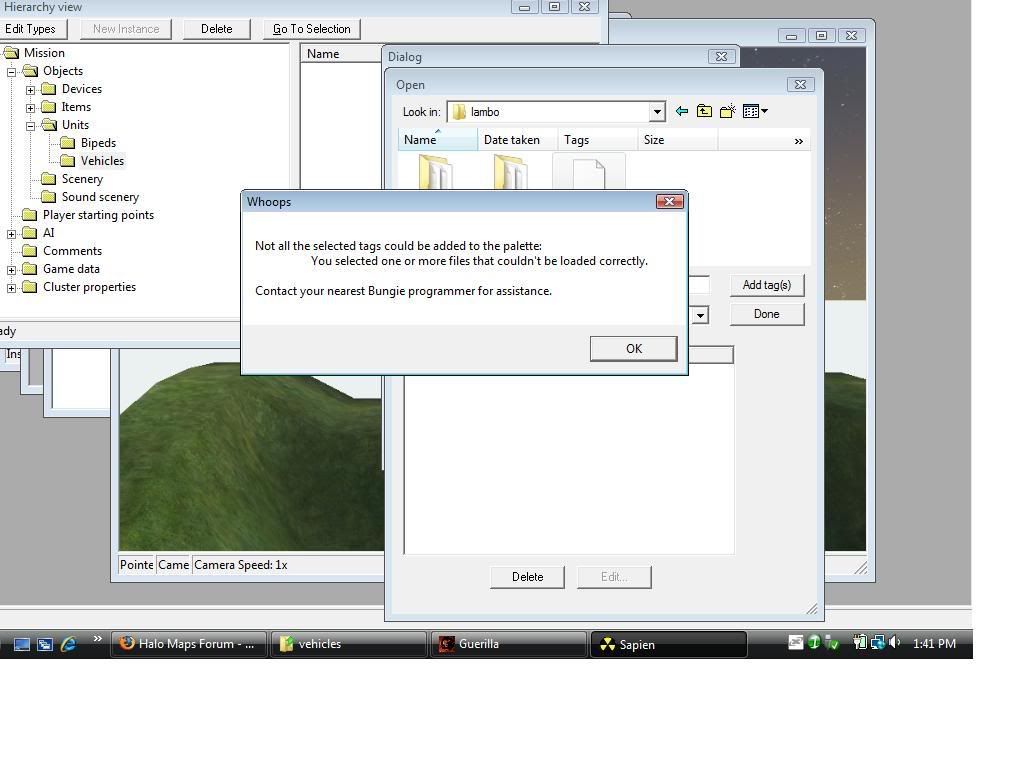 Know what it is? |
||||
|
|
|||||
|
Rm860 Joined: Sep 7, 2006
Dennis sleeps like this! |
Posted: Jul 12, 2007 01:48 PM
Msg. 7 of 11
Dude go do what i said above.
It does look complicated and is when you got like 12 tags all needing fixing. If you get alot of errors with tags it can take a good 20 minutes to an hour or more sometimes to fix off topic: i just got into the World In Conflict Beta..wooo. It's going to take 7 hours to download the beta client though. Edited by Rm860 on Jul 12, 2007 at 01:49 PM |
||||
|
|
|||||
|
Rm860 Joined: Sep 7, 2006
Dennis sleeps like this! |
Posted: Jul 12, 2007 01:51 PM
Msg. 8 of 11
yep yep do what i said.
|
||||
|
|
|||||
|
NapalM Joined: Jul 8, 2007
keke |
Posted: Jul 12, 2007 02:26 PM
Msg. 9 of 11
thanks a ton guys!!!!!!!!
 |
||||
|
|
|||||
|
Rm860 Joined: Sep 7, 2006
Dennis sleeps like this! |
Posted: Jul 12, 2007 02:40 PM
Msg. 10 of 11
your welcome a ton
|
||||
|
|
|||||
|
NapalM Joined: Jul 8, 2007
keke |
Posted: Nov 12, 2007 10:43 AM
Msg. 11 of 11
I feel like a NOOOB
Just goes to show we were ALL noobs to begin (unless you were born 1337) |
||||
|
|
|||||

|
