A Community discussion forum for Halo Custom Edition, Halo 2 Vista, Portal and Halo Machinima
|
 Home
Home Search
 Register
 Login
Login Member List
 Recent Posts
| »Forums Index »Halo Custom Edition (Bungie/Gearbox) »Halo CE General Discussion »44KHz sounds in CE without issues | 
|
| Author | Topic: 44KHz sounds in CE without issues (8 messages, Page 1 of 1) | ||||
| Moderators: Dennis | |||||
 SBB_Michelle Joined: Nov 4, 2015 
This site brings me pain. |
Posted: Dec 26, 2015 11:16 PM
Msg. 1 of 8
So, in Halo CE there is an issue that a lot of us modders know about, when you make a sound tag it has to be 22KHz or else the sound will not play or play ON THE WHOLE MAP.
And we all know that 22KHz sounds like defecation compared to 44KHz as it doesn't catch the detail in the pitches of the sound. Today, I (SBBMichelle) and Megasean have found a solution to this problem, and when you find out what it is you're gonna wonder why you didn't think of it yourself. - 22KHz: https://www.youtube.com/watch?v=rplPFU5rty0 44KHz: https://www.youtube.com/watch?v=m7JW4WqgH7w So, to explain how to do it in one sentence: You compile your sounds as 44k mono, you make it 22KHz in guerilla (You will need kornman's guerilla or os_guerilla for this) and make Halo play it with a pitch modifier of 2. This works because Halo decides how to play a sound based on it's frequency and amount of channels. That's why when your sound is 44KHz stereo it will play full volume in the two channels of your headphones as long as you are in the range where it plays, and when a sound is 22KHz mono it will play it using it's directional audio. This however is not affected by the pitch, so you can get a a part of the quality back by playing it on double pitch. 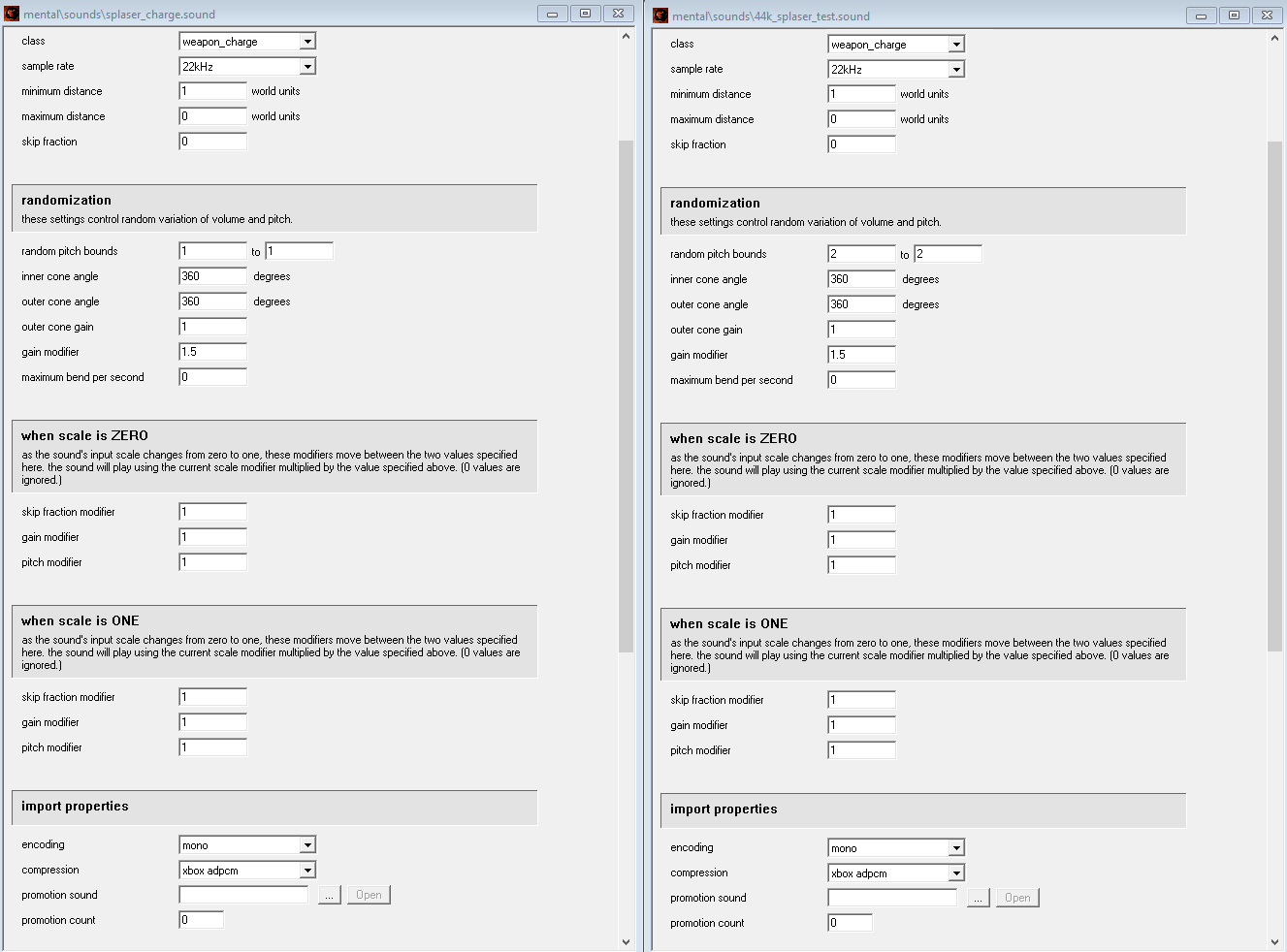 (Just showing that all you should change are those two values) The reason I am only mentioning the pitch of the sound is because Halo CE doesn't actually only change the pitch, it plays the sound in a different speed to get the pitch. And when you play a sound at double speed it plays double the info in the same amount of time. So, technically it is 2*22KHz. - Now, the difference is not super awesome, but definitely something and can be useful for some of you people that die on the inside when you hear how your sound quality is destroyed when you make it 22KHz. I also found that sounds like spartan laser charging sounds repeat more successfully when you do this. Give Megasean some love for finding this one out. Also now we are on the topic of sounds for CE, Here is a link to raffgie's Xbox ADPCM audio codec installer for 64bit for anyone who doesn't have it yet: http://www.mediafire.com/download/qpq2dxqdd8ai3n1/XBADPCM.zip (I originally only posted this on opencarnage, but I thought there might be some people here that could actually use this info.) Edited by SBB_Michelle on Dec 26, 2015 at 11:17 PM |
||||


|
|||||
|
MrChromed Joined: Apr 14, 2013 
Developer on SPv3 and ShadowMods. |
Posted: Dec 27, 2015 07:58 AM
Msg. 2 of 8
So, there's no need to re-compile the sound tag again after the Guerilla change, right?. Amazing tutorial Michelle and Sean. Keep the good work
 |
||||
|
|
|||||
|
xnx Joined: Feb 12, 2013 
h2 marine anims or i detonate the vest |
Posted: Dec 27, 2015 05:48 PM
Msg. 3 of 8
jesus.sound
|
||||
|
|
|||||
|
Masters1337 Joined: Mar 5, 2006 
halonaminator's unfortunate idol |
Posted: Dec 27, 2015 10:37 PM
Msg. 4 of 8
I'd advise not doing this, while it appears to work it can crash the game according to the people I know who have done this in the past.
|
||||
|
|
|||||
|
SBB_Michelle Joined: Nov 4, 2015
This site brings me pain. |
Posted: Dec 27, 2015 11:28 PM
Msg. 5 of 8
Might have been a faulty ogg dll.
I suggest using xboxadpcm. Edited by SBB_Michelle on Dec 27, 2015 at 11:29 PM |
||||
|
|
|||||
|
Super Flanker Joined: Oct 5, 2012 
The length of your life depends on my aim. |
Posted: Dec 28, 2015 09:10 AM
Msg. 6 of 8
Quote: --- Original message by: rangerDanger The moral of the story is that the Halo: CE engine is garbage. Even garbage can be useful. |
||||
|
|
|||||
|
beaucephal Joined: Sep 2, 2014 CMT SPv3 audio dude |
Posted: Dec 29, 2015 12:29 AM
Msg. 7 of 8
Honestly, as long as you're using a decent enough encoder for your downsampling, encoding at 22khz makes very little overall difference to the quality of ingame audio. The whole Nyquist theorem that established 44.1khz as a standard did so as complete overkill. The human ear rarely hears anything over 20khz anyway. Sure, because we hear overtones and harmonics, there might be a slightly perceptible drop in audio quality, but once you're in-game it's doubtful you'll notice any difference.
If you really can't get decent 22khz encoding, just chuck your sounds into Reaper, re-render at 22khz with your resample mode set at 512pt sinc, and in 9 out of 10 instances you'll have no noticeable difference in quality, without having to resort to a really hacky tag workaround. Edited by beaucephal on Dec 29, 2015 at 12:31 AM |
||||
|
|
|||||
|
Super Flanker Joined: Oct 5, 2012
The length of your life depends on my aim. |
Posted: Dec 29, 2015 09:22 AM
Msg. 8 of 8
Quote: --- Original message by: beaucephal Honestly, as long as you're using a decent enough encoder for your downsampling, encoding at 22khz makes very little overall difference to the quality of ingame audio. The whole Nyquist theorem that established 44.1khz as a standard did so as complete overkill. The human ear rarely hears anything over 20khz anyway. Sure, because we hear overtones and harmonics, there might be a slightly perceptible drop in audio quality, but once you're in-game it's doubtful you'll notice any difference. If you really can't get decent 22khz encoding, just chuck your sounds into Reaper, re-render at 22khz with your resample mode set at 512pt sinc, and in 9 out of 10 instances you'll have no noticeable difference in quality, without having to resort to a really hacky tag workaround. Edited by beaucephal on Dec 29, 2015 at 12:31 AM I hope this doesn't turn into another FOV thread. |
||||
|
|
|||||

|
