A Community discussion forum for Halo Custom Edition, Halo 2 Vista, Portal and Halo Machinima
|
 Home
Home Search
 Register
 Login
Login Member List
 Recent Posts
| »Forums Index »Halo Custom Edition (Bungie/Gearbox) »Halo CE General Discussion »This is really getting on my nerves..... | 
|
| Author | Topic: This is really getting on my nerves..... (24 messages, Page 1 of 1) | ||||
| Moderators: Dennis | |||||
 EmmanuelCD Joined: Jan 7, 2015 
End my suffering |
Posted: Nov 28, 2015 03:07 PM
Msg. 1 of 24
But the open edge is the most easiest error to fix :(
Undo what ever you done, back to the file you exported (hope you have a backup file). what i do i those cases is us editable mesh, select the edges dpendency and at the final theres an option called "select open edges". The you just fill that space with polys necesary. I thought Flanker teached you well |
||||


|
|||||
|
Kinnet Joined: Dec 27, 2013 
why are we still here? just to suffer? |
Posted: Nov 28, 2015 03:15 PM
Msg. 2 of 24
Quote: --- Original message by: EmmanuelCD But the open edge is the most easiest error to fix :( Undo what ever you done, back to the file you exported (hope you have a backup file). what i do i those cases is us editable mesh, select the edges dpendency and at the final theres an option called "select open edges". The you just fill that space with polys necesary. I thought Flanker teached you well maybe he did not provide enough nudes |
||||
|
|
|||||
|
MatthewDratt Joined: Sep 11, 2010 
TAKEDOWN IS OUT MattDratt.com |
Posted: Nov 28, 2015 03:39 PM
Msg. 3 of 24
It looks like you are using the worse way of modeling yet. Don't just create a box and tessellate. Gross.
https://vimeo.com/11781231 Higuys Terrain Tutorial https://www.youtube.com/playlist?list=PLffzBdSV8dXoWpG-_3AMmSJ7yXkNXTI5D Popes A10 Tutorial |
||||
|
|
|||||
|
Mootjuh Joined: Mar 12, 2008 
Hilariously derailing oneliner |
Posted: Nov 28, 2015 05:28 PM
Msg. 4 of 24
But tesselation is how terrain sculpting starts~
|
||||
|
|
|||||
|
R93_Sniper Joined: Feb 13, 2011 
When in Doubt, RUN! |
Posted: Nov 28, 2015 05:32 PM
Msg. 5 of 24
Quote: --- Original message by: Alex21788 I used poly mode, used the edge selecting mode, selected all the edges that were the error, I hit backspace. It messed up the parts on my map that where infected, I deleted all the parts that where infected This, oh my god, what are you even doing? Alright so here's the rundown right now. Hitting backspace while in border mode will delete edges. You don't want to DELETE, you want to FILL. What you did was never going to help, instead it made it worse. "Infected" seriously? Modeling isn't like working on a living creature, its not a matter of removing an issue by force. The fact that you even thought it was like that pretty much says that you need to sit down, back up, and start from the basics, because quite frankly you don't know what you're doing. Before even looking up any tutorials on how to model, you should learn how to operate max properly, and from there learn what closed world rules are. From there its a matter of implementation but don't go through tutorials and think that small things are unimportant, because its those small things that make huge differences. |
||||
|
|
|||||
|
Spartan314 Joined: Aug 21, 2010 
Former biped rigger & FP animator |
Posted: Nov 28, 2015 07:49 PM
Msg. 6 of 24
This is coming from a guy that's heading a project?
My recommendation is to scrap everything and just use a box as a BSP. Keep things simple until they work. Then you can go and elaborate things. What R93 said about deleting edges is correct. You've just made holes in your model. Spend some time familiarizing yourself with what each button in max does. How to extrude, collapse, bridge, etc. Utilizing and understanding these is essential to making an interesting model. You've got issues even exporting things so K.I.S.S. |
||||
|
|
|||||
|
Super Flanker Joined: Oct 5, 2012 
The length of your life depends on my aim. |
Posted: Nov 29, 2015 05:19 AM
Msg. 7 of 24
|
||||
|
|
|||||
|
Super Flanker Joined: Oct 5, 2012
The length of your life depends on my aim. |
Posted: Nov 29, 2015 05:51 AM
Msg. 8 of 24
Quote: --- Original message by: Alex21788 Yeah, I saw that Flanker. It looks diffrent to this. I can't see any holes in the errors, and I don't know how to find out. Please help. I'm not going to offer any additional help other than video tuts and the occasional pictorial. But since you are pulling on my heart strings, in edit poly mode hit "3" on your keyboard and show me the results in a captcha. (Take a few screens of different angles, 2 should be enough & post back here) |
||||
|
|
|||||
|
Super Flanker Joined: Oct 5, 2012
The length of your life depends on my aim. |
Posted: Nov 29, 2015 06:34 AM
Msg. 9 of 24
Yeah occasionally tool does that for me too. Initially I thought it was showing me the most severe errors and then once those were fixed it would then bring up the slightly less offending articles.
What I suggest you do from the pic is in edit poly mode hit "1" which should take you to vertex mode. Once in vertex mode hit "ctrl+a" this will select all of your verts associated with your bsp and then hit weld at a threshold of "0.01" Whilst still in vertex mode you may use the cut tool to cut edges between non quads or you may want to take the quick and easy route which would be to just use the connect tool with all your verts selected. But remember that will triangulate your mesh which may make things a teeny bit harder to select. Then convert your mesh to an "editible mesh" and try exporting once again. If at any time you feel you are perhaps making an undesirable change to your scene and you are not sure if it will work out save your max file under a different title name. Then if what you tried did not work out you may revert back to the previous file. It's basic stuff but yeah. |
||||
|
|
|||||
|
Super Flanker Joined: Oct 5, 2012
The length of your life depends on my aim. |
Posted: Nov 29, 2015 06:54 AM
Msg. 10 of 24
Quote: --- Original message by: Alex21788 Ok, I weilded it. But what about the cut tool? I've covered the cut tool in a few of my videos so I suggest going back and watching them again. But in a nut shell the cut tool allows you to independently cut edges from one vertex to another.  |
||||
|
|
|||||
|
Super Flanker Joined: Oct 5, 2012
The length of your life depends on my aim. |
Posted: Nov 29, 2015 07:17 AM
Msg. 11 of 24
Quote: --- Original message by: Alex21788 Ok. I wielded all the vertices ect, recompiled, gave me errors, imported wrl file, looks like this. http://i.imgur.com/X8JItZv.png Well you still have NGONS.....select all your verts and hit "connect" in the edit mesh or poly rollout, if hitting connect doesn't seem to do anything then you may have duplicate faces. |
||||
|
|
|||||
|
Super Flanker Joined: Oct 5, 2012
The length of your life depends on my aim. |
Posted: Nov 29, 2015 07:45 AM
Msg. 12 of 24
Quote: --- Original message by: Alex21788 I hit connect, It did something which is good. I recompiled and got less errors on my mapm but have 17 degenerate triangles, it looks like this. http://i.imgur.com/j1vnQIq.png Well it seems we are on the right road. To my knowledge degen tris never stopped a full compilation process for me but if you want to make sure all the errors are whipped out of your test bsp then I recommend doing this:   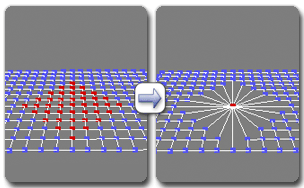  Remember to select only a group of vertices surrounded by a single wrl helper object. Don't select every single vertex surrounded by every single helper you have in your scene otherwise you will end up collapsing vertices from different parts of your bsp which will look awful and ruin the compilation process. Edited by Super Flanker on Nov 29, 2015 at 07:46 AM |
||||
|
|
|||||
|
Super Flanker Joined: Oct 5, 2012
The length of your life depends on my aim. |
Posted: Nov 29, 2015 08:19 AM
Msg. 13 of 24
Quote: --- Original message by: Alex21788 SUCCESS! Open edge error gone, but new one has spawned. it looks like this.. http://i.imgur.com/mdqwfJq.png Please help. Edited by Alex21788 on Nov 29, 2015 at 08:09 AM Well what does it say in the debug window? "overlapping faces" if you or anyone watched any of my videos specifically part 18 I do go into detail on why overlapping faces are bad and how to fix them. If it isn't in 18 it's probably in a previous video or you can use google: https://goo.gl/d81Ldx |
||||
|
|
|||||
|
Super Flanker Joined: Oct 5, 2012
The length of your life depends on my aim. |
Posted: Nov 29, 2015 09:02 AM
Msg. 14 of 24
Quote: --- Original message by: Alex21788 Never mind. I finally got it in sapien. Thank you very much flanker. For everything you have done. http://i.imgur.com/Tv6Uhy4.png One error tho. When opening the map in slayer or ctf modes, it gives me exception. Any help? Have you added player starting points or for that matter net game flags? Go watch the second half of part 17. |
||||
|
|
|||||
|
Corpen Joined: Aug 11, 2015 
Sierra 612 - DIAC - "Why are we here?" |
Posted: Nov 29, 2015 02:24 PM
Msg. 15 of 24
That looks amazing just add some geometry to the cliffs and it may be considered decent as well as that smooth out the terrain so it is more natural.
Edited by Corpen on Nov 29, 2015 at 02:25 PM |
||||
|
|
|||||
|
Nickster5000 Joined: Dec 11, 2010 
|
Posted: Nov 29, 2015 08:11 PM
Msg. 16 of 24
Quote: --- Original message by: Alex21788 UPDATE, MORE ERRORS. I have added the bases I want, but it has the same error, it looks like this. http://i.imgur.com/sFenIvp.png Edited by Alex21788 on Nov 29, 2015 at 03:55 PM I just don't understand why you don't go through flanker's tutorials, and then try these techniques on your own, or just do it at the same time as he does it in the tutorial... I'm sure he walks you through it if you're patient enough. |
||||
|
|
|||||
|
Kinnet Joined: Dec 27, 2013
why are we still here? just to suffer? |
Posted: Nov 29, 2015 09:23 PM
Msg. 17 of 24
Quote: --- Original message by: Nickster5000 Quote: --- Original message by: Alex21788 UPDATE, MORE ERRORS. I have added the bases I want, but it has the same error, it looks like this. http://i.imgur.com/sFenIvp.png Edited by Alex21788 on Nov 29, 2015 at 03:55 PM I just don't understand why you don't go through flanker's tutorials, and then try these techniques on your own, or just do it at the same time as he does it in the tutorial... I'm sure he walks you through it if you're patient enough. I know right !!!! |
||||
|
|
|||||
|
Spartan314 Joined: Aug 21, 2010
Former biped rigger & FP animator |
Posted: Nov 30, 2015 03:42 PM
Msg. 18 of 24
I still say you should use a box
|
||||
|
|
|||||
|
Corpen Joined: Aug 11, 2015
Sierra 612 - DIAC - "Why are we here?" |
Posted: Dec 1, 2015 02:49 PM
Msg. 19 of 24
Just go through the video slowly piece by piece then after each step do it your self if you get stuck with that part watch that bit again.
Edited by Corpen on Dec 1, 2015 at 04:45 PM |
||||
|
|
|||||
|
MEGA_VKNG Joined: Dec 23, 2013 
|
Posted: Dec 1, 2015 05:21 PM
Msg. 20 of 24
Quote: --- Original message by: Alex21788 Plz help plz Are you purposefully trying to be unlikable because its working |
||||
|
|
|||||
|
Kinnet Joined: Dec 27, 2013
why are we still here? just to suffer? |
Posted: Dec 1, 2015 07:04 PM
Msg. 21 of 24
Quote: --- Original message by: MEGASEAN2812 Quote: --- Original message by: Alex21788 Plz help plz Are you purposefully trying to be unlikable because its working Hey it worked in me |
||||
|
|
|||||
|
Super Flanker Joined: Oct 5, 2012
The length of your life depends on my aim. |
Posted: Dec 2, 2015 09:40 AM
Msg. 22 of 24
Quote: --- Original message by: Nickster5000 Quote: --- Original message by: Alex21788 UPDATE, MORE ERRORS. I have added the bases I want, but it has the same error, it looks like this. http://i.imgur.com/sFenIvp.png Edited by Alex21788 on Nov 29, 2015 at 03:55 PM I just don't understand why you don't go through flanker's tutorials, and then try these techniques on your own, or just do it at the same time as he does it in the tutorial... I'm sure he walks you through it if you're patient enough. I'm going to administer some tough love here and agree with nicky. You will never evolve with an attitude which demands constant help and attention. Follow what I have uploaded step by step. Then attempt to re-create it without watching the videos, if you have any trouble then by all means go back to what you had trouble with. |
||||
|
|
|||||
|
Super Flanker Joined: Oct 5, 2012
The length of your life depends on my aim. |
Posted: Dec 13, 2015 06:28 AM
Msg. 23 of 24
Quote: --- Original message by: Alex21788 The only trouble i'm having is attaching bases. I try to use the snapping thing you used flanker, but its not snapping at all!!!! Please help. http://i.imgur.com/7r9fO6p.png I'm pretty sure I mentioned in one video that you have to open up snapping settings, enable vertex snap only, and check axis constraints.   |
||||
|
|
|||||
|
Super Flanker Joined: Oct 5, 2012
The length of your life depends on my aim. |
Posted: Mar 26, 2016 03:35 PM
Msg. 24 of 24
Quote: --- Original message by: Alex21788 Quote: --- Original message by: Super Flanker Quote: --- Original message by: Alex21788 The only trouble i'm having is attaching bases. I try to use the snapping thing you used flanker, but its not snapping at all!!!! Please help. http://i.imgur.com/7r9fO6p.png I'm pretty sure I mentioned in one video that you have to open up snapping settings, enable vertex snap only, and check axis constraints. http://www.mastergraphics.com/wp-content/uploads/2013/02/Snap-Settings.png http://docs.autodesk.com/3DSMAX/15/ENU/3ds-Max-Help/images/GUID-6A08700A-A41B-4379-9AFB-988625EB5B27-low.png Thank you, it snaps properly now. 2 or so months later whut? |
||||
|
|
|||||

|
