A Community discussion forum for Halo Custom Edition, Halo 2 Vista, Portal and Halo Machinima
|
 Home
Home Search
 Register
 Login
Login Member List
 Recent Posts
| »Forums Index »Halo Custom Edition (Bungie/Gearbox) »Halo CE General Discussion »Huge error while building collision geometry... | 
|
| Author | Topic: Huge error while building collision geometry... (4 messages, Page 1 of 1) | ||||
| Moderators: Dennis | |||||
 altis94 Joined: Oct 5, 2012 
Join my Discord https://discord.gg/GDVEaRD |
Posted: Apr 27, 2015 11:12 AM
Msg. 1 of 4
Did you compile it to editable mesh before exporting?
|
||||


|
|||||
|
Jesse Joined: Jan 18, 2009 Discord: Holy Crust#4500 |
Posted: Apr 27, 2015 05:55 PM
Msg. 2 of 4
If you are using Bluestreak as the exporter, set the model to "editable mesh" before exporting.
otherwise, weld the verts to 0.01 and make sure there are no edges. Use the border tool to look for any edges that may be open. If you are using something transparent (like windows on a house, or glass on a gun) just set it to be double-sided. |
||||
|
|
|||||
|
The_Purrminator Joined: May 30, 2014 
(SBB) Michelle |
Posted: Apr 28, 2015 10:42 AM
Msg. 3 of 4
Import the [structure name].wrl from you halo folder into 3dsmax or whatever you use for modelling levels. And check where the blue error is.
If it's a triangle that looks kinda like the bottom one here: 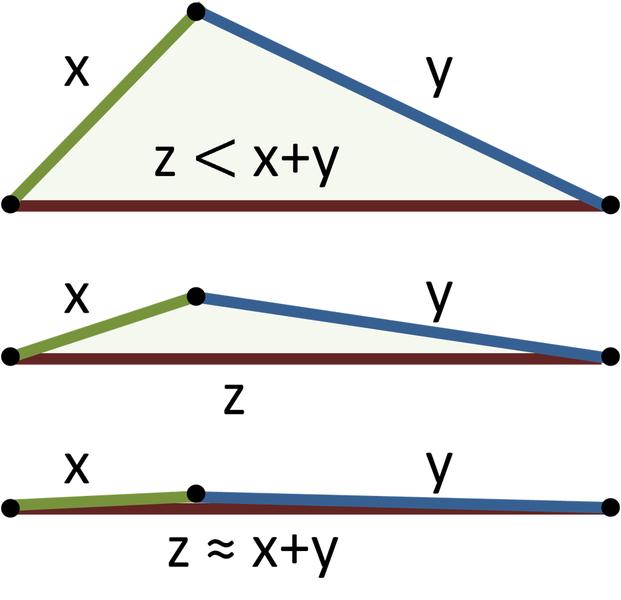 then make it look more like the two above ones by moving a vertex. If it's a normal triangle you should fix the uvs. |
||||
|
|
|||||
|
Super Flanker Joined: Oct 5, 2012 
The length of your life depends on my aim. |
Posted: Apr 29, 2015 07:21 AM
Msg. 4 of 4
Import your .wrl file associated with the bsp which is preventing compilation.
|
||||
|
|
|||||

|
