A Community discussion forum for Halo Custom Edition, Halo 2 Vista, Portal and Halo Machinima
|
 Home
Home Search
 Register
 Login
Login Member List
 Recent Posts
| »Forums Index »Halo Custom Edition (Bungie/Gearbox) »Halo CE General Discussion »I need help with my shader enviroment | 
|
| Author | Topic: I need help with my shader enviroment (27 messages, Page 1 of 1) | ||||
| Moderators: Dennis | |||||
 Halonimator Joined: Dec 15, 2014 
|
Posted: Feb 25, 2015 03:08 PM
Msg. 1 of 27
They look horrible and disgusting ingame, some images:
  Any thing that could help i will consider. Edited by Halonimator on Feb 25, 2015 at 03:09 PM Edited by Halonimator on Feb 25, 2015 at 07:58 PM |
||||


|
|||||
|
MatthewDratt Joined: Sep 11, 2010 
TAKEDOWN IS OUT MattDratt.com |
Posted: Feb 25, 2015 03:29 PM
Msg. 2 of 27
It looks like (a bad texture but also) a bad UV and model. Try adding smoothing groups to the surface plus a new UV.
|
||||
|
|
|||||
|
altis94 Joined: Oct 5, 2012 
Join my Discord https://discord.gg/GDVEaRD |
Posted: Feb 25, 2015 03:37 PM
Msg. 3 of 27
Remove cubemap.
|
||||
|
|
|||||
|
NeX Joined: Apr 11, 2013 
|
Posted: Feb 25, 2015 04:12 PM
Msg. 4 of 27
Yeah I can't imagine a texture like that would actually tile well at all
|
||||
|
|
|||||
|
Halonimator Joined: Dec 15, 2014
|
Posted: Feb 25, 2015 04:21 PM
Msg. 5 of 27
and also microbumps do not work!
|
||||
|
|
|||||
|
Xx1Talon1xX Joined: Feb 2, 2015 
Mexicans, Mexicans Everywhere! |
Posted: Feb 25, 2015 04:37 PM
Msg. 6 of 27
Them jaggys though....
|
||||
|
|
|||||
|
Higuy Joined: Mar 6, 2007 
@lucasgovatos |
Posted: Feb 25, 2015 04:43 PM
Msg. 7 of 27
For starters... you're using a texture that has lighting information already in it. Never do that! We have lightmaps and bump maps for a reason, and that is to give the texture real 3d environment lighting based of the conditions in the level. I suggest going to cgtextures.org and finding a good cliff texture. They are all free and will tell you if they tile. You'll probably want to resize them to a power of two though. Second, you'll want to apply a smoothing group to the mesh, along with making sure that the UV's a seamless for the most part to ensure good tiling with your already tiling texture. Lastly I suggest maybe adding some more polygons to round out a few of the egdes and make it look a bit more believable.
|
||||
|
|
|||||
|
MEGA_VKNG Joined: Dec 23, 2013 
|
Posted: Feb 25, 2015 05:02 PM
Msg. 8 of 27
That texture looks pretty bad. No offense. clean textures are the way to go. I wouldn't recommend using images from real life.
Edited by MEGASEAN2812 on Feb 25, 2015 at 05:02 PM |
||||
|
|
|||||
|
Xx1Talon1xX Joined: Feb 2, 2015
Mexicans, Mexicans Everywhere! |
Posted: Feb 25, 2015 05:12 PM
Msg. 9 of 27
Quote: --- Original message by: MEGASEAN2812 That texture looks pretty bad. No offense. clean textures are the way to go. I wouldn't recommend using images from real life. Edited by MEGASEAN2812 on Feb 25, 2015 at 05:02 PM But it makes his map look like the FOX engine.... |
||||
|
|
|||||
|
darksoldier Joined: Dec 28, 2010 
Helo my friend, it's time to fight ;) |
Posted: Feb 25, 2015 05:13 PM
Msg. 10 of 27
I think, that error doesn't come from the "shader.environment". You have two problems, but nothing difficult. You are using a illuminated texture and that's the first problem, try to search another texture on internet who is not illuminated. When you find it, open your model, and replace the old texture by the new one.
After it, you'll need to smooth all the cliffs. You can also select all the cliffs, and applying a "auto smooth". When the two parts will be finished, you'll have a clean model with a good texture applied on it. |
||||
|
|
|||||
|
Xx1Talon1xX Joined: Feb 2, 2015
Mexicans, Mexicans Everywhere! |
Posted: Feb 25, 2015 05:18 PM
Msg. 11 of 27
If you want semi nicer textures, you can get Halo 3 texture packs on this site that has clifs and anything else you really need, and they would look more natural in halo and better then the vanilla CE textures
|
||||
|
|
|||||
|
OrangeJuice Joined: Jan 29, 2009 
Documentation and debug.txt |
Posted: Feb 25, 2015 05:19 PM
Msg. 12 of 27
to get rid of those ugly texture-stretch marks in the bottom right and left in your pic:
try making a plane and cutting it up so it's shaped the way you need it to be, then strip-weld it onto the cliff:  you can also divide every vertical strip into its own element to make it easier too Edited by OrangeJuice on Feb 25, 2015 at 05:20 PM |
||||
|
|
|||||
|
darksoldier Joined: Dec 28, 2010
Helo my friend, it's time to fight ;) |
Posted: Feb 25, 2015 05:59 PM
Msg. 13 of 27
I did a little tutorial, to help you to improve your cliffs. First of all, they are many methods to get good looking cliffs, I will give you a simple one.
First, that's how you cliffs are looking in 3ds Max.  Now select your model, right clic (convert to editable mesh), and select vertex, and move all of them to get a better result  After you've done, you'll get something like that, better and clean.  Now apply a clean texture in your model.  When it's finished, right clic, and select again (convert to editable mesh), select vertex, and go to "soft selection" and select "Use soft selection", enter the number do you want in "fallof". And now play with it.  When you've done, select polygon and now select your cliffs with it. Now go to "smoothing groups" and select "auto smooth".  And now, you have nice looking cliffs !  Sorry for my english, I'm tired, it's late in France :) |
||||
|
|
|||||
|
Masters1337 Joined: Mar 5, 2006 
halonaminator's unfortunate idol |
Posted: Feb 25, 2015 06:29 PM
Msg. 14 of 27
What are you using that gives you detail bump map settings in your tags?
|
||||
|
|
|||||
|
Halonimator Joined: Dec 15, 2014
|
Posted: Feb 25, 2015 07:31 PM
Msg. 15 of 27
thanks for all the tricks.
to master: im using OS 3.1 Edited by Halonimator on Feb 25, 2015 at 07:38 PM |
||||
|
|
|||||
|
Xx1Talon1xX Joined: Feb 2, 2015
Mexicans, Mexicans Everywhere! |
Posted: Feb 25, 2015 07:39 PM
Msg. 16 of 27
Quote: --- Original message by: Halonimator thanks for all the tricks. to master: im using OS 3.1 Edited by Halonimator on Feb 25, 2015 at 07:38 PM WHY!?! |
||||
|
|
|||||
|
Masters1337 Joined: Mar 5, 2006
halonaminator's unfortunate idol |
Posted: Feb 25, 2015 07:50 PM
Msg. 17 of 27
Quote: --- Original message by: Halonimator thanks for all the tricks. to master: im using OS 3.1 Edited by Halonimator on Feb 25, 2015 at 07:38 PM That was never included in OS. From whom did you get your build? Edited by Masters1337 on Feb 25, 2015 at 07:50 PM |
||||
|
|
|||||
|
Halonimator Joined: Dec 15, 2014
|
Posted: Feb 25, 2015 07:55 PM
Msg. 18 of 27
Quote: --- Original message by: sparky The texture image is probably fine. Send the texture's image to me and I'll use STG Pro on it to make it tileable.   |
||||
|
|
|||||
|
stunt_man Joined: Sep 22, 2009 
GMYF - Now hosting proper MLG gametypes! |
Posted: Feb 25, 2015 07:59 PM
Msg. 19 of 27
Quote: --- Original message by: darksoldier I did a little tutorial, to help you to improve your cliffs. First of all, they are many methods to get good looking cliffs, I will give you a simple one. -snip- Not bad. My approach is similar - I start with a flat plane, tessellate once or twice (less than you) and then in Editable Poly I use the Slice tool to cut in other directions besides vertical/horizontal. Then, in order to make more organic extrusions, I use Soft Selection to move vertices. If it's too high-poly, I use the optimize modifier, but only in some sections (in order to retain a natural look). Most importantly, I Unwrap UV last, because I don't like being preoccupied by UV's when editing geometry. As far as UV unwrapping goes, apply quick planar maps in sections, then open the Unwrap Editor and weld to get rid of the seams. Also make sure the bottom/top of the cliff lines up with the bottom/top of the texture (like darksoldier pics). Then Relax the parts around your extrusions (careful not to use Relax too much). Smoothing groups come last (because it's easier to spot ugly extrusions without them) but at that point I usually just use Auto-Smooth. Here's the result: 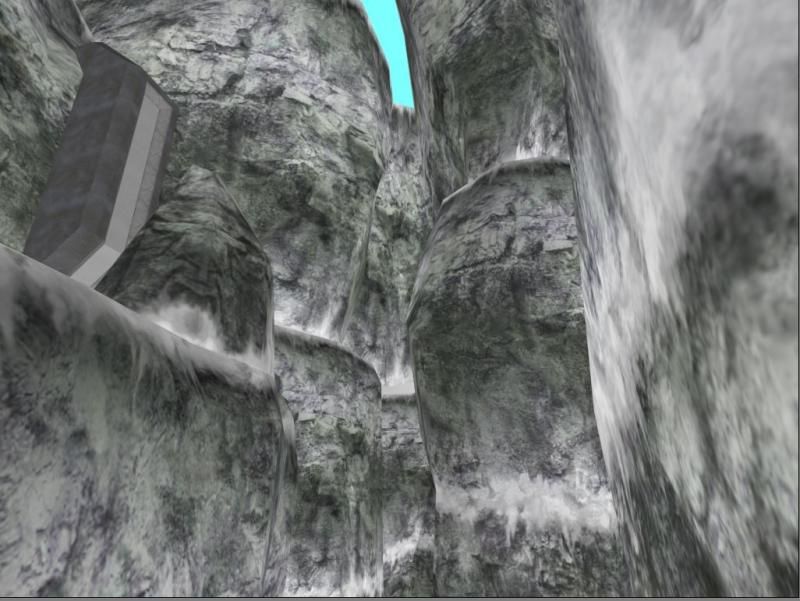 @darksoldier: Il n'est jamais trop tard pour écrire un post de valeur sur halomaps :^) Et ton anglais est beaucoup mieux que la plupart des gens qui post ici Edited by stunt_man on Feb 25, 2015 at 08:03 PM |
||||
|
|
|||||
|
gruntfromhalo Joined: Nov 21, 2007 
actual loli |
Posted: Feb 26, 2015 02:21 AM
Msg. 20 of 27
I usually just make my cliffs super boxy then cut the hell out of 'em as needed/connect edges/whatever else to add dem loops. But I keep it at the low poly ugly stage for a long time though 'cause it's much easier to do drastic changes in level design if you don't have a bunch of highpoly cliffs you spent 10hr perfecting to mangle. This way it's also easy to keep edgeflow good and detail level/polygon count consistent throughout map.
|
||||
|
|
|||||
|
darksoldier Joined: Dec 28, 2010
Helo my friend, it's time to fight ;) |
Posted: Feb 26, 2015 07:41 AM
Msg. 21 of 27
Quote: --- Original message by: stunt_man Quote: --- Original message by: darksoldier I did a little tutorial, to help you to improve your cliffs. First of all, they are many methods to get good looking cliffs, I will give you a simple one. -snip- Not bad. My approach is similar - I start with a flat plane, tessellate once or twice (less than you) and then in Editable Poly I use the Slice tool to cut in other directions besides vertical/horizontal. Then, in order to make more organic extrusions, I use Soft Selection to move vertices. If it's too high-poly, I use the optimize modifier, but only in some sections (in order to retain a natural look). Most importantly, I Unwrap UV last, because I don't like being preoccupied by UV's when editing geometry. As far as UV unwrapping goes, apply quick planar maps in sections, then open the Unwrap Editor and weld to get rid of the seams. Also make sure the bottom/top of the cliff lines up with the bottom/top of the texture (like darksoldier pics). Then Relax the parts around your extrusions (careful not to use Relax too much). Smoothing groups come last (because it's easier to spot ugly extrusions without them) but at that point I usually just use Auto-Smooth. Here's the result: http://i3.photobucket.com/albums/y76/stunt_man/cliffs%20example.jpg @darksoldier: Il n'est jamais trop tard pour écrire un post de valeur sur halomaps :^) Et ton anglais est beaucoup mieux que la plupart des gens qui post ici Edited by stunt_man on Feb 25, 2015 at 08:03 PM Hehe ! thank you ^^ Your French is very good too ! :) I edited the orginal texture, to make it more darker with less light. See under the new texture. Not the best I can do, but if you want to keep this texture, it will maybe help you a bit. About the shader, try using the same shader as in b30 (cliffs.shader_environment). Just replace the old textures by your own.  I tested the texture myself, and it's much better now, but it's need alot of work. I used the shader "Cliffs.shader_environment" and I replaced the old textures by the new one.   However, we can see the texture is not reliable, so I recommend you to change it by a better texture (who is reliable).  Edited by darksoldier on Feb 26, 2015 at 12:53 PM |
||||
|
|
|||||
|
Dalek Joined: Aug 12, 2011 
|
Posted: Feb 26, 2015 11:31 AM
Msg. 22 of 27
or if you want to keep this texture go to gimp > filter > mapping > make seamless.
|
||||
|
|
|||||
|
darksoldier Joined: Dec 28, 2010
Helo my friend, it's time to fight ;) |
Posted: Feb 26, 2015 12:51 PM
Msg. 23 of 27
I have fixed the texture for you ! Not the best texture in the world but the result is good !
   |
||||
|
|
|||||
|
DaLode Joined: Oct 4, 2014 
Ho ho hooooly doodle! |
Posted: Feb 26, 2015 01:29 PM
Msg. 24 of 27
Quote: --- Original message by: Masters1337 Quote: --- Original message by: Halonimator thanks for all the tricks. to master: im using OS 3.1 Edited by Halonimator on Feb 25, 2015 at 07:38 PM That was never included in OS. From whom did you get your build? Edited by Masters1337 on Feb 25, 2015 at 07:50 PM From me. Cheers! |
||||
|
|
|||||
|
OrangeJuice Joined: Jan 29, 2009
Documentation and debug.txt |
Posted: Feb 26, 2015 01:36 PM
Msg. 25 of 27
direct-to-greyscale bumpmaps..
 |
||||
|
|
|||||
|
Halonimator Joined: Dec 15, 2014
|
Posted: Feb 26, 2015 08:53 PM
Msg. 26 of 27
Quote: --- Original message by: DaLode Quote: --- Original message by: Masters1337 Quote: --- Original message by: Halonimator thanks for all the tricks. to master: im using OS 3.1 Edited by Halonimator on Feb 25, 2015 at 07:38 PM That was never included in OS. From whom did you get your build? Edited by Masters1337 on Feb 25, 2015 at 07:50 PM From me. Cheers! you're a liar, i modded by my own! |
||||
|
|
|||||
|
Super Flanker Joined: Oct 5, 2012 
The length of your life depends on my aim. |
Posted: Feb 27, 2015 10:33 AM
Msg. 27 of 27
Quote: --- Original message by: darksoldier
I did a little tutorial, to help you to improve your cliffs. First of all, they are many methods to get good looking cliffs, I will give you a simple one. Never use the standard uvw modifer for your cliffs. Use the unwrap uvw instead. And this. http://www.renderhjs.net/textools/ |
||||
|
|
|||||

|
