A Community discussion forum for Halo Custom Edition, Halo 2 Vista, Portal and Halo Machinima
|
 Home
Home Search
 Register
 Login
Login Member List
 Recent Posts
| »Forums Index »Halo Custom Edition (Bungie/Gearbox) »Halo CE Technical / Map Design »Artificial intelligence Question | 
|
| Author | Topic: Artificial intelligence Question (13 messages, Page 1 of 1) | ||||
| Moderators: Dennis | |||||
 DukeJohn Joined: Jan 27, 2014 
Mess with the best, Die like the rest. |
Posted: Jun 3, 2014 11:52 PM
Msg. 1 of 13
Can Anyone explain to me in details. how to make an AI, Move to a specific position, i tried everything, all i want to do, is make Covenant (Red Team) Move over to the Marines (Blue team) and Attack them (they will attack by default anyway) but i cannot get them to move, i tried setting the pursuing to the other side of the map, and i tried setting "Move Positions" but those won't work either. anyone got a clue how to do that?
and they do move, but only after i discharge my weapon, then they "move - randomly" but they do not move to the other base. Edited by DukeJohn on Jun 3, 2014 at 11:55 PM |
||||


|
|||||
|
MatthewDratt Joined: Sep 11, 2010 
TAKEDOWN IS OUT MattDratt.com |
Posted: Jun 4, 2014 12:12 AM
Msg. 2 of 13
Cheap way:
Put firing positions where you want them to attack. Put firing positions all over where you want them to attack. Put their positions as "Guard at guarding positions." |
||||
|
|
|||||
|
DukeJohn Joined: Jan 27, 2014
Mess with the best, Die like the rest. |
Posted: Jun 4, 2014 01:16 AM
Msg. 3 of 13
Didn't work. Anything else?
|
||||
|
|
|||||
|
kinpat Joined: Apr 22, 2014 
:D |
Posted: Jun 4, 2014 04:48 AM
Msg. 4 of 13
***I suggest that you zoom on these pictures in browser so that you can see the text in them better***
Did you a quick tutorial, which at least for me worked completely fine: 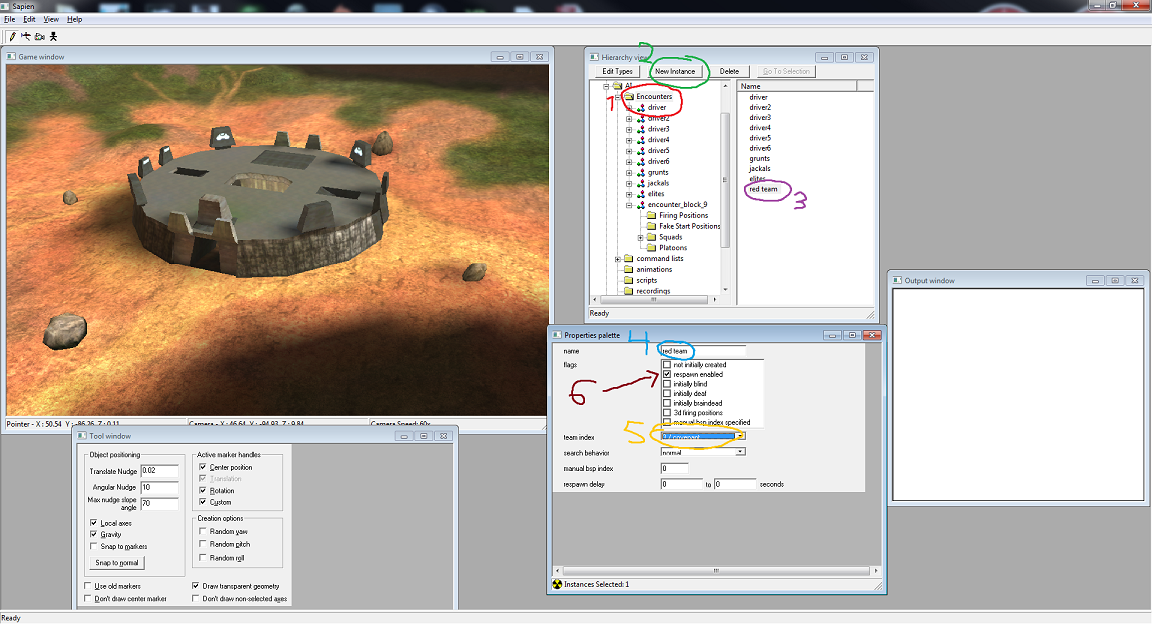 1. click on encounters 2. click on the "new instance" 3. click on the new encounter you just made (at beginning its named encounter_block_*number*) 4. change the name to something meaningful 5. change the team index to 3 (covenant) 6. check the "respawn enabled" if you want, but it's not necessary. 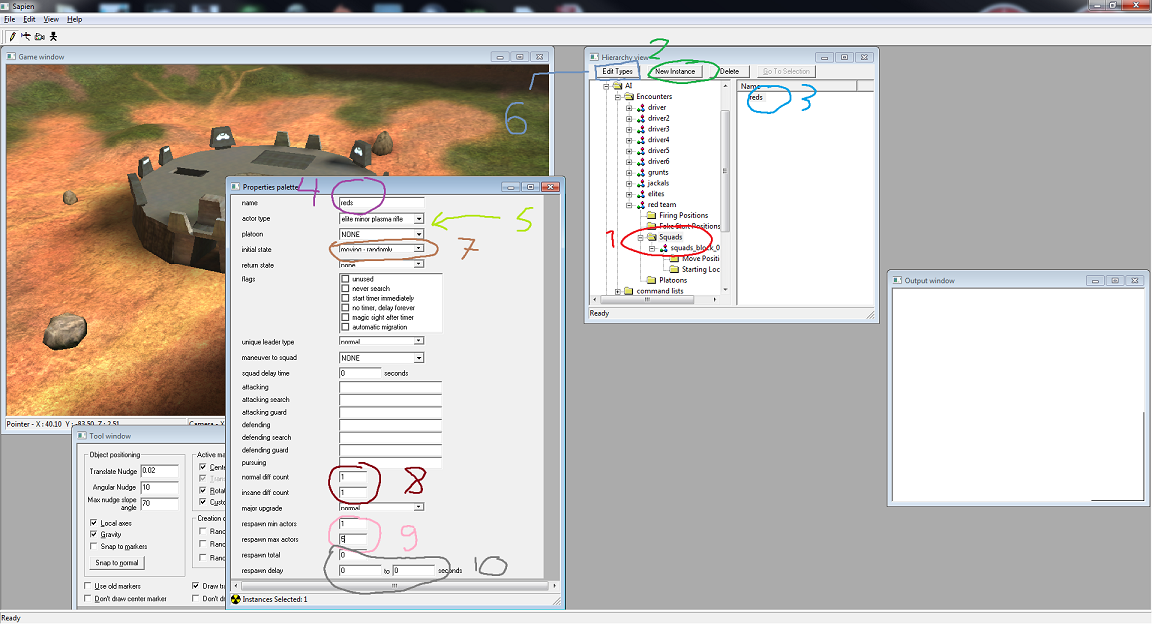 1. now click on the "squads" button and 2. click "new instance". 3. select the new squad you made and 4. rename it 5. now choose the actor type (I chose "elite minor plasma rifle" in this case) 6. If you don't have any actor variants selected, click on the edit types button, scroll to the "actor variants", go to your tags\characters folder, and choose the one you want. 7. change the initial state to "moving randomly" 8. change the number in normal/insane diff count to 1. 9. change these values to whatever you want but in this case my min actors is 1 and max actors is 5 (there will spawn elites between 1 and 5 (usually there will always spawn the max amount of actors). 10. if you have respawn enabled, here you can set time delay for the ai (for example respawn every 10 minutes) and that how many times the ai is allowed to respawn 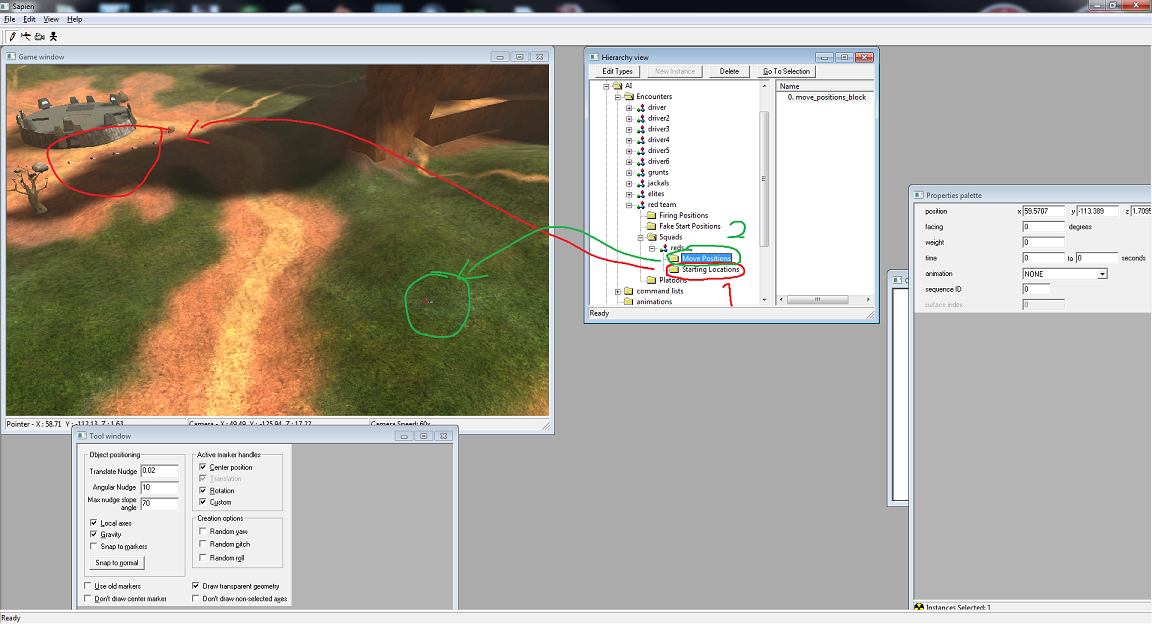 1. click on the "starting locations" and place at least 1 of them (I placed 5 just to make the elites spawn faster) 2. click on the "move locations" and place 1 somewhere (you don't have to change ANY properties for these) 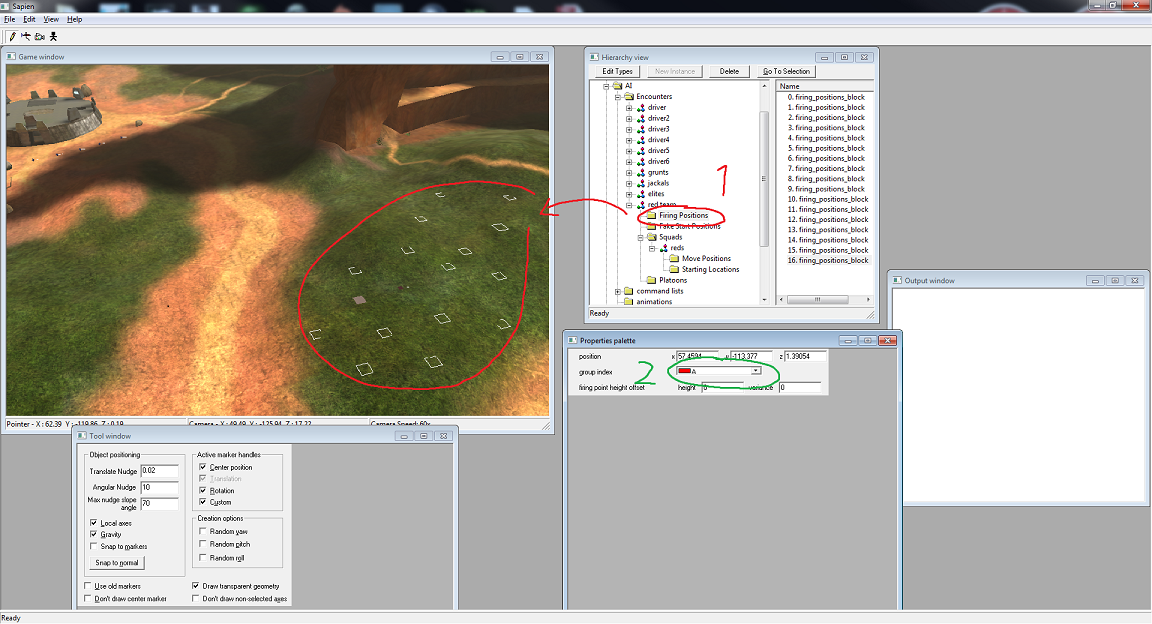 1. click on the "firing positions", and place some around the "move position" 2. here you can see that the group index for all of these is A, for example you could make 2 points in A group and 2 points in B group and make the elites attack at A and defend at B. 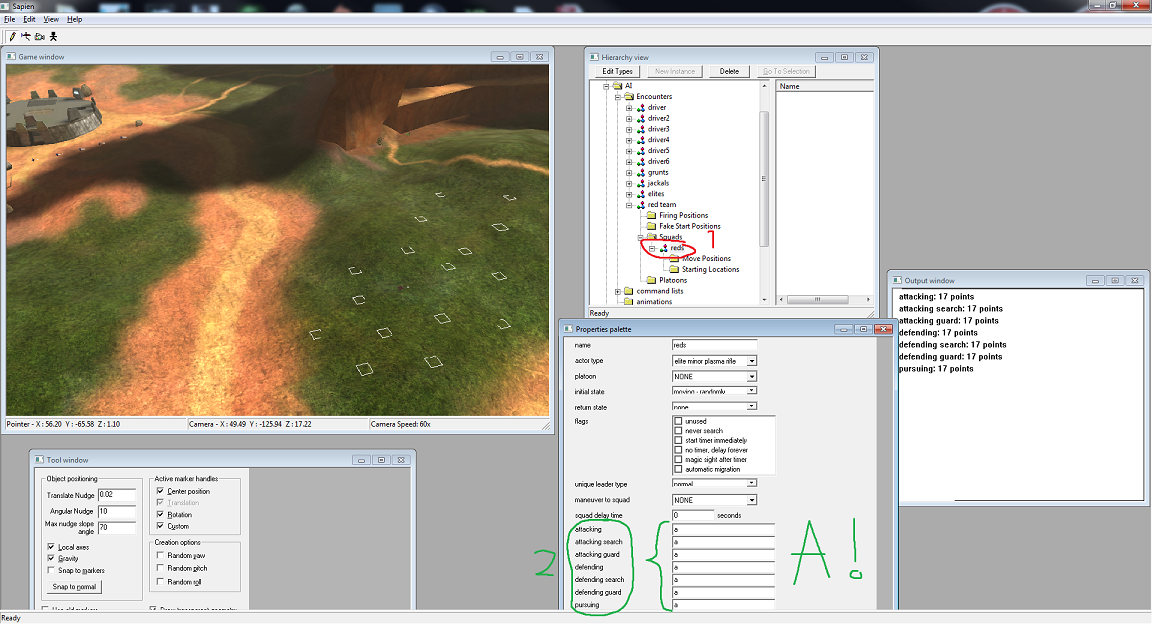 1. now click on your squad again and scroll down in the properties palette to where it says "attacking", "attacking search" etc etc 2. now place A to every one of those, so that the elites will attack and defend at A points. 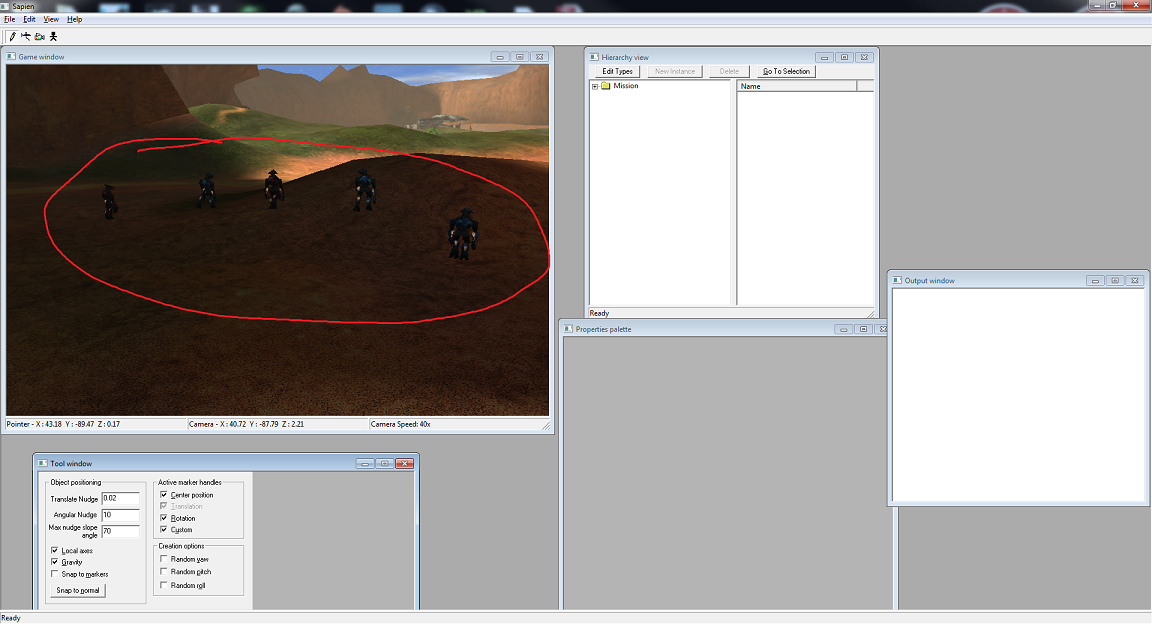 Now save your scenario and restart sapien. Your AI should be working now, and if it doesn't, check if you left something undone from what I told to do  Now for the second team, do it exactly like you did here but change the team index to something else and put some other actor for that encounter. Edited by kinpat on Jun 4, 2014 at 04:52 AM |
||||
|
|
|||||
|
MatthewDratt Joined: Sep 11, 2010
TAKEDOWN IS OUT MattDratt.com |
Posted: Jun 4, 2014 12:59 PM
Msg. 5 of 13
Quote: --- Original message by: DukeJohn Didn't work. Anything else? Then you're just doing it wrong. |
||||
|
|
|||||
|
stunt_man Joined: Sep 22, 2009 
GMYF - Now hosting proper MLG gametypes! |
Posted: Jun 4, 2014 02:08 PM
Msg. 6 of 13
Excellent post kinpat, 10/10
|
||||
|
|
|||||
|
DukeJohn Joined: Jan 27, 2014
Mess with the best, Die like the rest. |
Posted: Jun 4, 2014 09:05 PM
Msg. 7 of 13
@kinpat Thanks for taking the time to make this, must have taken a little while, i really appreciate it, and it seems to work on pretty much every other map other than bloodgulch (which mine seems to be really messed up), and is there a way to make them move faster, like not walking but, running kinda?
Edited by DukeJohn on Jun 4, 2014 at 09:16 PM |
||||
|
|
|||||
|
kinpat Joined: Apr 22, 2014
:D |
Posted: Jun 5, 2014 04:59 AM
Msg. 8 of 13
Well considering that the halo AI isn't the smartest AI we know, it's (as far as I know, someone please correct me if I'm wrong) kinda impossible to make it run with the move command, at least when there's no enemies around, because halo AI only runs when it's doing something that is related to shooting enemies. So to the point already, you can make the AI run to certain points (in this case, to the firing position that are used as guarding points by the squad) by changing their initial stance to "guarding at guard positions" and return state can be left to none. Also if you want them to run somewhere, and after that stop guarding and walk in loop between 2 points, put initial stance to "guarding at guard...." and return stance to "moving loop", and then make 2 move position to both sides of the firing positions. But remember that when the AI is a guard position, it will NOT follow any move positions.
|
||||
|
|
|||||
|
clonecam117 Joined: Dec 11, 2012 
Now a professional VFX/particle effect artist. |
Posted: Jun 5, 2014 03:41 PM
Msg. 9 of 13
You could just use command lists.
and kinpat, the AI is about as intelligent as the mapper. If you're good at it, AI can be almost human-like. |
||||
|
|
|||||
|
DukeJohn Joined: Jan 27, 2014
Mess with the best, Die like the rest. |
Posted: Jun 6, 2014 04:29 PM
Msg. 10 of 13
Also why can't i Open SP maps in Sapien. i go into Sapien and it closes, but not with MP maps (they work fine).
This is the Debug error I Extract the SP tags (From Halo Combat Evolved) like A10, or B30,or something like that, but i get this debut error when i try to open them. 06.06.14 16:26:13 sapien pc 01.00.00.0609 ---------------------------------------------- 06.06.14 16:26:13 reference function: _write_to_error_file 06.06.14 16:26:13 reference address: 401b13 06.06.14 16:26:13 Couldn't read map file './sapienbeta.map' 06.06.14 16:26:13 CreateDevice succeeded with refresh rate = 0 06.06.14 16:26:13 Sound card doesn't meet minimum hardware requirements. Disabling hardware option. 06.06.14 16:26:14 Increasing sound decompression buffer size to 1048576 bytes 06.06.14 16:26:16 EAX: 0x00000000 06.06.14 16:26:16 EBX: 0x00000001 06.06.14 16:26:16 ECX: 0x00000000 06.06.14 16:26:16 EDX: 0x00000000 06.06.14 16:26:16 EDI: 0x0018E3C0 06.06.14 16:26:16 ESI: 0x00000000 06.06.14 16:26:16 EBP: 0x0018E298 06.06.14 16:26:16 ESP: 0x0018E28C 06.06.14 16:26:16 EIP: 0x779EE9E4, C2 08 00 90 ????? 06.06.14 16:26:16 EXCEPTION halt in \halopc\haloce\source\tag_files\tag_groups.c,#3157: #3 is not a valid animation_block index in [#0,#3) Edited by DukeJohn on Jun 6, 2014 at 04:33 PM |
||||
|
|
|||||
|
ICE x Toxiic Joined: Nov 26, 2011 
The Emperor protects. |
Posted: Jul 2, 2014 09:08 PM
Msg. 11 of 13
http://forum.halomaps.org/index.cfm%3Fpage=topic&topicID=40577
This thread should help solve the problem of SP maps crashing in Sapien it worked for me. |
||||
|
|
|||||
|
sos Joined: Aug 8, 2008 
Getting my legal team, brb |
Posted: Jul 5, 2014 12:59 PM
Msg. 12 of 13
Quote: --- Original message by: MatthewDratt Quote: --- Original message by: DukeJohn Didn't work. Anything else? rekt Also, I think ripping the default Halo PC campaign .maps will result in you not being able to open the scenario files. Download the copies on this site and rip those. Edited by sos on Jul 5, 2014 at 01:02 PM |
||||
|
|
|||||
|
Heatguts Joined: Jun 6, 2014 
Recon Armor FTW! |
Posted: Jul 7, 2014 09:47 PM
Msg. 13 of 13
You shouldn't need a script. Just make sure you have ai, have firing positions under a label, have the ai set that letter to all their statuses (attacking, defending, etc), and have their default spawn state set at searching or alert or anything other than none. If they aren't firing at you, make sure they aren't on your team (make sure they hate your guts lol).
You shouldn't need scripts to make ai move. I use scripts (and everyone else does) to spawn them and order them around from attack to defend. FYI firing positions IS Halo's pathfinding system. Also, your problem may be using custom actor varients. You are using ripped ones from a vanilla Halo PC campaign map, right? |
||||
|
|
|||||

|
