A Community discussion forum for Halo Custom Edition, Halo 2 Vista, Portal and Halo Machinima
|
 Home
Home Search
 Register
 Login
Login Member List
 Recent Posts
| »Forums Index »Halo Custom Edition (Bungie/Gearbox) »Halo CE Technical / Map Design »Bluestreak Model Exporting Error | 
|
| Author | Topic: Bluestreak Model Exporting Error (9 messages, Page 1 of 1) | ||||
| Moderators: Dennis | |||||
 Skidrow925 Joined: Mar 19, 2010 
"ideological sense of respect and tact of a 5yo" |
Posted: Jan 4, 2014 10:42 AM
Msg. 1 of 9
Tried to make a slight modification to the stock warthog involving the moving of 2 markers. I re-linked all nodes in proper order and attempted to use bluestreak to export.
The issue appears to have something to do with textures. MatIDs and MatNames are good as far as I can tell. 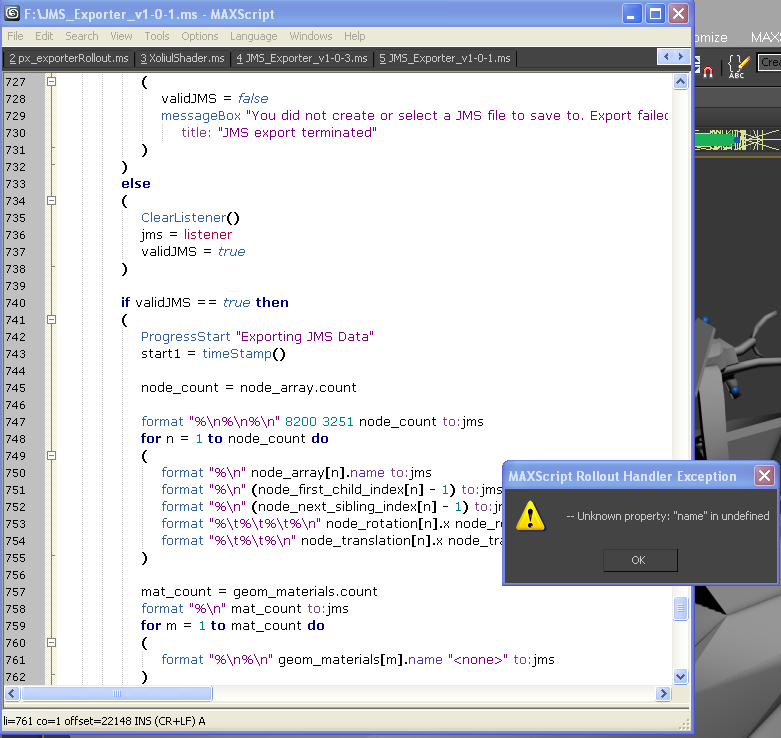 3ds Max 15 (2013) Bluestreak 1.0.1 If those help. |
||||


|
|||||
|
Skidrow925 Joined: Mar 19, 2010
"ideological sense of respect and tact of a 5yo" |
Posted: Jan 5, 2014 01:30 PM
Msg. 2 of 9
They were already named and applied, but I went ahead and re-did it, but still nothing. Same error.
|
||||
|
|
|||||
|
MatthewDratt Joined: Sep 11, 2010 
TAKEDOWN IS OUT MattDratt.com |
Posted: Jan 5, 2014 11:28 PM
Msg. 3 of 9
Does all of your materials have a bitmap? Halo doesnt like to export if you have a material that has no bitmap attached in 3ds max.
In other words if you selected bitmap, but then backed out and in bitmap it says "NONE" then that's bad Edited by MatthewDratt on Jan 5, 2014 at 11:29 PM |
||||
|
|
|||||
|
Skidrow925 Joined: Mar 19, 2010
"ideological sense of respect and tact of a 5yo" |
Posted: Jan 6, 2014 10:12 AM
Msg. 4 of 9
Quote: --- Original message by: MatthewDratt Does all of your materials have a bitmap? Halo doesnt like to export if you have a material that has no bitmap attached in 3ds max. In other words if you selected bitmap, but then backed out and in bitmap it says "NONE" then that's bad Edited by MatthewDratt on Jan 5, 2014 at 11:29 PM I didn't have bitmaps, but I applied them again, and I see them in the viewport, but still getting the same error. |
||||
|
|
|||||
|
Maniac1000 -Helpful Poster- Joined: Feb 24, 2007 
|
Posted: Jan 6, 2014 01:35 PM
Msg. 5 of 9
Are you using multimaterial or standard?
|
||||
|
|
|||||
|
Skidrow925 Joined: Mar 19, 2010
"ideological sense of respect and tact of a 5yo" |
Posted: Jan 6, 2014 02:03 PM
Msg. 6 of 9
It's a multimaterial.
|
||||
|
|
|||||
|
Skidrow925 Joined: Mar 19, 2010
"ideological sense of respect and tact of a 5yo" |
Posted: Jan 6, 2014 02:53 PM
Msg. 7 of 9
It does show the names.
|
||||
|
|
|||||
|
Skidrow925 Joined: Mar 19, 2010
"ideological sense of respect and tact of a 5yo" |
Posted: Jan 7, 2014 12:58 PM
Msg. 8 of 9
MatID's and MatNames are all good.
|
||||
|
|
|||||
|
Maniac1000 -Helpful Poster- Joined: Feb 24, 2007
|
Posted: Jan 7, 2014 01:21 PM
Msg. 9 of 9
Try using standard materials, just drag them from the multi to standard slots.
are you converting to mesh before export. |
||||
|
|
|||||

|
