A Community discussion forum for Halo Custom Edition, Halo 2 Vista, Portal and Halo Machinima
|
 Home
Home Search
 Register
 Login
Login Member List
 Recent Posts
| »Forums Index »Halo Custom Edition (Bungie/Gearbox) »Halo CE General Discussion »Boolean and the fog plane - the musical | 
|
| Author | Topic: Boolean and the fog plane - the musical (19 messages, Page 1 of 1) | ||||
| Moderators: Dennis | |||||
 Hobbet360 Joined: Jan 10, 2012 
ProTools > ToolPro |
Posted: Oct 27, 2013 12:35 AM
Msg. 1 of 19
Is using the Boolean effect/modifier/thing the right way to go when creating fog planes?
-Because I know from experience that just creating a plane that goes through the entire structure/island/thing will create a tonne of issues. -Or... is there another way to deal with fog planes with an insane amount of triangles to deal with... :o |
||||


|
|||||
|
eliteslasher Joined: Jun 30, 2008 
Crysis 3!!!!!!! All I have to say. :D |
Posted: Oct 27, 2013 02:59 AM
Msg. 2 of 19
unless you are exact portaling a fog plane you do not need to cut anything into anything. Fog planes that are for the whole map that tell the game to render fog at a certain height and under are to be made as a separate object and also attached to the frame. If you see from the online tutorials they have a specific material they must be labeled as well. But anyway, if you are doing it this way with a fog plane defining fog for the whole map, just make it a flat plane that extends the whole map. 2 triangles only, and label it properly.
|
||||
|
|
|||||
|
Hobbet360 Joined: Jan 10, 2012
ProTools > ToolPro |
Posted: Oct 27, 2013 03:46 AM
Msg. 3 of 19
the fog plane is half-way down a cliff face.
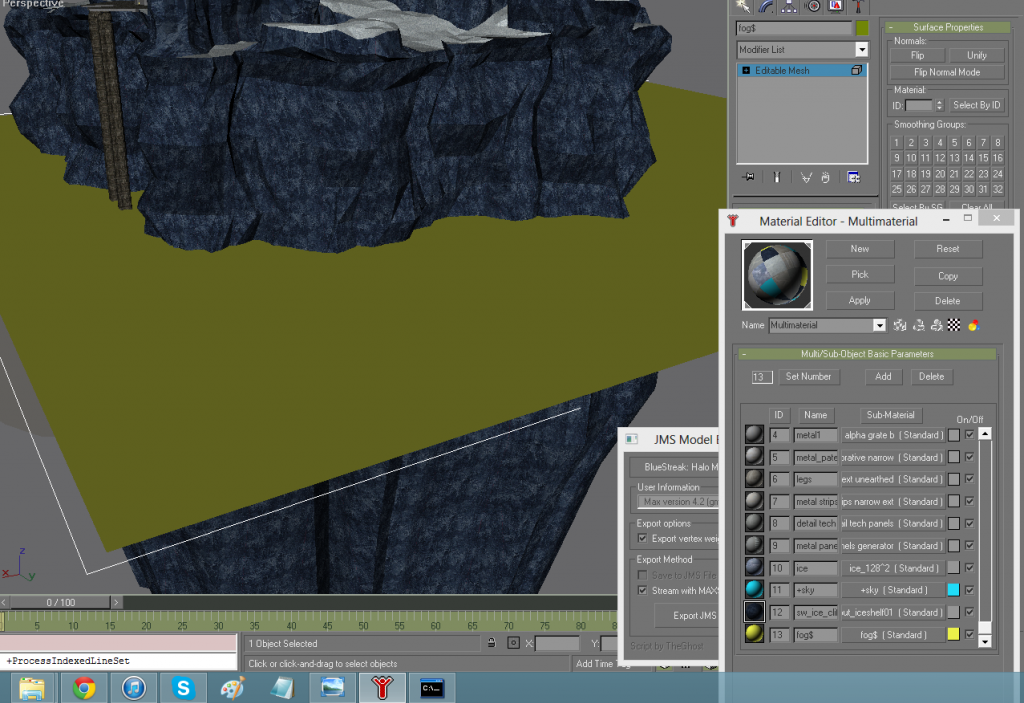 I get errors doing that though... bro. |
||||
|
|
|||||
|
jackrabbit Joined: Apr 27, 2005 
Fight Against the Machine of Deth! |
Posted: Oct 27, 2013 03:50 AM
Msg. 4 of 19
you need to use the modifire that allows errors!
& your plane needs o be alot bigger check your draw distances! Edited by jackrabbit on Oct 27, 2013 at 03:53 AM |
||||
|
|
|||||
|
Hobbet360 Joined: Jan 10, 2012
ProTools > ToolPro |
Posted: Oct 27, 2013 04:41 AM
Msg. 5 of 19
Modifire?
These are tool "orange" errors. |
||||
|
|
|||||
|
Hobbet360 Joined: Jan 10, 2012
ProTools > ToolPro |
Posted: Oct 27, 2013 04:48 AM
Msg. 6 of 19
Oh, there's 2.
But obviously the overlapping edges one. |
||||
|
|
|||||
|
jackrabbit Joined: Apr 27, 2005
Fight Against the Machine of Deth! |
Posted: Oct 27, 2013 04:51 AM
Msg. 7 of 19
it does not matter just name it
water!#$% errors go away =) Edited by jackrabbit on Oct 27, 2013 at 04:58 AM |
||||
|
|
|||||
|
Hobbet360 Joined: Jan 10, 2012
ProTools > ToolPro |
Posted: Oct 27, 2013 04:58 AM
Msg. 8 of 19
"Couldn't allocate subclusters"
-Tool |
||||
|
|
|||||
|
jackrabbit Joined: Apr 27, 2005
Fight Against the Machine of Deth! |
Posted: Oct 27, 2013 04:59 AM
Msg. 9 of 19
remake the plane try again.
add a uvw map to it just like anything else. that will affect the water riples along with the shader. set your meterial id no smoothing groups make sure refine ends is checked in edit geomitry. Edited by jackrabbit on Oct 27, 2013 at 05:03 AM |
||||
|
|
|||||
|
Hobbet360 Joined: Jan 10, 2012
ProTools > ToolPro |
Posted: Oct 27, 2013 05:01 AM
Msg. 10 of 19
:(
Be back in another 2 hours. |
||||
|
|
|||||
|
jackrabbit Joined: Apr 27, 2005
Fight Against the Machine of Deth! |
Posted: Oct 27, 2013 05:04 AM
Msg. 11 of 19
why 2 hr's?
sounds like you are doing somehing extra to it that you dont have to draw out a plane should take like 5 seconds lol |
||||
|
|
|||||
|
Hobbet360 Joined: Jan 10, 2012
ProTools > ToolPro |
Posted: Oct 27, 2013 05:15 AM
Msg. 12 of 19
Exporting = 2 hours.
|
||||
|
|
|||||
|
jackrabbit Joined: Apr 27, 2005
Fight Against the Machine of Deth! |
Posted: Oct 27, 2013 06:39 AM
Msg. 13 of 19
his level is not optimized and he has a whole lot of unneeded verts.
|
||||
|
|
|||||
|
Higuy Joined: Mar 6, 2007 
@lucasgovatos |
Posted: Oct 27, 2013 09:06 AM
Msg. 14 of 19
Quote: --- Original message by: hobbet360 Exporting = 2 hours. 3ds Max 8 = a few seconds |
||||
|
|
|||||
|
jackrabbit Joined: Apr 27, 2005
Fight Against the Machine of Deth! |
Posted: Oct 27, 2013 09:30 AM
Msg. 15 of 19
fuunyest thread title ever!
Boolean and the fog plane - the musical I lol! |
||||
|
|
|||||
|
Hobbet360 Joined: Jan 10, 2012
ProTools > ToolPro |
Posted: Oct 29, 2013 03:47 AM
Msg. 16 of 19
Chimp = fake open edges.
I spend my first year and a half of mapping (before I joined this community) modeling levels correctly but thinking I wasn't, due to chimp's pretend open edge errors. Bluestreak is the way to go with Gmax. I did the material as "fog!$", got it in-game - but oddly, though the fog is beneath the plane, I get this "fog" shader capping the fog. :\ 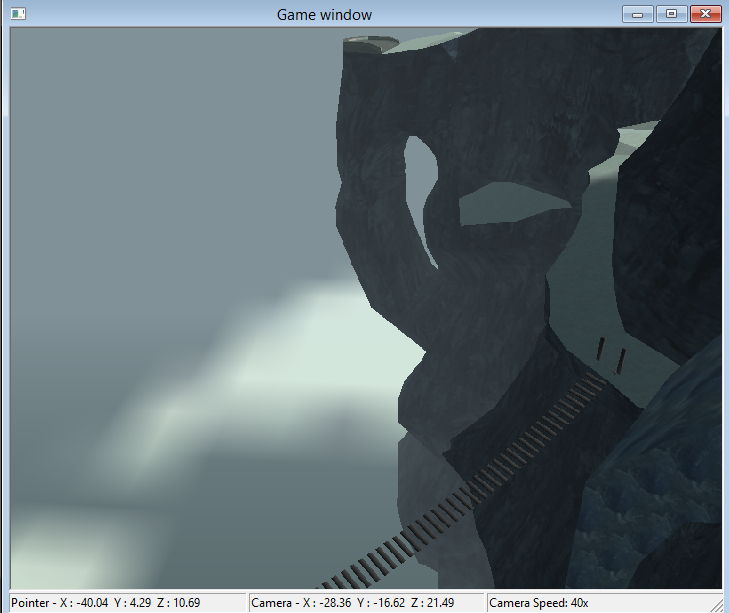 |
||||
|
|
|||||
|
Hobbet360 Joined: Jan 10, 2012
ProTools > ToolPro |
Posted: Oct 29, 2013 05:41 AM
Msg. 17 of 19
I assume you use 3DS max?
This is what I have kinda figured out so far... Chimp + Gmax = 3 edges that will ALWAYS be open, stretched across the map. Bluesstreak + Gmax = long export time, but no errors. Blitz + Gmax = no go! bro. Chimp + 3DSMax = dunno. Blue streak + 3DSMax = errors of some sort. Blitz + 3DSMax = great! And thanks. :) |
||||
|
|
|||||
|
jackrabbit Joined: Apr 27, 2005
Fight Against the Machine of Deth! |
Posted: Oct 29, 2013 09:03 AM
Msg. 18 of 19
no i think you can set the level of the fog with gurialla open the bsp tag
|
||||
|
|
|||||
|
Hobbet360 Joined: Jan 10, 2012
ProTools > ToolPro |
Posted: Oct 30, 2013 02:31 AM
Msg. 19 of 19
Quote: --- Original message by: Mootjuh If his fog is facing the wrong way, then the fog plane is facing the wrong way. The fog is fine, but the plane is not, can I do this without another export? Change the shader to clouds or something? Anyone got tile-able cloud shaders? |
||||
|
|
|||||

|
