A Community discussion forum for Halo Custom Edition, Halo 2 Vista, Portal and Halo Machinima
|
 Home
Home Search
 Register
 Login
Login Member List
 Recent Posts
| »Forums Index »Halo Custom Edition (Bungie/Gearbox) »Halo CE General Discussion »biped help plezzz | 
|
| Author | Topic: biped help plezzz (4 messages, Page 1 of 1) | ||||
| Moderators: Dennis | |||||
 savinpvtmike Joined: Apr 18, 2010 
It's heavily inserted |
Posted: Sep 20, 2013 02:54 AM
Msg. 1 of 4
so im trying to finish off my mass effect tags and i feel like re-rigging my player model but the forearms are way to long to fit in the hands can some one help me fix this
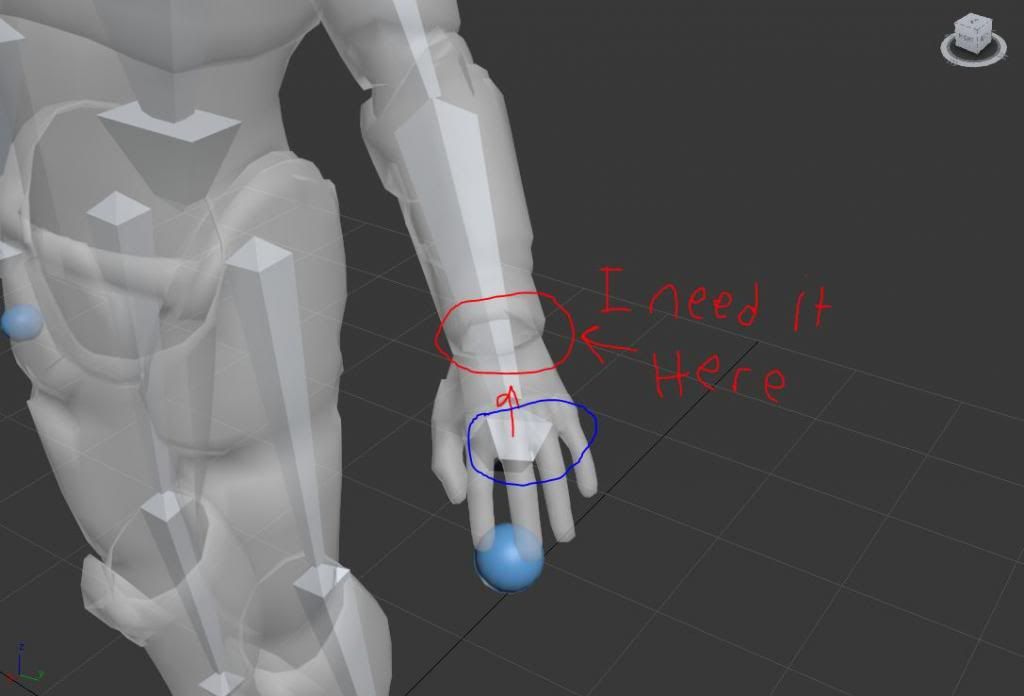 and if i move or edit the scale it re-sizes back to this Edited by savinpvtmike on Sep 20, 2013 at 02:57 AM |
||||


|
|||||
|
Dumb AI Joined: Sep 18, 2011 
Dead. |
Posted: Sep 20, 2013 09:07 PM
Msg. 2 of 4
Quote: --- Original message by: Destroyer50 its simple jut move the node to there It's not that simple. |
||||
|
|
|||||
|
SOI_7 Joined: Mar 23, 2012 
Welcome to the true man's world |
Posted: Sep 21, 2013 09:08 AM
Msg. 3 of 4
My suggestion would be to break the bone connection between the hand and the forearm, then move it to desired position and re-link it again. Anyhow, if the model is already rigged, the vertices will move with it, so you'll have some troubles... moreover, if the model uses a stock animation, the bone will return to it's original position during the animation even if you moved it.
The best solution, IMO, is editing the geometry according to the boneset. Instead of moving the bone, stretch the arm. |
||||
|
|
|||||
|
R93_Sniper Joined: Feb 13, 2011 
When in Doubt, RUN! |
Posted: Sep 21, 2013 11:46 PM
Msg. 4 of 4
from the looks of it, in addition, your bones arent going to be set right even if you have it like that. Try scaling the model up a bit and /then/ rig it to the bones.
|
||||
|
|
|||||

|
