A Community discussion forum for Halo Custom Edition, Halo 2 Vista, Portal and Halo Machinima
|
 Home
Home Search
 Register
 Login
Login Member List
 Recent Posts
| »Forums Index »Halo Custom Edition (Bungie/Gearbox) »Halo CE General Discussion »BlindWolf (Working in progress!) | 
|
| Page 3 of 4 | Go to page: · 1 · 2 · [3] · 4 · Prev · Next |
| Author | Topic: BlindWolf (Working in progress!) (138 messages, Page 3 of 4) | ||||
| Moderators: Dennis | |||||
 altis94 Joined: Oct 5, 2012 
Join my Discord https://discord.gg/GDVEaRD |
Posted: Nov 19, 2013 01:07 PM
Msg. 71 of 138
Maybe he didn't mean AI but playing as blindwolf in mp map?
|
||||


|
|||||
|
sshers4 Joined: Apr 28, 2013 
|
Posted: Nov 19, 2013 03:33 PM
Msg. 72 of 138
Included the teeth and subsequent to that I will be include the ears and then commence detail the blindwolf. And goldkilla the jaw will be fixed right at the closing stage.
Here is the screenshot.     @Fossy yes these blindwolf will be in packs I will have to do something about that. Edited by sshers4 on Nov 19, 2013 at 03:42 PM Edited by sshers4 on Nov 19, 2013 at 04:48 PM |
||||
|
|
|||||
|
Caesar Joined: Jul 1, 2013 
|
Posted: Nov 19, 2013 05:16 PM
Msg. 73 of 138
goldkilla nothing is wrong with the jaw it looks fine. Edited by caeserishome on Nov 19, 2013 at 05:18 PM |
||||
|
|
|||||
|
sshers4 Joined: Apr 28, 2013
|
Posted: Nov 19, 2013 05:28 PM
Msg. 74 of 138
For those who want's to see the feet here it is.
 |
||||
|
|
|||||
|
bourrin33 Joined: Oct 19, 2009 
HEK not installed tho |
Posted: Nov 21, 2013 11:28 AM
Msg. 75 of 138
Quote: --- Original message by: UNDEROATH RMT Edge faces please it's called wireframe, and calm your tits, it's a sculpture. |
||||
|
|
|||||
|
OHunterO Joined: May 24, 2012 
. |
Posted: Nov 22, 2013 11:47 PM
Msg. 76 of 138
You need to get the general form before you start to add details, it still doesn't look "real". Also, people asking for a wireframe when it's clearly a sculpt, your idiots...
|
||||
|
|
|||||
|
sshers4 Joined: Apr 28, 2013
|
Posted: Nov 26, 2013 10:07 AM
Msg. 77 of 138
@Lolman Not sure what you mean.
Screenshots.      I have been working on it genuinely hard and next element I will be adding a Thung, ears and muscle on his legs. And right at the end I will be brighten the model and then texture it on sculptris. These are the list that I will be doing. Model Bitmap Animation Collision Actor Actor Varient dialouge Sound tag 1 Sound tag 2 Shaders Thanks for you’re patient. Edited by sshers4 on Nov 26, 2013 at 10:08 AM |
||||
|
|
|||||
|
Caesar Joined: Jul 1, 2013
|
Posted: Nov 26, 2013 03:20 PM
Msg. 78 of 138
Good work man.
|
||||
|
|
|||||
|
sshers4 Joined: Apr 28, 2013
|
Posted: Nov 26, 2013 03:48 PM
Msg. 79 of 138
I have included ears, thung and the muscle on to his leg.
    Edited by sshers4 on Nov 26, 2013 at 03:48 PM |
||||
|
|
|||||
|
Spartan314 Joined: Aug 21, 2010 
Former biped rigger & FP animator |
Posted: Nov 26, 2013 04:21 PM
Msg. 80 of 138
Quote: --- Original message by: reachfan bad ass muscle you've made. How do you made that in 3ds max? the thung looks smooth and nice. He didn't... it's a sculpt... |
||||
|
|
|||||
|
solitude Joined: Sep 2, 2013 
chfan |
Posted: Nov 26, 2013 04:50 PM
Msg. 81 of 138
Quote: --- Original message by: Spartan314 Quote: --- Original message by: reachfan bad ass muscle you've made. How do you made that in 3ds max? the thung looks smooth and nice. He didn't... it's a sculpt... Sculptris is complex I can't barely create anything. How he did it? |
||||
|
|
|||||
|
Caesar Joined: Jul 1, 2013
|
Posted: Nov 26, 2013 05:33 PM
Msg. 82 of 138
Quote: --- Original message by: solitude Quote: --- Original message by: Spartan314 Quote: --- Original message by: reachfan bad ass muscle you've made. How do you made that in 3ds max? the thung looks smooth and nice. He didn't... it's a sculpt... Sculptris is complex I can't barely create anything. How he did it? You need a lot patient when it comes up producing sculptris. |
||||
|
|
|||||
|
altis94 Joined: Oct 5, 2012
Join my Discord https://discord.gg/GDVEaRD |
Posted: Nov 26, 2013 06:01 PM
Msg. 83 of 138
my slow typing...
Edited by altis94 on Nov 26, 2013 at 06:02 PM |
||||
|
|
|||||
|
jeanpaulosanchez Joined: Aug 6, 2013 
|
Posted: Nov 26, 2013 07:28 PM
Msg. 84 of 138
The model looks finish now rigg it and animate it then make a map and include 10 blind wolfs so they can kick our ass.
go on do it release it. |
||||
|
|
|||||
|
locker Joined: Nov 7, 2013 
|
Posted: Nov 26, 2013 07:34 PM
Msg. 85 of 138
Quote: --- Original message by: jeanpaulosanchez The model looks finish now rigg it and animate it then make a map and include 10 blind wolfs so they can kick our ass. go on do it release it. Is it just me that this creature looks like a raptor? Nice work I love the toe  |
||||
|
|
|||||
|
oracle Joined: Oct 21, 2013 
|
Posted: Nov 26, 2013 07:43 PM
Msg. 86 of 138
 It will be funny seeing these orginial blindwolfs fight against these one :P |
||||
|
|
|||||
|
oracle Joined: Oct 21, 2013
|
Posted: Nov 26, 2013 07:47 PM
Msg. 87 of 138
Quote: --- Original message by: Lolman Quote: --- Original message by: oracle http://imageshack.us/a/img833/3497/dtti.png It will be funny seeing these orginial blindwolfs fight against these one :P IN CE3, right? -_- CE3? what's that. |
||||
|
|
|||||
|
beatlejuice Joined: Oct 31, 2013 
|
Posted: Nov 26, 2013 07:51 PM
Msg. 88 of 138
The blindwolf now looks alarming. But the orginial they don't look that intimadating.
You're planning to release somewhere this year? |
||||
|
|
|||||
|
vetog Joined: Nov 7, 2013
|
Posted: Nov 26, 2013 08:08 PM
Msg. 89 of 138
Quote: --- Original message by: oracle http://imageshack.us/a/img833/3497/dtti.png It will be funny seeing these orginial blindwolfs fight against these one :P Depends if both have amazing animation. I alway's vote for the orginial blindwolf but this one looks elegant. Edited by vetog on Nov 26, 2013 at 08:09 PM |
||||
|
|
|||||
|
sshers4 Joined: Apr 28, 2013
|
Posted: Nov 27, 2013 12:03 PM
Msg. 90 of 138
I have included cheeks and produce some changes on his legs.
  |
||||
|
|
|||||
|
sshers4 Joined: Apr 28, 2013
|
Posted: Nov 27, 2013 01:46 PM
Msg. 91 of 138
Hay guy's, I include a small number of textures around his body and face now keep in mind I have included these textures on sculptris.
If you guys think this model looks over and done with now I think it's time for me to Bake to low poly and rig with a custom boneset. Here are the screenshots  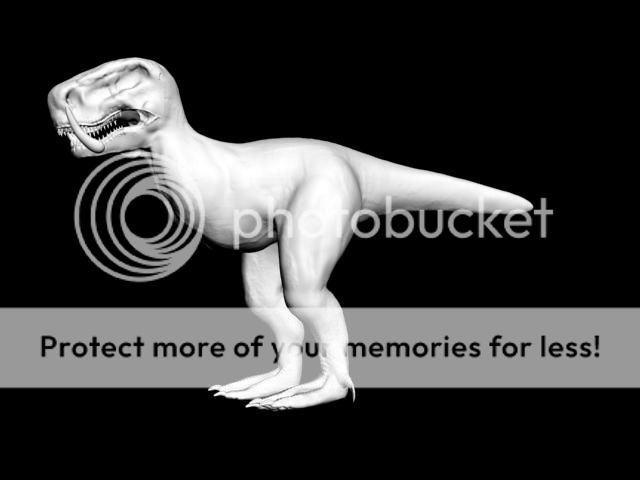   |
||||
|
|
|||||
|
jeanpaulosanchez Joined: Aug 6, 2013
|
Posted: Nov 27, 2013 01:57 PM
Msg. 92 of 138
Quote: --- Original message by: sshers4 Hay guy's, I include a small number of textures around his body and face now keep in mind I have included these textures on sculptris. If you guys think this model looks over and done with now I think it's time for me to Bake to low poly and rig with a custom boneset. Here are the screenshots http://i707.photobucket.com/albums/ww79/sshers1/kjdpvgsd_zps40af064e.png http://i707.photobucket.com/albums/ww79/sshers1/nscas_zps530fcd64.jpg http://i707.photobucket.com/albums/ww79/sshers1/ohnfpds_zps81f5fa50.png http://i707.photobucket.com/albums/ww79/sshers1/jsaf_zps15403faa.png Raaaar all of that complicated work you did. I love the textures |
||||
|
|
|||||
|
beatlejuice Joined: Oct 31, 2013
|
Posted: Nov 27, 2013 02:07 PM
Msg. 93 of 138
Perfect so it's the model is done no more sculptris and changing?
|
||||
|
|
|||||
|
Maniac1000 -Helpful Poster- Joined: Feb 24, 2007 
|
Posted: Nov 27, 2013 02:19 PM
Msg. 94 of 138
I see no textures.
|
||||
|
|
|||||
|
locker Joined: Nov 7, 2013
|
Posted: Nov 27, 2013 02:28 PM
Msg. 95 of 138
Quote: --- Original message by: Maniac1000 I see no textures. lolz look carefully at the body. |
||||
|
|
|||||
|
sshers4 Joined: Apr 28, 2013
|
Posted: Nov 27, 2013 06:33 PM
Msg. 96 of 138
Quote: --- Original message by: Mootjuh Looks fine, start baking. No worries :) now I am going to start colouring the blindwolf on Sculptris and then I can start baking and then low poly :) So everyone, what colour do you want this blindwolf to be? |
||||
|
|
|||||
|
altis94 Joined: Oct 5, 2012
Join my Discord https://discord.gg/GDVEaRD |
Posted: Nov 27, 2013 06:45 PM
Msg. 97 of 138
Pink. And make rainbows come from it's butt.
|
||||
|
|
|||||
|
solitude Joined: Sep 2, 2013
chfan |
Posted: Nov 27, 2013 07:15 PM
Msg. 98 of 138
This is good example I think you should get this colour :)
 and then add those rainbows stripes. |
||||
|
|
|||||
|
OHunterO Joined: May 24, 2012
. |
Posted: Nov 29, 2013 11:23 AM
Msg. 99 of 138
Your not going to listen are you, but your still doing it wrong.
You need to build up the BASIC shape and anatomy first, before you add details, get references of real life animals and use them to make it look more realistic. See below, the basic muscle definition is there, ignore the different colors on the mesh. You need this kind of mesh first, and then re-topologize it so you have your loops in the correct places for animating.  Then you will use this base mesh to add details and texture it,or in my case use poly paint to get some base colours in, then maybe more detail in Photoshop.  |
||||
|
|
|||||
|
LMT Heretic Joined: Feb 18, 2010 
There are mysteries, that should remain hidden... |
Posted: Nov 29, 2013 11:48 AM
Msg. 100 of 138
I believe that this has gone kind of exagerated, Hunter may say what he believes should be done (and he is somewhat right, adding the anatomy would be a good idea and make the blind wolf a glorious thing to kill) But Hunter you shouldn't be pushing like if you were either his boss or someone who has made something supremely better, just keep telling it to him, and he'll do it later.
and Well everyone does the funny stuff first. |
||||
|
|
|||||
|
Maniac1000 -Helpful Poster- Joined: Feb 24, 2007
|
Posted: Nov 29, 2013 12:53 PM
Msg. 101 of 138
As bad a poster hunter is, he is right and he can model better than most people on this forum.
|
||||
|
|
|||||
|
Spartan314 Joined: Aug 21, 2010
Former biped rigger & FP animator |
Posted: Nov 29, 2013 03:03 PM
Msg. 102 of 138
Quote: --- Original message by: ftsshot Quote: --- Original message by: OHunterO stop being jealous at least this model looks better what killer made. I heard you can't make your own one. So please go way.Your not going to listen are you, but your still doing it wrong. You need to build up the BASIC shape and anatomy first, before you add details, get references of real life animals and use them to make it look more realistic. See below, the basic muscle definition is there, ignore the different colors on the mesh. You need this kind of mesh first, and then re-topologize it so you have your loops in the correct places for animating. https://dl.dropboxusercontent.com/u/63494571/dragon_polygroups.jpg Then you will use this base mesh to add details and texture it,or in my case use poly paint to get some base colours in, then maybe more detail in Photoshop. https://dl.dropboxusercontent.com/u/63494571/dragon_color1jpg.jpg You really don't know who you're talking to do you... |
||||
|
|
|||||
|
R93_Sniper Joined: Feb 13, 2011 
When in Doubt, RUN! |
Posted: Dec 1, 2013 12:07 AM
Msg. 103 of 138
I laugh at how there are people here going against hunter and saying he can't model. I suggest you incompetents go look up Halo Reach Grenade Launcher, Halo Reach Shotgun and the Halo 3 Scarab in the 3D models section.
Regardless. The model looks good, but as hunter said, there's little muscle definition and the wolf looks....fat. If you also add a lot of extra details after the anatomy is done, you can bake it down with a normal map which you can overlay on the diffuse map. It'll look a lot better when it's low poly that way. |
||||
|
|
|||||
|
master noob Joined: Aug 10, 2012 
343Industries Advocate |
Posted: Dec 1, 2013 01:37 AM
Msg. 104 of 138
when sculpting, its usually best to define the shapes and anatomy first before adding detail. from the mouth and feet, it looks like you added detail as you went and stopped with the anatomy/definition halfway and just started adding unnecessary bumps where it suited you. the end result, what you have, is a half-detailed blank slate of a piece of clay and nothing resembling what could have or ever had been organic.
|
||||
|
|
|||||
|
OHunterO Joined: May 24, 2012
. |
Posted: Dec 1, 2013 03:16 PM
Msg. 105 of 138
Quote: --- Original message by: Joker Quote: --- Original message by: R93_Sniper I laugh at how there are people here going against hunter and saying he can't model. I suggest you incompetents go look up Halo Reach Grenade Launcher, Halo Reach Shotgun and the Halo 3 Scarab in the 3D models section. Regardless. The model looks good, but as hunter said, there's little muscle definition and the wolf looks....fat. If you also add a lot of extra details after the anatomy is done, you can bake it down with a normal map which you can overlay on the diffuse map. It'll look a lot better when it's low poly that way. I laughed here so hard that Hunter copied bungie assets :) He can't make anything of his own..... ...your living up to your username. |
||||
|
|
|||||
| Page 3 of 4 | Go to page: · 1 · 2 · [3] · 4 · Prev · Next |

|
