A Community discussion forum for Halo Custom Edition, Halo 2 Vista, Portal and Halo Machinima
|
 Home
Home Search
 Register
 Login
Login Member List
 Recent Posts
| »Forums Index »Halo Custom Edition (Bungie/Gearbox) »Halo CE Technical / Map Design »trying to install ce on windows 8 | 
|
| Author | Topic: trying to install ce on windows 8 (15 messages, Page 1 of 1) | ||||
| Moderators: Dennis | |||||
 christian Joined: Jul 11, 2013 
|
Posted: Jul 11, 2013 03:37 AM
Msg. 1 of 15
i am trying to install halo custom edition on my computer but every time i install it, it says "this app can't run on your pc..." is there any way to get custom edition on windows 8
|
||||


|
|||||
|
Oskarmandude Joined: Mar 16, 2013 
Bosnia |
Posted: Jul 11, 2013 05:23 AM
Msg. 2 of 15
Step 1. Get Windows 7
Step 2. Back up your files Step 3. Install Windows 7 Step 4. Put your stuff back on Step 5. Enjoy a good os. |
||||
|
|
|||||
|
ALacKOfLife Joined: Jul 10, 2013 |
Posted: Jul 11, 2013 05:42 AM
Msg. 3 of 15
I know this isn't much help but I will say it is possible to install Halo CE on Windows 8, I'm proof of that.
But we don't really know much of what you're saying to help :s |
||||
|
|
|||||
|
christian Joined: Jul 11, 2013
|
Posted: Jul 11, 2013 07:57 AM
Msg. 4 of 15
so after I download halo custom edition, I click on halosetup_en_1.00 to install the game and a message shows up saying "this app can't run on your pc, to find a version for your pc, check with the software publisher"
|
||||
|
|
|||||
|
kirby_422 Joined: Jan 22, 2006 
Apparently public enemy number 1? |
Posted: Jul 11, 2013 08:03 AM
Msg. 5 of 15
Are you using a desktop version of W8, or one of the lite tablet ones (ARM processor).
http://en.wikipedia.org/wiki/Windows_RT |
||||
|
|
|||||
|
christian Joined: Jul 11, 2013
|
Posted: Jul 11, 2013 03:06 PM
Msg. 6 of 15
I am using a desktop version of windows 8
|
||||
|
|
|||||
|
Hobbet360 Joined: Jan 10, 2012 
ProTools > ToolPro |
Posted: Jul 11, 2013 09:43 PM
Msg. 7 of 15
I use windows 8.......
I like it apart from the occasional Mobile website thing. 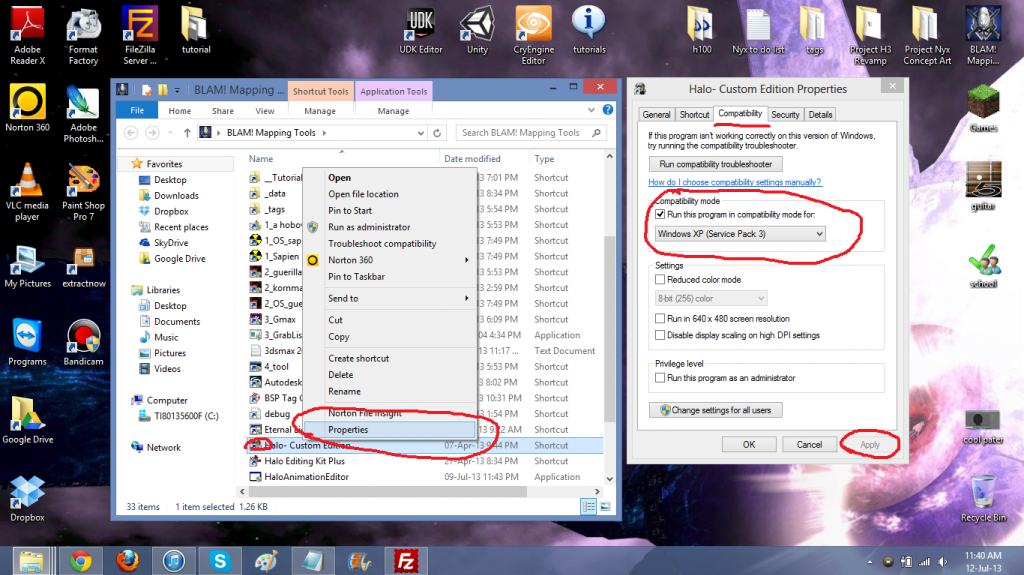 |
||||
|
|
|||||
|
christian Joined: Jul 11, 2013
|
Posted: Jul 11, 2013 10:40 PM
Msg. 8 of 15
I tried that it didn't work :(
|
||||
|
|
|||||
|
Hobbet360 Joined: Jan 10, 2012
ProTools > ToolPro |
Posted: Jul 11, 2013 11:02 PM
Msg. 9 of 15
when the dialogue box appears, try hitting "more info" in blue and then run anyway.
|
||||
|
|
|||||
|
christian Joined: Jul 11, 2013
|
Posted: Jul 12, 2013 02:16 AM
Msg. 10 of 15
Yea it don't give me that option, it just forces me to close and cancel the install
|
||||
|
|
|||||
|
Hobbet360 Joined: Jan 10, 2012
ProTools > ToolPro |
Posted: Jul 12, 2013 04:09 AM
Msg. 11 of 15
Sorry, I am out of ideas then, I couldn't run normal halo 1.09ce because it says my CD key is invalid, so I just resorted to 1.00ce, even though I own the game. :\
Yeah, sorry, idk. |
||||
|
|
|||||
|
christian Joined: Jul 11, 2013
|
Posted: Jul 12, 2013 04:16 AM
Msg. 12 of 15
I have done some research on this error and it appears that other people have the same problem when installing a program onto windows 8 64bits, and they fixed the issue by installing an alternate program that is compatible ... Long story short halo maps doesn't that other install program for halo ce, so I can't play my favorite game :(
But thanks for all the help anyway guys |
||||
|
|
|||||
|
Hobbet360 Joined: Jan 10, 2012
ProTools > ToolPro |
Posted: Jul 12, 2013 04:35 AM
Msg. 13 of 15
(Works on my Toshiba, 64 bit, 1,5GB GPU, I5 CPU, Win 8, laptop and whatever)
Idk. |
||||
|
|
|||||
|
christian Joined: Jul 11, 2013
|
Posted: Jul 15, 2013 08:51 AM
Msg. 14 of 15
neve mind found the problem, it was smart screen
I had to disable smart screen and then re-download custom edition and the setup worked perfectly. I can play custom edition now!!! thanks for all your help guy's |
||||
|
|
|||||
|
Jaz Joined: Mar 21, 2010 
[Insert sarcastic comment here] |
Posted: Jul 15, 2013 09:13 AM
Msg. 15 of 15
Next time it happens, click 'More Info' and then 'Run Anyway'. If such a dialog doesn't appear while SmartScreen is on, there's probably something wrong with your account.(maybe your permissions are messed up :/)
I can run Halo PC and CE fine on Windows 8 Pro 64-bit so it's certainly not a universal thing for Windows 8. I don't recommend disabling SmartScreen completely. Though it's annoying, it does actually prevent your computer from being hacked as it disallows any unauthorised(or 'dodgy') software from being installed without your permission. (As an example; this translates to blocking those forced anti-virus scan scams :/) Edited by Jaz on Jul 15, 2013 at 09:16 AM |
||||
|
|
|||||

|
