A Community discussion forum for Halo Custom Edition, Halo 2 Vista, Portal and Halo Machinima
|
 Home
Home Search
 Register
 Login
Login Member List
 Recent Posts
| »Forums Index »Halo Custom Edition (Bungie/Gearbox) »Halo CE General Discussion »Ideas on how to make my map better? | 
|
| Author | Topic: Ideas on how to make my map better? (20 messages, Page 1 of 1) | ||||
| Moderators: Dennis | |||||
 ReAcH Joined: Dec 27, 2011 
|
Posted: Dec 5, 2012 06:22 PM
Msg. 1 of 20
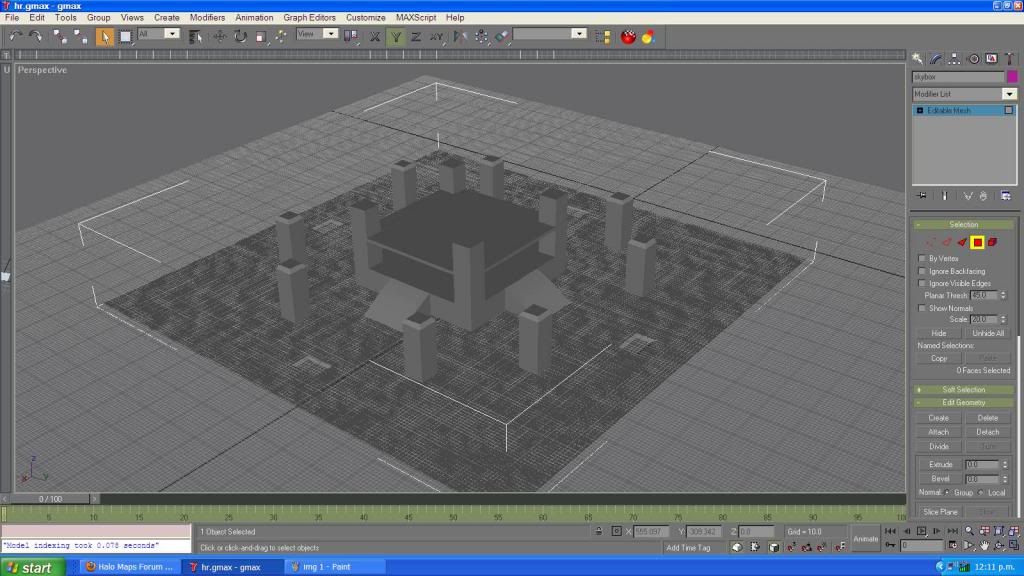
Any ideas?
 Edited by Dennis on Dec 5, 2012 at 06:26 PM |
||||


|
|||||
|
Dumb AI Joined: Sep 18, 2011 
Dead. |
Posted: Dec 5, 2012 06:28 PM
Msg. 2 of 20
Seems to be based off the general design of Hang Em High.
Add some tunnels under all those structure things. |
||||
|
|
|||||
|
ReAcH Joined: Dec 27, 2011
|
Posted: Dec 5, 2012 07:15 PM
Msg. 3 of 20
Quote: --- Original message by: Dumb AI Seems to be based off the general design of Hang Em High. Add some tunnels under all those structure things. Thank you for your idea. |
||||
|
|
|||||
|
SilentJacket Joined: Jun 9, 2012 
-Did I miss something?- |
Posted: Dec 5, 2012 09:58 PM
Msg. 4 of 20
add more cover, whomever controls the middle controls the map, causing a lot of camping
|
||||
|
|
|||||
|
renegade343 Joined: Jun 26, 2012 
CE3 Stage Modeler, Editor, and Writer |
Posted: Dec 5, 2012 10:22 PM
Msg. 5 of 20
Actually feels a lot more like Derelict than Hang 'em High...
Anything other than Slayer and Oddball looks like it'd be complete chaos and spawning hell... I'd suggest making somewhere that players could spawn safely in, without getting killed instantly. Otherwise, it might be a little too early to tell. But good luck! |
||||
|
|
|||||
|
ReAcH Joined: Dec 27, 2011
|
Posted: Dec 5, 2012 11:22 PM
Msg. 6 of 20
I should of said this before but i am working from the middle out
 . There will be four rooms. 1 room Red Team other Blue team and in a game like free for all you will spawn in a random room. I was thinking of adding doors at the start of every room , but ill wait till i get to it. Any ways . There will be four rooms. 1 room Red Team other Blue team and in a game like free for all you will spawn in a random room. I was thinking of adding doors at the start of every room , but ill wait till i get to it. Any ways 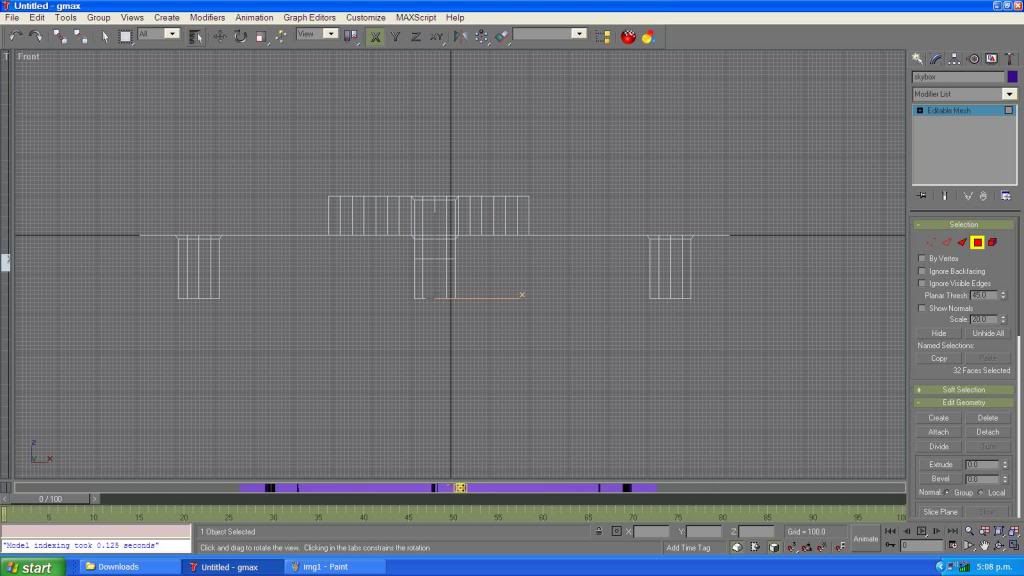 I had to restart because i delete something and saved it -_- But i like this one a lot more.  How would i link all the tunnels? In the middle tunnel i was going to add a gravity lift. And the only way to get to it is one on the four tunnels. And over the middle tunnel hole (if it can be done) i would make it one way only. So u can walk over it but if you use the gravity lift you will go through it and up to the 2nd level. Edited by ReAcH on Dec 5, 2012 at 11:28 PM |
||||
|
|
|||||
|
KingFisher Joined: Jun 10, 2011 
Creativity is the main element of level design. |
Posted: Dec 6, 2012 12:27 AM
Msg. 7 of 20
Keep the central structure, but it would be cool if you added 2 structures in between the one you have modeled. That way you have a red base and a blue base. Here is an example:
 1) Blue Base. 2) The structure you already have. This can be the central structures. 3)Red Base. 4)Random building with narrow corridors for shotgun gameplay. Close quarters combat so to say. 5)Snipe Tower. Ultimately the bases can be similar to each other. Edited by KingFisher on Dec 6, 2012 at 12:28 AM |
||||
|
|
|||||
|
ReAcH Joined: Dec 27, 2011
|
Posted: Dec 6, 2012 01:12 AM
Msg. 8 of 20
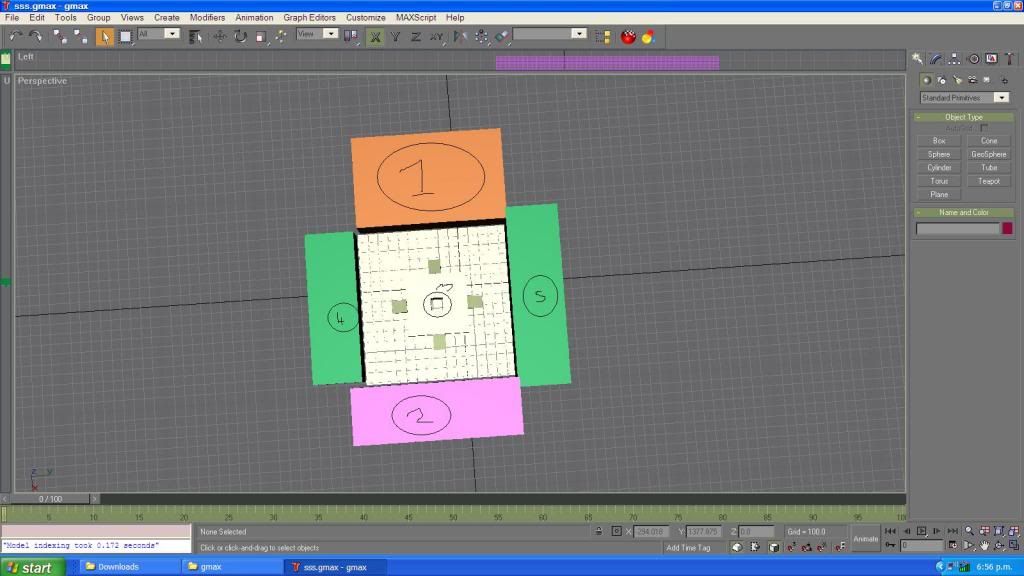 I might have your idea wrong so tell me if i do. 1) red team 2)blue team 3)The only way to get in to any of the 2 buildings (random rooms) 4)random room 5)random room. I was think of making the tunnels (3) more shotgun friendly. Its not just from point 1 to point 2. It has corners so your weapon will do more damage. |
||||
|
|
|||||
|
KingFisher Joined: Jun 10, 2011
Creativity is the main element of level design. |
Posted: Dec 6, 2012 02:45 AM
Msg. 9 of 20
Let me explain with a quick 5 minute model:
 Here is the layout  These would be the bases, each having two entrances that lead to a flag room for CTF and Spawning.  The shotgun hall has three entrances that lead to a short hallway, which is good for close combat.  The snipe tower has two ramps to get to the top, it has some coverage. But not too much, otherwise people will camp. This would be good for the sniper.  This is just a perspective of how it looks from base to base. Hope that helps somewhat. This |
||||
|
|
|||||
|
ReAcH Joined: Dec 27, 2011
|
Posted: Dec 6, 2012 04:58 AM
Msg. 10 of 20
Oh i see now. That looks nice. Did it really take you 5 mins? because it look as if it took u a bit.
|
||||
|
|
|||||
|
KingFisher Joined: Jun 10, 2011
Creativity is the main element of level design. |
Posted: Dec 6, 2012 10:57 AM
Msg. 11 of 20
I've been modeling in 3ds max for about 6 years. So yeah, it didn't take too long. If you have any more questions don't be afraid to send me a private message.
|
||||
|
|
|||||
|
Higuy Joined: Mar 6, 2007 
@lucasgovatos |
Posted: Dec 6, 2012 04:01 PM
Msg. 12 of 20
There are plenty of tricks as to how he made that very fast, for example making one object and copying it, or using tools like extrude, bevel, and bridge. But I agree with Pope, his layout is pretty nice, would be worth trying that and seeing how it works!
|
||||
|
|
|||||
|
General Okar Joined: Aug 29, 2011 
I hate this place |
Posted: Dec 6, 2012 04:18 PM
Msg. 13 of 20
This would be an awesome map with KingFisher's layout. Just wondering but will you be using standard halo 1 tags or different ones?
|
||||
|
|
|||||
|
ReAcH Joined: Dec 27, 2011
|
Posted: Dec 6, 2012 04:19 PM
Msg. 14 of 20
Going to stop work on this map fro a few days -_- this pc has had it. So im going to buy a new 1 in the next week or so.
Quote: --- Original message by: General Okar This would be an awesome map with KingFisher's layout. Just wondering but will you be using standard halo 1 tags or different ones? I might edit the guns. Like the sniper so it not a 1 hit kill gun all the time. But i was going to keep the halo shotgun but make something like this. 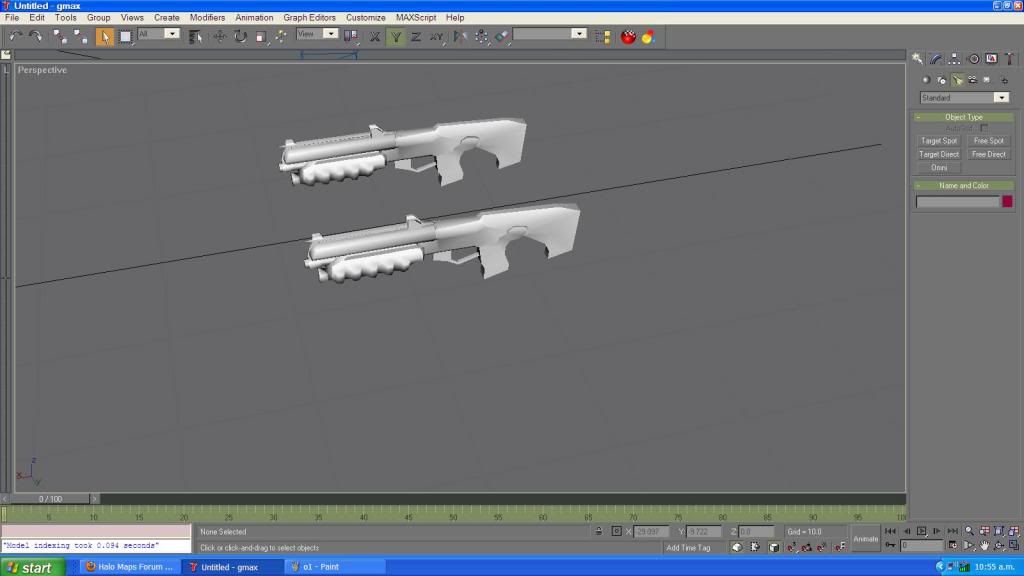 As you can see its just the shotgun made smaller. Its damage will be more but its range will be shorter. Edited by ReAcH on Dec 6, 2012 at 05:02 PM |
||||
|
|
|||||
|
Dumb AI Joined: Sep 18, 2011
Dead. |
Posted: Dec 6, 2012 06:13 PM
Msg. 15 of 20
Kind of like the H2 shotgun except it's damage is worse than the H1 shotgun's (it's lower).
|
||||
|
|
|||||
|
ReAcH Joined: Dec 27, 2011
|
Posted: Dec 7, 2012 01:48 AM
Msg. 16 of 20
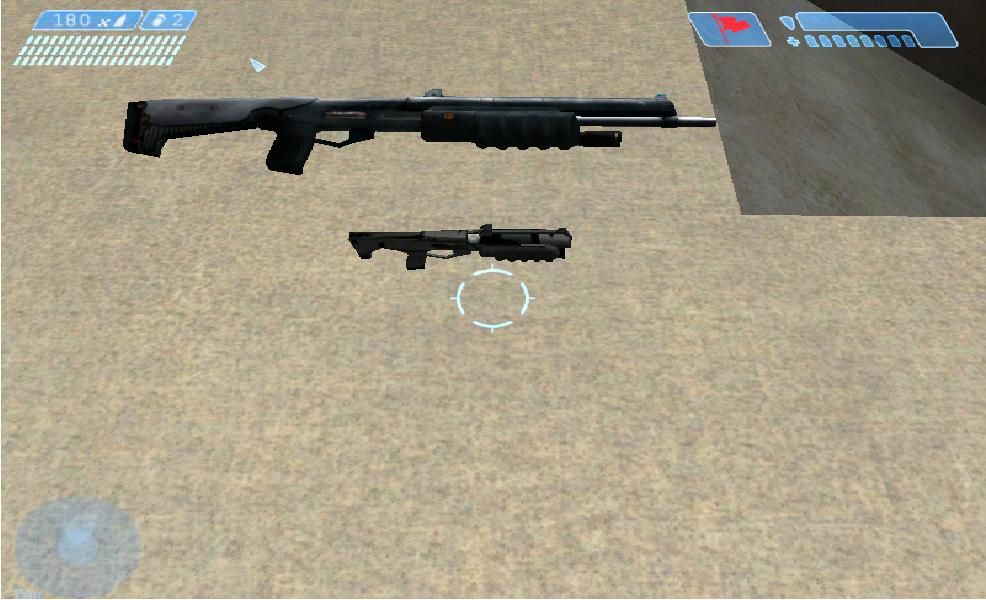 -_- i made it as a weapon but my PC would not let me export the model. So i made it in to scenery and this is the size different. How is it , to small or what? |
||||
|
|
|||||
|
renegade343 Joined: Jun 26, 2012
CE3 Stage Modeler, Editor, and Writer |
Posted: Dec 7, 2012 02:04 AM
Msg. 17 of 20
To put it into perspective, the smaller model would be like 30cm (1 feet) long...
The Chief could snap that into two. Last time I checked, guns shouldn't be like that P: (PS: If you're going to change the dimensions, why not add your own little flair -like making it double-barreled- while at it? It'll take more time and need a new UV, but it should be worth it if you can pull it off?) Edited by renegade343 on Dec 7, 2012 at 02:05 AM |
||||
|
|
|||||
|
ReAcH Joined: Dec 27, 2011
|
Posted: Dec 7, 2012 02:18 AM
Msg. 18 of 20
Quote: --- Original message by: mastur cheef It's too small, and the uvs are not good. Ill make it bigger when i get my new PC. But i can't really do anything right now. To export my map in to .jms take 5hours and its 50% ( i used a map i made a little bit ago. Every thing is the same it took 6hours to export as a few weeks ago about 1 hour) :( |
||||
|
|
|||||
|
CorpseManTS Joined: Nov 16, 2008 
Sorry, I cant hear u with my bullet in your mouth! |
Posted: Dec 7, 2012 02:26 AM
Msg. 19 of 20
take the stock away and make it like an Akimbo mini shotgun and its perfect
|
||||
|
|
|||||
|
ReAcH Joined: Dec 27, 2011
|
Posted: Dec 7, 2012 03:03 AM
Msg. 20 of 20
I was going to get rid of all my halo's until i found this -->Adjutant<--. I think that's what they use to get the textures from halo reach and stuff (i hope I'm not wrong) is it really hard to use? I just want to use it for textures.
|
||||
|
|
|||||

|
