A Community discussion forum for Halo Custom Edition, Halo 2 Vista, Portal and Halo Machinima
|
 Home
Home Search
 Register
 Login
Login Member List
 Recent Posts
| »Forums Index »Halo Custom Edition (Bungie/Gearbox) »Halo CE Technical / Map Design »riged character help | 
|
| Author | Topic: riged character help (22 messages, Page 1 of 1) | ||||
| Moderators: Dennis | |||||
 savinpvtmike Joined: Apr 18, 2010 
It's heavily inserted |
Posted: Jul 23, 2012 09:40 PM
Msg. 1 of 22
so i have a character riged in 3ds max 8 but when i import it into halo it dues not work so i try the JMS Weight Injector thing and when i put the model back in guerilla i get an error
Quote: Couldn't read map file './guerillabeta.map' Version mismatch. Attempting maximally invasive emergency surgery. failed to find end of block element 8 failed to find end of block element 0 failed to find end of block element 0 couldn't import tag then i try BlueStreak and i get this error in cmd 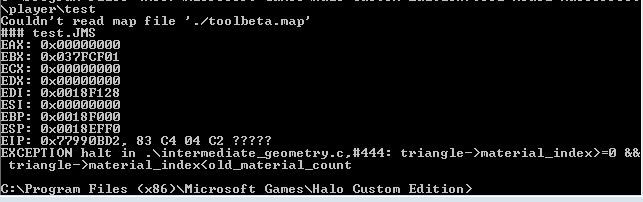 what do i do and also i have fingers and toes on the biped is that the problem. if so how do i get rid of them without deleting the biped. |
||||


|
|||||
|
savinpvtmike Joined: Apr 18, 2010
It's heavily inserted |
Posted: Jul 24, 2012 11:05 AM
Msg. 2 of 22
what do you mean set ids right?
|
||||
|
|
|||||
|
XlzQwerty1 Joined: Aug 6, 2009 
|
Posted: Jul 24, 2012 12:41 PM
Msg. 3 of 22
Export with blue streak.
|
||||
|
|
|||||
|
savinpvtmike Joined: Apr 18, 2010
It's heavily inserted |
Posted: Jul 24, 2012 01:36 PM
Msg. 4 of 22
all ready did if you can read the first post.
the animations work and every thing works fine except putting it in game. Edited by savinpvtmike on Jul 24, 2012 at 01:36 PM |
||||
|
|
|||||
|
savinpvtmike Joined: Apr 18, 2010
It's heavily inserted |
Posted: Jul 24, 2012 02:29 PM
Msg. 5 of 22
sorry i still don't know what you mean can you explane how i can fix the ids.
Edited by savinpvtmike on Jul 24, 2012 at 02:30 PM |
||||
|
|
|||||
|
kirby_422 Joined: Jan 22, 2006 
Apparently public enemy number 1? |
Posted: Jul 24, 2012 02:48 PM
Msg. 6 of 22
With blitzkreig, you can setup materials anyway you choose. With Bluestreak, you are required to use multi-materials. Open 3dmax, and open the material editor. Click the button that says standard, pick "multi/sub-object", create every material inside that multi-material, and apply that to your model. The IDs next to each of these mutli-materials are how you assign them to your model. Over in the right side, in your editable mesh screen, you can set IDs to selected faces. Use this to apply correct materials.
|
||||
|
|
|||||
|
savinpvtmike Joined: Apr 18, 2010
It's heavily inserted |
Posted: Jul 24, 2012 03:23 PM
Msg. 7 of 22
OK now i get cant create object in sapien but the model works as a scenery tho what do i do there.
|
||||
|
|
|||||
|
kirby_422 Joined: Jan 22, 2006
Apparently public enemy number 1? |
Posted: Jul 24, 2012 03:38 PM
Msg. 8 of 22
Does the node checksum match everywhere? Open the model_animations, scroll to the bottom, copy the checksum and paste it in the gbxmodel in its checksum slot (top). Then hope the nodes match.
|
||||
|
|
|||||
|
savinpvtmike Joined: Apr 18, 2010
It's heavily inserted |
Posted: Jul 24, 2012 03:48 PM
Msg. 9 of 22
ok now it pops up but now it gets disformed how do i fix that.
|
||||
|
|
|||||
|
kirby_422 Joined: Jan 22, 2006
Apparently public enemy number 1? |
Posted: Jul 24, 2012 04:09 PM
Msg. 10 of 22
rig your model better and/or use correct node locations.
How did you get your bone set for rigging? did you import an existing gbxmodel and take that set of bones? |
||||
|
|
|||||
|
savinpvtmike Joined: Apr 18, 2010
It's heavily inserted |
Posted: Jul 24, 2012 04:13 PM
Msg. 11 of 22
no i use the bones built in 3ds max 8 but the animations work grate in 3ds max
Edited by savinpvtmike on Jul 24, 2012 at 04:13 PM |
||||
|
|
|||||
|
kirby_422 Joined: Jan 22, 2006
Apparently public enemy number 1? |
Posted: Jul 24, 2012 04:19 PM
Msg. 12 of 22
If you're using custom bones, you need custom animations.
|
||||
|
|
|||||
|
savinpvtmike Joined: Apr 18, 2010
It's heavily inserted |
Posted: Jul 24, 2012 04:45 PM
Msg. 13 of 22
how do i use the imported bones then every time i export i get a no actor error
|
||||
|
|
|||||
|
kirby_422 Joined: Jan 22, 2006
Apparently public enemy number 1? |
Posted: Jul 24, 2012 04:51 PM
Msg. 14 of 22
imported bones re-export correctly with bluestreak. Bluestreak only cares about the name, unlike blitzkreig (which cares about them having the biped modifier). Treat imported bones the same as ones made in max, and just export with bluestreak.
|
||||
|
|
|||||
|
savinpvtmike Joined: Apr 18, 2010
It's heavily inserted |
Posted: Jul 24, 2012 05:21 PM
Msg. 15 of 22
now when i use this there are permanent envelopes how do i get rid of them
|
||||
|
|
|||||
|
savinpvtmike Joined: Apr 18, 2010
It's heavily inserted |
Posted: Jul 24, 2012 05:34 PM
Msg. 16 of 22
lol
|
||||
|
|
|||||
|
kirby_422 Joined: Jan 22, 2006
Apparently public enemy number 1? |
Posted: Jul 24, 2012 05:41 PM
Msg. 17 of 22
So, what exactly is it that you can't get rid of? on the side panel, if you assign weights, it effects all other bones on that vertice, so you can use that to get rid of wrong bones, etc. And there is also a maximum bone limit, and one to remove 0 weighted things (just clears up the weight table, and im sure bluestreak would prefer this. I just automatically do it anyways lol) Set the max bone limit to 2, it should defaultly be 3 (H1 accepts 2 nodes, H2 accepts 4 nodes per vert)
|
||||
|
|
|||||
|
savinpvtmike Joined: Apr 18, 2010
It's heavily inserted |
Posted: Jul 24, 2012 09:03 PM
Msg. 18 of 22
so i spent an hour re riging my model and i get an error
Quote: --Runtime error: Exceeded the vertex weight list countSkin:skin |
||||
|
|
|||||
|
kirby_422 Joined: Jan 22, 2006
Apparently public enemy number 1? |
Posted: Jul 24, 2012 09:07 PM
Msg. 19 of 22
sounds like you have vertices weighted to more than 2 nodes. (there was reasons I mentioned setting the max bone count)
|
||||
|
|
|||||
|
savinpvtmike Joined: Apr 18, 2010
It's heavily inserted |
Posted: Jul 24, 2012 09:12 PM
Msg. 20 of 22
i did set the limit to 2
so any ideas Edited by savinpvtmike on Jul 24, 2012 at 10:02 PM |
||||
|
|
|||||
|
kirby_422 Joined: Jan 22, 2006
Apparently public enemy number 1? |
Posted: Jul 24, 2012 10:07 PM
Msg. 21 of 22
Was that the popup error, or the highlighted text in the textbox? (post both) Also, did you try the remove zero weight over on the right side?
|
||||
|
|
|||||
|
savinpvtmike Joined: Apr 18, 2010
It's heavily inserted |
Posted: Jul 25, 2012 01:30 PM
Msg. 22 of 22
the textbox = skinNode0 = skinOps.getVertexWeightBoneID theSkin face_verts[f][vertices] 1error= --Runtime error: Exceeded the vertex weight list countSkin:skin Edited by savinpvtmike on Jul 25, 2012 at 02:26 PM |
||||
|
|
|||||

|
