A Community discussion forum for Halo Custom Edition, Halo 2 Vista, Portal and Halo Machinima
|
 Home
Home Search
 Register
 Login
Login Member List
 Recent Posts
| »Forums Index »Halo Custom Edition (Bungie/Gearbox) »Halo CE General Discussion »cmt a50 glitchy VISR | 
|
| Author | Topic: cmt a50 glitchy VISR (7 messages, Page 1 of 1) | ||||
| Moderators: Dennis | |||||
 Guilty_spark Joined: Dec 8, 2011 
enjoy my bright, blue, balls! |
Posted: Feb 28, 2012 11:14 PM
Msg. 1 of 7
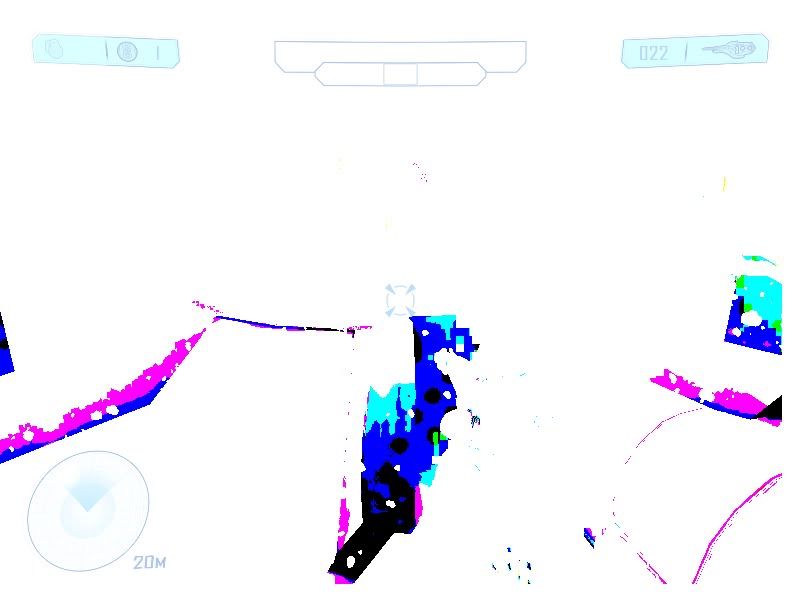
this happened twice with me this happens when I use it sometimes teh lag please have a look
 |
||||


|
|||||
|
ally Joined: Jun 23, 2010 
Aye Ready |
Posted: Feb 28, 2012 11:16 PM
Msg. 2 of 7
nice video card, what type are you using?
|
||||
|
|
|||||
|
P3 Joined: Dec 2, 2011 
|
Posted: Feb 28, 2012 11:17 PM
Msg. 3 of 7
Maybe you have the older OS version...
|
||||
|
|
|||||
|
ally Joined: Jun 23, 2010
Aye Ready |
Posted: Feb 28, 2012 11:18 PM
Msg. 4 of 7
nah cant be that p3, i only installed the older version when i played the a50 map and it worked fine for me. no problems at all.
|
||||
|
|
|||||
|
Guilty_spark Joined: Dec 8, 2011
enjoy my bright, blue, balls! |
Posted: Feb 28, 2012 11:20 PM
Msg. 5 of 7
My video card supports shader 3.0 and this glitch usually doesnt occur when I use it and im using OS version 3.0.3
|
||||
|
|
|||||
|
teh lag Joined: May 6, 2008 
|
Posted: Feb 28, 2012 11:21 PM
Msg. 6 of 7
That is very strange. The only thing I can imagine being the causes is if the PP effect that is used to simulate the "light adjustment" effect when the visr is first turned on is somehow going crazy. The next time this happens, enter into the console "pp_set_effect_instance_active 1 0" and see if it goes away. If it does, I'll have to look into how we're using that effect. It would also help if you could describe the steps it takes to reproduce this - are you saving/loading checkpoints? Does it happen if you died in the middle of switching the visr on? Etc...
|
||||
|
|
|||||
|
Guilty_spark Joined: Dec 8, 2011
enjoy my bright, blue, balls! |
Posted: Feb 28, 2012 11:24 PM
Msg. 7 of 7
sorry teh lag IDK what I do to cause this glitch it just radomly occurs ill try that console command right now.it doesnt make it go away still occuring.I can tell you this I was messing with the visr options quite a lot.
Edited by Spark on Feb 28, 2012 at 11:29 PM |
||||
|
|
|||||

|
