A Community discussion forum for Halo Custom Edition, Halo 2 Vista, Portal and Halo Machinima
|
 Home
Home Search
 Register
 Login
Login Member List
 Recent Posts
| »Forums Index »Halo Custom Edition (Bungie/Gearbox) »Halo CE Technical / Map Design »BSP not there! | 
|
| Author | Topic: BSP not there! (17 messages, Page 1 of 1) | ||||
| Moderators: Dennis | |||||
 DarkHalo003 Joined: Mar 10, 2008 
All ARs Need Green Little Buttons. |
Posted: Jun 14, 2011 12:36 AM
Msg. 1 of 17
I open my level in Sapien and the BSP is not there. It has the structure_scenario labeled in the dropbox, but NO BSP. I've ran lightmaps several times and still nothing. There is no debug, it's just a sky, with grayness at the bottom. Can someone please enlighten me on how to fix this?
|
||||


|
|||||
|
ally Joined: Jun 23, 2010 
Aye Ready |
Posted: Jun 14, 2011 12:43 AM
Msg. 2 of 17
i doubt my first suggestion was of any use, surely you have a copy of the BSP in the scenes folder of 3ds max?
also your drop box will store the file on which ever drive you set to hold your file. maybe check the location it's set to. Edited by ally on Jun 14, 2011 at 02:04 AM been spending a bit of time looking up different things in case your file isn't showing up in your drop box, just posting this link in case your file was deleted. https://www.dropbox.com/help/11 also worth taking a look in this location in your cache folder, which should be located inside the "~/.dropbox/cache" or "~/Dropbox/.dropbox.cache`" folders i'm just clutching at straws here hoping something helps. goodluck man Edited by ally on Jun 14, 2011 at 04:38 AM |
||||
|
|
|||||
|
DarkHalo003 Joined: Mar 10, 2008
All ARs Need Green Little Buttons. |
Posted: Jun 14, 2011 11:28 AM
Msg. 3 of 17
No, the file DOES show up in the dropbox. It's just the BSP itself doesn't appear. It's all just the .sky tag.
|
||||
|
|
|||||
|
kirby_422 Joined: Jan 22, 2006 
Apparently public enemy number 1? |
Posted: Jun 14, 2011 12:27 PM
Msg. 4 of 17
When modeling the BSP, where did you put it? your camera starts at 0,0,0 so if its super far away, you wont see it. Most SP BSPs are too far away to see (+ the fact they are portaled so they wont render when not nearby) so take that into account too.
|
||||
|
|
|||||
|
DarkHalo003 Joined: Mar 10, 2008
All ARs Need Green Little Buttons. |
Posted: Jun 15, 2011 07:06 AM
Msg. 5 of 17
I'm going to try to re-export it today from 0,0,0. 3ds Max 10 was freaking out and decided to be a pain when ever I was panning the camera.
|
||||
|
|
|||||
|
ally Joined: Jun 23, 2010
Aye Ready |
Posted: Jun 15, 2011 01:36 PM
Msg. 6 of 17
you got this fixed?
|
||||
|
|
|||||
|
DarkHalo003 Joined: Mar 10, 2008
All ARs Need Green Little Buttons. |
Posted: Jun 17, 2011 08:57 PM
Msg. 7 of 17
Quote: --- Original message by: ally you got this fixed? I haven't compiled a new version yet, decided I needed a serious break since I was getting royally wound up the day I tried this (not just from this one thing). I'll compile soon and let you know if anything changed. I hate how picky the system is with assigning textures, however. 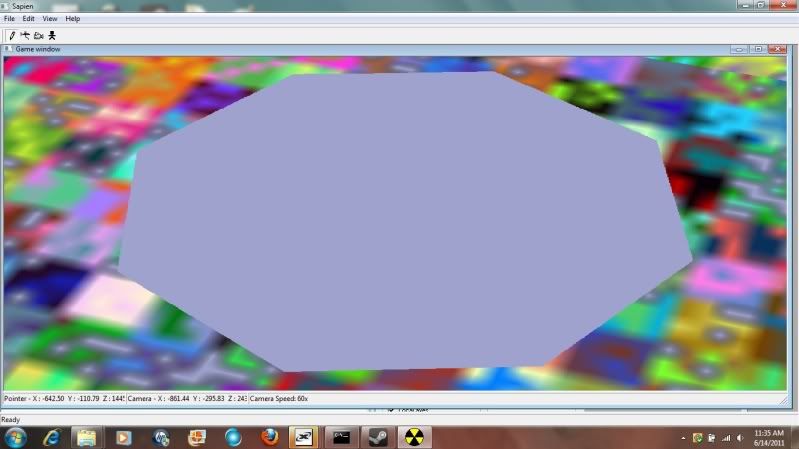 Ignore the obviously bad bitmaps in the background, those are fixed now. This is what happens when I open it in Sapien. I get a huge octagon supposedly where my BSP is supposed to be. How do I fix this? Here's what I do for the map: 1.) Create a skybox, apply the +sky material to the sky box. 2.) I select my modeled level and move it into the skybox. 3.) I then attach my model to the skybox and select the second option, the "Match Material to Material ID." 4.) I export. This is what happens. I'm sure my method is easily what's causing this and I could use a lot of help with it. Edited by DarkHalo003 on Jun 17, 2011 at 09:50 PM Edited by DarkHalo003 on Jun 17, 2011 at 09:51 PM |
||||
|
|
|||||
|
ally Joined: Jun 23, 2010
Aye Ready |
Posted: Jun 17, 2011 09:50 PM
Msg. 8 of 17
ah yes this mapping caper can be a little annoying sometimes, i get problems too sometimes and have nearly deleted HEK all together a few times.
goodluck. just saw your edit damn!! Edited by ally on Jun 17, 2011 at 09:51 PM |
||||
|
|
|||||
|
SlappyThePirate Joined: Aug 24, 2009 
You are irritating, I'll release nothing |
Posted: Jun 17, 2011 10:10 PM
Msg. 9 of 17
Quote: Here's what I do for the map: 1.) Create a skybox, apply the +sky material to the sky box. 2.) I select my modeled level and move it into the skybox. 3.) I then attach my model to the skybox and select the second option, the "Match Material to Material ID." 4.) I export.  You actually have to seal up the world with sky faces. Also, don't cheat with the matching materials-- actually make the +sky a sub-material ID to use. |
||||
|
|
|||||
|
Higuy Joined: Mar 6, 2007 
@lucasgovatos |
Posted: Jun 17, 2011 10:14 PM
Msg. 10 of 17
Quote: --- Original message by: SlappyThePirate Quote: Here's what I do for the map: 1.) Create a skybox, apply the +sky material to the sky box. 2.) I select my modeled level and move it into the skybox. 3.) I then attach my model to the skybox and select the second option, the "Match Material to Material ID." 4.) I export. You actually have to seal up the world with sky faces. Also, don't cheat with the matching materials-- actually make the +sky a sub-material ID to use. Quite frankly if the bsp he made is sealed and its inside the box of +sky, it shouldn't matter. You can make floating objects all you want as long as there sealed and inside +sky. Like Kirby said, its probably far away. In max, create a box and move it somewhere inside your bsp. Get the coordinates. In sapien, create a scenery object, or a flag, or something. Then in its properties, set those coordinates from max. Find the object in your hierarchy, and double click it, and it should take you to it, which is inside your map. |
||||
|
|
|||||
|
milkkookie Joined: Aug 10, 2010 
:) |
Posted: Jun 17, 2011 10:17 PM
Msg. 11 of 17
Quote: --- Original message by: SlappyThePirate Quote: Here's what I do for the map: 1.) Create a skybox, apply the +sky material to the sky box. 2.) I select my modeled level and move it into the skybox. 3.) I then attach my model to the skybox and select the second option, the "Match Material to Material ID." 4.) I export. You actually have to seal up the world with sky faces. Also, don't cheat with the matching materials-- actually make the +sky a sub-material ID to use. that might be the same mistake i made, i will try this  |
||||
|
|
|||||
|
DarkHalo003 Joined: Mar 10, 2008
All ARs Need Green Little Buttons. |
Posted: Jun 17, 2011 11:41 PM
Msg. 12 of 17
Higuy is right. My method is acceptable (try the FIRST option when attaching instead) and then, once in Sapien, use the Dusk sky and look for strange object while going down. If you see any, use a scenery and try clicking it on to the object. That's how I found my BSP! Here is the proof:
http://www.xfire.com/profile/darkhalo003/screenshots/?view#115082521 http://www.xfire.com/video/48b821/ Ignore the scaling, I know it needs to be bigger. I'm just glad it's in-game now. |
||||
|
|
|||||
|
ally Joined: Jun 23, 2010
Aye Ready |
Posted: Jun 18, 2011 07:11 AM
Msg. 13 of 17
good to see your map ingame now after the problems holding it back, it was hard to see how small the doorways were in the video, i was hoping it would be so small that you would have to crouch to get through a doorway in the video XD
|
||||
|
|
|||||
|
DarkHalo003 Joined: Mar 10, 2008
All ARs Need Green Little Buttons. |
Posted: Jun 18, 2011 11:55 AM
Msg. 14 of 17
Quote: --- Original message by: ally good to see your map ingame now after the problems holding it back, it was hard to see how small the doorways were in the video, i was hoping it would be so small that you would have to crouch to get through a doorway in the video XD Haha in the firs first in-game build one of them required me to crouch.lol. |
||||
|
|
|||||
|
ally Joined: Jun 23, 2010
Aye Ready |
Posted: Jun 18, 2011 01:16 PM
Msg. 15 of 17
LOL excellent!
|
||||
|
|
|||||
|
SlappyThePirate Joined: Aug 24, 2009
You are irritating, I'll release nothing |
Posted: Jun 18, 2011 04:52 PM
Msg. 16 of 17
Quote: Quite frankly if the bsp he made is sealed and its inside the box of +sky, it shouldn't matter. You can make floating objects all you want as long as there sealed and inside +sky. This kind of bsp has been known to cause problems, I remember finding old topics about it when I had floaty-bsp problems. |
||||
|
|
|||||
|
Higuy Joined: Mar 6, 2007
@lucasgovatos |
Posted: Jun 18, 2011 09:22 PM
Msg. 17 of 17
Quote: --- Original message by: SlappyThePirate Quote: Quite frankly if the bsp he made is sealed and its inside the box of +sky, it shouldn't matter. You can make floating objects all you want as long as there sealed and inside +sky. This kind of bsp has been known to cause problems, I remember finding old topics about it when I had floaty-bsp problems.Uh, I've never had any problems with it. Even Arteen did this with over a hundred something separate objects (Destiny is the maps name), just floating there in the sky as the bsp, and it worked just fine. |
||||
|
|
|||||

|
