A Community discussion forum for Halo Custom Edition, Halo 2 Vista, Portal and Halo Machinima
|
 Home
Home Search
 Register
 Login
Login Member List
 Recent Posts
| »Forums Index »Halo Custom Edition (Bungie/Gearbox) »Halo CE General Discussion »The Most Common Errors Building From Scratch And How To Avoid Them? | 
|
| Author | Topic: The Most Common Errors Building From Scratch And How To Avoid Them? (18 messages, Page 1 of 1) | ||||
| Moderators: Dennis | |||||
 Wesker Joined: Jun 8, 2011 
Your Future Hinges upon This Fight!!! |
Posted: Jun 11, 2011 01:22 AM
Msg. 1 of 18
say like when building a map
i believe that there was a forum on this sometime ago but i cant find it |
||||


|
|||||
|
UnevenElefant5 Joined: May 3, 2008 
its been fun yall, i'll never forget this site :') |
Posted: Jun 11, 2011 02:06 AM
Msg. 2 of 18
There really should be some kind of documentation or official tutorial that's included with the HEK or something, which details the level creation process from start to finish, and includes information about potential errors.
*cough cough* C:\Program Files\Microsoft Games\Halo Custom Edition\HEK_Tutorial\index.html sidebar -> level compilation or: C:\Program Files\Microsoft Games\Halo Custom Edition\HEK_Tutorial\references\level_design\mp_level_design\mp_ld_level_compilation.html |
||||
|
|
|||||
|
eliteslasher Joined: Jun 30, 2008 
Crysis 3!!!!!!! All I have to say. :D |
Posted: Jun 11, 2011 05:15 AM
Msg. 3 of 18
|
||||
|
|
|||||
|
Wesker Joined: Jun 8, 2011
Your Future Hinges upon This Fight!!! |
Posted: Jun 11, 2011 11:12 AM
Msg. 4 of 18
ah most thanx elite slasher and uneven
i dont plan on downloading HEK yet but i want to avoid inconveniences while modeling |
||||
|
|
|||||
|
UnevenElefant5 Joined: May 3, 2008
its been fun yall, i'll never forget this site :') |
Posted: Jun 11, 2011 11:15 AM
Msg. 5 of 18
Oh, sorry, I just assumed you had downloaded the HEK already. But yeah, what slasher posted is exactly what I was talking about, that webpage covers creating a level from start to finish. It's a bit advanced for a first map, but it covers more things like creating playerclipping (invisible walls), portals, and water.
|
||||
|
|
|||||
|
DarkHalo003 Joined: Mar 10, 2008 
All ARs Need Green Little Buttons. |
Posted: Jun 11, 2011 12:33 PM
Msg. 6 of 18
How do I accomplish fixing this:
Quote: When compiling using Tool the following error message appears: ### ERROR couldn't update edge # (red). This is typically caused by faces or surfaces that are duplicated or shared between objects. The faces have shared vertices and\or faces. The objects should either be separated or merged. A good example would be 2 identical cubes that have been moved together such that they each share one side. The cubes should either be moved apart, or merged together which would include the removal of any duplicate or illegal faces. |
||||
|
|
|||||
|
SlappyThePirate Joined: Aug 24, 2009 
You are irritating, I'll release nothing |
Posted: Jun 11, 2011 12:45 PM
Msg. 7 of 18
 Just don't make edges that are formed from more than two faces/triangles. Sometimes you need to do so for glass, in which case use a double-sided face. EDIT: for top-right shape, imagine the rectangle is a hole in a wall (from sw side to ne side), not a box. Edited by SlappyThePirate on Jun 11, 2011 at 12:48 PM |
||||
|
|
|||||
|
DarkHalo003 Joined: Mar 10, 2008
All ARs Need Green Little Buttons. |
Posted: Jun 11, 2011 04:11 PM
Msg. 8 of 18
That still doesn't answer how to fix it. I've already modeled the map and I attached a circle to the model I was working on so I could create faces from the circle to the model for a center piece.
Here is the circle of interest: 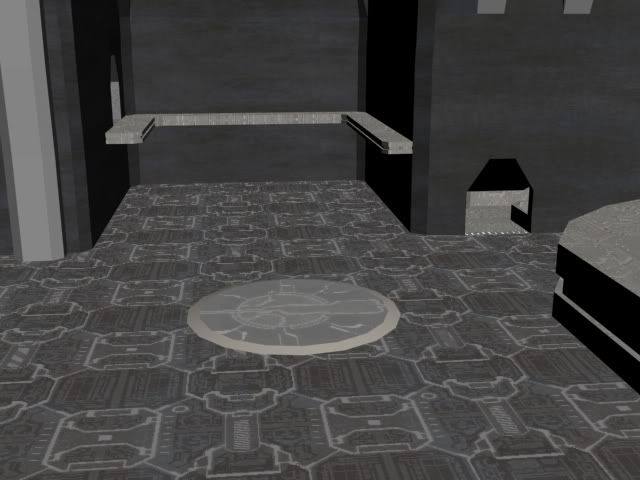 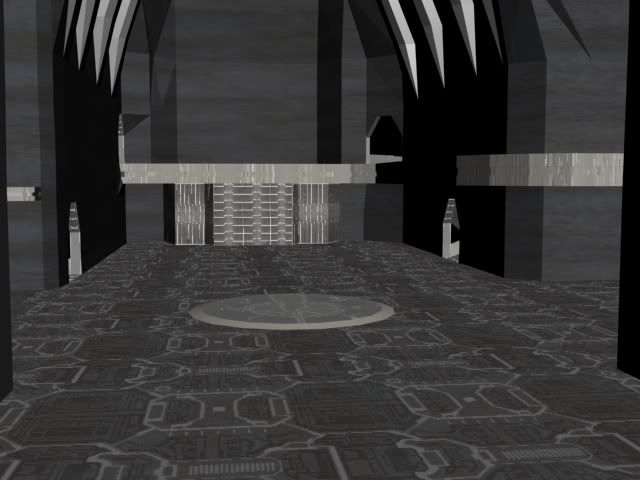 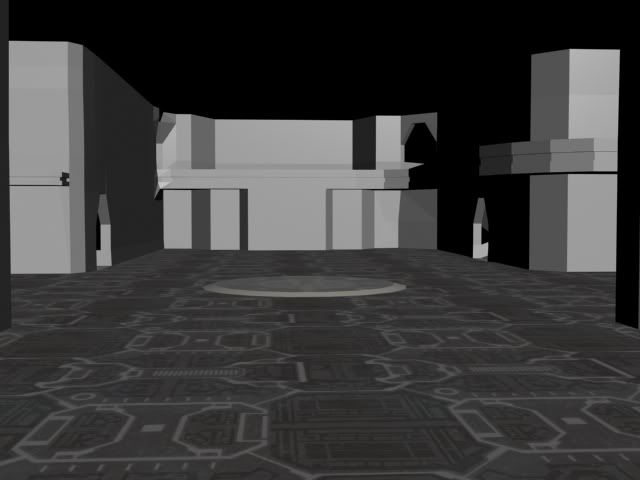 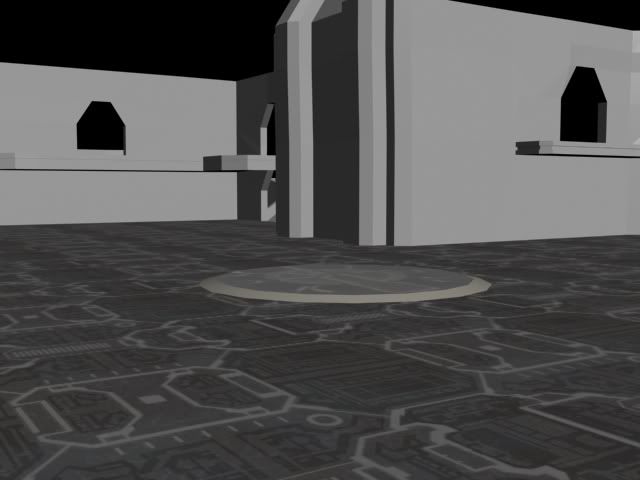 Any suggestions? It sounds to me that the faces are too low to the rest of the BSP (from the HEK description). Maybe raising the face could fix it? |
||||
|
|
|||||
|
ally Joined: Jun 23, 2010 
Aye Ready |
Posted: Jun 11, 2011 04:49 PM
Msg. 9 of 18
tbh it would be good to hit F4 and show a image of that circle a bit closer to see for example is the circle just with bevel applied or is it extruded then scaled, you said that was a circle added then attached.in that case did you delete faces from the surrounding polys so that you could make new ones to make the circle part of the bsp floor?
|
||||
|
|
|||||
|
chrisk123999 Joined: Aug 10, 2008 
=CE= Chris [Captain] [=] |
Posted: Jun 11, 2011 05:24 PM
Msg. 10 of 18
What's the exact error?
|
||||
|
|
|||||
|
SlappyThePirate Joined: Aug 24, 2009
You are irritating, I'll release nothing |
Posted: Jun 11, 2011 06:34 PM
Msg. 11 of 18
A wireframe-only (F3) and a see-through (ALT+X) of this area, or a picture with the WRL imported, could show us where the problem is.
And I though you were going to do something else about that floor. Needs moar stuff. |
||||
|
|
|||||
|
DarkHalo003 Joined: Mar 10, 2008
All ARs Need Green Little Buttons. |
Posted: Jun 11, 2011 09:04 PM
Msg. 12 of 18
Quote: --- Original message by: SlappyThePirate A wireframe-only (F3) and a see-through (ALT+X) of this area, or a picture with the WRL imported, could show us where the problem is. And I though you were going to do something else about that floor. Needs moar stuff. The floor is fine, it's just the render. In the view port it looks a lot like it will in-game. |
||||
|
|
|||||
|
SlappyThePirate Joined: Aug 24, 2009
You are irritating, I'll release nothing |
Posted: Jun 11, 2011 09:40 PM
Msg. 13 of 18
So, where's the update edge error you're getting?
|
||||
|
|
|||||
|
DarkHalo003 Joined: Mar 10, 2008
All ARs Need Green Little Buttons. |
Posted: Jun 12, 2011 11:02 AM
Msg. 14 of 18
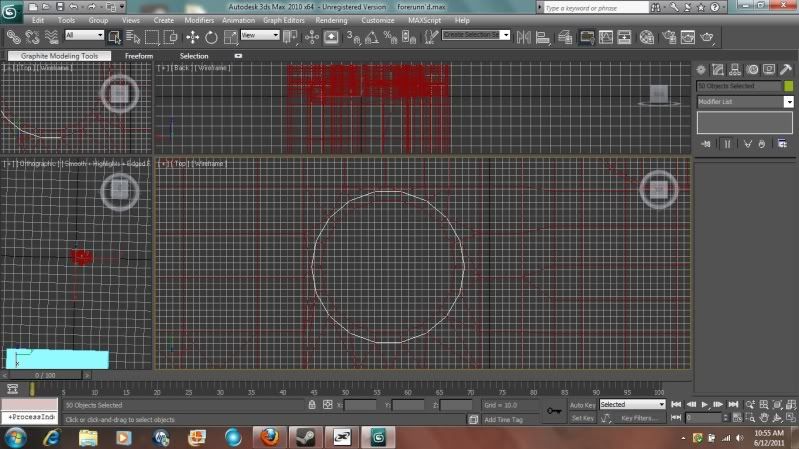 The error encases the white section of edges that are the circle after I connected the circle with the polygons via Editable Mesh/Poly>Polygon>Create (uses 3+ vertices to create a polygon). Any suggestions? I can't really give a better render; my mouse isn't working currently. Edited by DarkHalo003 on Jun 12, 2011 at 11:02 AM |
||||
|
|
|||||
|
chrisk123999 Joined: Aug 10, 2008
=CE= Chris [Captain] [=] |
Posted: Jun 12, 2011 11:10 AM
Msg. 15 of 18
When exporting make sure you convert it to editable mesh first. Also, try clicking one of the verts along the edge of that circle and dragging it up. You should be able to tell what's wrong when you do that.
|
||||
|
|
|||||
|
DarkHalo003 Joined: Mar 10, 2008
All ARs Need Green Little Buttons. |
Posted: Jun 12, 2011 12:06 PM
Msg. 16 of 18
Quote: --- Original message by: chrisk123999 When exporting make sure you convert it to editable mesh first. Also, try clicking one of the verts along the edge of that circle and dragging it up. You should be able to tell what's wrong when you do that. I usually use Editable Mesh, but I'll make sure I didn't leave it all in Poly. I'll double check the verts, though I'm positive they're okay. |
||||
|
|
|||||
|
SlappyThePirate Joined: Aug 24, 2009
You are irritating, I'll release nothing |
Posted: Jun 12, 2011 01:31 PM
Msg. 17 of 18
 You have to delete the circular face under the circle (red). On the right part of this picture I'm trying to show how these edges of the circle are touching three faces. |
||||
|
|
|||||
|
DarkHalo003 Joined: Mar 10, 2008
All ARs Need Green Little Buttons. |
Posted: Jun 12, 2011 01:44 PM
Msg. 18 of 18
Yeah I just fixed that. Now I have three EDGES left! WOOHOO!
Update Edges are done. Now, HOW THE HELL DO I FIX OPEN EDGES????? Edited by DarkHalo003 on Jun 12, 2011 at 03:08 PM |
||||
|
|
|||||

|
