A Community discussion forum for Halo Custom Edition, Halo 2 Vista, Portal and Halo Machinima
|
 Home
Home Search
 Register
 Login
Login Member List
 Recent Posts
| »Forums Index »Halo Custom Edition (Bungie/Gearbox) »Halo CE General Discussion »How do you properly model Covenant? | 
|
| Author | Topic: How do you properly model Covenant? (7 messages, Page 1 of 1) | ||||
| Moderators: Dennis | |||||
 DarkHalo003 Joined: Mar 10, 2008 
All ARs Need Green Little Buttons. |
Posted: May 29, 2011 10:26 PM
Msg. 1 of 7
Yo guys, I have an important question:
How do you properly model Covenant architecture and assets? It's been bothering me for quite some time now and the trickiest part isn't so much their architecture as it is their characters and items. For example, here is a picture of a leg of the Covy Locust I'm trying to model:  As you can see, though it looks Covenant, there are some inaccuracies. I want to know how to properly model Covenant Architecture; anyone have any clue? |
||||


|
|||||
|
Echo77 Joined: Jul 20, 2010 
Humble thyself and hold thy tongue. |
Posted: May 29, 2011 10:34 PM
Msg. 2 of 7
Covenant things seem to have an organic flow to them. Sort of like beetles. Everything is kinda bulby and covered by an armored caparace.
|
||||
|
|
|||||
|
Higuy Joined: Mar 6, 2007 
@lucasgovatos |
Posted: May 29, 2011 10:46 PM
Msg. 3 of 7
I did a bunch of Covenant like architecture a long time ago, it wasn't that difficult. Covy Architecture is made of organic and solids, and colors tend to be purple, blue, orange, and green.
Here are the things I did a long time ago: 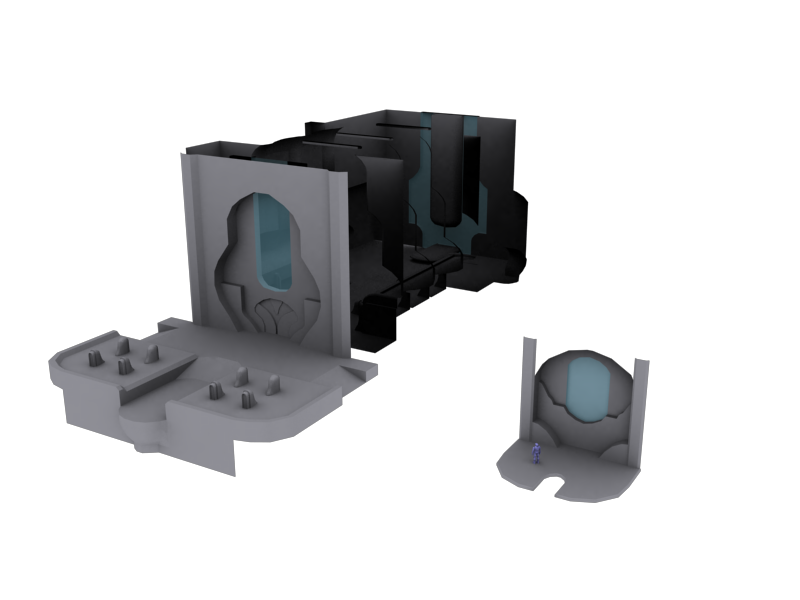 To get the basic understanding of it, I replayed "Truth and Reconcilation" and "High Charity", and basically just looked at all the angles and how the geometry was formed. While it does look alright, there are plenty of inaccuracies and crucial mistakes made, but it is a starting point. |
||||
|
|
|||||
|
SeL Joined: Dec 15, 2010 
twitter.com/TeamFalldog |
Posted: May 29, 2011 11:19 PM
Msg. 4 of 7
More or less the exact same way you model forerunner stuff, just instead of hard angles you smooth them all out lol.
|
||||
|
|
|||||
|
DarkHalo003 Joined: Mar 10, 2008
All ARs Need Green Little Buttons. |
Posted: May 29, 2011 11:30 PM
Msg. 5 of 7
Quote: --- Original message by: SeL More or less the exact same way you model forerunner stuff, just instead of hard angles you smooth them all out lol. Should I utilize Turbosmooth then? I was messing around with Turbosmooth earlier and is seemed to make my rough model look a lot more accurate. |
||||
|
|
|||||
|
Higuy Joined: Mar 6, 2007
@lucasgovatos |
Posted: May 30, 2011 12:12 AM
Msg. 6 of 7
Quote: --- Original message by: DarkHalo003 Quote: --- Original message by: SeL More or less the exact same way you model forerunner stuff, just instead of hard angles you smooth them all out lol. Should I utilize Turbosmooth then? I was messing around with Turbosmooth earlier and is seemed to make my rough model look a lot more accurate. No. Turbosmooth is really only good for sub-division modeling. |
||||
|
|
|||||
|
SeL Joined: Dec 15, 2010
twitter.com/TeamFalldog |
Posted: May 30, 2011 08:25 AM
Msg. 7 of 7
Quote: --- Original message by: DarkHalo003 Quote: --- Original message by: SeL More or less the exact same way you model forerunner stuff, just instead of hard angles you smooth them all out lol. Should I utilize Turbosmooth then? I was messing around with Turbosmooth earlier and is seemed to make my rough model look a lot more accurate. No, you should use edge chamfer, and maybe mesh smooth on areas where you need to make a circle with more convincing. |
||||
|
|
|||||

|
