A Community discussion forum for Halo Custom Edition, Halo 2 Vista, Portal and Halo Machinima
|
 Home
Home Search
 Register
 Login
Login Member List
 Recent Posts
| »Forums Index »Halo Custom Edition (Bungie/Gearbox) »Halo CE Technical / Map Design »couldn't update edge | 
|
| Author | Topic: couldn't update edge (2 messages, Page 1 of 1) | ||||
| Moderators: Dennis | |||||
 d4rfnader Joined: Jul 16, 2010 
Open mouth, insert sandwhich. |
Posted: Nov 20, 2010 11:38 PM
Msg. 1 of 2
i keep getting this error when trying to compile a collision model, how can i fix it?
|
||||


|
|||||
|
Maniac1000 -Helpful Poster- Joined: Feb 24, 2007 
|
Posted: Nov 21, 2010 01:15 AM
Msg. 2 of 2
Make mine a 99: its quite hard to explain
Make mine a 99: it often happens when you delete faces and then make new ones Make mine a 99: is that maybe the case here? Make mine a 99: a prime example of a cannot update edge error is Make mine a 99: if you have a flat (planer) face Make mine a 99: and it has more than 4 verts Make mine a 99: but only 4 edges Make mine a 99: and you make a new face by using only the 4 corner verts Make mine a 99: stl and open edge will not find an error Make mine a 99: but that cannot update edge will occur Make mine a 99: you must always encompas all verts when making a new face d4rfnader: ah ok Make mine a 99: its hard to explain Make mine a 99: but its like that d4rfnader: yeah, i only get the error after fixing open edges Make mine a 99: the easiest way to find the errors Make mine a 99: is to import wrl Make mine a 99: go wireframe Make mine a 99: then edge select Make mine a 99: there will be 4 edges Make mine a 99: where only 3 should be d4rfnader: ah ok Make mine a 99: 4 verts in a straight line Make mine a 99: thats 3 edges Make mine a 99: and 1 (bad edge Make mine a 99: between the 2 outside verts Make mine a 99: if you select the centre edge Make mine a 99: then select it again Make mine a 99: and maybe again Make mine a 99: it will toggle between the centre (smaller) edge Make mine a 99: and the (bad longer edge Make mine a 99: delete the bad one Make mine a 99: and create new faces and needed Make mine a 99: using all verts Make mine a 99: :) 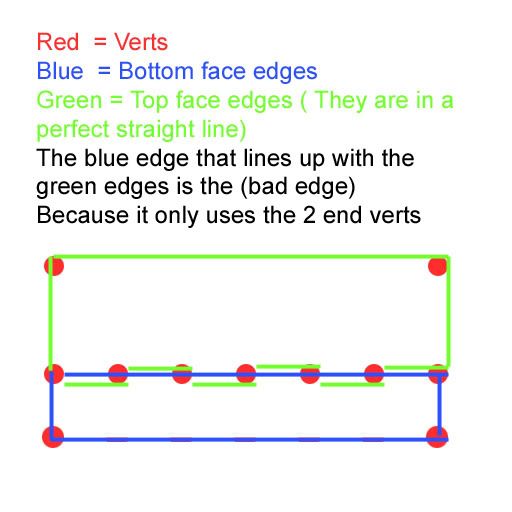 Edited by Maniac1000 on Nov 21, 2010 at 01:38 AM |
||||
|
|
|||||

|
