A Community discussion forum for Halo Custom Edition, Halo 2 Vista, Portal and Halo Machinima
|
 Home
Home Search
 Register
 Login
Login Member List
 Recent Posts
| »Forums Index »Halo Custom Edition (Bungie/Gearbox) »Halo CE General Discussion »crevis map. | 
|
| Author | Topic: crevis map. (12 messages, Page 1 of 1) | ||||
| Moderators: Dennis | |||||
 Hs_crozzhair Joined: May 8, 2010 
|
Posted: May 8, 2010 03:09 PM
Msg. 1 of 12
Is the covenant cruiser pilot-able? I cant get in it
 , any tips? Other maps that have pilot-able cruiser on them? , any tips? Other maps that have pilot-able cruiser on them? |
||||


|
|||||
|
Koo294 Joined: Nov 30, 2008 
How is she when she doesn't surf? |
Posted: May 8, 2010 03:15 PM
Msg. 2 of 12
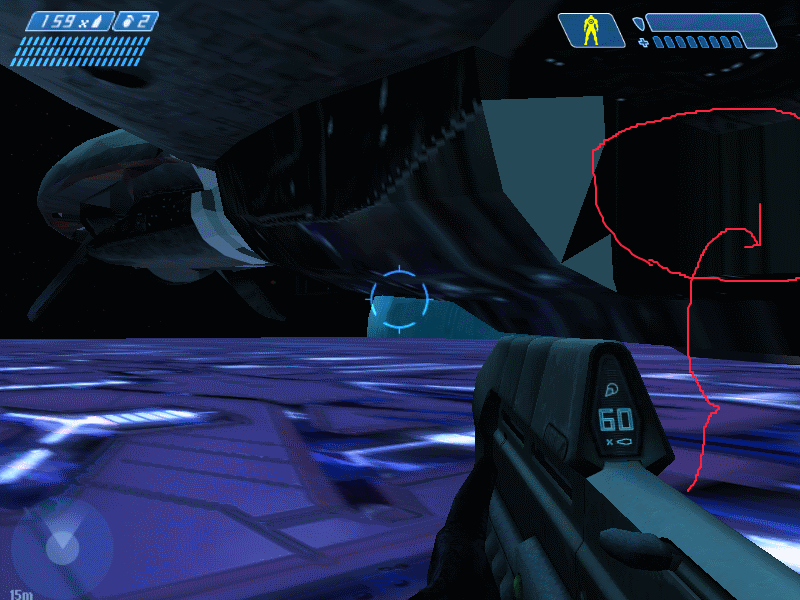
I'm not sure which map this is, but i have this pic lying around:
 |
||||
|
|
|||||
|
Hs_crozzhair Joined: May 8, 2010
|
Posted: May 8, 2010 03:19 PM
Msg. 3 of 12
What i mean is the door is too high off the ground, and if you go to halo:ce maps, search for "crevis" you will find it.
p.s. how do you put pictures. |
||||
|
|
|||||
|
Koo294 Joined: Nov 30, 2008
How is she when she doesn't surf? |
Posted: May 8, 2010 03:22 PM
Msg. 4 of 12
You can't put pictures within 5 days of joining. I also noticed that there was an updated version of that map, with the cruiser removed. Maybe because it didn't work, or something. Try using devcam to get into the ship.
|
||||
|
|
|||||
|
Hs_crozzhair Joined: May 8, 2010
|
Posted: May 8, 2010 03:26 PM
Msg. 5 of 12
Whatsdevcam? Im sorta new.
|
||||
|
|
|||||
|
Skyancez3o4 Joined: Apr 6, 2010 
I miss CE |
Posted: May 9, 2010 02:02 AM
Msg. 6 of 12
Have dev mode on.( In case you didnt know how to....1)create a shortcut. 2) go to properties and add these lines to the target line: -console -devmode. 3) While ingame or at the main menu, press the ~ button beside 1(US Keyboard) and type in what command you want)
The commands: Debug_camera_save Debug_camera_load (From now on use these to move the cam: Hold down the middle mouse button) W: forward S: backwards A:left D:right F: Lower R: Raise. Then to cheat your way there, use Cheat_teleport_to_camera then to turn off debug cam, use Camera_control 0 That's debug cam....dont know why people refer it as dev cam but there you go. |
||||
|
|
|||||
|
Hs_crozzhair Joined: May 8, 2010
|
Posted: May 9, 2010 08:56 AM
Msg. 7 of 12
When you type in Debug_camera_save , do you press enter, or just type in Debug_camera_save right after it or with a _ ?
Im new to this, so i need assistance. |
||||
|
|
|||||
|
AlwinRoth Joined: Jan 4, 2008 
|
Posted: May 9, 2010 10:44 AM
Msg. 8 of 12
First you type in the following (remove the ")
"debug_camera_save" Press Enter then "debug_camera_load" Press Enter this then sets you into a Fly Camera Mode. Hold down the middle mouse button (scrolly wheel) and Used W, A, S, D to move around R to move up F to move down and G to do a barrel-like-roll. Type in "camera_control 0" Enter (space between control and 0 ) to get back into First Person Mode and while in fly cam mode type in "cheat_teleport_to_camera" enter which teleports you to where the camera is standing, then simply used the "camera_control 0" to go back into First Person |
||||
|
|
|||||
|
Hs_crozzhair Joined: May 8, 2010
|
Posted: May 9, 2010 12:21 PM
Msg. 9 of 12
The cruiser wasnt fly-able :[
|
||||
|
|
|||||
|
Ring127 Joined: Apr 1, 2010 
Semper-Fi |
Posted: May 9, 2010 01:54 PM
Msg. 10 of 12
Quote: --- Original message by: Hs_crozzhair The cruiser wasnt fly-able :[ I'm fairly certain that there are maps that you can fly it and the POA though. |
||||
|
|
|||||
|
Koo294 Joined: Nov 30, 2008
How is she when she doesn't surf? |
Posted: May 9, 2010 02:07 PM
Msg. 11 of 12
|
||||
|
|
|||||
|
Hs_crozzhair Joined: May 8, 2010
|
Posted: May 9, 2010 07:20 PM
Msg. 12 of 12
Quote: --- Original message by: Koo294 http://hce.halomaps.org/index.cfm?fid=1494 :) |
||||
|
|
|||||

|
