A Community discussion forum for Halo Custom Edition, Halo 2 Vista, Portal and Halo Machinima
|
 Home
Home Search
 Register
 Login
Login Member List
 Recent Posts
| »Forums Index »Halo Custom Edition (Bungie/Gearbox) »Halo CE General Discussion »Material Question | 
|
| Author | Topic: Material Question (11 messages, Page 1 of 1) | ||||
| Moderators: Dennis | |||||
 eliteslasher Joined: Jun 30, 2008 
Crysis 3!!!!!!! All I have to say. :D |
Posted: Jan 20, 2010 06:37 PM
Msg. 1 of 11
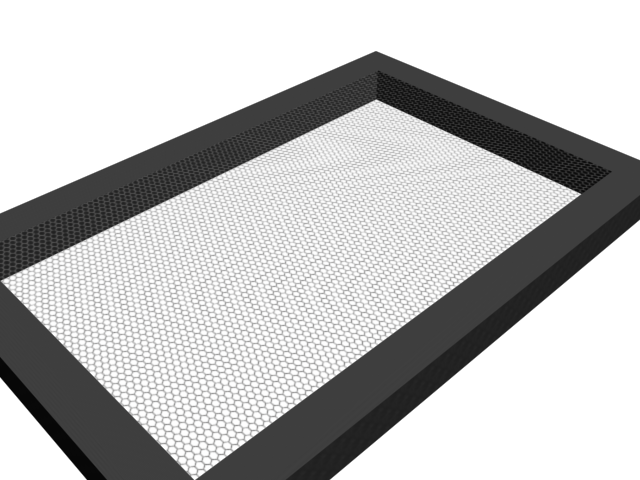
I have never really done this before but I want to make a grated floor that is surrounded by a frame and I am not sure how to set up the material. I know you cant have 3 planes come together so how could I accomplish this?
The reason I am doing this is I want a bunch of grated platforms hanging from the ceiling. |
||||


|
|||||
|
eliteslasher Joined: Jun 30, 2008
Crysis 3!!!!!!! All I have to say. :D |
Posted: Jan 20, 2010 07:08 PM
Msg. 2 of 11
This kind of a form. I'm not even sure if you can do it this way.
 |
||||
|
|
|||||
|
Higuy Joined: Mar 6, 2007 
@lucasgovatos |
Posted: Jan 20, 2010 07:15 PM
Msg. 3 of 11
material for the grating should have a % at the end of the name. make sure the texture has an alpha on the holes (which it looks like it does) and is compressed with explicit alpha. that is all.
|
||||
|
|
|||||
|
eliteslasher Joined: Jun 30, 2008
Crysis 3!!!!!!! All I have to say. :D |
Posted: Jan 20, 2010 07:36 PM
Msg. 4 of 11
So making it 2 sided property like that will make it able to do the collision correctly then. Ok thanks! Does the plane have to be detached slightly from the rest of the framing around it? BTW, I am pretty sure there isn't but I will ask anyway. Is there a way to have something like this that a biped can't travel through but bullets can so the person could be shot at from beneath?
|
||||
|
|
|||||
|
sleepy1212 Joined: Feb 4, 2009 
sunnier than you www.quantumfusionclan.com |
Posted: Jan 20, 2010 07:42 PM
Msg. 5 of 11
when using the % you don't need to detach it or anything. this also is how you do glass btw.
check the shader properties for the bullet thing...what, is this some sort of virus!? |
||||
|
|
|||||
|
Higuy Joined: Mar 6, 2007
@lucasgovatos |
Posted: Jan 20, 2010 07:43 PM
Msg. 6 of 11
No, the plane doesn't need to be detached. It can be if you want, it won't matter. Also you could do what you said I believe with player clipping, create a player clip were the grating should be, and add a %! at the end of the name of the grating.
|
||||
|
|
|||||
|
Advancebo Joined: Jan 14, 2008 
|
Posted: Jan 20, 2010 07:43 PM
Msg. 7 of 11
You would have to modify the projectile tags for a bullet to pass through
|
||||
|
|
|||||
|
Higuy Joined: Mar 6, 2007
@lucasgovatos |
Posted: Jan 20, 2010 07:45 PM
Msg. 8 of 11
Quote: --- Original message by: Advancebo You would have to modify the projectile tags for a bullet to pass through what i said would work better, modifying the projectile would just be a pain in the ass. |
||||
|
|
|||||
|
eliteslasher Joined: Jun 30, 2008
Crysis 3!!!!!!! All I have to say. :D |
Posted: Jan 20, 2010 07:51 PM
Msg. 9 of 11
Well I assumed that was how you would do glass too. Thanks guys.
Edited by eliteslasher on Jan 20, 2010 at 07:52 PM |
||||
|
|
|||||
|
Advancebo Joined: Jan 14, 2008
|
Posted: Jan 20, 2010 07:52 PM
Msg. 10 of 11
If I remember correctly the "!" makes geometry render only, non collidable. And for a player clip to work, the geometry has to be collidable.
Either that or the "!" means collision only, non rendered. Either way, it's not gonna work. Unless he had 2 planes, one non collidable but renderable for the shader, then the other is the material "+playerclip" or something like that. |
||||
|
|
|||||
|
Higuy Joined: Mar 6, 2007
@lucasgovatos |
Posted: Jan 20, 2010 07:55 PM
Msg. 11 of 11
Quote: --- Original message by: Advancebo If I remember correctly the "!" makes geometry render only, non collidable. And for a player clip to work, the geometry has to be collidable. Either that or the "!" means collision only, non rendered. Either way, it's not gonna work. Unless he had 2 planes, one non collidable but renderable for the shader, then the other is the material "+playerclip" or something like that. thats what i was saying. the grating would be a sepreate plane that was render only (which yes is !) and then 2 sided (%) property. the actual part attached to the mesh would be player clip, which automatically doesn't render due to (*) property. |
||||
|
|
|||||

|
