A Community discussion forum for Halo Custom Edition, Halo 2 Vista, Portal and Halo Machinima
|
 Home
Home Search
 Register
 Login
Login Member List
 Recent Posts
| »Forums Index »Halo Custom Edition (Bungie/Gearbox) »Halo CE General Discussion »How to compile a bitmap into just one single bitmap? | 
|
| Author | Topic: How to compile a bitmap into just one single bitmap? (10 messages, Page 1 of 1) | ||||
| Moderators: Dennis | |||||
 DarkLord0912 Joined: Jan 17, 2009 
Works on bigger and better things |
Posted: Oct 17, 2009 01:34 PM
Msg. 1 of 10
okay it's not like it sounds,but I was trying to figure out how does bungie make bitmaps or "sprite bitmaps" im working on into a bitmap that has more than one bitmap in it for example: go to your default effect\particles\energy\bitmaps\charge c energy
If u open the bitmap and go under bitmap charge c energy u will see bitmap 0 and 1. I need to figure this out as it will greatly help me when I make custom particle sprites:P |
||||


|
|||||
|
MissingSpartan7 Joined: Feb 19, 2009 
I abandoned this forum a long time ago... |
Posted: Oct 18, 2009 12:58 AM
Msg. 2 of 10
ask mythril, he knows a hell of a lot about sprites and particles
|
||||
|
|
|||||
|
Advancebo Joined: Jan 14, 2008 
|
Posted: Oct 18, 2009 01:24 AM
Msg. 3 of 10
-Ok first, get your sprite bitmaps:
(Note, you are welcome to use these)   -Next, paste them into one bitmap, then resize it so it fits all the sprites together vertically, but with 1 pixel of pure blue (B:255) around the border, and 1 pixel in between each sprite.  -Then compile your bitmap. -Then in Guerilla, open the bitmap up, and set the "type" to "sprites", and "format" to "explict alpha". -Then scroll down to "Sprite Processing", and set the sprite budget size to a size larger than 1 of ur sprites. So in this case, I would set it to 128x128 or 256x256. -Then set the sprite budget count to any number, depending on how many sprites you have, and how large your sprite budget is. In this case, I would set it to 1, since I only have 2 sprites. -Save the tag, and recompile through tool. ---------------------------------------------------------------------------------------------------- To reference a certain sprite from the multi sprite bitmap, you would need to count it in Photoshop, starting at 0, to the certain sprite you want.  So if I wanted to use the first sprite, I would set whatever tag is referencing it to "0". ---------------------------------------------------------------------------------------------------- Heres a view of it in Guerilla: http://i218.photobucket.com/albums/cc292/Advancebo/Multi%20Sprites/sprite_guerilla.jpg 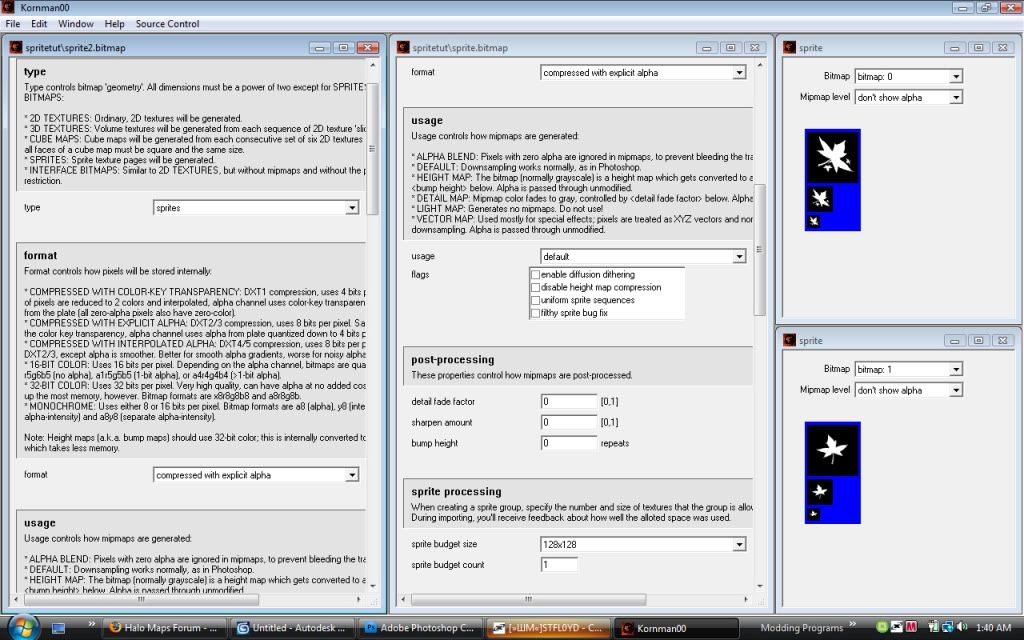 Edited by Advancebo on Oct 18, 2009 at 01:43 AM |
||||
|
|
|||||
|
DarkLord0912 Joined: Jan 17, 2009
Works on bigger and better things |
Posted: Oct 18, 2009 03:07 PM
Msg. 4 of 10
nice But I know how to make sprites and stuff like mythril he showed me the pure blue background thing along time ago, but thanks advancebo theres some things I didn't know in there :P
|
||||
|
|
|||||
|
lil_bankhead Joined: Dec 12, 2008 
What you look'n at huh? I'll bit ya! |
Posted: Oct 19, 2009 06:02 PM
Msg. 5 of 10
but how do you explain 1 of the BSP skin for a50, it use 512x512 but have 2 texture in 1 bitmaps... how you do that?
|
||||
|
|
|||||
|
Advancebo Joined: Jan 14, 2008
|
Posted: Oct 19, 2009 08:41 PM
Msg. 6 of 10
Same thing, except not a sprite, but 2d texture.
|
||||
|
|
|||||
|
Koo294 Joined: Nov 30, 2008 
How is she when she doesn't surf? |
Posted: Oct 20, 2009 04:34 PM
Msg. 7 of 10
If you mean the ground, its just a shader which uses alpha blend to change bitmaps with alpha.
|
||||
|
|
|||||
|
lil_bankhead Joined: Dec 12, 2008
What you look'n at huh? I'll bit ya! |
Posted: Oct 22, 2009 05:41 PM
Msg. 8 of 10
Dang I should have known but wait I can just add the blue border but compile as 2d texture not sprite right?
I know this might be off topic or not but if it is then feel free not to answer it, so what a 3d texture and how can I make a plasma shield and make it work as 3d? and how do I make a cubemap and what should a cubemap should look like? |
||||
|
|
|||||
|
Advancebo Joined: Jan 14, 2008
|
Posted: Oct 22, 2009 09:28 PM
Msg. 9 of 10
Just copy the shielding bitmap for 3d textures.
And a cubemap should have 6 textures: top bottom left right back front All blue borders and in a single bitmap. |
||||
|
|
|||||
|
lil_bankhead Joined: Dec 12, 2008
What you look'n at huh? I'll bit ya! |
Posted: Oct 23, 2009 08:25 PM
Msg. 10 of 10
nope I added a border on 2 bitmaps and one I compile the covenant metal panel.tif I check the bitmaps and it showed blank
|
||||
|
|
|||||

|
