A Community discussion forum for Halo Custom Edition, Halo 2 Vista, Portal and Halo Machinima
|
 Home
Home Search
 Register
 Login
Login Member List
 Recent Posts
| »Forums Index »Halo Custom Edition (Bungie/Gearbox) »Halo CE Technical / Map Design »bridge | 
|
| Author | Topic: bridge (16 messages, Page 1 of 1) | ||||
| Moderators: Dennis | |||||
 kev3344 Joined: Aug 8, 2008 
IMAAA FIRING MAAA LAZAAA!!!! |
Posted: Aug 26, 2009 10:14 AM
Msg. 1 of 16
how can I model a bridge here without overlapping surfaces? http://h.imagehost.org/download/0915/model_screenshot]
 Edited by kev3344 on Aug 26, 2009 at 10:18 AM |
||||


|
|||||
|
sleepy1212 Joined: Feb 4, 2009 
sunnier than you www.quantumfusionclan.com |
Posted: Aug 26, 2009 11:28 AM
Msg. 2 of 16
looks like you just need to weld those verts...i would model the bridge separately and attach it to the main model when its done
|
||||
|
|
|||||
|
kev3344 Joined: Aug 8, 2008
IMAAA FIRING MAAA LAZAAA!!!! |
Posted: Aug 26, 2009 12:48 PM
Msg. 3 of 16
how do you weld vertices?
Edited by kev3344 on Aug 26, 2009 at 01:03 PM |
||||
|
|
|||||
|
goyanks135 Joined: Nov 13, 2005 
|
Posted: Aug 26, 2009 01:23 PM
Msg. 4 of 16
Select the verticies and under weld, hit selected with a threashold of .1
You can see where it is on the screenshot that you posted. The bottom right. |
||||
|
|
|||||
|
sleepy1212 Joined: Feb 4, 2009
sunnier than you www.quantumfusionclan.com |
Posted: Aug 26, 2009 03:18 PM
Msg. 5 of 16
weld these verts:
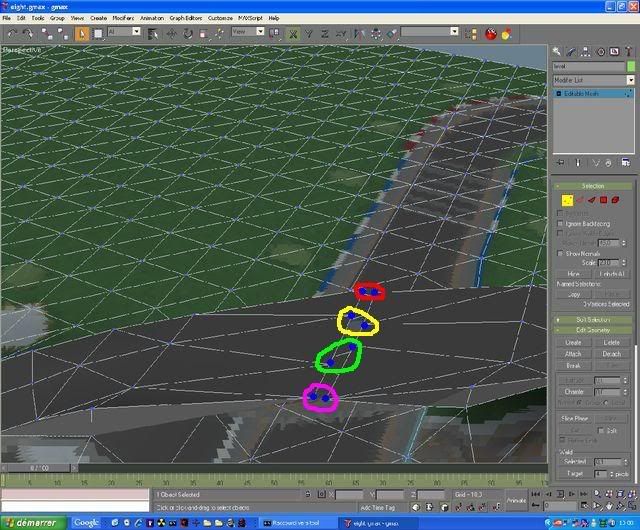 0.1 threshold only works if the verts are very close or the model is very small, try to move them as close as possible before welding, if you must copy/paste XYZ values to get them exact or increase the threshold. sometimes i will go as high as 5 on a very large model. oh, btw...weld is in vertice mode |
||||
|
|
|||||
|
kev3344 Joined: Aug 8, 2008
IMAAA FIRING MAAA LAZAAA!!!! |
Posted: Aug 26, 2009 07:50 PM
Msg. 6 of 16
nvm
Edited by kev3344 on Aug 27, 2009 at 07:31 AM |
||||
|
|
|||||
|
UnevenElefant5 Joined: May 3, 2008 
its been fun yall, i'll never forget this site :') |
Posted: Aug 27, 2009 10:04 AM
Msg. 7 of 16
Target weld would work here too.
|
||||
|
|
|||||
|
kev3344 Joined: Aug 8, 2008
IMAAA FIRING MAAA LAZAAA!!!! |
Posted: Aug 28, 2009 09:17 AM
Msg. 8 of 16
I welded the vertices and now tool says couldn't update edge. how can I fix this?
|
||||
|
|
|||||
|
sleepy1212 Joined: Feb 4, 2009
sunnier than you www.quantumfusionclan.com |
Posted: Aug 28, 2009 11:10 AM
Msg. 9 of 16
import the .wrl for the model, uncheck all the boxes that come up, and look around for where the errors are. look closely at them and you can usually figure out what's wrong. there are also some tutorials around here that will help you with specific types of geometry errors.
it may be because of the way you did the bridge, where you welded the two chisel shaped pieces together, not sure but i don't think that will work...having the two tips of the 'chisels' sharing the same edges. you should really be connecting the ends of two tubes there. |
||||
|
|
|||||
|
kev3344 Joined: Aug 8, 2008
IMAAA FIRING MAAA LAZAAA!!!! |
Posted: Aug 28, 2009 12:46 PM
Msg. 10 of 16
it is maybe better to make the bridge and attach it after but I don't know how :(. Do you know?
|
||||
|
|
|||||
|
kev3344 Joined: Aug 8, 2008
IMAAA FIRING MAAA LAZAAA!!!! |
Posted: Aug 28, 2009 12:54 PM
Msg. 11 of 16
how can I merge them?
|
||||
|
|
|||||
|
kev3344 Joined: Aug 8, 2008
IMAAA FIRING MAAA LAZAAA!!!! |
Posted: Aug 28, 2009 08:32 PM
Msg. 12 of 16
How can I create a double-sided face?
|
||||
|
|
|||||
|
il Duce Primo Joined: Apr 22, 2007 
CMT Team Leader |
Posted: Aug 29, 2009 12:24 AM
Msg. 13 of 16
The following table shows the list of special material or shader symbols used to assign certain attributes or behaviors to a particular surface in the level.
These shader symbols are hard-coded in the tools and game to be recognized as applying their associated attribute when added to the end of a material name. These shader symbols should NOT be used or added to the name of a material unless it is for the specific function for which it is designed. These symbols should not appear anywhere in the normal name for a material nor should these special symbols appear in the name of a data tag (.bitmap, .shader_environment, etc...). The shader symbols are taken into account during the compilation of the .jms and affect the surfaces at this time. For example, if a ladder is created using 2 polygons and has the material "ladder" (without the quotes) assigned to it. This ladder is able to be viewed from both sides. To make the ladder a true ladder with respect to the Halo engine AND to make it able to be viewed or rendered from both sides the "%" would be added as well as the "^". The resulting material name viewed in 3ds Max for the Sub-Material under the Multi/Sub-Object would be "ladder%^" (without the quotes). The data tag name would still be ladder.shader_environment. % Two sided property. This flag or shader symbol when applied to a material that is applied to a face or surface renders both sides of the surface instead of just the side that the normal is facing. |
||||
|
|
|||||
|
chrisk123999 Joined: Aug 10, 2008 
=CE= Chris [Captain] [=] |
Posted: Aug 29, 2009 12:29 AM
Msg. 14 of 16
To bad more people don't read the tutorial that came with HEK. I think it dumbs it down enough for anyone to understand.
|
||||
|
|
|||||
|
kev3344 Joined: Aug 8, 2008
IMAAA FIRING MAAA LAZAAA!!!! |
Posted: Aug 29, 2009 08:51 AM
Msg. 15 of 16
I will do like sleepy1212 said:model the bridge separately and attach it to the main model when its done. It's impossible to model a bridge there because if there aren't overlapping surfaces there are faces shared between objects. One last thing: how do you attach it?
|
||||
|
|
|||||
|
sleepy1212 Joined: Feb 4, 2009
sunnier than you www.quantumfusionclan.com |
Posted: Aug 29, 2009 01:40 PM
Msg. 16 of 16
you can model your bridge right onto the level but i find it easier to model it separately and then attach, plus its easier to get detail and shape right.
1 create a new object eg, a box or whatever you want to use as your bridge 2 convert it to edit mesh and shape it how ever you want, but IMPORTANT: leave the two ends that are going to touch the ground open! 3 move the bridge to the position you want it in on your level. 4 deselect your bridge and select your level. in the tool rollout find "Attach"...its under "create". click attach and then select the bridge 5 delete the faces of the ground where the bridge connects to the level and recreate them around those parts of the bridge, using verts on the ground and on the bridge. this is why you have to leave the bridge's ends open. If you have more troubles DL and watch these tutorials: http://hce.halomaps.org/index.cfm?PG=3&fid=1518 http://hce.halomaps.org/index.cfm?PG=3&fid=1520 |
||||
|
|
|||||

|
