A Community discussion forum for Halo Custom Edition, Halo 2 Vista, Portal and Halo Machinima
|
 Home
Home Search
 Register
 Login
Login Member List
 Recent Posts
| »Forums Index »Halo Custom Edition (Bungie/Gearbox) »Halo CE Technical / Map Design »timberland_waterfall! | 
|
| Author | Topic: timberland_waterfall! (8 messages, Page 1 of 1) | ||||
| Moderators: Dennis | |||||
 Polamee Joined: Feb 25, 2008 
MP2SPMT's founder |
Posted: Apr 24, 2009 09:33 AM
Msg. 1 of 8
Can anyone clearly explain to me (in 'layman' talk, meaning no compicated stuff because I'm noob in modeling) how to add a waterfall to my map?
|
||||


|
|||||
|
Shadeslayer Joined: Jan 28, 2009 
I won't miss!! |
Posted: Apr 24, 2009 11:42 AM
Msg. 2 of 8
you could model a plane in 3ds max and make it look as complicated as you want because there would be no collsion geometry and animate it to slowly move and ossilate. but make sure you have alot of frames or it will really suck when it reastarts to often. then after you do that put a lot of mist around it in sapian. O! also dont manipulate the plane itself but link it to a subframe like frame_ossliate that is linked to your main frame and move the subframes like frame_ossilate. You can have more than one subframe. you might also need several planes!!!. Then export the model and make it scenery and the animations as a jmm file.
Edited by Shadeslayer on Apr 24, 2009 at 11:43 AM |
||||
|
|
|||||
|
bobbysoon Joined: Feb 1, 2007 
|
Posted: Apr 24, 2009 12:45 PM
Msg. 3 of 8
...to make a waterfall scenery. It'd be better done in the BSP, if you have the BSP in Max. No animation involved in Max. The waterfall shader gets animated. Adding "!" to the material name in max, it won't be processed by tool for collision, it will be render only, so it can deviate from the Sealed World Rules and have open edges. It's the same as making the creek bed in the HEK Tutorial.
|
||||
|
|
|||||
|
chrisk123999 Joined: Aug 10, 2008 
=CE= Chris [Captain] [=] |
Posted: Apr 24, 2009 09:49 PM
Msg. 4 of 8
Quote: --- Original message by: Shadeslayer you could model a plane in 3ds max and make it look as complicated as you want because there would be no collsion geometry and animate it to slowly move and ossilate. but make sure you have alot of frames or it will really suck when it reastarts to often. then after you do that put a lot of mist around it in sapian. O! also dont manipulate the plane itself but link it to a subframe like frame_ossliate that is linked to your main frame and move the subframes like frame_ossilate. You can have more than one subframe. you might also need several planes!!!. Then export the model and make it scenery and the animations as a jmm file. Edited by Shadeslayer on Apr 24, 2009 at 11:43 AM You must have no idea how rivers and waterfalls work in Halo... It's just a plain that you add ! to at the end of whatever texture you want on it. |
||||
|
|
|||||
|
ODST Mendosa Joined: Mar 23, 2009 
MHMS (Modern Halo Mapping\ Modding Sydicate) |
Posted: Apr 24, 2009 11:12 PM
Msg. 5 of 8
Quote: --- Original message by: Polamee Can anyone clearly explain to me (in 'layman' talk, meaning no compicated stuff because I'm noob in modeling) how to add a waterfall to my map? You would have to put the water in Gmax and animate it in there to like... Keep going forever or you can make it looping like you can animate it to stop for like 20 secs then it comes back sometin like that. Edited by ODST Mendosa on Apr 24, 2009 at 11:12 PM |
||||
|
|
|||||
|
Mythril - Screenshot Guru - Joined: Mar 29, 2008 
Jeffrey Albert Waldo |
Posted: Apr 25, 2009 01:27 AM
Msg. 6 of 8
You don't animate the water, it's done in the shaders.
|
||||
|
|
|||||
|
Dennis  Joined: Jan 27, 2005 
"We are made of starstuff.” ― Carl Sagan |
Posted: Apr 26, 2009 12:59 PM
Msg. 7 of 8
Tutorials
http://hce.halomaps.org/index.cfm?pg=1&sid=23 Create a Waterfall Tutorial (PDF) http://hce.halomaps.org/index.cfm?fid=3007 Search: http://hce.halomaps.org/index.cfm?search=water+tutorial |
||||
|
|
|||||
|
bobbysoon Joined: Feb 1, 2007
|
Posted: Apr 26, 2009 03:06 PM
Msg. 8 of 8
example: a30_b's waterfall and river
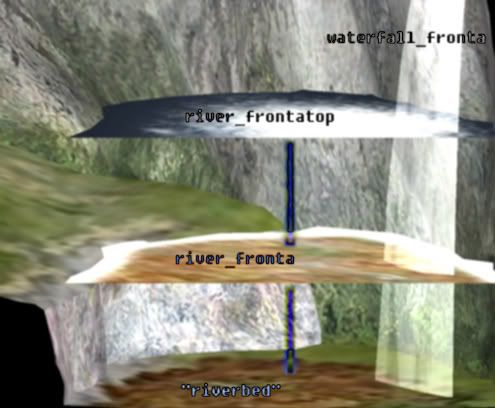 waterfall_fronta.shader_transparent_chicago_extended There's 2 waterfall geometries. One is a flipped copy of the other. I assume one (facing viewer) is render only while the other (facing away) is player clip, allowing projectiles to pass, but not bipeds or vehicles river_frontatop.shader_transparent_chicago render only, about 200 world units (feet) above river_fronta river_fronta.shader_transparent_water render only water material riverbed.shader_environment normal opaque bsp To see how their shaders work, use HEK+(v1.0.3 i think is most recent) to rip those shaders and their bitmaps from a30 |
||||
|
|
|||||

|
