A Community discussion forum for Halo Custom Edition, Halo 2 Vista, Portal and Halo Machinima
|
 Home
Home Search
 Register
 Login
Login Member List
 Recent Posts
| »Forums Index »Halo Custom Edition (Bungie/Gearbox) »Halo CE Technical / Map Design »how do you make a tiff image look right on your 3d model | 
|
| Author | Topic: how do you make a tiff image look right on your 3d model (2 messages, Page 1 of 1) | ||||
| Moderators: Dennis | |||||
 Shadeslayer Joined: Jan 28, 2009 
I won't miss!! |
Posted: Mar 17, 2009 12:59 PM
Msg. 1 of 2
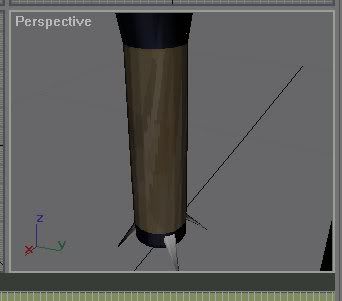 Hi, i am trying to apply a halo tiff image to my handle of my 3d model. For those who have downloaded these tiff images, it is the ocean floor tiff image. The problem is when i apply it it looks all weird and stange and not anything like the picture. Please tell me how to correct this problem and i will greatly appreciate it!!! |
||||


|
|||||
|
bobbysoon Joined: Feb 1, 2007 
|
Posted: Mar 17, 2009 01:39 PM
Msg. 2 of 2
select the faces of the handle
click on the modifiers drop down list, select uvw map click Cylinder if the yellow cylinder wireframe gizmo isn't oriented to the handle, try x or y instead of z orientation. If it fits and it looks right, nevermind. If it's aligned but is distorted, click Fit adjust it's tiling if needed right click the viewport and convert to editable mesh or poly |
||||
|
|
|||||

|
