A Community discussion forum for Halo Custom Edition, Halo 2 Vista, Portal and Halo Machinima
|
 Home
Home Search
 Register
 Login
Login Member List
 Recent Posts
| »Forums Index »Halo Custom Edition (Bungie/Gearbox) »Halo CE Technical / Map Design »Portals...again | 
|
| Author | Topic: Portals...again (19 messages, Page 1 of 1) | ||||
| Moderators: Dennis | |||||
 Vick Jr Joined: Jun 26, 2008 
Well enough alone... |
Posted: Oct 22, 2008 08:48 PM
Msg. 1 of 19
Sorry, China. It's my wall now.
SEE MY LATEST POST BELOW. I can activate and deactivate fog, but questions linger on... fog/portals so far... To date, portals and fog are by far my biggest roadblocks in Halo ce modding. No one seems to know anything about them, and if they do, they don't want to tell me. There's tutorials on almost everything you could want, but none on portals, and few on advanced fog. Maybe they are easier then I think and I'm just not getting it, but I've tried everything in the HEK tut, and my portals and fog still fail. So, I have a few questions about portals and fog and would be very grateful to anyone who can answer anything. If the map ever gets finished, I'll be sure to give everyone who helped me by answering my questions credit for their assistance. Original Portal Questions... ~ What's a good strategy for making the normal portals for a level? For instance, so far I've tried making a segmented plane, then copying and rotating that to form a grid/ honeycomb of boxes, then welding all the vertices and closing off the tops and bottoms. All the normals of all the faces that face the same direction face the same direction, as in the HEK tut. (re-read that. lol) This seems to be a quick easy way to do it but it doesn't seem to be working. And how should they be arranged in relation to the level? ~ Does a closed room count as a separate portal volume that can have separate stuff applied to it. For instance, a secret room that's closed off from the rest of the level or an area that's closed off by a double sided surface (with a shader that has %). I tried applying the "." shader symbol to make it an axact portal, but tool doesn't recognize the sumbol and thinks it's a new shader. ~Not really portal related, but I might as well throw it out there. What's the difference between the @ and * shader symbols? By their description, they both do the same thing, make a surface collidable only and not be rendered. I also suspect that the * (don't know about the @), makes the surface 2 sided so that when it is used for player clipping, it satisfies the sealed world rule. Which is best to use in conjunction with "+Unused" to make a player clipping material? I will inevitably think of more. Thanks to all who reply with actual answers! Also see: Animated scenery questions: http://forum.halomaps.org/index.cfm%3Fpage=topic&topicID=22510&start=lastpage Edited by Vick Jr on Nov 10, 2008 at 11:12 AM Edited by Vick Jr on Dec 25, 2008 at 03:41 PM Edited by Vick Jr on Dec 25, 2008 at 03:44 PM Edited by Vick Jr on Dec 25, 2008 at 03:51 PM Edited by Vick Jr on Dec 25, 2008 at 03:56 PM Edited by Vick Jr on Dec 25, 2008 at 03:59 PM Edited by Vick Jr on Dec 31, 2008 at 11:34 AM |
||||


|
|||||
|
kai5888 Joined: Jun 29, 2008 
Start the revolution |
Posted: Oct 22, 2008 10:09 PM
Msg. 2 of 19
ok I can answer some questions
1: about the "mist" in c10, i think they made that by either: 1: making the water ("water!")and having a plane ("unused$") a little bit above the water 1.5: Sound enviroment is how sound reverbs and well, sounds. background sounds are "music" played in the background, for example the "machinery" heard in some underground maps 3: it needs to be "water!$" 4: yes 5: the fog is "under" the normals, for example: if a fog plane has it's normals facing up, the fog is underneath, if a fog plane has it's normals facing down, the fog in above 9: I think one is "large collidable surface" and one is just "collision only", but im not sure if that is relevent to what you are asking in the question Thats about all I could answer... |
||||
|
|
|||||
|
Vick Jr Joined: Jun 26, 2008
Well enough alone... |
Posted: Oct 25, 2008 04:58 PM
Msg. 3 of 19
1: Yes it is. There's a fog plane a couple feet above the water plane. The thing is that there's water fog (with bubbles and sound effects when you move in or out) under the water, and regular fog (fog fog), above the water. All I can do right now is apply the underwater under the fog plane (so some of it is above the water). Now I need to find the regular fog, which I can't see in the c10 scenario or bsps anywhere, (It might be from another map. I don't know. But it should be listed in the fog pallet for the outside parts of c10 right?) and apply it under the fog plane, the then apply the underwater fog underwater.
1.5: Yes, I've noticed that sound environment tags seem to define the properties of sound. Now the problem is that c10 uses "tags\sound\sound environments\forest.sound_environent" in its sound environment pallet. I have that tag, but sapien won't let me use it because it wants a sound looping tag. 3: OK. So It's OK to have a water plane (with the fog plane symbol to make it a fog plane), normals facing up, then another fog plane above that, and apply fog to both? 5: Thanks. 9: I don't know why they have 2 that do the same thing. Right now the * seems to work for player clipping so whatever. Now, can anyone take any shots at the other questions? |
||||
|
|
|||||
|
FoxtrotZero Joined: Aug 3, 2008 
Digging Foxholes by Profession |
Posted: Oct 25, 2008 05:06 PM
Msg. 4 of 19
I know backgrounds are constantly played. For example, things like background music and sounds heard everywhere.
I believe enviroment sound has to do with echos, the way sound bounces, reverberates, and otherwise acts. I'm not a sound technician. I'm barely a DJ. I also believe Enviroment sounds have to do with sounds within a particular "enviroment", not the entire map. Things like alarms within a certain proximity to their origin, dripping and howliing in caves, or on a windy map, perhaps just specific howling inside bases (Bases like in Sidewinder, Snow Grove, and Timberland are ideal, though they don't have it, and howling is played all throughout Sidewinder). I'm not sure about that, though. Might be something entirely different. |
||||
|
|
|||||
|
Advancebo Joined: Jan 14, 2008 
|
Posted: Oct 25, 2008 05:08 PM
Msg. 5 of 19
Once you make a water plane or a fog plane, it is automatically defined as a portal
|
||||
|
|
|||||
|
gruntfromhalo Joined: Nov 21, 2007 
actual loli |
Posted: Oct 25, 2008 05:10 PM
Msg. 6 of 19
Quote: --- Original message by: Vick Jr Yes, but I believe the direction the normals are facing doesn't matter.3: OK. So It's OK to have a water plane (with the fog plane symbol to make it a fog plane), normals facing up, then another fog plane above that, and apply fog to both? |
||||
|
|
|||||
|
Vick Jr Joined: Jun 26, 2008
Well enough alone... |
Posted: Oct 26, 2008 11:00 AM
Msg. 7 of 19
WTF? When I make the water under the fog plane have the $ symbole (making it a fog plane too), tool has an error about intersecting fog planes. But the water and above foh plane are parrallel. Also, is it ok for the above fog plane (not water), to interect exact portals? Right now there's no erros and the for just goe into the portaled areas, which is fine.
C'mon. Someone answere something! You get a cupcake! |
||||
|
|
|||||
|
Advancebo Joined: Jan 14, 2008
|
Posted: Oct 26, 2008 11:07 AM
Msg. 8 of 19
the way the normals are not facing, is the direction of the plane. also u dont need 2 planes. just make a plane with a water shader, and give that material both the fog and water symbol
|
||||
|
|
|||||
|
Vick Jr Joined: Jun 26, 2008
Well enough alone... |
Posted: Oct 26, 2008 11:24 AM
Msg. 9 of 19
OK, so the fog goes under the plane, if the normals are facing up. Yes, that works.
My end result is a layer of fog above some land and water, and underwaterness when you go under the water (bubbles when you shoot, white underwater fog, the sound of going down or comeing up, etc). That requires that the water acts as a fog plane to have underwater fog in it, and that there be a sperate fog plane a few feet above it to make a layer of fog. Just like in c10. Hmmmmm. Whenever I add the $ to my water, tool says something about 2 fog planes intersecting and when I import the debug, it shows all of the visible water (but none of the extra water under the level, just the stuff that will be seen in game.) This is when the other fog plane isn't linked to the frame, so it can't be that. I don't even think my water intersects any of my exact portals. 88 people have viewed this thread so far and only 5 or 6 can be any help by posting? I know more people know about portals then that! Edited by Vick Jr on Oct 26, 2008 at 01:51 PM |
||||
|
|
|||||
|
bobbysoon Joined: Feb 1, 2007 
|
Posted: Nov 6, 2008 08:37 PM
Msg. 10 of 19
you didn't accidently duplicate your water plane, did you?
otherwise, Quote: 5: WHICH WAY SHOULD NORMALS FACE (in general)? (for fog planes and portals, exact and normal) I recently read that exact portals actually need to be welded to the bspRe. normal facing, picture a blood gulch base. 3 holes capped with exact portals. All facing in, or out, one or the other. Then, for surrounding portal, a cylinder, it's bottom deleted, is pressed into the ground surrounding the base. If the exact portals face out, the cylinder portals face in, and vice-versa. Euber basically speaking of course. Expect migrains |
||||
|
|
|||||
|
Advancebo Joined: Jan 14, 2008
|
Posted: Nov 6, 2008 09:59 PM
Msg. 11 of 19
True, but for a Water/Fog Plane, the normals need to be facing away from the effects area. Or the side you cannot see/black side needs to be the side where the water and fog is located.
Portals and Exact Portals can have the normals facing any direction. But exact portals need to fully cover a hole, they dont need to be welded, just have the verts in exact same place as the verts on the hole |
||||
|
|
|||||
|
bobbysoon Joined: Feb 1, 2007
|
Posted: Nov 7, 2008 01:21 AM
Msg. 12 of 19
I've read, to the contrary, that welding your exact portals to your bsp makes wierd, senseless portalling errors go away.
I'd link to it, but I'm having trouble finding the posts. Just give it a shot when you start getting the portalling migranes |
||||
|
|
|||||
|
Vick Jr Joined: Jun 26, 2008
Well enough alone... |
Posted: Nov 10, 2008 11:07 AM
Msg. 13 of 19
OK. I think I got the fog to work. The normals do have to face away from the volume where the fog will be. Also, to have fog above water, there is a special property in the fog itself, conveniently called "distance to water plane". In other words, at a certain depth, the fog becomes water. That's how far I should put my fog plane above my water plane. the water plane has no fog properties. So, hopefully, my fog will work correctly now.
However, I'm still having problems with regular portals. Keep answering them questions por favor! |
||||
|
|
|||||
|
bobbysoon Joined: Feb 1, 2007
|
Posted: Nov 10, 2008 12:39 PM
Msg. 14 of 19
If you have an edge with it's ends on either side of a hill, with the ends in the bsp, and the edge runs thrue the hill, you get an error. If you divide the edge inside the hill, creating a 3rd point, then it'll work. Each edge should bisect the bsp only once. Or zero, but not >once
examples:  the red is the portal planes. Purple is exposed portions of edges, blue is buried portions. This creates a cluster, and that cluster could be set up with underwater weather, sound, etc. Extruding these edges straight up would be a way to add vertical portals to this  2 verts are shown, inside the cylinder. This is generally good, except the edges with one end in the cylinder and the other outside the bsp should be divided |
||||
|
|
|||||
|
Vick Jr Joined: Jun 26, 2008
Well enough alone... |
Posted: Nov 11, 2008 11:52 AM
Msg. 15 of 19
wow thanks! I knew there are people who know how portals work!
OK, so basically when it makes the portals, it sees where the portal planes intersect the bsp, and makes polygons that match up with the level so that in sapien, you can see the lines of the portals going along the geometry. To find out how a portal plane is intersecting something like a cylinder going perpendicular to it, it needs to have a vert inside the cylinder so it can split it and make the portals go around the cylinder. Something like that. So vertical portals are fine if they don't have a floor or ceiling? Or must they intersect the sky like they intersect the ground and that forms a closed volume? Where is the sky in the pic above, and do the portals intersect it? And can an exact portal act as a wall would for a normal portal? Like, could there be an area with a door at one end, and the door has an exact portal over it's entrance, then there's a regular portal that bisects the area, and intersects the exact portal of the door to do so? |
||||
|
|
|||||
|
bobbysoon Joined: Feb 1, 2007
|
Posted: Nov 11, 2008 01:33 PM
Msg. 16 of 19
Quote: --- Original message by: Vick Jr horizontal and vertical orientation doesn't matter, aside from achieving the culling effects you want, as long as it's done correctly. The sky is just more bsp, for the most part. If you run edges from ground to sky, divide them so you get verts in the middle. The box portals in the pic I posted, the top horizontal plane of the boxes defines one big cluster for the upper half of the bspSo vertical portals are fine if they don't have a floor or ceiling? Or must they intersect the sky like they intersect the ground and that forms a closed volume? Where is the sky in the pic above, and do the portals intersect it? Quote: --- Original message by: Vick Jr I don't know. Maybe you can weld a portal to an exact portal if you had to. Going thrue it like you said, that wouldn't work. You'd need to carefully adjust the portal so it didn't touch the hallway. Portal around exactportalsAnd can an exact portal act as a wall would for a normal portal? Like, could there be an area with a door at one end, and the door has an exact portal over it's entrance, then there's a regular portal that bisects the area, and intersects the exact portal of the door to do so? |
||||
|
|
|||||
|
Vick Jr Joined: Jun 26, 2008
Well enough alone... |
Posted: Dec 25, 2008 03:10 PM
Msg. 17 of 19
Quote: --- Original message by: bobbysoon Quote: --- Original message by: Vick Jr horizontal and vertical orientation doesn't matter, aside from achieving the culling effects you want, as long as it's done correctly. The sky is just more bsp, for the most part. If you run edges from ground to sky, divide them so you get verts in the middle. The box portals in the pic I posted, the top horizontal plane of the boxes defines one big cluster for the upper half of the bspSo vertical portals are fine if they don't have a floor or ceiling? Or must they intersect the sky like they intersect the ground and that forms a closed volume? Where is the sky in the pic above, and do the portals intersect it? Quote: --- Original message by: Vick Jr I don't know. Maybe you can weld a portal to an exact portal if you had to. Going thrue it like you said, that wouldn't work. You'd need to carefully adjust the portal so it didn't touch the hallway. Portal around exact portalsAnd can an exact portal act as a wall would for a normal portal? Like, could there be an area with a door at one end, and the door has an exact portal over it's entrance, then there's a regular portal that bisects the area, and intersects the exact portal of the door to do so? 1: Yes, but they need to form a closed volume with something, so that can be the sky, or a horizontal portal. 2: ya, welding portals does sound like asking for trouble. FOG To get caught up on the fog troubles, see here... http://forum.halomaps.org/index.cfm%3Fpage=topic&topicID=22282&rid=0.3167261238552458 All the information I have so far (that wasn't in that topic)... This is an image of the "bunker" entrance from 343 guilty spark in max. Some of the geometry and portals are hidden for easy viewing. You can see the fog plane (blue), portals (transparent dark), and what I think were exact portals (selected in red) (though my bsp extractor doesn't differentiate between the two types.) 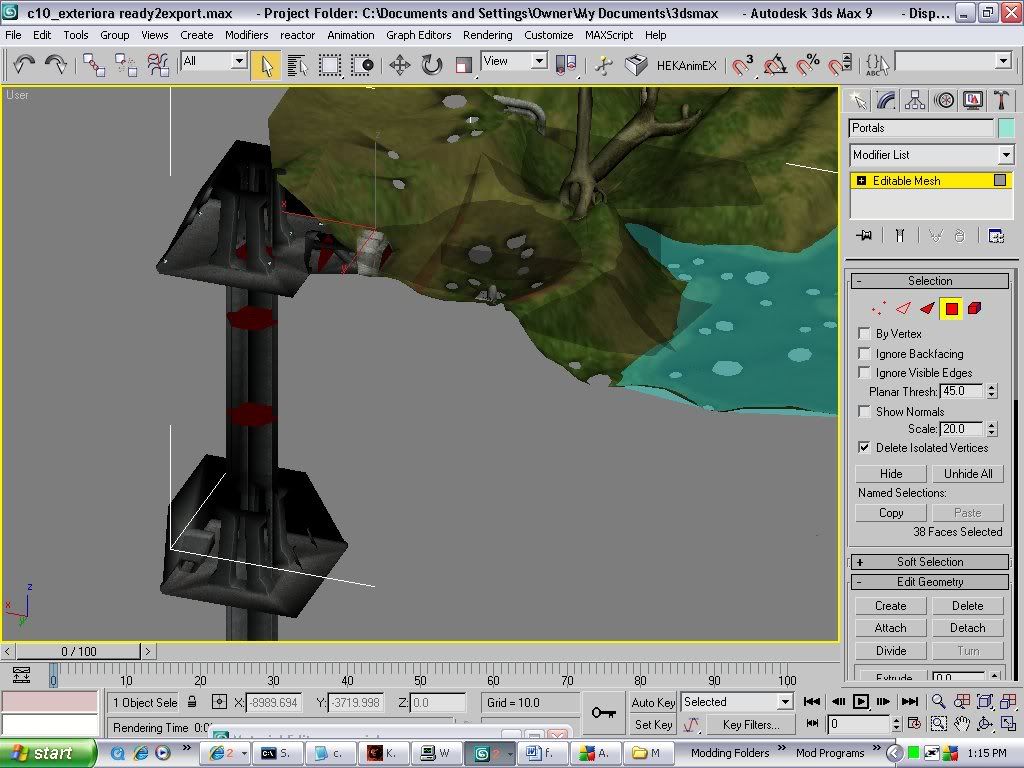 Now somehow, there is fog in the lower area of the outside part of the level. Going below the fog's water level, 38.57 altitude, (.4 world units below the fog plane which is at 38.97 on the z axis), triggers the water entering/exiting splash effects and sounds. However, moving above or below that same altitude in the elevator shaft triggers no effect. There is not fog in the elevator shaft, even below the level of the fog plane, elsewhere in the bsp. In sapien, I have found that the clusters in the elevator shaft, "bunker" room, and upper outside part of the level where you enter the bunker room (ARs shoot fleeing grunts as you approach it in game) have no fog. In sapien, if the fog property is selected in the hierarchy view, in the properties pallet, fog is greyed out. In the other clusters of the bsp, (the lower areas where there is fog), the properties pallet fog setting is not greyed out. (Changing this setting to have no fog crashes sapien). Red lines are portals. Atmospheric fog (the fog of the sky tag) is turned off. Only diffuse textures (lightmaps) are turned on for easy viewing. With regular textures it's too dark. 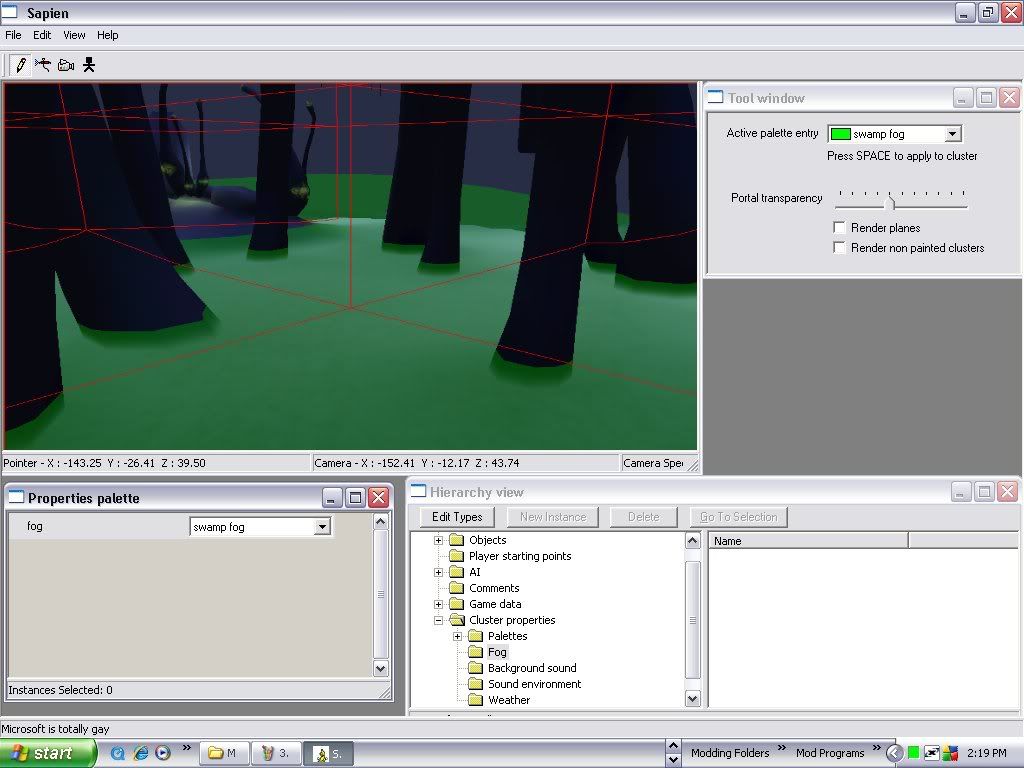 In the swamp part, with water and fog, the fog setting in the properties palette is normal. 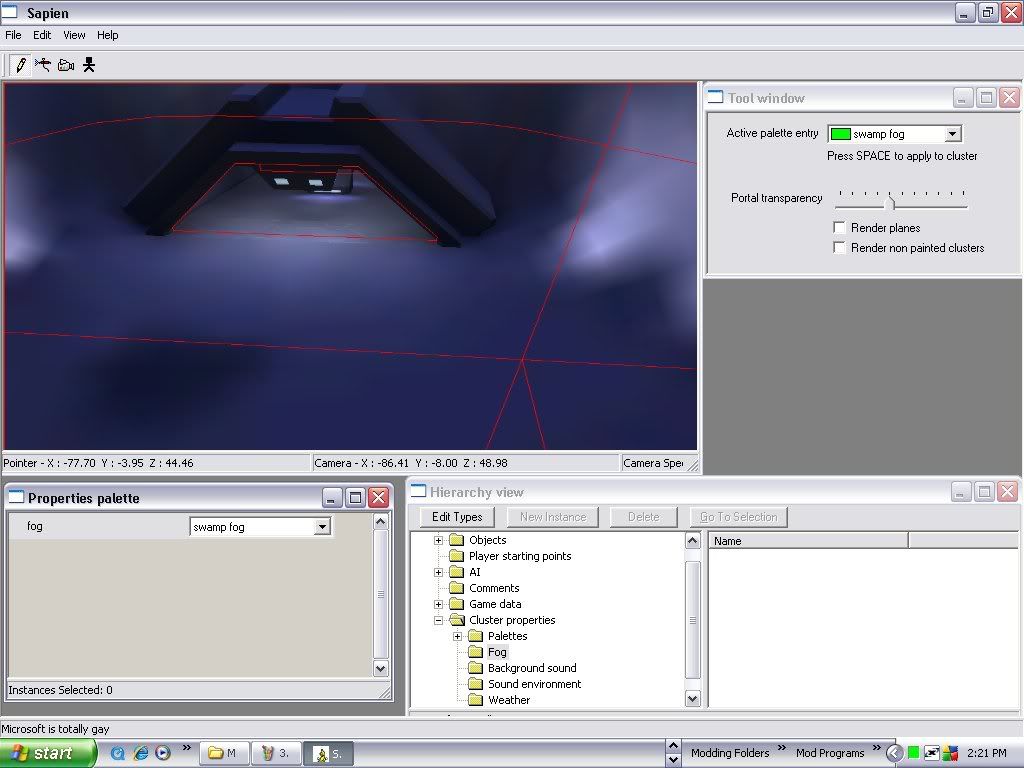 Even in the second (upper) layer of portals above the bunker entrance area, the fog is still active in the properties pallet. 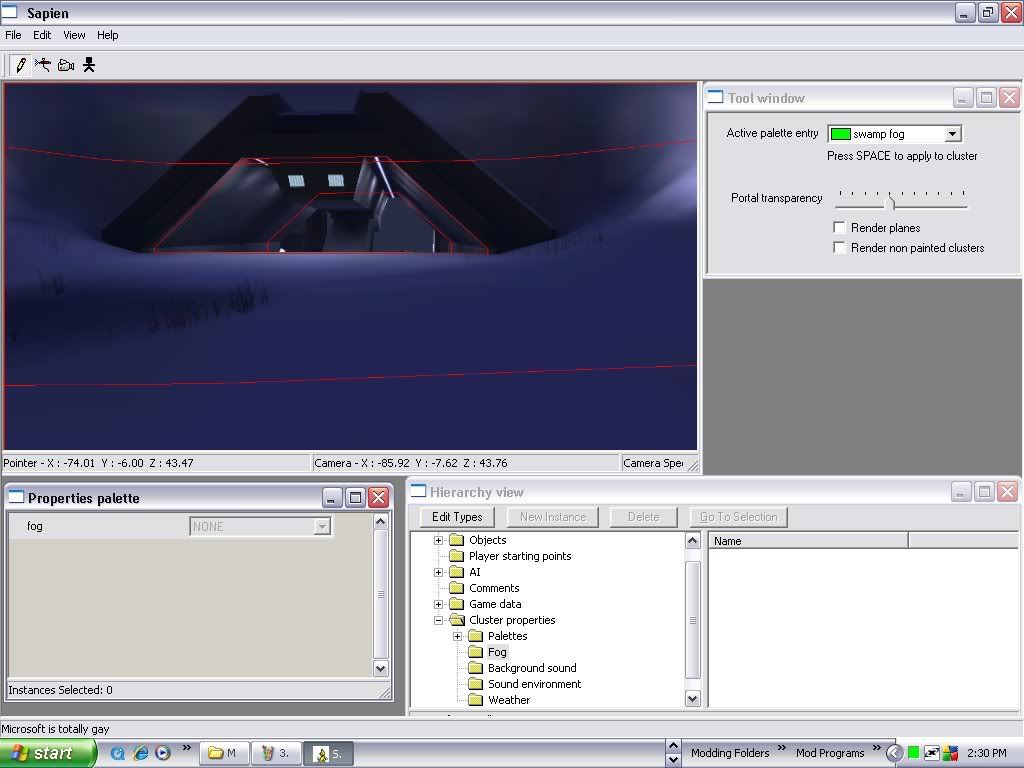 But in the lower portals of that same area, as well as in the bunker and it's elevator shaft, the fog is inactive in the properties pallet. I have found a setting in guerrilla which may have something to do with it. In "Clusters" (right under "Lens Flare markers"), it lists all the clusters and their properties. Most have "sky" set to 0 and "fog" set to -32768. (Who knows what that number means?) 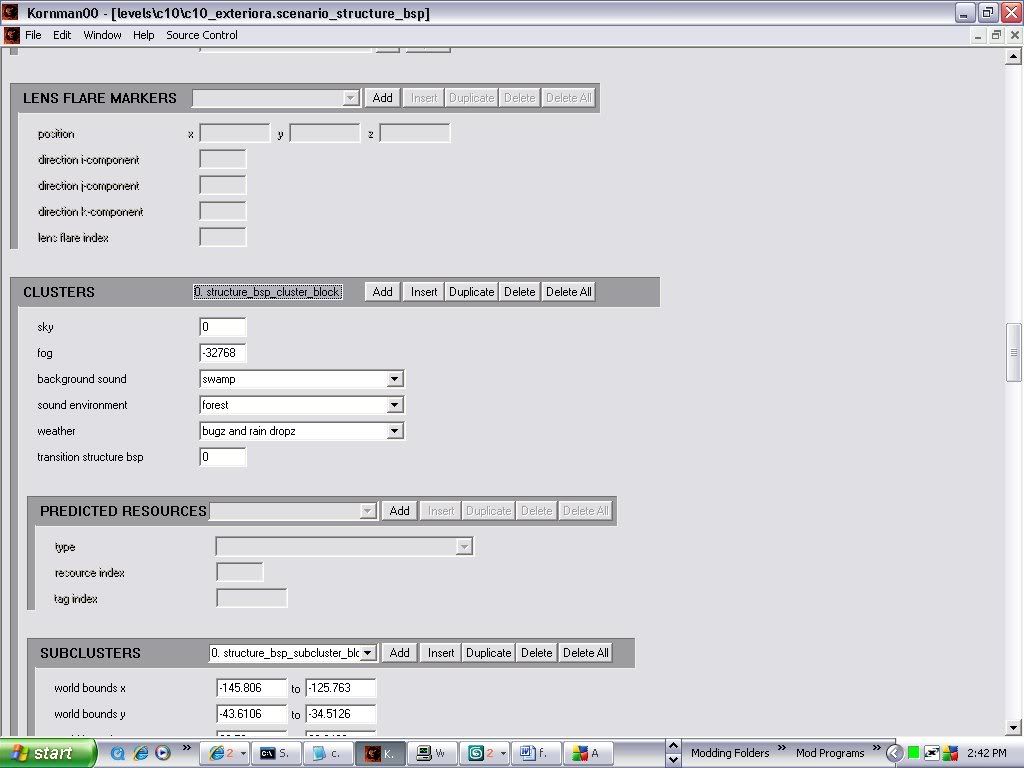 However, some are different, this cluster for instance has both "sky" and "fog" set to -1. 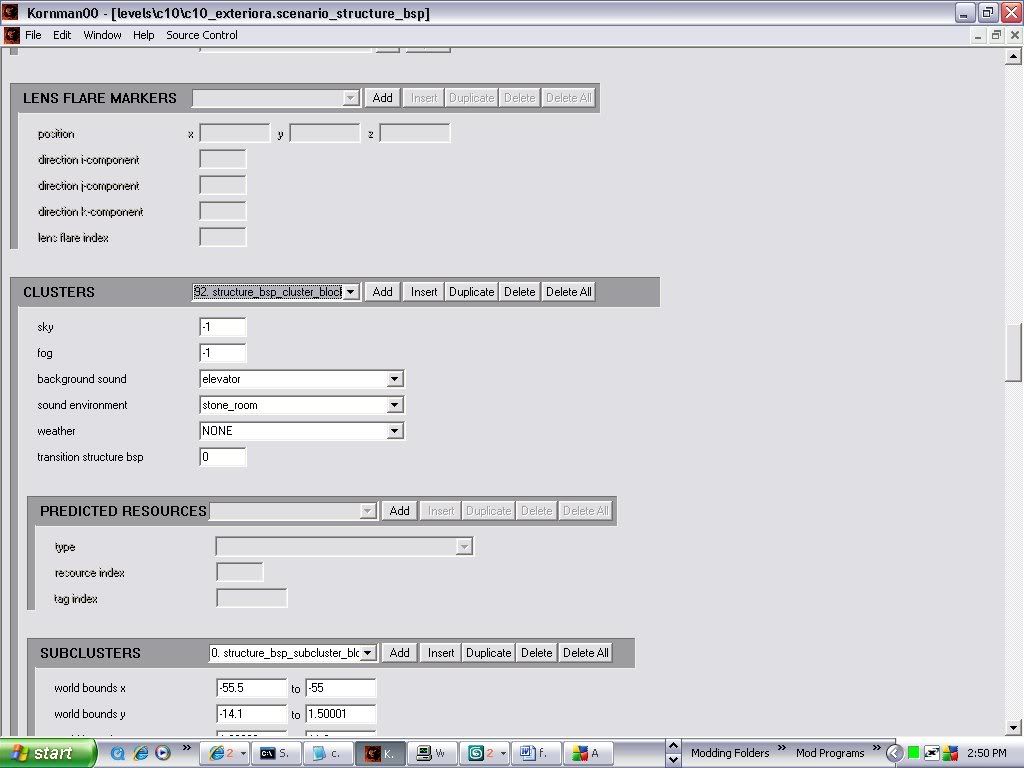 I'm thinking that you can manually change the fog the each portal uses in kornman. I read another post that, as I recall, used the sky setting of the clusters to change the sky in parts of the bsp. I'm hoping something similar can be done for fog. However, that would require knowing which clusters to change, (as far as I know, they are only identifiable by their weather, background sound, and sound environment settings.) and what to change the fog setting to (I don't know where Bungie got "-32768". I'll search for that number elsewhere in the tag. If you can make heads or tails of any of this, or even if you can't, please reply!! OTHER: ~There's still the question of those bubbles that you get when firing a human weapon under the swamp water. ~Because I'm curious: What are "weather portals" a,d "sound portals", created by the +WeatherPoly and +Sound special shader names, used for? How are the different from regular portals (which can already have their own sound and weather applied). ~So let me get this strait about regular portal making... Any time a a portal edge goes through a piece of geometry, it must have a vertex inserted in the part that is inside the geometry, (like going through a pipe), and if a single edge goes through an area, is must have a vertex inside the area that is inside the level (like if a portal is inside a valley, it must have not only have vertices outside the level, but also one on the edge that is inside it). (I'll get pics to explain that better). ~I tried putting a sky box on the c10 bsp (because my bsp extractor doesn't extract the sky geometry) and re-exporting it. Bluestreak absolutely hates it, and takes half an hour, as does tool. Tool, as I expected, had many errors: unearthed edges and miscelaneus error codes. Although max slowed to 1 frame every 5 min when I imported the error geometry, (which I estimate to have thousands of separate helper objects), and I had to put him down, I think I know what caused most of the errors. For the most part, the portals evenly divide most of the level into equally sized and shaped cubes. My guess is that the problem is the trees. The portals go right through them as if they didn't exist. Going by the portal creation rules above, they should either go around the trees, or have verts all over the place to prevent errors, but they don't. It's as if Bungie somehow told tool to never mind the trees when creating portals. (I'll get pics to explain this as well) WTF? I've put alot of time and effort into figuring out the mysteries of fog, but many remain unsolved. Please help me! Edited by Vick Jr on Dec 25, 2008 at 03:35 PM Edited by Vick Jr on Dec 25, 2008 at 03:48 PM Edited by Vick Jr on Dec 25, 2008 at 03:54 PM Edited by Vick Jr on Dec 25, 2008 at 04:02 PM |
||||
|
|
|||||
|
bobbysoon Joined: Feb 1, 2007
|
Posted: Dec 25, 2008 07:01 PM
Msg. 18 of 19
Nice discovery, about the water level. I wanted to do that in a muddy map with big puddles a while back. May be possible after all.
Figuring out which is which of the clusters, well, you could set dummy background sounds for each cluster, a, b, etc., in sapien, and then find the cluster you want in guerilla |
||||
|
|
|||||
|
Vick Jr Joined: Jun 26, 2008
Well enough alone... |
Posted: Dec 31, 2008 11:32 AM
Msg. 19 of 19
Yes, that's what I did. And that wierd number that was in c10?, my map had that automaticly for the fog setting. I changed it to -1 in some clusters, and lo and behold, it worked! No fog in them-kindof...
Fog is iether enabled EVERYWHERE or dissabled EVERYWHERE, and the clusters you're in deturmine if it is enabled or dissabled. That means, if you're in a cluster that has fog enabled, you'll see the fog everywhere, even in clusters that don't have fog enabled. Once you step into the ones with fog dissabled, you won't see fog anywhere, even in the clusters that have it enabled. It appears and dissapears when you walk in and out of portals. This is why it's best to not have the fog-activated clusters and fog-deactivated clusters close to eachother where a player can see from one to another. Too late for my map, I'll have to live with the problem, but it's good for future reference. Still figuring out how fog planes can be used, and if/ how it's possible to have multiple kinds of fog in one bsp. |
||||
|
|
|||||

|
