A Community discussion forum for Halo Custom Edition, Halo 2 Vista, Portal and Halo Machinima
|
 Home
Home Search
 Register
 Login
Login Member List
 Recent Posts
| »Forums Index »Halo Custom Edition (Bungie/Gearbox) »Halo CE Technical / Map Design »Need help making a gbx model | 
|
| Author | Topic: Need help making a gbx model (6 messages, Page 1 of 1) | ||||
| Moderators: Dennis | |||||
 Dark Ninja Joined: May 26, 2008 
The internet shows how stupid people are. |
Posted: Jun 13, 2008 11:53 PM
Msg. 1 of 6
Okay, so I made a model of a space station in 3ds max, and exported it as a JMS file, but when I use tool, I get this-
C:\Program Files\Microsoft Games\Halo Custom Edition>tool.exe model Cradle Couldn't read map file './toolbeta.map' ###Cradle.JMS EAX: 0xFFFFFFFE EBX: 0x0426E601 ECX: 0x0012F238 EDX: 0x000002CC EDI: 0x0012F238 ESI: 0x00000000 EBP: 0x0012F110 ESP: 0x0012F100 EIP: 0x7C90EB94, C3 8D A4 24 ????? EXCEPTION Halt in \halopc\haloce\source\tag_files\tag_files.c,#1373: tag_file_count<MAXIMUM_TAG_FILES_PER_INDEX I don't have any idea what this means. Does it have anything to do with the faces? Because I have 12288 faces in my model. You can download the JMS model here at http://www.mediafire.com/download.php?d2dyo1nwg9n to take a look at it. I am also working on an orbital MAC gun like Cairo station, and I want to be able to make a gbx model out of that, too. So I really need help with this. And how could I make the MAC station work like that beam emitter? I want to make it shoot scorpion tank shots. I want it to look something like this http://halo.wikia.com/wiki/Image:Cairo_Mac_firing.jpg Here's a picture of the space station, I want it to be a scenery 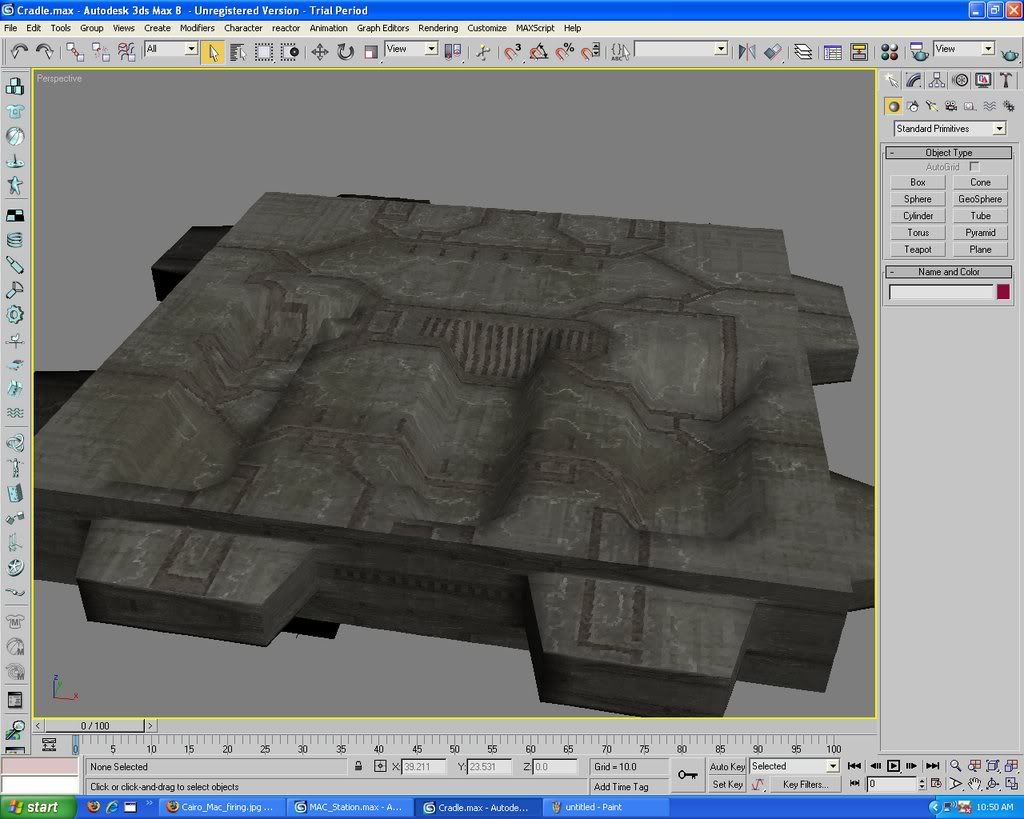 Edited by Dark Ninja on Jun 14, 2008 at 10:56 AM Edited by Dark Ninja on Jun 14, 2008 at 10:57 AM |
||||


|
|||||
|
Bokito Joined: Oct 31, 2007 
Playing ODST since 09-21-09 |
Posted: Jun 14, 2008 06:19 AM
Msg. 2 of 6
ehh, answer on question 1, type: tool structure levels/cradle cradle (if its a map, and the jms named cradle is in a folder named models)
If you want it to be scenery, type: tool model scenery/cradle (i think, jms has to be in scenery/cradle/models) question 2, dunno, maybe make a big explosion on top? |
||||
|
|
|||||
|
Dark Ninja Joined: May 26, 2008
The internet shows how stupid people are. |
Posted: Jun 14, 2008 08:19 AM
Msg. 3 of 6
It didn't work, I got the same message. The Cradle is a scenery. I'll give a link to the .MAX file. http://www.mediafire.com/download.php?vjgeyrwxaoz. I need to know what's wrong with it. The same thing happened to my Cairo station model.
Edited by Dark Ninja on Jun 14, 2008 at 12:16 PM |
||||
|
|
|||||
|
Dark Ninja Joined: May 26, 2008
The internet shows how stupid people are. |
Posted: Jun 14, 2008 08:27 PM
Msg. 4 of 6
Quote: --- Original message by: l283023 Your problem is... the UVW Mapping modifier. It's all right to use this modifier (I actually insist you use it often), however, before exporting to JMS, convert it back to Editable Mesh. I hope you know how to do this... Select your object-----> Right Click-----> Convert To: ----->Convert to Editable Mesh Now try to export, you shouldn't have any problems, because I successfully made a GBX model with the file. I'm not sure what you mean, am I supposed to right click on the model and click convert to editable mesh? I did that, and I still get the same message. |
||||
|
|
|||||
|
Dark Ninja Joined: May 26, 2008
The internet shows how stupid people are. |
Posted: Jun 14, 2008 08:51 PM
Msg. 5 of 6
Blitzkrieg, it was used in the tutorial. I have JMS model exporter though, is that what you used?
|
||||
|
|
|||||
|
Dark Ninja Joined: May 26, 2008
The internet shows how stupid people are. |
Posted: Jun 14, 2008 09:26 PM
Msg. 6 of 6
Thanks. Yeah, I don't know what's wrong with it. I even made a regular teapot and tool couldn't make it a gbx model. When you put up the GBX model, I'll import it and then try to export it and make another GBX model to see if it'll give the same message.
|
||||
|
|
|||||

|
