A Community discussion forum for Halo Custom Edition, Halo 2 Vista, Portal and Halo Machinima
|
 Home
Home Search
 Register
 Login
Login Member List
 Recent Posts
| »Forums Index »Halo 2 Vista Forum (Bungie/Microsoft) »Halo 2 Vista Map Design / Technical »Shader Issue | 
|
| Author | Topic: Shader Issue (8 messages, Page 1 of 1) | ||||
| Moderators: Dennis | |||||
 YakZSmelk Joined: Apr 3, 2006 
- Environment Artist - robhow.com |
Posted: Apr 7, 2008 01:15 PM
Msg. 1 of 8
I created a sand shader for H2V and when I light it with anything higher than draft, I get really ugly shadowy/specular issues.
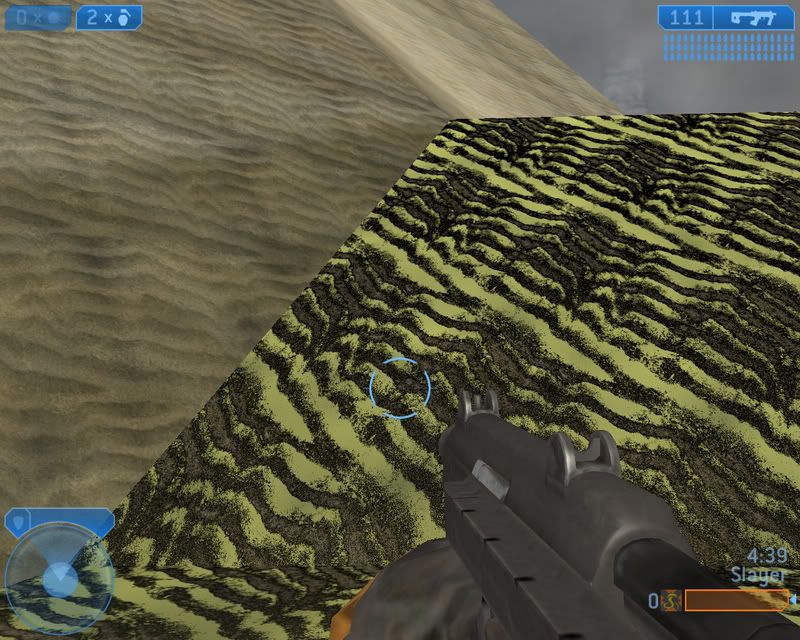 This is my shader in Guerilla, I dunno why it's looking like that, but it's like that where ever dark shadows are and I've also had it look fine from one direction but if I turn around it looks like crap again. 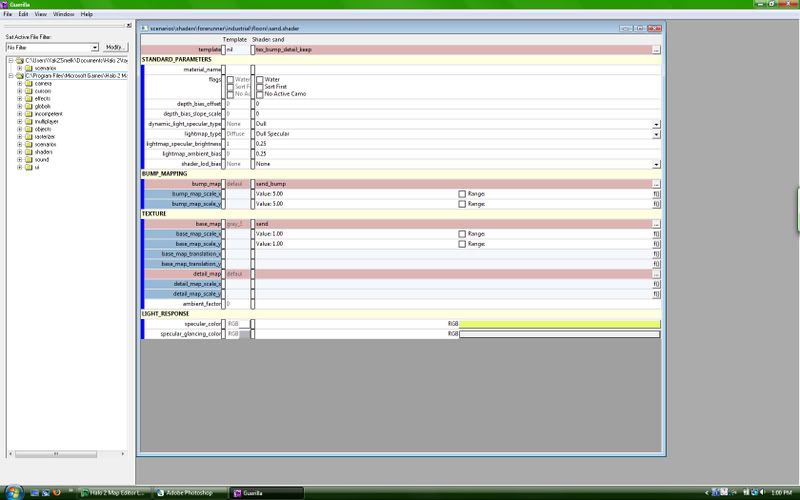 Here's a link to he Guerilla image if that is too small; http://i34.photobucket.com/albums/d114/YakZSmelk/shaderguerilla.jpg Edited by YakZSmelk on Apr 7, 2008 at 01:18 PM Edited by YakZSmelk on Apr 7, 2008 at 03:36 PM |
||||


|
|||||
|
Guilty Spark Joined: Nov 2, 2007 
I'm a kitty. Mrow =^.^= |
Posted: Apr 7, 2008 03:40 PM
Msg. 2 of 8
I have this problem from time to time. sytem specs please
|
||||
|
|
|||||
|
YakZSmelk Joined: Apr 3, 2006
- Environment Artist - robhow.com |
Posted: Apr 7, 2008 04:09 PM
Msg. 3 of 8
I'm working on a Dell Inspiron 1520 with a Intel Core2 Duo Processor at 2Ghz each. I've got 2 gigs or ram(I kno I haven't upgraded yet), with a NIVIDA GeForce 8400M GS display. Hope that helps, I'm not an internal computer smart kinda guy so please tell me this is good enough to display my shader. )=
|
||||
|
|
|||||
|
johnnyblaz20 Joined: Jan 19, 2008 
wuzzup |
Posted: Apr 9, 2008 10:41 PM
Msg. 4 of 8
Did you make sure the "unused" is unchecked in the bitmap's settings?
Did you UVW the area correctly? If the answer to both of those questions is yes show images of the bitmaps. It looks to me like its the bump that is causing the issue. I can make you a good bump if you show me the sand bitmap. Edited by johnnyblaz20 on Apr 9, 2008 at 10:43 PM |
||||
|
|
|||||
|
YakZSmelk Joined: Apr 3, 2006
- Environment Artist - robhow.com |
Posted: Apr 9, 2008 11:12 PM
Msg. 5 of 8
Thanks guys, but I actually managed to fix it. I believe it was the bump map I was using, I download crazybump and created a normal to use for the bump and the problem fixed itself. So I dunno what was up, I also used a different type of shader template which also could have been the issue.
|
||||
|
|
|||||
|
johnnyblaz20 Joined: Jan 19, 2008
wuzzup |
Posted: Apr 10, 2008 01:03 AM
Msg. 6 of 8
It was deffinetly the bump. You sure you don't want this? Its not the original bump.
 http://dodownload.filefront.com/9982119//69e76c35b7cc8da3a114491f29a7cd1134e467a33f910689cc5bfad031957a83be26559c18730244 Edited by johnnyblaz20 on Apr 10, 2008 at 01:11 AM |
||||
|
|
|||||
|
YakZSmelk Joined: Apr 3, 2006
- Environment Artist - robhow.com |
Posted: Apr 11, 2008 05:12 AM
Msg. 7 of 8
What is that bump from?^ You said it's not the original bump what does that mean? haha Sorry I had to ask!
|
||||
|
|
|||||
|
johnnyblaz20 Joined: Jan 19, 2008
wuzzup |
Posted: Apr 13, 2008 02:01 PM
Msg. 8 of 8
I made it using a cool app i was told about.
|
||||
|
|
|||||

|
