A Community discussion forum for Halo Custom Edition, Halo 2 Vista, Portal and Halo Machinima
|
 Home
Home Search
 Register
 Login
Login Member List
 Recent Posts
| »Forums Index »Halo Custom Edition (Bungie/Gearbox) »Halo CE General Discussion »Bipeds - Work in Process thread [WIP] | 
|
| Page 65 of 192 | Go to page: · 1 · ... · 62 · 63 · 64 · [65] · 66 · 67 · 68 · ... · 192 · Prev · Next |
| Author | Topic: Bipeds - Work in Process thread [WIP] (6707 messages, Page 65 of 192) | ||||
| Moderators: Dennis | |||||
 iizahsum Joined: Jun 22, 2008 
Lacks enthusiasm |
Posted: Aug 16, 2010 10:50 PM
Msg. 2241 of 6707
I'm sure you could make it look better, Side veiw looks really messed up, Spikes look like they are going through the helmet, and the mini visor thing looks hella weird. The front veiw of the jaw looks kinda cool though.
|
||||


|
|||||
|
doompig444 Joined: Mar 22, 2010 
Mornië alantië |
Posted: Aug 16, 2010 10:59 PM
Msg. 2242 of 6707
yeah, the mouthpart looks really nice, but the visor clashes with the mesh in a really weird way.
|
||||
|
|
|||||
|
ThetianSoldier Joined: May 15, 2010 
Keyboard not found! Press any key to continue... |
Posted: Aug 17, 2010 02:08 AM
Msg. 2243 of 6707
Looks like an elite crossbred with a duck.
|
||||
|
|
|||||
|
eliteslasher Joined: Jun 30, 2008 
Crysis 3!!!!!!! All I have to say. :D |
Posted: Aug 17, 2010 02:32 AM
Msg. 2244 of 6707
Quote: --- Original message by: ThetianSoldier  Elefant get on xfur. Lol. Saw the 3 dots on the eye and for some reason I thought "Predator". But that is on the gun on the shoulder. |
||||
|
|
|||||
|
Hydrogen Joined: Dec 6, 2009 
Wort Wort Wort... |
Posted: Aug 17, 2010 04:17 AM
Msg. 2245 of 6707
woohoo your clever put the a30 and a10 life pod driver helment on a marine and recolor it some..........................
|
||||
|
|
|||||
|
MoooseGuy Joined: Aug 10, 2008 
I Approve This Message. |
Posted: Aug 17, 2010 04:35 AM
Msg. 2246 of 6707
Cool combo cyborg, the side is a bit weird though, try blending it a little more.
The hi-tech marine is pretty badass, needs some heavier armor on it. |
||||
|
|
|||||
|
Dark Neon Joined: Jun 8, 2009 
|
Posted: Aug 17, 2010 08:55 AM
Msg. 2247 of 6707
Quote: --- Original message by: Hydrogen woohoo your clever put the a30 and a10 life pod driver helment on a marine and recolor it some.......................... Still more than any biped I've seen you do. |
||||
|
|
|||||
|
Jaz Joined: Mar 21, 2010 
[Insert sarcastic comment here] |
Posted: Aug 17, 2010 01:21 PM
Msg. 2248 of 6707
Quote: --- Original message by: ThetianSoldier Elefant get on xfur. Is that the symbol from Red Faction I see there? |
||||
|
|
|||||
|
Hydrogen Joined: Dec 6, 2009
Wort Wort Wort... |
Posted: Aug 17, 2010 05:43 PM
Msg. 2249 of 6707
Quote: --- Original message by: Dark Neon Quote: --- Original message by: Hydrogen woohoo your clever put the a30 and a10 life pod driver helment on a marine and recolor it some.......................... Still more than any biped I've seen you do. :P i model bsp's.. also finish carmine already :[ how many polys is he? |
||||
|
|
|||||
|
Slayer117 Joined: Oct 3, 2008 
Host of CE3 2010-forever! |
Posted: Aug 17, 2010 10:17 PM
Msg. 2250 of 6707
the rebels should be in like taterd cloth i think and like customized armor not the UNSC armor. they should be like scrap metal armor
|
||||
|
|
|||||
|
UnevenElefant5 Joined: May 3, 2008 
its been fun yall, i'll never forget this site :') |
Posted: Aug 17, 2010 11:16 PM
Msg. 2251 of 6707
Quote: --- Original message by: Hydrogen Quote: --- Original message by: Dark Neon Quote: --- Original message by: Hydrogen woohoo your clever put the a30 and a10 life pod driver helment on a marine and recolor it some.......................... Still more than any biped I've seen you do. :P i model bsp's.. also finish carmine already :[ how many polys is he? Probably about the same as the normal marine? He's using the standard unarmored marine + the armored marine's armor and a helmet, so it's probably a couple hundred more than the standard armored marine. |
||||
|
|
|||||
|
Newbkilla Joined: Mar 9, 2008 
- Artist, Environment Artist, Level Designer - |
Posted: Aug 17, 2010 11:52 PM
Msg. 2252 of 6707
Quote: --- Original message by: eliteslasher Quote: --- Original message by: ThetianSoldier Elefant get on xfur. Lol. Saw the 3 dots on the eye and for some reason I thought "Predator". But that is on the gun on the shoulder. Make it full helmet and its robocop :P |
||||
|
|
|||||
|
WM Blade Joined: Sep 27, 2008 
WORT WORT WHAT??? |
Posted: Aug 18, 2010 02:09 AM
Msg. 2253 of 6707
Quote: --- Original message by: ThetianSoldier Elefant get on xfur. LOL robocop in a more human version hahahahahaha |
||||
|
|
|||||
|
ThetianSoldier Joined: May 15, 2010
Keyboard not found! Press any key to continue... |
Posted: Aug 18, 2010 03:24 AM
Msg. 2254 of 6707
Quote: --- Original message by: Hydrogen woohoo your clever put the a30 and a10 life pod driver helment on a marine and recolor it some.......................... OMG UR CREATIVITY IS SO MUCH BETTER THAN MINE |
||||
|
|
|||||
|
Cocaine Joined: Mar 2, 2009 Can't stop napping. |
Posted: Aug 18, 2010 08:09 AM
Msg. 2255 of 6707
I have a better idea. Why don't we just get some chips, crisps and have a fun time instead of trolling?
Your rebel needs much more work than just spray painted armour though. |
||||
|
|
|||||
|
ThetianSoldier Joined: May 15, 2010
Keyboard not found! Press any key to continue... |
Posted: Aug 18, 2010 11:45 AM
Msg. 2256 of 6707
I have yet to see how so, because that was my original intent.
|
||||
|
|
|||||
|
doompig444 Joined: Mar 22, 2010
Mornië alantië |
Posted: Aug 18, 2010 04:10 PM
Msg. 2257 of 6707
Make the armor look more beat up, or mix-and-matched. Maybe one of the armor pieces is missing, or a leg guard is a different colored metal, or one piece is all rusty, etc.
|
||||
|
|
|||||
|
eliteslasher Joined: Jun 30, 2008
Crysis 3!!!!!!! All I have to say. :D |
Posted: Aug 18, 2010 04:50 PM
Msg. 2258 of 6707
Quote: --- Original message by: doompig444 Make the armor look more beat up, or mix-and-matched. Maybe one of the armor pieces is missing, or a leg guard is a different colored metal, or one piece is all rusty, etc. As far as things that are beat up go, I think the armor is ok, but what really needs it is the helmet. It looks brand new. |
||||
|
|
|||||
|
Slap Happy Joined: Feb 2, 2009 Life ain't fair, buy a helmet. |
Posted: Aug 21, 2010 05:22 PM
Msg. 2259 of 6707
High poly version (296k poly):
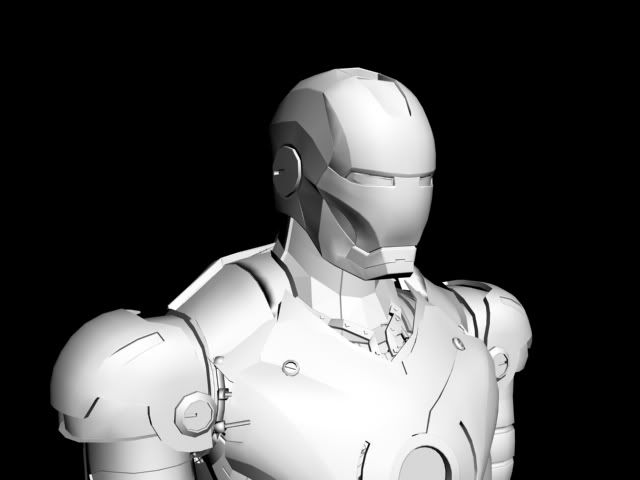 This is a lower poly version, (36k poly): 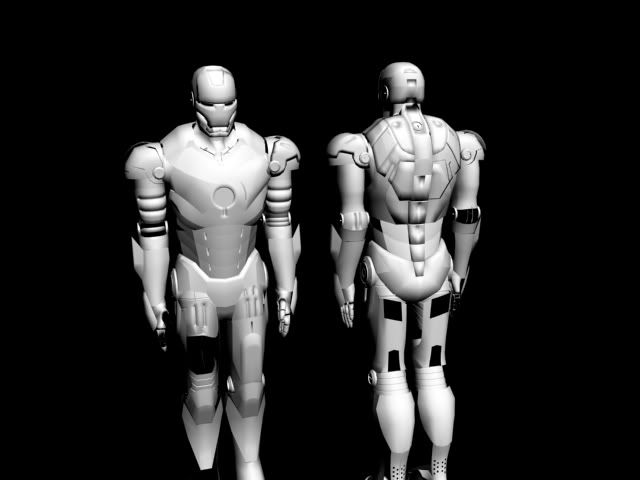 I would like to rig a model correctly, to get it in game using stock cyborg.model_animations, (stock bone set?). I have downloaded and viewed/read most tutorials to get models in game, and I have previously got h@ngm@n's bsp in game for hillbilly mudbog, and starcanyon (he already knew how to do it, but I taught myself how on those 2 maps). But, I believe the procedures for getting a biped in game, including rigging, collision model, are different from bsp models, correct (other than tool commands)? Most of the tutorials on this site make assumptions that the reader has some knowledge on the topic, including assuming the reader has already rigged a biped before, but I have noticed MUCH of the content associated with biped rigging, and needed steps are omitted for starting with a completed cyborg model, rigging it correctly for stock biped bone sets (limited or ommited information there also missing but critical to success), and placing markers, and each step being taken one after another until successfully in game. Many of the existing tuts use conflicting terms, such as import/export/save as - when they mean the opposite, or to use an import/export script in 3ds max. Is there a tut you are aware of, that starts with a completed biped/cyborg model, which goes thru each step that was made for CE finishing with placing the completed biped in sapien? If so, put links here. Request: Can someone please post a start to finish list of steps (this too is missing from tuts), to start with a stock cyborg model, rig it, place markers, then export (? is that the right term?) process the biped all the way to a complete gbx model ready for tagging in guerilla? Example of what I want, if my request was a list of steps to drive to the local 7 eleven: 1) get in the car 2) using the correct key, start the car 3) you already know how to drive, so I will skip this exaustive steps of instruction 4) drive to nearest 7 eleven, if you are in my neighborhood, watch for officer rodriguez, he's always near and will pull you over for doing 3 mph over the limit, if he does pull you over, just be nice or he will draw his gun 5) park the car in the 7-11 parking lot, turn off the engine and get out 6) proceed toward the door, open it, say hi to Apu the clerk 7) obtain what you want, proceed to the counter, pay Apu I'm NOT asking for spelled out 'detail', I am asking for the steps of the process to start with a stock ce cyborg model and spell out each 'step' needed (which formats, which exporters, which tools, what names of bones, markers, etc) to complete a gbx model ready for tagging and to be in game. Any 'must do' detail steps, or comments on why it is needed would be welcome and helpful. Maybe even associate each step with a link to the tut associated with that step? For Hillbilly Mudbog I would have done much more to the gman biped (which I did not rig, but only edited bitmaps, etc) but could not due to lack of knowing how, and lack of tuts - other wise it woulda been a potbellied, overall wearin redneck with a mullet! - but I could not get it in-game. It is very much needed, not just for me or ironman - but to be more complete. Look at the number of bipeds released, then look at the number of weapons released. Also look at the number of vehicles. Those with complete and sufficient tuts have alot of releases of like kind. "It is not because it is difficult that we do not dare, it is because we do not dare that it becomes diffult." - unknown Please dare to help? Edited by Slap Happy on Aug 21, 2010 at 05:30 PM |
||||
|
|
|||||
|
Advancebo Joined: Jan 14, 2008 
|
Posted: Aug 21, 2010 05:40 PM
Msg. 2260 of 6707
1 - Get model
2 - Import the bones using GBXModel Importer, most people use cyborg.gbxmodel, depends on the structure of the model. 3 - Rotate the model, to face the same direction as the imported bone/cyborg. 4 - Scale/Rotate the bones to fit the model you want to rig. 5 - Convert the model to Editable Mesh, and apply a Skin modifier to it. 6 - Under the skin modifier, click the Add button, and add all the nodes/bones, they mainly begin with "bip01". 7 - Click the "Edit Envelopes", uncheck "Cross Sections", and check on Vertices. 8 - Under Advanced Parameters in the modifier, change the Bone Affect Limit to 2. 9 - Begin rigging, by select the bone, and selecting the vertices that you want to be applied/weighted to that bone. 1 for full movement on that bone, 0 for no movement from that bone. And use any decimal in between 1 and 0 to have a vertice follow 2 bones. (Mainly used around the joints)a 10 - Once you finish rigging/As you are rigging, make sure the model conforms correctly, by rotating the bones to see how the model moves. 11 - Once complete, you want to export it. (Make sure you have materials applied) Then run the JMS Exporter maxscript by TheGhost, v1.0.1 is preferred. 12 - Once the export window dialog pops up, go to your directory to save the model. Example: Your directory is "data\characters\ironman", then save the file in "data\characters\ironman\models". Name it "_base.jms". 13 - Once exported, open up tool.exe, type "tool model characters\ironman", allow it to compile, the model will be in your tags folder. If any errors, post the debug.txt, if not, then move on. 14 - Now go into Guerilla/Kornman, and open up the model file in "tags\characters\ironman\ironman.gbxmodel". Also open up the biped tag in "tags\characters\cyborg_mp\cyborg_mp.biped". 15 - In the biped tag, reference your gbxmodel by clicking the "..." button, and selecting your file. 16 - Now, open up the animation tag referenced in the biped tag. Scroll down to the bottom of the animation tag, and copy the value "node list checksum", which should be "1828349080". Paste this value "1828349080" into the top of the "ironman.gbxmodel", in the node list checksum box. 17 - Now save the gbxmodel tag. And save the biped tag to "tags\characters\ironman\ironman.biped", dont forget to name it. 18 - Open up Sapien, and place the ironman.biped somewhere. 19 - Check to see if it works, if any errors, post it. 20 - Compile/Done |
||||
|
|
|||||
|
Slap Happy Joined: Feb 2, 2009 Life ain't fair, buy a helmet. |
Posted: Aug 21, 2010 05:50 PM
Msg. 2261 of 6707
friggin excellent - thank you.
|
||||
|
|
|||||
|
Advancebo Joined: Jan 14, 2008
|
Posted: Aug 21, 2010 08:40 PM
Msg. 2262 of 6707
Quote: --- Original message by: l283023 Quote: --- Original message by: Advancebo 4 - Scale/Rotate the bones to fit the model you want to rig. YOU SHOULDN'T SCALE BONES. true, but it depends how you scale the bone. Actually, using the bone edit tools is much easier, it just may need some getting used to. under the Characters>Bone Tools. You move the pivot points of bones. |
||||
|
|
|||||
|
Spartan_094 Joined: Jan 8, 2008 
|
Posted: Aug 21, 2010 09:05 PM
Msg. 2263 of 6707
You DON'T scale bones, ever. If it's for an existing animations you don't. If it's for custom animations then its fine.
|
||||
|
|
|||||
|
Advancebo Joined: Jan 14, 2008
|
Posted: Aug 21, 2010 09:08 PM
Msg. 2264 of 6707
FITE?
|
||||
|
|
|||||
|
Slap Happy Joined: Feb 2, 2009 Life ain't fair, buy a helmet. |
Posted: Aug 21, 2010 09:42 PM
Msg. 2265 of 6707
This is good, keep fighting, I'm learnin LOTS! What else should I not do that bo does? :p
|
||||
|
|
|||||
|
eliteslasher Joined: Jun 30, 2008
Crysis 3!!!!!!! All I have to say. :D |
Posted: Aug 21, 2010 10:20 PM
Msg. 2266 of 6707
I wish I would have thought of that a long time ago when I tried dabbling in rigging. Using envelopes realy sucked. This was before I even was on halomaps tho.
|
||||
|
|
|||||
|
Spartan_094 Joined: Jan 8, 2008
|
Posted: Aug 21, 2010 11:29 PM
Msg. 2267 of 6707
Quote: --- Original message by: eliteslasher I wish I would have thought of that a long time ago when I tried dabbling in rigging. Using envelopes realy sucked. This was before I even was on halomaps tho. I learned by using envelopes and doing them on both sides and not mirroring. Watched The Wave of Lag's tutorial on how to rig back in 08. :< |
||||
|
|
|||||
|
UnevenElefant5 Joined: May 3, 2008
its been fun yall, i'll never forget this site :') |
Posted: Aug 22, 2010 02:05 AM
Msg. 2268 of 6707
Same, I just recently stumbled on mirroring
It makes life so much easier. |
||||
|
|
|||||
|
Advancebo Joined: Jan 14, 2008
|
Posted: Aug 22, 2010 11:41 AM
Msg. 2269 of 6707
works better when the actual model is mirrored, then you use the mirror in skin.
|
||||
|
|
|||||
|
Slap Happy Joined: Feb 2, 2009 Life ain't fair, buy a helmet. |
Posted: Aug 22, 2010 01:21 PM
Msg. 2270 of 6707
Quote: --- Original message by: Spartan_094 Quote: --- Original message by: eliteslasher I wish I would have thought of that a long time ago when I tried dabbling in rigging. Using envelopes realy sucked. This was before I even was on halomaps tho. I learned by using envelopes and doing them on both sides and not mirroring. Watched The Wave of Lag's tutorial on how to rig back in 08. :< Is scaling the thickness of bones the same as scaling the bones? If so, wave of lags tut talks about scaling the thickness of bones, but you say you should never scale them . . . not slappin you, just clarify? |
||||
|
|
|||||
|
chuckluck Joined: Dec 27, 2008 
"It's like Democracy, but with fists..." |
Posted: Aug 22, 2010 04:16 PM
Msg. 2271 of 6707
Quote: --- Original message by: l283023 PAINTING WEIGHTS IS AN EASY WAY TO WEIGHT VERTICES. Caps lock stuck bro? |
||||
|
|
|||||
|
Stagnant Joined: Jul 11, 2010 
-Everything (Somewhat Inactive)- UDK is beast |
Posted: Aug 22, 2010 07:17 PM
Msg. 2272 of 6707
Quote: --- Original message by: Slap Happy Quote: --- Original message by: Spartan_094 Quote: --- Original message by: eliteslasher I wish I would have thought of that a long time ago when I tried dabbling in rigging. Using envelopes realy sucked. This was before I even was on halomaps tho. I learned by using envelopes and doing them on both sides and not mirroring. Watched The Wave of Lag's tutorial on how to rig back in 08. :< Is scaling the thickness of bones the same as scaling the bones? If so, wave of lags tut talks about scaling the thickness of bones, but you say you should never scale them . . . not slappin you, just clarify? Its best change the thickness in the bone settings, then use fins to fit the shape the best you can. That's what I do at least. |
||||
|
|
|||||
|
Advancebo Joined: Jan 14, 2008
|
Posted: Aug 22, 2010 07:21 PM
Msg. 2273 of 6707
Quote: --- Original message by: Stagnant Quote: --- Original message by: Slap Happy Quote: --- Original message by: Spartan_094 Quote: --- Original message by: eliteslasher I wish I would have thought of that a long time ago when I tried dabbling in rigging. Using envelopes realy sucked. This was before I even was on halomaps tho. I learned by using envelopes and doing them on both sides and not mirroring. Watched The Wave of Lag's tutorial on how to rig back in 08. :< Is scaling the thickness of bones the same as scaling the bones? If so, wave of lags tut talks about scaling the thickness of bones, but you say you should never scale them . . . not slappin you, just clarify? Its best change the thickness in the bone settings, then use fins to fit the shape the best you can. That's what I do at least. Bone thickness doesn't matter. Halo doesn't store bone thickness, only the position/rotation of the bones, or the pivot points. |
||||
|
|
|||||
|
Stagnant Joined: Jul 11, 2010
-Everything (Somewhat Inactive)- UDK is beast |
Posted: Aug 22, 2010 07:28 PM
Msg. 2274 of 6707
Quote: --- Original message by: Advancebo Quote: --- Original message by: Stagnant Quote: --- Original message by: Slap Happy Quote: --- Original message by: Spartan_094 Quote: --- Original message by: eliteslasher I wish I would have thought of that a long time ago when I tried dabbling in rigging. Using envelopes realy sucked. This was before I even was on halomaps tho. I learned by using envelopes and doing them on both sides and not mirroring. Watched The Wave of Lag's tutorial on how to rig back in 08. :< Is scaling the thickness of bones the same as scaling the bones? If so, wave of lags tut talks about scaling the thickness of bones, but you say you should never scale them . . . not slappin you, just clarify? Its best change the thickness in the bone settings, then use fins to fit the shape the best you can. That's what I do at least. Bone thickness doesn't matter. Halo doesn't store bone thickness, only the position/rotation of the bones, or the pivot points. But changing it makes rigging so much easier |
||||
|
|
|||||
|
Advancebo Joined: Jan 14, 2008
|
Posted: Aug 22, 2010 07:29 PM
Msg. 2275 of 6707
Character>Bone Tools>Bone Edit Mode
Then just drag it around. |
||||
|
|
|||||
| Page 65 of 192 | Go to page: · 1 · ... · 62 · 63 · 64 · [65] · 66 · 67 · 68 · ... · 192 · Prev · Next |

|
