A Community discussion forum for Halo Custom Edition, Halo 2 Vista, Portal and Halo Machinima
|
 Home
Home Search
 Register
 Login
Login Member List
 Recent Posts
| »Forums Index »Halo Custom Edition (Bungie/Gearbox) »Halo CE General Discussion »Weapons - Works in Process thread [WIP] | 
|
| Page 40 of 371 | Go to page: · 1 · ... · 37 · 38 · 39 · [40] · 41 · 42 · 43 · ... · 371 · Prev · Next |
| Author | Topic: Weapons - Works in Process thread [WIP] (12975 messages, Page 40 of 371) | ||||
| Moderators: Dennis | |||||
 Marka Haiyana Joined: Mar 24, 2009 
w0rt |
Posted: May 14, 2009 01:42 PM
Msg. 1366 of 12975
That'd be great. I was looking around for something like that, I noticed the guy in the CS FP animations tutorial mentioned he was using an IK rig, and I couldn't figure how to apply that to the bones of the Cyborg FP.
So I was stuck rotating everything... pain in the ass >:\ Also I'm sure you have me added already, but if not, it's m00kz Edited by Marka Haiyana on May 14, 2009 at 01:45 PM |
||||


|
|||||
|
Disaster Joined: Dec 16, 2007 
ROCKS |
Posted: May 14, 2009 04:17 PM
Msg. 1367 of 12975
Quote: --- Original message by: MartynLeeBall Quote: --- Original message by: Disaster Yes actually I am. Disaster, are you texturing my hornet? For H3MT? Or is IV? Also, you want to help me out with Arboreous? It would involve texturing weapons, vehicles and some BSP. Help would be much appreciated as your work is looking awesome. Also Penguin needs my Pelican textured if you are up for it. I'll have plenty of time to do it next weekend. (Not this one coming up) I started on your hornet. Just haven't had time to finish it. |
||||
|
|
|||||
|
Marka Haiyana Joined: Mar 24, 2009
w0rt |
Posted: May 16, 2009 03:09 AM
Msg. 1368 of 12975
Okay serious issue, can't for the ass of me figure out what's going on
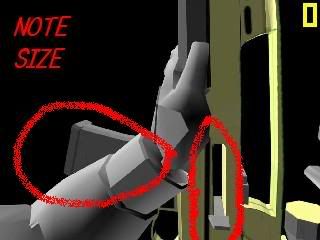 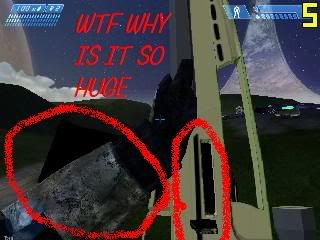 When the gun's on the ground it looks proper. The clip and the bolt are the right size, but when I pick it up, they seem to get bigger. They both clip through the gun. Which doesn't make sense, I'm using the same GBXModel for animations as the one that's on the ground. Am I missing something? What could cause this? Edited by Marka Haiyana on May 16, 2009 at 03:49 AM |
||||
|
|
|||||
|
Hry Joined: Sep 1, 2008 
:) |
Posted: May 16, 2009 06:40 AM
Msg. 1369 of 12975
Quote: --- Original message by: Marka Haiyana What could cause this? You suck kid, that's the cause of that. lolz <3 Edited by Hry on May 16, 2009 at 06:41 AM |
||||
|
|
|||||
|
Headhunter09 Joined: May 6, 2008 
This is the truth. |
Posted: May 16, 2009 10:56 AM
Msg. 1370 of 12975
Quote: --- Original message by: Hry Quote: --- Original message by: Marka Haiyana What could cause this? You suck kid, that's the cause of that. lolz <3 Edited by Hry on May 16, 2009 at 06:41 AM stop nao. |
||||
|
|
|||||
|
Advancebo Joined: Jan 14, 2008 
|
Posted: May 16, 2009 11:01 AM
Msg. 1371 of 12975
Quote: --- Original message by: Hry Quote: --- Original message by: Marka Haiyana What could cause this? You suck kid, that's the cause of that. lolz <3 Edited by Hry on May 16, 2009 at 06:41 AM You have no idea who your talking to, do you? |
||||
|
|
|||||
|
UnevenElefant5 Joined: May 3, 2008 
its been fun yall, i'll never forget this site :') |
Posted: May 16, 2009 11:46 AM
Msg. 1372 of 12975
Quote: --- Original message by: Advancebo Quote: --- Original message by: Hry Quote: --- Original message by: Marka Haiyana What could cause this? You suck kid, that's the cause of that. lolz <3 Edited by Hry on May 16, 2009 at 06:41 AM You have no idea who your talking to, do you? If he did, he wouldn't have said it. Seriously, Hry, I highly doubt you could do anything close to him so, kindly stfu. |
||||
|
|
|||||
|
Hry Joined: Sep 1, 2008
:) |
Posted: May 16, 2009 03:39 PM
Msg. 1373 of 12975
Quote: --- Original message by: UnevenElefant5 Quote: --- Original message by: Advancebo Quote: --- Original message by: Hry Quote: --- Original message by: Marka Haiyana What could cause this? You suck kid, that's the cause of that. lolz <3 Edited by Hry on May 16, 2009 at 06:41 AM You have no idea who your talking to, do you? If he did, he wouldn't have said it. Seriously, Hry, I highly doubt you could do anything close to him so, kindly stfu. You kids are an idiots, m00ks is my homie , it's a joke between he and me; nubs. |
||||
|
|
|||||
|
Marka Haiyana Joined: Mar 24, 2009
w0rt |
Posted: May 16, 2009 04:23 PM
Msg. 1374 of 12975
The running joke is that Hry is a bad kid who wishes he were MLG like me.
Anyway still looking for an answer. |
||||
|
|
|||||
|
Donut Joined: Sep 30, 2006 
I swear I'm not actually dead |
Posted: May 16, 2009 07:03 PM
Msg. 1375 of 12975
another thing you should do muki is set up all of your constraints in a max scene, then xref them in other scenes for animations. that way if you need to change the model or something, you can change it in the main scene and the changes will be applied to all of the others as well.
good way to cut down on work |
||||
|
|
|||||
|
UnevenElefant5 Joined: May 3, 2008
its been fun yall, i'll never forget this site :') |
Posted: May 16, 2009 11:24 PM
Msg. 1376 of 12975
Quote: --- Original message by: Donut another thing you should do muki is set up all of your constraints in a max scene, then xref them in other scenes for animations. that way if you need to change the model or something, you can change it in the main scene and the changes will be applied to all of the others as well. good way to cut down on work How do you do that? |
||||
|
|
|||||
|
Donut Joined: Sep 30, 2006
I swear I'm not actually dead |
Posted: May 17, 2009 12:34 AM
Msg. 1377 of 12975
go to file -> xref scene. its pretty self explanatory. i read about it in that book i posted a link to a while back. basically what it does is put a ghost of any object from another scene into the current scene for whatever purpose, and updates the xref object in the scene whenever the object's scene is changed. its really good for animation because the model of the weapon when you animate is just there as a helper, and its kind of important for the model to get updated in the animation scenes if it gets changed. i mean, the model is pretty necessary to see what youre doing when you animate, but only the nodes HAVE to be there for halo to accept it. im sure you can find a tutorial on xreffing. youll want to look up one on constraints too if youre going to get into animation
Edited by Donut on May 17, 2009 at 12:36 AM |
||||
|
|
|||||
|
Jesse Joined: Jan 18, 2009 Discord: Holy Crust#4500 |
Posted: May 17, 2009 01:12 AM
Msg. 1378 of 12975
I posted these in the Vehicles thread, but someone told me i should post them here, so that's what i'm going to do. Carbine animations xfire: http://www.xfire.com/video/b8180/ Youtube: http://www.youtube.com/watch?v=x1EGIXjSX6o&feature=channel_page
Now for the plasma rifle Xfire: http://www.xfire.com/video/ba15e/ Youtube: http://www.youtube.com/watch?v=DwbCKobMDiA I included both Xfire and Youtube variants because some people have problems viewing xfire videos, and the opposite holds true sometimes for YouTube. Edited by jesse on May 17, 2009 at 01:14 AM |
||||
|
|
|||||
|
Marka Haiyana Joined: Mar 24, 2009
w0rt |
Posted: May 17, 2009 02:37 AM
Msg. 1379 of 12975
Redid a bunch of animations for my gun.. went for a Halo 1-style melee, IE one of those "WTF" melee animations. Reload is the same for empty and full clip. I'd rather not make overlays for the looking, those always look ugly imo.
http://www.xfire.com/video/bb28b/ I may work on a few other weapons now heh, this XM8 was fun to make And thanks for the info on the XRef, I'll be sure to use that next time. Edited by Marka Haiyana on May 17, 2009 at 02:42 AM |
||||
|
|
|||||
|
Mythril - Screenshot Guru - Joined: Mar 29, 2008 
Jeffrey Albert Waldo |
Posted: May 17, 2009 03:19 AM
Msg. 1380 of 12975
The return to the origin after the reload seems a bit quick. Otherwise, pretty damn good (by my standards)
|
||||
|
|
|||||
|
Newbkilla Joined: Mar 9, 2008 
- Artist, Environment Artist, Level Designer - |
Posted: May 17, 2009 08:40 AM
Msg. 1381 of 12975
I think it moves too much when he is idle.
|
||||
|
|
|||||
|
NapalM Joined: Jul 8, 2007 
keke |
Posted: May 17, 2009 09:21 AM
Msg. 1382 of 12975
I liked the idle animation, but the moments were too big.
|
||||
|
|
|||||
|
UnevenElefant5 Joined: May 3, 2008
its been fun yall, i'll never forget this site :') |
Posted: May 17, 2009 10:12 AM
Msg. 1383 of 12975
Quote: --- Original message by: Marka Haiyana Redid a bunch of animations for my gun.. went for a Halo 1-style melee, IE one of those "WTF" melee animations. Reload is the same for empty and full clip. I'd rather not make overlays for the looking, those always look ugly imo. http://www.xfire.com/video/bb28b/ I may work on a few other weapons now heh, this XM8 was fun to make And thanks for the info on the XRef, I'll be sure to use that next time. Edited by Marka Haiyana on May 17, 2009 at 02:42 AM Damn, those are better than some of mine. The melee in particular was good. Although I didn't like how the finger looked in the posing and the idle was really exaggurated. And you're right not to make overlays for looking, I think they look ugly too :p E: By finger I mean the pointer finger on the right hand. Edited by UnevenElefant5 on May 17, 2009 at 10:13 AM |
||||
|
|
|||||
|
Donut Joined: Sep 30, 2006
I swear I'm not actually dead |
Posted: May 17, 2009 04:51 PM
Msg. 1384 of 12975
Quote: --- Original message by: Marka Haiyana Okay serious issue, can't for the ass of me figure out what's going on When the gun's on the ground it looks proper. The clip and the bolt are the right size, but when I pick it up, they seem to get bigger. They both clip through the gun. Which doesn't make sense, I'm using the same GBXModel for animations as the one that's on the ground. Am I missing something? What could cause this? Edited by Marka Haiyana on May 16, 2009 at 03:49 AM if you used the scale tool on any of the frames while animating, it will scale the geometry attached to them ingame |
||||
|
|
|||||
|
Jesse Joined: Jan 18, 2009 Discord: Holy Crust#4500 |
Posted: May 17, 2009 10:22 PM
Msg. 1385 of 12975
[ASP] Assault rifle animations. They were animated by Hayabusa. Model is CAD's.
YouTube version http://www.youtube.com/watch?v=wi9buogRI58&feature=channel_page Xfire version http://www.xfire.com/video/bbf95/ We want some critisizm, NAO. Edited by jesse on May 17, 2009 at 10:32 PM |
||||
|
|
|||||
|
Marka Haiyana Joined: Mar 24, 2009
w0rt |
Posted: May 18, 2009 04:03 AM
Msg. 1386 of 12975
If you're going for a Halo 3 look, it looks great. But since it's based on Halo 3 origins, the gun blocks most of the screen, which is a pain in the ass.
|
||||
|
|
|||||
|
Mythril - Screenshot Guru - Joined: Mar 29, 2008
Jeffrey Albert Waldo |
Posted: May 18, 2009 04:24 AM
Msg. 1387 of 12975
Firing animation seems too weak. Something also looks strange about the melee, I just can't put my finger on it.
|
||||
|
|
|||||
|
Marka Haiyana Joined: Mar 24, 2009
w0rt |
Posted: May 18, 2009 05:20 AM
Msg. 1388 of 12975
Halp plz.
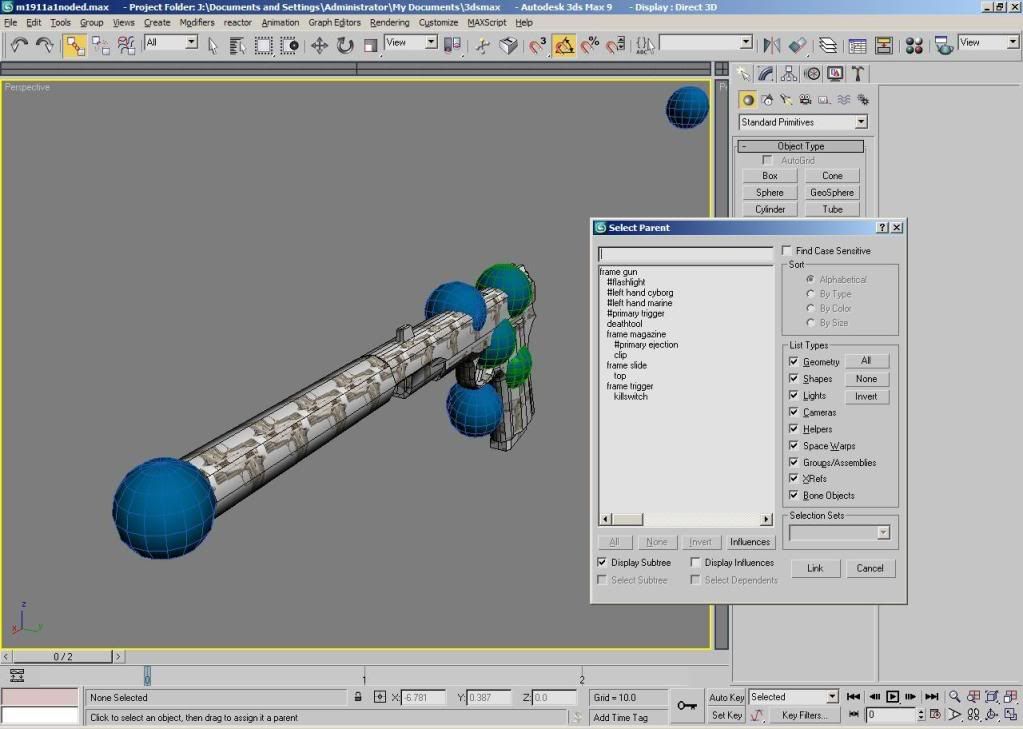 Oh man this model is pimp I can't frickin wait to get this shizzle into Halo 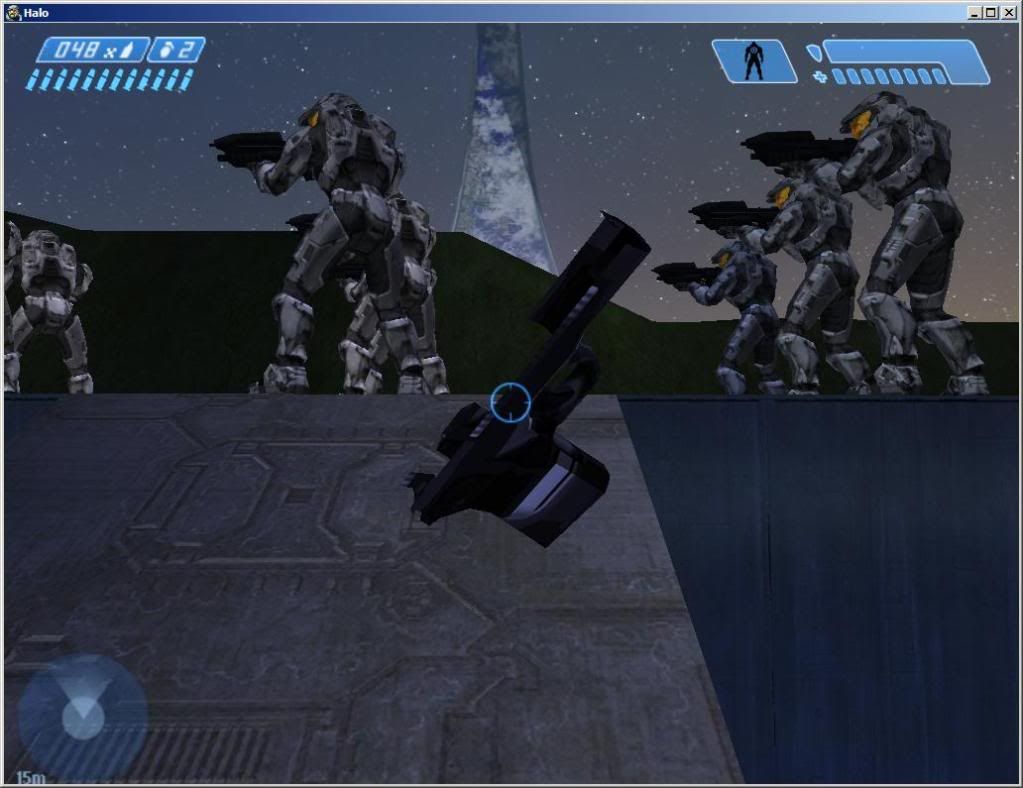 FFFFFFFFFFFFFFFFFFFFFFFFFFFFFFFFF It's mostly elements attached together, I made sure there's no open edges, all the surfaces have the right material ID and everything. Half the model's missing. What the hale. sup with this bre Point me in the right direction and I should figure it out. YES, IT'S OBVIOUSLY UNTEXTURED D; Edited by Marka Haiyana on May 18, 2009 at 05:37 AM |
||||
|
|
|||||
|
Mythril - Screenshot Guru - Joined: Mar 29, 2008
Jeffrey Albert Waldo |
Posted: May 18, 2009 07:01 AM
Msg. 1389 of 12975
It might be the shader, or, is the symmetry modifier (if you used it) collapsed?
|
||||
|
|
|||||
|
Advancebo Joined: Jan 14, 2008
|
Posted: May 18, 2009 07:22 AM
Msg. 1390 of 12975
Export in editable mesh. and the node list checksum must be the same.
|
||||
|
|
|||||
|
UnevenElefant5 Joined: May 3, 2008
its been fun yall, i'll never forget this site :') |
Posted: May 18, 2009 10:06 AM
Msg. 1391 of 12975
Quote: --- Original message by: Marka Haiyana Halp plz. snip Oh man this model is pimp I can't frickin wait to get this shizzle into Halo snip FFFFFFFFFFFFFFFFFFFFFFFFFFFFFFFFF It's mostly elements attached together, I made sure there's no open edges, all the surfaces have the right material ID and everything. Half the model's missing. What the hale. sup with this bre Point me in the right direction and I should figure it out. YES, IT'S OBVIOUSLY UNTEXTURED D; Edited by Marka Haiyana on May 18, 2009 at 05:37 AM Convert to editable patch then back to editable mesh and try again. This happens to me all the time. |
||||
|
|
|||||
|
Marka Haiyana Joined: Mar 24, 2009
w0rt |
Posted: May 18, 2009 02:12 PM
Msg. 1392 of 12975
Thanks all, but I figured it out myself earlier. Took an hour break from it, came back, then thought, "HMM MAYBE THIS WILL WORK." I converted to Mesh and unhid all the triangles. Now for the animating >:D
|
||||
|
|
|||||
|
Ro0ster Joined: Jan 21, 2008 
is a rooster |
Posted: May 18, 2009 02:30 PM
Msg. 1393 of 12975
Quote: --- Original message by: Marka Haiyana Just for your imformation, don't ever export anything for halo in editable poly. It screws up, I learned that the hard way too.Thanks all, but I figured it out myself earlier. Took an hour break from it, came back, then thought, "HMM MAYBE THIS WILL WORK." I converted to Mesh and unhid all the triangles. Now for the animating >:D |
||||
|
|
|||||
|
Marka Haiyana Joined: Mar 24, 2009
w0rt |
Posted: May 18, 2009 04:07 PM
Msg. 1394 of 12975
I've had issues with it in the past with a few other weapons and a BSP. Suprisingly, it was the last thing that came to mind this time.. I think I was trying too hard HEH
|
||||
|
|
|||||
|
Maniac1000 -Helpful Poster- Joined: Feb 24, 2007 
|
Posted: May 18, 2009 04:30 PM
Msg. 1395 of 12975
You can export in editible poly if you are using blitzkreig.
|
||||
|
|
|||||
|
Ro0ster Joined: Jan 21, 2008
is a rooster |
Posted: May 18, 2009 04:55 PM
Msg. 1396 of 12975
Quote: --- Original message by: Maniac1000 Never knew that, thanks.You can export in editible poly if you are using blitzkreig. I am used to gmax, but I recently accuired the 3ds max 8 trial, so I guess I don't have to convert it to mesh. |
||||
|
|
|||||
|
Marka Haiyana Joined: Mar 24, 2009
w0rt |
Posted: May 18, 2009 08:55 PM
Msg. 1397 of 12975
bam
 Anis: http://www.youtube.com/watch?v=BUMVutnIYQ0 http://www.xfire.com/video/bcaac/ Also got some XM8 sounds |
||||
|
|
|||||
|
corndogman939 Joined: Apr 6, 2007 
Using the same avatar since 2007 |
Posted: May 18, 2009 09:10 PM
Msg. 1398 of 12975
Next time, don't shoot the weapon at the bipeds, that way we wont hear the beeping noise, and can hear the actual sounds.
|
||||
|
|
|||||
|
Marka Haiyana Joined: Mar 24, 2009
w0rt |
Posted: May 18, 2009 09:12 PM
Msg. 1399 of 12975
Ehhh the shooting sounds suck anyway, they were ripped and stolen from Youtube videos.
HEH Edited by Marka Haiyana on May 18, 2009 at 09:14 PM |
||||
|
|
|||||
|
master24a Joined: Oct 22, 2008 
LMT arrazando |
Posted: May 18, 2009 09:22 PM
Msg. 1400 of 12975
look this sound http://www.fpsbanana.com/sounds/1704
|
||||
|
|
|||||
| Page 40 of 371 | Go to page: · 1 · ... · 37 · 38 · 39 · [40] · 41 · 42 · 43 · ... · 371 · Prev · Next |

|
