A Community discussion forum for Halo Custom Edition, Halo 2 Vista, Portal and Halo Machinima
|
 Home
Home Search
 Register
 Login
Login Member List
 Recent Posts
| »Forums Index »Halo Custom Edition (Bungie/Gearbox) »Halo CE General Discussion »Weapons - Works in Process thread [WIP] | 
|
| Page 39 of 371 | Go to page: · 1 · ... · 36 · 37 · 38 · [39] · 40 · 41 · 42 · ... · 371 · Prev · Next |
| Author | Topic: Weapons - Works in Process thread [WIP] (12975 messages, Page 39 of 371) | ||||
| Moderators: Dennis | |||||
 Newbkilla Joined: Mar 9, 2008 
- Artist, Environment Artist, Level Designer - |
Posted: May 5, 2009 06:57 PM
Msg. 1331 of 12975
Nope, works for me.
|
||||


|
|||||
|
Marka Haiyana Joined: Mar 24, 2009 
w0rt |
Posted: May 9, 2009 05:03 AM
Msg. 1332 of 12975
Attempting an XM8 using some tricks learned from the Beretta tutorial... the guy makes it seem so easy
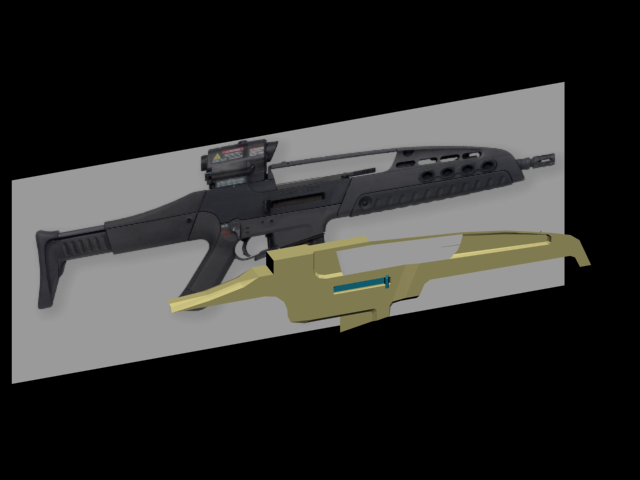 No idea how I'm gonna go about doing the buttstock/handle, the gun's got all these crazy smooth transitions and I'm a total max nub Edited by Marka Haiyana on May 9, 2009 at 05:05 AM |
||||
|
|
|||||
|
Koo294 Joined: Nov 30, 2008 
How is she when she doesn't surf? |
Posted: May 9, 2009 05:42 AM
Msg. 1333 of 12975
Quote: --- Original message by: Glowing Gwunt this is what i'm trying to make:  this is how far i've got:  you can tell i'm new to this, can't you? I would be doing alot better if i could find a weapon moddeling tut for gmax Edited by Glowing Gwunt on May 9, 2009 at 03:33 AM Tau! anyway, 3ds UI is virtually the same as gmax UI, so you can pretty much use a 3ds max tutorial for gmax. |
||||
|
|
|||||
|
Koo294 Joined: Nov 30, 2008
How is she when she doesn't surf? |
Posted: May 9, 2009 06:53 AM
Msg. 1334 of 12975
That doesn't make much difference. You can use a 3dsmax tutorial for gmax because they have the same (more or less) UI
|
||||
|
|
|||||
|
Headhunter09 Joined: May 6, 2008 
This is the truth. |
Posted: May 9, 2009 06:54 AM
Msg. 1335 of 12975
Quote: --- Original message by: Koo294 Quote: --- Original message by: Glowing Gwunt this is what i'm trying to make: this is how far i've got: you can tell i'm new to this, can't you? I would be doing alot better if i could find a weapon moddeling tut for gmax Edited by Glowing Gwunt on May 9, 2009 at 03:33 AM Tau! anyway, 3ds UI is virtually the same as gmax UI, so you can pretty much use a 3ds max tutorial for gmax. Yeah, Tau rock so much. Most 3DS tutorials can be used for Gmax, but beware the ones that use exclusive features like target weld and unwrapping, and some other stuff I can't remember. |
||||
|
|
|||||
|
Koo294 Joined: Nov 30, 2008
How is she when she doesn't surf? |
Posted: May 9, 2009 06:55 AM
Msg. 1336 of 12975
What? gmax has target weld and unwrapping.
|
||||
|
|
|||||
|
Koo294 Joined: Nov 30, 2008
How is she when she doesn't surf? |
Posted: May 9, 2009 07:00 AM
Msg. 1337 of 12975
Quote: --- Original message by: Glowing Gwunt Quote: I've tried, but i don't find them similar in any way at all. hey, dont do that! you edited that text to say that after we suggested it would be the same. Anyway, they are very similar. |
||||
|
|
|||||
|
Headhunter09 Joined: May 6, 2008
This is the truth. |
Posted: May 9, 2009 10:21 AM
Msg. 1338 of 12975
it doesn't really matter what version its talking about. I think they all have the same features pretty much
|
||||
|
|
|||||
|
ODX Joined: Jul 26, 2007 
A rare sight, indeed. |
Posted: May 9, 2009 01:30 PM
Msg. 1339 of 12975
Clayrendergo:
 Just a random M16 with some addons I found on fpsbanana (awesome place to find weapons). ...Yeah yeah I hear you, Sandtrap Open Source weapons are still being worked on don't worry >:| |
||||
|
|
|||||
|
UnevenElefant5 Joined: May 3, 2008 
its been fun yall, i'll never forget this site :') |
Posted: May 9, 2009 01:51 PM
Msg. 1340 of 12975
 |
||||
|
|
|||||
|
ODX Joined: Jul 26, 2007
A rare sight, indeed. |
Posted: May 9, 2009 05:51 PM
Msg. 1341 of 12975
Quote: --- Original message by: MartynLeeBall .Quote: --- Original message by: ODX Not having a dig or anything ut did you model any of it? If so make render of the model you make please.*Picture* Just a random M16 with some addons I found on fpsbanana (awesome place to find weapons).| I don't model, at all. |
||||
|
|
|||||
|
Advancebo Joined: Jan 14, 2008 
|
Posted: May 9, 2009 07:27 PM
Msg. 1342 of 12975
Quote: --- Original message by: MartynLeeBall Quote: --- Original message by: ODX Clayrendergo: Just a random M16 with some addons I found on fpsbanana (awesome place to find weapons). ...Yeah yeah I hear you, Sandtrap Open Source weapons are still being worked on don't worry >:| Not having a dig or anything ut did you model any of it? If so make render of the model you make please. Hes about to animate it, considering the origins. |
||||
|
|
|||||
|
Geared Joined: Mar 6, 2009 
EPI Creator |
Posted: May 10, 2009 12:13 AM
Msg. 1343 of 12975
if only my stuff was taht awsome lol...maybe some day in far off time :P
|
||||
|
|
|||||
|
FlyAwayNow Joined: May 10, 2009 
Triage at Dawn |
Posted: May 10, 2009 03:25 PM
Msg. 1344 of 12975
I was just about to say looks a bit like something youd find in uhhhhhhhhh somewhere. Well i was about to say SMOD but i just realised. HaloSMOD anyone?
|
||||
|
|
|||||
|
ODX Joined: Jul 26, 2007
A rare sight, indeed. |
Posted: May 10, 2009 10:04 PM
Msg. 1345 of 12975
Now, should I do a reload kind of like Killzone 2's or a Call of Duty 4 style one? I'd promised some time ago that I'd start to copy Call of Duty 4 animations (because they're awesomeness) but Killzone 2's is unique, in a sense. Send me a PM saying which one you want so we don't clutter this thread with people whining that they want this one or that one and so forth.
|
||||
|
|
|||||
|
Exception Joined: Jul 9, 2008
Been So So long since I have been on this Forum |
Posted: May 11, 2009 02:45 AM
Msg. 1346 of 12975
Quote: --- Original message by: ODX Clayrendergo: Just a random M16 with some addons I found on fpsbanana (awesome place to find weapons). ...Yeah yeah I hear you, Sandtrap Open Source weapons are still being worked on don't worry >:| im pretty sure thats a cod 4 rip.... |
||||
|
|
|||||
|
ChocolateNugget Joined: Sep 29, 2007 
im your #1 fan !! |
Posted: May 11, 2009 03:13 AM
Msg. 1347 of 12975
No, COD4 doesn't have that much detail in it's weapons. Most of the detail is in the textures and normals.
|
||||
|
|
|||||
|
ODX Joined: Jul 26, 2007
A rare sight, indeed. |
Posted: May 11, 2009 08:23 AM
Msg. 1348 of 12975
|
||||
|
|
|||||
|
Marka Haiyana Joined: Mar 24, 2009
w0rt |
Posted: May 11, 2009 11:30 PM
Msg. 1349 of 12975
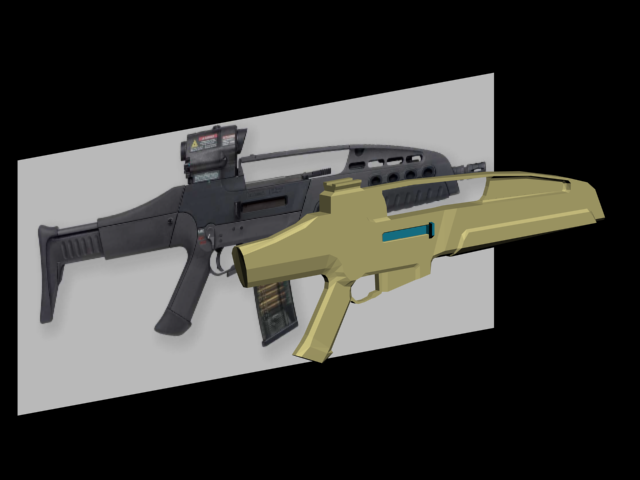 Been at this for two days, it's coming out okay for a first serious model in Max.. Can't wait to tag it. >:) EDIT: TAGGED AND YOUTUBED http://www.youtube.com/watch?v=r1bI9WmoqnU Needs a skin/anis Edited by Marka Haiyana on May 12, 2009 at 06:08 AM |
||||
|
|
|||||
|
UnevenElefant5 Joined: May 3, 2008
its been fun yall, i'll never forget this site :') |
Posted: May 13, 2009 08:43 PM
Msg. 1350 of 12975
Looks like a lot of extruded/beveled/chamfered boxes. A lot of those details can be worked into the mesh, you don't need a seperate object for them, and also, round off the bottom of the barrel, it doesn't look very comfortable. Neither does the handle, and the sphere at the end of the bolt-thing looks a little big. Although, I must say, I do love the design of the weapon.
|
||||
|
|
|||||
|
Disaster Joined: Dec 16, 2007 
ROCKS |
Posted: May 13, 2009 08:51 PM
Msg. 1351 of 12975
 Glock 18c I textured for Tactical-Assault |
||||
|
|
|||||
|
wesman Joined: Mar 18, 2008 
no your a freezer |
Posted: May 13, 2009 09:32 PM
Msg. 1352 of 12975
whats tactical assault?
oh and that is sex |
||||
|
|
|||||
|
Disaster Joined: Dec 16, 2007
ROCKS |
Posted: May 13, 2009 09:33 PM
Msg. 1353 of 12975
|
||||
|
|
|||||
|
Advancebo Joined: Jan 14, 2008
|
Posted: May 13, 2009 09:53 PM
Msg. 1354 of 12975
Quote: --- Original message by: Disaster Glock 18c I textured for Tactical-Assault Dam nice  Thinking of going into graphics artist? |
||||
|
|
|||||
|
Disaster Joined: Dec 16, 2007
ROCKS |
Posted: May 13, 2009 09:55 PM
Msg. 1355 of 12975
Yes actually I am.
|
||||
|
|
|||||
|
Newbkilla Joined: Mar 9, 2008
- Artist, Environment Artist, Level Designer - |
Posted: May 13, 2009 10:09 PM
Msg. 1356 of 12975
Get on xfire mister..
|
||||
|
|
|||||
|
Disaster Joined: Dec 16, 2007
ROCKS |
Posted: May 13, 2009 10:15 PM
Msg. 1357 of 12975
I'm supposed to be doing school work :P
I'm the biggest procrastinator in the world and I have waited untill 3 days before the written part of my final exam is due. :( Edited by Disaster on May 13, 2009 at 10:16 PM |
||||
|
|
|||||
|
Newbkilla Joined: Mar 9, 2008
- Artist, Environment Artist, Level Designer - |
Posted: May 13, 2009 10:27 PM
Msg. 1358 of 12975
That's what Josh was saying. I was going to add why you weren't studying:)
Also:   Edited by Newbkilla on May 13, 2009 at 10:34 PM |
||||
|
|
|||||
|
ChocolateNugget Joined: Sep 29, 2007
im your #1 fan !! |
Posted: May 14, 2009 12:06 AM
Msg. 1359 of 12975
Man, I wish I had the patients to texture stuff. Maybe I'll learn this summer while I work on my various projects. Lol
|
||||
|
|
|||||
|
Marka Haiyana Joined: Mar 24, 2009
w0rt |
Posted: May 14, 2009 01:36 AM
Msg. 1360 of 12975
I'm having an animation issue. First time attempting to animate a gun, and I'm getting an error. Basically, in most of my animations, the frame-gun is linked to the right wrist.
IE: http://i655.photobucket.com/albums/uu279/m00kz/anigrenade.gif 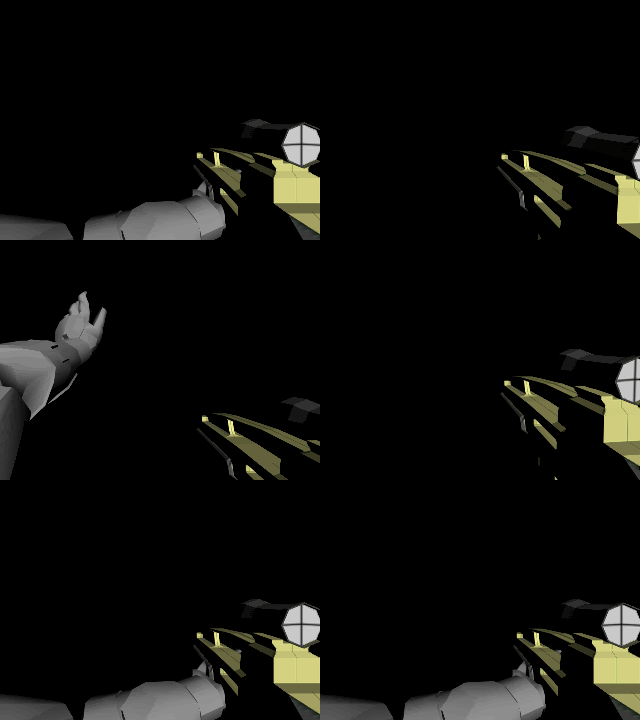 However, for the ready animation, I'm wanting the right hand to come around and pull back the bolt. This requires a different hierarchy, and for this specific animation, I've set up the gun to be linked to the left wrist. IE: http://i655.photobucket.com/albums/uu279/m00kz/aniready.gif  Now, tool gives me this error when I compile the animations: "Not all animations were using the same node graph! Import failed. Ask Jason to push you around in a wheelchair if you need it."It's pretty obvious that the hierarchy needs to be the same in all of the animations. Is there a way to do that without completely messing up my ready animation? And how can I avoid this in the future? And yes, the gifs skip a few frames, I used a crappy converter Edited by Marka Haiyana on May 14, 2009 at 01:37 AM |
||||
|
|
|||||
|
Donut Joined: Sep 30, 2006 
I swear I'm not actually dead |
Posted: May 14, 2009 01:50 AM
Msg. 1361 of 12975
yes, link frame gun to frame bones24 or whatever its called on the arm's rig, and use keyframe based constraints on the frame gun and the right wrist. you cannot use different hierarchies for the same animation graph
|
||||
|
|
|||||
|
Marka Haiyana Joined: Mar 24, 2009
w0rt |
Posted: May 14, 2009 02:28 AM
Msg. 1362 of 12975
Okay, so I'm assuming I should go back and do that for all my previous animations as well heh, shouldn't be too bad
|
||||
|
|
|||||
|
ODX Joined: Jul 26, 2007
A rare sight, indeed. |
Posted: May 14, 2009 08:22 AM
Msg. 1363 of 12975
I'm going to have to say that right now you're probably animating without IK. Basically, it's hard as hell. When you get on xfire or some other program, ask me or ICEE and we'll give you a max plugin that IK's the arms for you. Pretty much, it creates two circles (that somewhat make a sphere) around your wrists that you can move and the rest of the arm will move with it. You can also constrain them to frame [anything] and they will follow the exact movements of that object you linked them to. Helps when doing things like twisting mags around when you take them out (ala Call of Duty 4 style).
You can change the constrain for animations so in one you could have the left hand constrained to the frame mag, and in another you can have it to the ophandle. Vice versa with the right hand as well. Edit: Btw, you can move your shoulders. Edited by ODX on May 14, 2009 at 08:22 AM |
||||
|
|
|||||
|
Invader Veex Joined: Apr 11, 2007 
i make poast |
Posted: May 14, 2009 08:24 AM
Msg. 1364 of 12975
The gun needs to be linked to one frame only throughout the animation set.
Here's a link to ik setup if you need it. http://www.halotrialmods.org/zteam/downloads/FP_IK_Controller_Setup.ms |
||||
|
|
|||||
|
Advancebo Joined: Jan 14, 2008
|
Posted: May 14, 2009 08:30 AM
Msg. 1365 of 12975
Quote: --- Original message by: ODX I'm going to have to say that right now you're probably animating without IK. Basically, it's hard as hell. When you get on xfire or some other program, ask me or ICEE and we'll give you a max plugin that IK's the arms for you. Pretty much, it creates two circles (that somewhat make a sphere) around your wrists that you can move and the rest of the arm will move with it. You can also constrain them to frame [anything] and they will follow the exact movements of that object you linked them to. Helps when doing things like twisting mags around when you take them out (ala Call of Duty 4 style). You can change the constrain for animations so in one you could have the left hand constrained to the frame mag, and in another you can have it to the ophandle. Vice versa with the right hand as well. Edit: Btw, you can move your shoulders. Edited by ODX on May 14, 2009 at 08:22 AM You mean the IK thing from CAD? IV got it. Edited by Advancebo on May 14, 2009 at 08:31 AM |
||||
|
|
|||||
| Page 39 of 371 | Go to page: · 1 · ... · 36 · 37 · 38 · [39] · 40 · 41 · 42 · ... · 371 · Prev · Next |

|
