A Community discussion forum for Halo Custom Edition, Halo 2 Vista, Portal and Halo Machinima
|
 Home
Home Search
 Register
 Login
Login Member List
 Recent Posts
| »Forums Index »Halo Custom Edition (Bungie/Gearbox) »Halo CE Technical / Map Design »New problem with sapiwn :( | 
|
| Author | Topic: New problem with sapiwn :( (6 messages, Page 1 of 1) | ||||
| Moderators: Dennis | |||||
 RJ00125 Joined: Apr 14, 2007 
Kill On!! |
Posted: Jun 22, 2007 01:01 AM
Msg. 1 of 6
OK, I got everything to work but when I open up the game window in sapien all I see is a half black and half blue screen. Please help.
Edit: Also now for some reason my game window is full screen and I cant minimize it and I cant do anythin in it. Edited by RJ00125 on Jun 22, 2007 at 02:28 AM |
||||


|
|||||
|
MF Boom Joined: Mar 5, 2007 
I am the bone of my sword... |
Posted: Jun 22, 2007 06:20 AM
Msg. 2 of 6
Your second problem isn't uncommon. I have that as well, but you should still be able to do stuff with it. Hold down the alt key and hit the - on the numpad. It'll give you options like "next", "last", "maximize", "minimize", etc. Mine is always full, even when I select restore, but I can still use it without too much of a problem...
As for the first one, have you ran radiosity/lightmaps and everything? If so, make sure you're looking at the map and everything, or check the debug.txt for any errors... I'd have to see it to know exactly what you mean. |
||||
|
|
|||||
|
RJ00125 Joined: Apr 14, 2007
Kill On!! |
Posted: Jun 22, 2007 02:27 PM
Msg. 3 of 6
ummm... for some reason my keyboard is being stupid and I can get a screenshot. I will keep trying and repost.
Edit: ok heres a screenshot. Also I have run radiosity. 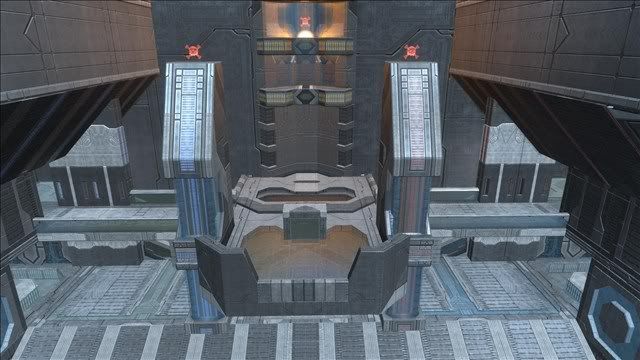 Edit: umm.. I tried what you said and it worked but I still can't do anything in the game window. Edited by RJ00125 on Jun 22, 2007 at 03:07 PM Edited by RJ00125 on Jun 22, 2007 at 04:45 PM |
||||
|
|
|||||
|
MechWarrior001 Joined: Mar 13, 2007 
|
Posted: Jun 22, 2007 05:12 PM
Msg. 4 of 6
The error you are encountering more than likely has to do with:
A) Old/outdated graphics card/drivers B) Possible incorrect graphical settings C) You are using Windows vista meaning it could have some sort of compatability issue D) Something in the Sapien.exe file could be corrupted causing that error. Thats all i could think of. |
||||
|
|
|||||
|
RJ00125 Joined: Apr 14, 2007
Kill On!! |
Posted: Jun 22, 2007 10:43 PM
Msg. 5 of 6
well I just bought this laptop so it has a very good graphics card; my graphical settings are manufacturer recommended; what kind of compatability issues can I have; and how can I fix a problem with the .exe file.
|
||||
|
|
|||||
|
MF Boom Joined: Mar 5, 2007
I am the bone of my sword... |
Posted: Jun 22, 2007 11:49 PM
Msg. 6 of 6
A lot of laptops have problems with Halo though, because the hardware is different. Motherboards have different GPU chips on laptops than desktops. But the compatibility settings can be changed. Right click on the icon for Sapien, and go to Properties. click the Compatibility tab, and there should be a checkbox saying "Run this program in compatibility for:". Check that, and select Windows XP from the drop-down menu. See if that fixes your problem.
|
||||
|
|
|||||

|
