A Community discussion forum for Halo Custom Edition, Halo 2 Vista, Portal and Halo Machinima
|
 Home
Home Search
 Register
 Login
Login Member List
 Recent Posts
| »Forums Index »Halo Custom Edition (Bungie/Gearbox) »Halo CE General Discussion »How do you make LODs? | 
|
| Author | Topic: How do you make LODs? (21 messages, Page 1 of 1) | ||||
| Moderators: Dennis | |||||
 rododoonceagain Joined: Dec 21, 2014 
Left Halo because life |
Posted: Apr 17, 2015 11:44 AM
Msg. 1 of 21
Ok, guys, that's it. My models are done; however, they use so many polys that the game goes well below 1 fps when there are more than 4 or 5 of them on screen. This, of course, isn't exactly what I call "good", so I'm afraid I'll have to set up these hated level of details. I was told that Multires can come in handy, but honestly I can't figure out how should I do it. I placed it on top of the stack modifier, then I exported my model with a 20% cutoff, 40% cutoff and so on. A problem arose, however: on exporting, the script (jms model exporter version 1.02, with support for regions) automatically decides to shut down my multires modifier, and so the model is at full res once again. Now, I need BOTH regions support, weight support and a way to persuade 3ds max to use my multires WITHOUT doing all the skin from scratch once again (doing these marines was a pain due to the awkward death animations in Halo and the insane amount of vertices they have); what should I do? Remember that I am a complete noob with 3Ds max, so keep things easy, please.
ALSO is there a way to import rigged gbxmodels in 3ds max? I wanted to look at how Bungie originally rigged the characters, but the gbx model importer script completely messes weightings up. |
||||


|
|||||
|
altis94 Joined: Oct 5, 2012 
Join my Discord https://discord.gg/GDVEaRD |
Posted: Apr 17, 2015 02:51 PM
Msg. 2 of 21
Just collapse multires modifier. I'm not sure about skin modifier, I rarely used it.
|
||||
|
|
|||||
|
bourrin33 Joined: Oct 19, 2009 
HEK not installed tho |
Posted: Apr 17, 2015 04:39 PM
Msg. 3 of 21
yeah to me, you need to collapse the modifier (rightclick on the stack of modifier and use collapse), and remake regions and skinning by hand. I didn't find a better way...
you can make the skin modifier very gross though, as they are just seen from far and the few pixels merging together doesn't show the ugly job. Try importing that reach marine used on altis zmp maps and check how ugly are the level of details. And for your messed up rigging upon import, it may be because of the 3ds max version you are using, I think it doesn't work well over max 2012. |
||||
|
|
|||||
|
altis94 Joined: Oct 5, 2012
Join my Discord https://discord.gg/GDVEaRD |
Posted: Apr 18, 2015 07:48 AM
Msg. 4 of 21
You can copy skin modifier, convert to editable poly, weld vertices and then convert back to editable mesh and paste skin modifier. Works good enough.
|
||||
|
|
|||||
|
il Duce Primo Joined: Apr 22, 2007 
CMT Team Leader |
Posted: Apr 18, 2015 08:56 AM
Msg. 5 of 21
Always import a similar object from the original game to get an idea of the changes in details from one LOD to the next.
|
||||
|
|
|||||
|
Super Flanker Joined: Oct 5, 2012 
The length of your life depends on my aim. |
Posted: Apr 18, 2015 10:56 AM
Msg. 6 of 21
Quote: --- Original message by: rododoonceagain Ok, guys, that's it. My models are done; however, they use so many polys that the game goes well below 1 fps when there are more than 4 or 5 of them on screen. This, of course, isn't exactly what I call "good", so I'm afraid I'll have to set up these hated level of details. I was told that Multires can come in handy, but honestly I can't figure out how should I do it. I placed it on top of the stack modifier, then I exported my model with a 20% cutoff, 40% cutoff and so on. A problem arose, however: on exporting, the script (jms model exporter version 1.02, with support for regions) automatically decides to shut down my multires modifier, and so the model is at full res once again. Now, I need BOTH regions support, weight support and a way to persuade 3ds max to use my multires WITHOUT doing all the skin from scratch once again (doing these marines was a pain due to the awkward death animations in Halo and the insane amount of vertices they have); what should I do? Remember that I am a complete noob with 3Ds max, so keep things easy, please. ALSO is there a way to import rigged gbxmodels in 3ds max? I wanted to look at how Bungie originally rigged the characters, but the gbx model importer script completely messes weightings up. Pm ur models. Ill optimize a few lods out of them if I can. |
||||
|
|
|||||
|
BKTiel Joined: Mar 18, 2014 
strong independent bird needs no cage |
Posted: Apr 18, 2015 11:15 AM
Msg. 7 of 21
flanker is a reputed leaker
wouldn't do that were I you |
||||
|
|
|||||
|
Super Flanker Joined: Oct 5, 2012
The length of your life depends on my aim. |
Posted: Apr 18, 2015 11:19 AM
Msg. 8 of 21
Quote: --- Original message by: BKTiel flanker is a reputed leaker wouldn't do that were I you Eyyy! Screw u parrot humpr. I never leak anything. Just ask patxi or altis. I am 100% legit bueno helper guy. And yes this is a phone post. I was that outraged by ur post that i didnt even waste time pausing my twistys site rip torrent 2 respond to you. |
||||
|
|
|||||
|
BKTiel Joined: Mar 18, 2014
strong independent bird needs no cage |
Posted: Apr 18, 2015 11:55 AM
Msg. 9 of 21
Quote: --- Original message by: SS Flanker I am 100% legit bueno helper guy. ^ |
||||
|
|
|||||
|
rododoonceagain Joined: Dec 21, 2014
Left Halo because life |
Posted: Apr 19, 2015 01:06 PM
Msg. 10 of 21
Couldn't care less about leaks, honestly. If you find pleasure playing with half-finished models, I won't be the one to stop you. However, I found a quick solution.
1) Clone the mesh with the skin data 2) Delete the skin data in the new mesh 3) Apply multires, then collapse it 4) Copy-paste the skin modifier from the old mesh to the new mesh. 5) Make once again regions, then export 6) ??? 7) Profit It seems to work flawlessly, as for now; without having to resking every LOD, the whole process took me no more than a quarter of hour. Why am I posting this here?, you may ask. Well, I do it so that you know how to do it and you all can release quality content without having to reskin everything for each and every lod you make. Now go and make good things! Edited by rododoonceagain on Apr 19, 2015 at 01:13 PM |
||||
|
|
|||||
|
bourrin33 Joined: Oct 19, 2009
HEK not installed tho |
Posted: Apr 19, 2015 03:17 PM
Msg. 11 of 21
That's great to know, thanks. Even if I don't need to port a rigged thing anytime soon.
Except if I start making a custom spartan model... |
||||
|
|
|||||
|
rododoonceagain Joined: Dec 21, 2014
Left Halo because life |
Posted: Apr 19, 2015 04:24 PM
Msg. 12 of 21
I was going that you owe me quality content for that info, but then I remembered that I'm still using your h3 hunters, so I guess you owe me nothing lol
|
||||
|
|
|||||
|
Super Flanker Joined: Oct 5, 2012
The length of your life depends on my aim. |
Posted: Apr 20, 2015 09:39 AM
Msg. 13 of 21
My method takes a lot longer but I have more control.
 |
||||
|
|
|||||
|
altis94 Joined: Oct 5, 2012
Join my Discord https://discord.gg/GDVEaRD |
Posted: Apr 20, 2015 09:47 AM
Msg. 14 of 21
That's a pretty bad way of using LODs. LOD should have like twice smaller triangle count than the LOD above it. You won't see any details from a distance anyway so why waste tagspace.
|
||||
|
|
|||||
|
Super Flanker Joined: Oct 5, 2012
The length of your life depends on my aim. |
Posted: Apr 20, 2015 09:54 AM
Msg. 15 of 21
Quote: --- Original message by: altis94 That's a pretty bad way of using LODs. LOD should have like twice smaller triangle count than the LOD above it. You won't see any details from a distance anyway so why waste tagspace. It was a 5 minute example. I used the preserve uv's option in the editable poly rollout. 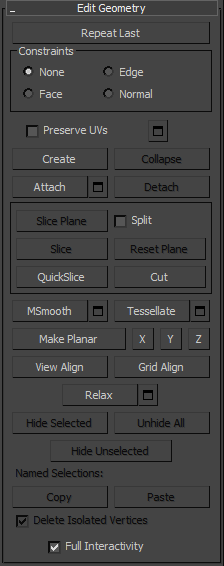 And then I just used target weld mostly. |
||||
|
|
|||||
|
rododoonceagain Joined: Dec 21, 2014
Left Halo because life |
Posted: Apr 21, 2015 11:57 AM
Msg. 16 of 21
> make all permutations and LODs
> Half an hour to compile all this stuff > 13 MB of gbxmodel > mfw  Edited by rododoonceagain on Apr 21, 2015 at 11:58 AM |
||||
|
|
|||||
|
Super Flanker Joined: Oct 5, 2012
The length of your life depends on my aim. |
Posted: Apr 23, 2015 10:49 AM
Msg. 17 of 21
Quote: --- Original message by: rododoonceagain > make all permutations and LODs > Half an hour to compile all this stuff > 13 MB of gbxmodel > mfw http://myfunnyreaction.com/media/k2/items/src/94ea69ba6d138bccade59f45aa6f86ca.jpg Edited by rododoonceagain on Apr 21, 2015 at 11:58 AM x32bit based processor tho! |
||||
|
|
|||||
|
MosesofEgypt Joined: Apr 3, 2013 
|
Posted: Apr 23, 2015 11:50 PM
Msg. 18 of 21
Make sure to read this in order to understand how LOD cutoffs actually work. it's pretty simple to get them to work just right with the little bit of knowledge in this tutorial.
http://hce.halomaps.org/index.cfm?fid=6884 |
||||
|
|
|||||
|
rododoonceagain Joined: Dec 21, 2014
Left Halo because life |
Posted: Apr 25, 2015 07:46 AM
Msg. 19 of 21
I know how are LODs made and how do they work. But I have 9 permutations (base body, trooper light, trooper heavy, trooper commander, trooper medic, trooper radio, ODST, space marine and Johnson), all of them with 5 LODs, and the superhigh LOD is at full res, with a crazy amount of vertices (didn't feel like cutting them off), so the tagspace is more than justified. It's just that 13mb is really a lot.
Edited by rododoonceagain on Apr 25, 2015 at 07:54 AM |
||||
|
|
|||||
|
MosesofEgypt Joined: Apr 3, 2013
|
Posted: Apr 25, 2015 12:43 PM
Msg. 20 of 21
First off, the tutorial I linked you to isn't explaining how to create LOD's, it's explaining how to set the lod cutoffs in the gbxmodel tag so that the lod switches at the exact time you want it to. As far as I'm aware, I'm the first person to uncover how the LOD switching works.
Secondly, what are the triangle counts on your LOD's?. There are 5 possible LOD's, so each level should have about a 20% reduction in triangles. I'm asking because 13MB sounds like quite an awful lot, though you do have 9 permutations and I don't know how much room the "Compressed Vertices" are taking up in the tag(they are removed when it's compiled). You can possibly reduce how much geometry you need in the file by splitting it into regions if, say, Johnson uses the same body as the trooper light or base body. CMT had me doing optimizations for TSCE, and that included making LOD's for most of the weapons and optimizing most every bitmap. |
||||
|
|
|||||
|
rododoonceagain Joined: Dec 21, 2014
Left Halo because life |
Posted: Apr 25, 2015 01:47 PM
Msg. 21 of 21
About the tutorial, I used the values of the stock marines. They seem to work fairly well, and LODs are switched well, no doubt about it; that being said, I'm going to read your manual anyway; the very simple fact that you worked for TSC:E make your words a little bit more believable than mine.
About reductions, they were chosen case by case: the body went 100%\80%\60%\40%\32% (lowering some more seemed to screw geometry and UV way too badly for my taste), other permutations had something like 100%\70%\50%\25%\7% or else, depending on how did they react to the optimization. As for the regions, models have 2 of them: one is the body with a single permutation (it is what it takes the biggest amount of vertices anyway, along with the legs of the heavy trooper), the second region instead has 8 permutations and contains head and armor that characterize every permutation. So I have the head and the armor for Johnson (I'd gladly appreciate if I knew how Johnson looked in AOTCR in CEA, but I couldn't find any clear view of him; does he have a backpack? Which armor is he wearing?), head and armor for the radio trooper, head and armor for the space marine and so forth. If there is any way to optimize this any better than so, I've yet to find it. Edited by rododoonceagain on Apr 25, 2015 at 01:51 PM |
||||
|
|
|||||

|
