A Community discussion forum for Halo Custom Edition, Halo 2 Vista, Portal and Halo Machinima
|
 Home
Home Search
 Register
 Login
Login Member List
 Recent Posts
| »Forums Index »Halo Custom Edition (Bungie/Gearbox) »Halo CE Technical / Map Design »3DS MAX Transformation Problem...? | 
|
| Author | Topic: 3DS MAX Transformation Problem...? (4 messages, Page 1 of 1) | ||||
| Moderators: Dennis | |||||
 renegade343 Joined: Jun 26, 2012 
CE3 Stage Modeler, Editor, and Writer |
Posted: Mar 21, 2015 10:39 PM
Msg. 1 of 4
So I decided to make a BSP by making modular parts in 3DS Max and copying/pasting them into a bigger model...
Except I noticed that the transform coordinate/origin/whatever you call the coordinate you reference when you're shifting objects around is REALLY far off from the rest of my module model. (see picture below) 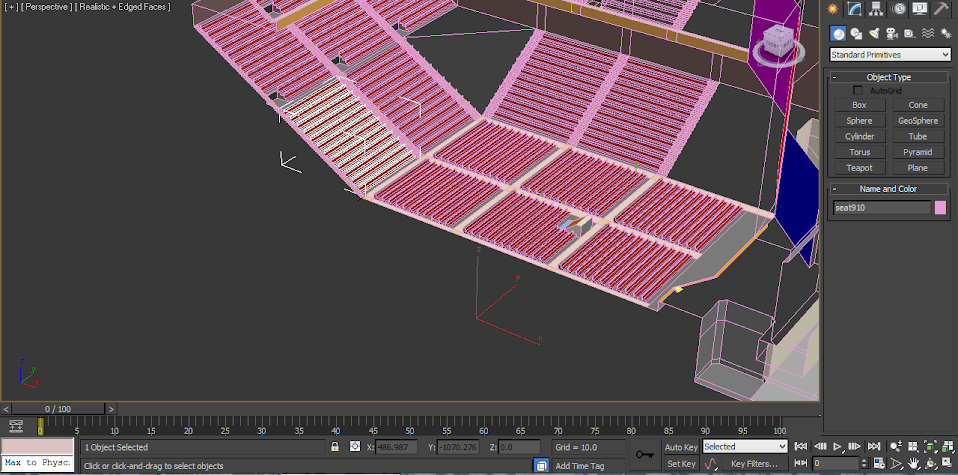 What could I do to move this coordinate and make my transforming/copying easier? |
||||


|
|||||
|
Super Flanker Joined: Oct 5, 2012 
The length of your life depends on my aim. |
Posted: Mar 22, 2015 12:43 PM
Msg. 2 of 4
Quote: --- Original message by: renegade343 So I decided to make a BSP by making modular parts in 3DS Max and copying/pasting them into a bigger model... Except I noticed that the transform coordinate/origin/whatever you call the coordinate you reference when you're shifting objects around is REALLY far off from the rest of my module model. (see picture below) https://lh6.googleusercontent.com/-YpFfWllD1Vo/VQ4nJT1lxpI/AAAAAAAADKo/Vk8I2jo6nL8/w958-h475-no/halp.png What could I do to move this coordinate and make my transforming/copying easier? I think you mean the transform gizmo. This problem occurs when you first start working with a primitive. Essentially 3dsmax automatically centers the Gizmo based upon the object you create. However as soon as you start editing the primitive you start to alter the true center of the mesh. In order to reset the gizmo to the objects center you need to: . Head over to the hierarchy tab. . Under the "adjust pivot" rollout, click on "affect pivot only" . Then directly beneath that should be the "alignment" rollout. . You then need to just hit "center" to object and the transform gizmo will have been reset to the objects new center. 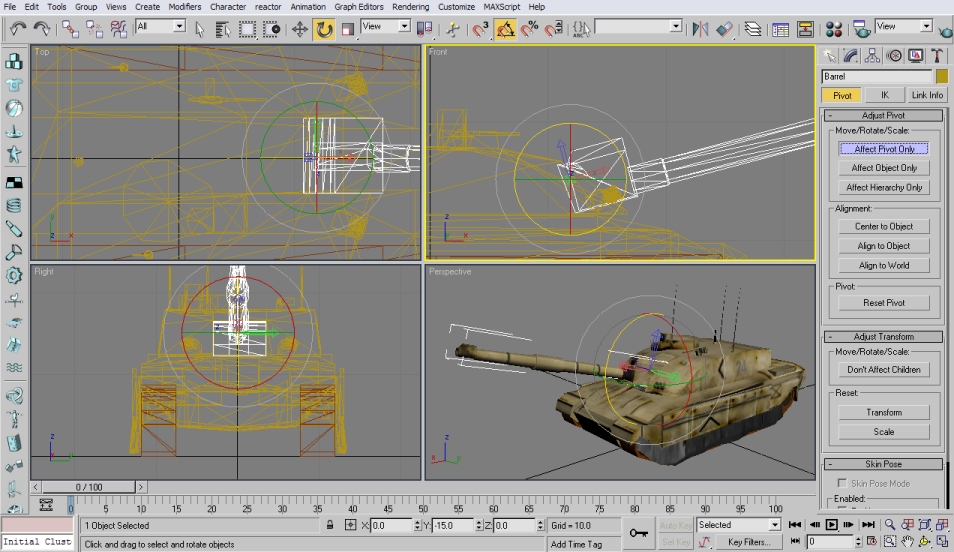 |
||||
|
|
|||||
|
renegade343 Joined: Jun 26, 2012
CE3 Stage Modeler, Editor, and Writer |
Posted: Mar 26, 2015 12:31 AM
Msg. 3 of 4
(Sorry it took me so long to reply) That did the trick, thank you so much! :D
I essentially started off with a box with grids and just moved individual vertices around (are there any more efficient ways to model out there with 3DS MAX...? for future reference x.x) But that makes sense. Thanks for your help! |
||||
|
|
|||||
|
Super Flanker Joined: Oct 5, 2012
The length of your life depends on my aim. |
Posted: Mar 27, 2015 11:10 AM
Msg. 4 of 4
Np.
I wish people would help me now. :( |
||||
|
|
|||||

|
