A Community discussion forum for Halo Custom Edition, Halo 2 Vista, Portal and Halo Machinima
|
 Home
Home Search
 Register
 Login
Login Member List
 Recent Posts
| »Forums Index »Halo Custom Edition (Bungie/Gearbox) »Halo CE General Discussion »AMD Switchable | 
|
| Author | Topic: AMD Switchable (11 messages, Page 1 of 1) | ||||
| Moderators: Dennis | |||||
 Jaz Joined: Mar 21, 2010 
[Insert sarcastic comment here] |
Posted: Nov 8, 2014 03:47 PM
Msg. 1 of 11
Anyone else tried AMD switchable graphics? Halo's refusing to recognise my dedicated GPU on my new laptop and keeps insisting I have an unsupported unknown Intel gpu.(which I do but I have it set to use the dedicated instead)
I have a Dell Inspiron with an i5 3337u and an AMD Radeon 7670M. In theory, the game should be using the 7670M because I have it set to 'High performance' in Catalyst. However, when I launch the game, I get a popup saying that my hardware is below minimum specs. It claims that my GPU is a 64M Intel. When I click 'Continue Anyway', the game only runs in 1280x800 at max and lags a fair bit. I've heard quite a few games have issues with AMD switchable graphics but I didn't expect Halo to. I've tried both the official drivers from Dell and Unifl. With either, the game thinks it should be using the integrated. Strange that even integrated lags so much but even so, it should be using dedicated instead. E: Incase anyone wants a screenshot of the popup for reference: 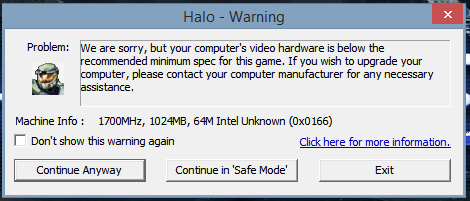 Edited by Jaz on Nov 8, 2014 at 03:54 PM |
||||


|
|||||
|
kirby_422 Joined: Jan 22, 2006 
Apparently public enemy number 1? |
Posted: Nov 8, 2014 03:57 PM
Msg. 2 of 11
idk about AMD, but with my nvidia card in my laptop, I can right click any EXE, run with graphic processor, and choose which card I use for that program. NVIDIA control panel also allowed me to configure defaults, etc. By default, it used intel for general applications, and NVIDIA just did all of its physics X stuff alongside the intel.
|
||||
|
|
|||||
|
Jaz Joined: Mar 21, 2010
[Insert sarcastic comment here] |
Posted: Nov 8, 2014 03:59 PM
Msg. 3 of 11
Quote: --- Original message by: Waffles I don't know much about laptops, but check your bios and disable integrated from there if you can. If not, find a way to disable the integrated GPU from the desktop. Halo is an ancient game and the 7000 series gpu's from AMD are way beyond the qvl halo lists so it wouldn't recognize it, but it would still accept it (same thing with my GTX 760, its unknown to halo but still runs). Its trying to use the intel IGPU that much is clear, disable it since its not "switching". Edited by Waffles on Nov 8, 2014 at 03:53 PM Can't disable the integrated. I don't think you can on any laptop with Optimus or Switchable because the integrated's feeding the screen by default. I've heard some laptops allow you to disable the integrated if you use an external screen but unfortunately the BIOS for this particularly laptop is disgustingly limited and offers no such option.(there are barely any options in the BIOS) I'm just wondering if anyone else with either Nvidia Optimus or AMD Switchable have had a similar issue and/or found a workaround/solution. |
||||
|
|
|||||
|
Jaz Joined: Mar 21, 2010
[Insert sarcastic comment here] |
Posted: Nov 8, 2014 04:10 PM
Msg. 4 of 11
Quote: --- Original message by: Waffles Try what Kirby mentioned, also idr if AMD had game profiles or not. Look for halo for game profile settings and see if you can find a setting to force the dedicated card. AMD Switchable has a section in Catalyst; 'Switchable Graphics Application Settings'. There, I can set applications to either 'Power saving' or 'High performance'. As I understand it, 'Power saving' is integrated and 'High performance' is the dedicated. I have Halo set to 'High performance' so it should be using the dedicated. But still getting the issue. |
||||
|
|
|||||
|
Higuy Joined: Mar 6, 2007 
@lucasgovatos |
Posted: Nov 8, 2014 05:14 PM
Msg. 5 of 11
Open Catalyst and go to "Gaming" tab. Add an application (haloce.exe) and put in the necessary settings... maybe that will work? I have nvidia in my laptop and have to do a similar thing for certain programs.
|
||||
|
|
|||||
|
Jaz Joined: Mar 21, 2010
[Insert sarcastic comment here] |
Posted: Nov 9, 2014 12:40 PM
Msg. 6 of 11
Got it working. Turns out clicking "Don't show this warning again", then 'Continue anyway' allowed the game to launch. I was then still limited to 1280x800 but vidmode appears to be working.(I used vidmode in Target to get to 1600x900)
I'm just hoping it's actually using the dedicated. If it's using integrated, a few maps might lag /: Edit: Oh wait; oddly, chat's broken. Even without vidmode at 1280x720, I can't see chat at all. Text just doesn't show at all.(not just when I'm typing; I see no chat at all from anyone) Not sure how that issue could even exist. I'm on 1.10, and even without 1.10, 1280x720 was already supported. So very strange. Edited by Jaz on Nov 9, 2014 at 12:55 PM |
||||
|
|
|||||
|
Super Flanker Joined: Oct 5, 2012 
The length of your life depends on my aim. |
Posted: Nov 12, 2014 07:34 AM
Msg. 7 of 11
Edit: Oh wait; oddly, chat's broken. Even without vidmode at 1280x720, I can't see chat at all. Text just doesn't show at all.(not just when I'm typing; I see no chat at all from anyone) c:\Program Files (x86)\Microsoft Games\Halo Custom Edition\redist Launch > msxmlemu.wininstaller Edited by SS Flanker on Nov 12, 2014 at 07:34 AM |
||||
|
|
|||||
|
BKTiel Joined: Mar 18, 2014 
strong independent bird needs no cage |
Posted: Nov 12, 2014 09:37 AM
Msg. 8 of 11
As far as the original quandary, that's just how AMD's switchable graphics work; at least on the lower end. The discrete GPU is accessed through the integrated chipset.
I used to have a 6650m machine and it did the same thing; confused me too until I realized there was probably a reason you had to get a specific driver for the machine to work. Happily on a 970m lappie now with none of that though :> |
||||
|
|
|||||
|
Jaz Joined: Mar 21, 2010
[Insert sarcastic comment here] |
Posted: Nov 13, 2014 08:00 PM
Msg. 9 of 11
Quote: --- Original message by: SS Flanker Edit: Oh wait; oddly, chat's broken. Even without vidmode at 1280x720, I can't see chat at all. Text just doesn't show at all.(not just when I'm typing; I see no chat at all from anyone) c:\Program Files (x86)\Microsoft Games\Halo Custom Edition\redist Launch > msxmlemu.wininstaller Edited by SS Flanker on Nov 12, 2014 at 07:34 AM Thank you very much. That worked perfectly. Do the redists normally run during Halo's installation, as I've never had to run them manually before? |
||||
|
|
|||||
|
BKTiel Joined: Mar 18, 2014
strong independent bird needs no cage |
Posted: Nov 13, 2014 10:17 PM
Msg. 10 of 11
They should.
|
||||
|
|
|||||
|
Super Flanker Joined: Oct 5, 2012
The length of your life depends on my aim. |
Posted: Nov 15, 2014 06:32 AM
Msg. 11 of 11
Quote: --- Original message by: Jaz Quote: --- Original message by: SS Flanker Edit: Oh wait; oddly, chat's broken. Even without vidmode at 1280x720, I can't see chat at all. Text just doesn't show at all.(not just when I'm typing; I see no chat at all from anyone) c:\Program Files (x86)\Microsoft Games\Halo Custom Edition\redist Launch > msxmlemu.wininstaller Edited by SS Flanker on Nov 12, 2014 at 07:34 AM Thank you very much. That worked perfectly. Do the redists normally run during Halo's installation, as I've never had to run them manually before?  I would like a hug. |
||||
|
|
|||||

|
