A Community discussion forum for Halo Custom Edition, Halo 2 Vista, Portal and Halo Machinima
|
 Home
Home Search
 Register
 Login
Login Member List
 Recent Posts
| »Forums Index »Halo Custom Edition (Bungie/Gearbox) »Halo CE Technical / Map Design »Work around Halo's crumby weather system | 
|
| Author | Topic: Work around Halo's crumby weather system (8 messages, Page 1 of 1) | ||||
| Moderators: Dennis | |||||
 stunt_man Joined: Sep 22, 2009 
GMYF - Now hosting proper MLG gametypes! |
Posted: May 19, 2014 03:16 PM
Msg. 1 of 8
So you know how when you're in a cluster with no weather (ie. inside a building), and you have weather outside, but when you're inside looking out you can't see the weather because the cluster you are standing has no weather? Has anyone figured out a way to get around this immersion-breaker?
My idea: place a plane right outside the building's entrance, 1-way facing in, and apply an animated transparent shader that mimics the weather effect, so it looks like it's snowing/raining outside. A couple of things to consider before I try it:
Thanks in advance |
||||


|
|||||
|
MatthewDratt Joined: Sep 11, 2010 
TAKEDOWN IS OUT MattDratt.com |
Posted: May 19, 2014 05:22 PM
Msg. 2 of 8
Im actually going to have this issue coming out, but I would place multiple planes outside and (if possible) only let people who are inside see them. The multiple planes would give the illusion of depth, but it wouldnt work if the player could get right on top of them.
|
||||
|
|
|||||
|
altis94 Joined: Oct 5, 2012 
Join my Discord https://discord.gg/GDVEaRD |
Posted: May 19, 2014 05:27 PM
Msg. 3 of 8
"+weatherpoly Applied to faces that are used to define a portal or portals to use as a volume for setting weather effects." - Official hek tutorial.
|
||||
|
|
|||||
|
MatthewDratt Joined: Sep 11, 2010
TAKEDOWN IS OUT MattDratt.com |
Posted: May 19, 2014 09:17 PM
Msg. 4 of 8
What I get from that is it just acts as a portal, just for weather though. So you still wont get the effects until you step into it
|
||||
|
|
|||||
|
ZX 707 Joined: Feb 15, 2012 |
Posted: May 19, 2014 11:19 PM
Msg. 5 of 8
No, you can see the weather from outside it. You can see this in some of the campaign levels like c10 and c40.
|
||||
|
|
|||||
|
stunt_man Joined: Sep 22, 2009
GMYF - Now hosting proper MLG gametypes! |
Posted: May 20, 2014 12:24 AM
Msg. 6 of 8
Well well well.
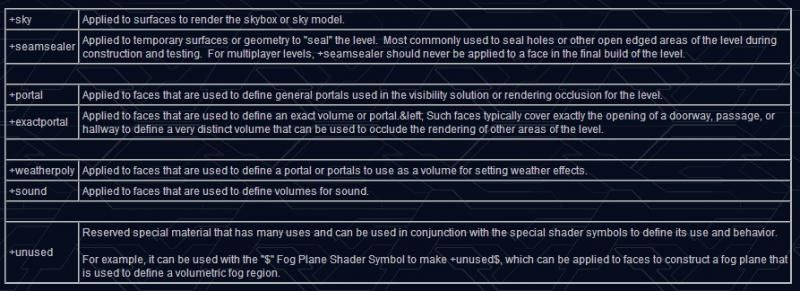 EDIT: just checked c10, works perfectly. Wonderful :D +unused seems interesting as well. Anyone have experience using this to play with fog? Can it allow for the removal of fog in adjacent clusters when you are standing in a cluster with fog enabled? Edited by stunt_man on May 20, 2014 at 12:28 AM |
||||
|
|
|||||
|
rentafence Joined: Dec 4, 2005 
|
Posted: May 21, 2014 09:21 AM
Msg. 7 of 8
The descriptions in the official hek tutorial are incredibly vague. Has anyone tried +weatherpoly yet? I don't understand what they're trying to say. Do you define a cluster using +weather poly and set weather for that cluster?
|
||||
|
|
|||||
|
stunt_man Joined: Sep 22, 2009
GMYF - Now hosting proper MLG gametypes! |
Posted: May 21, 2014 11:21 AM
Msg. 8 of 8
I'm wondering about this too. Does it work like an exact portal or a normal portal? Or neither?
I'm not quite at this point in development of my map, but I might be able to give it a shot tonight, I'll post results here. Edited by stunt_man on May 21, 2014 at 11:22 AM |
||||
|
|
|||||

|
