A Community discussion forum for Halo Custom Edition, Halo 2 Vista, Portal and Halo Machinima
|
 Home
Home Search
 Register
 Login
Login Member List
 Recent Posts
| »Forums Index »Halo Custom Edition (Bungie/Gearbox) »Halo CE General Discussion »Test Map Model Problem | 
|
| Author | Topic: Test Map Model Problem (19 messages, Page 1 of 1) | ||||
| Moderators: Dennis | |||||
 Dumb AI Joined: Sep 18, 2011 
Dead. |
Posted: Dec 19, 2013 07:55 PM
Msg. 1 of 19
inb4 lrn2tutorial...
Okay, my BSP will not not compile. According to Tool, there are quite a few edges that are "red". I can't check the .wrl which makes the problem harder to solve. Apparently, Chimp can do that but Max won't run it and my version of Max can't import wrl. It would be great if someone can help me with this. I will give the max file and the wrl to anyone who would like to check the wrl for me. Edited by Dumb AI on Dec 19, 2013 at 07:56 PM |
||||


|
|||||
|
Hobbet360 Joined: Jan 10, 2012 
ProTools > ToolPro |
Posted: Dec 19, 2013 08:34 PM
Msg. 2 of 19
It's been a while since I did my last model with a collision, "red" as in "open edges" or "couldn't update edge #", I don't remember.
For open edges... Covert it to "editable poly", select the "border" tool, highlight the entire model, press Z. (Z for 3DSMax, E for Gmax) It should zoom you into the open edges. Just seal the mesh where the hole is, then it's all good. For "couldn't update edge #", it's a bit more technical... You would need the .wrl to find it, unless you can find.... a) An edge that Looks absolutely retarded, as in it is folded back on itself. or... b) You joined an extrusion, or another mesh, to the main mesh and forgot to delete the face/s that are unseen. |
||||
|
|
|||||
|
Dumb AI Joined: Sep 18, 2011
Dead. |
Posted: Dec 19, 2013 08:47 PM
Msg. 3 of 19
Quote: --- Original message by: hobbet360 It's been a while since I did my last model with a collision, "red" as in "open edges" or "couldn't update edge #", I don't remember. For open edges... Covert it to "editable poly", select the "border" tool, highlight the entire model, press Z. (Z for 3DSMax, E for Gmax) It should zoom you into the open edges. Just seal the mesh where the hole is, then it's all good. For "couldn't update edge #", it's a bit more technical... You would need the .wrl to find it, unless you can find.... a) An edge that Looks absolutely retarded, as in it is folded back on itself. or... b) You joined an extrusion, or another mesh, to the main mesh and forgot to delete the face/s that are unseen. Can you take a look at the wrl for me? I can't import wrls or use Chimp. |
||||
|
|
|||||
|
Hobbet360 Joined: Jan 10, 2012
ProTools > ToolPro |
Posted: Dec 19, 2013 08:48 PM
Msg. 4 of 19
K
What version of 3DS are you running? If it's not 2010, then I could just export the WRL as a .3DS or .OBJ or something-rather, for you to use. Edited by hobbet360 on Dec 19, 2013 at 08:50 PM |
||||
|
|
|||||
|
Dumb AI Joined: Sep 18, 2011
Dead. |
Posted: Dec 19, 2013 08:53 PM
Msg. 5 of 19
Quote: --- Original message by: hobbet360 K What version of 3DS are you running? If it's not 2010, then I could just export the WRL as a .3DS or .OBJ or something-rather, for you to use. Edited by hobbet360 on Dec 19, 2013 at 08:50 PM Well, that sucks. I use 2010, lol. |
||||
|
|
|||||
|
Hobbet360 Joined: Jan 10, 2012
ProTools > ToolPro |
Posted: Dec 19, 2013 08:55 PM
Msg. 6 of 19
I forgot to say.... if it IS 2010, then I could just fix it and send it back.
 |
||||
|
|
|||||
|
Dumb AI Joined: Sep 18, 2011
Dead. |
Posted: Dec 19, 2013 08:57 PM
Msg. 7 of 19
Quote: --- Original message by: hobbet360 I forgot to say.... if it IS 2010, then I could just fix it and send it back. Oh, I guess everything will work out then. Here: http://www.mediafire.com/download/r4oaxc4i8p8p6yw/box2.wrl Thanks for helping, hobbes. |
||||
|
|
|||||
|
Hobbet360 Joined: Jan 10, 2012
ProTools > ToolPro |
Posted: Dec 19, 2013 09:07 PM
Msg. 8 of 19
I just converted the .wrl to .obj.............
You can buy it here, without batteries. EDIT.... I think OBJ makes things sideways... xP Edited by hobbet360 on Dec 19, 2013 at 09:08 PM EDIT 2 At a guess, this may be the issue... 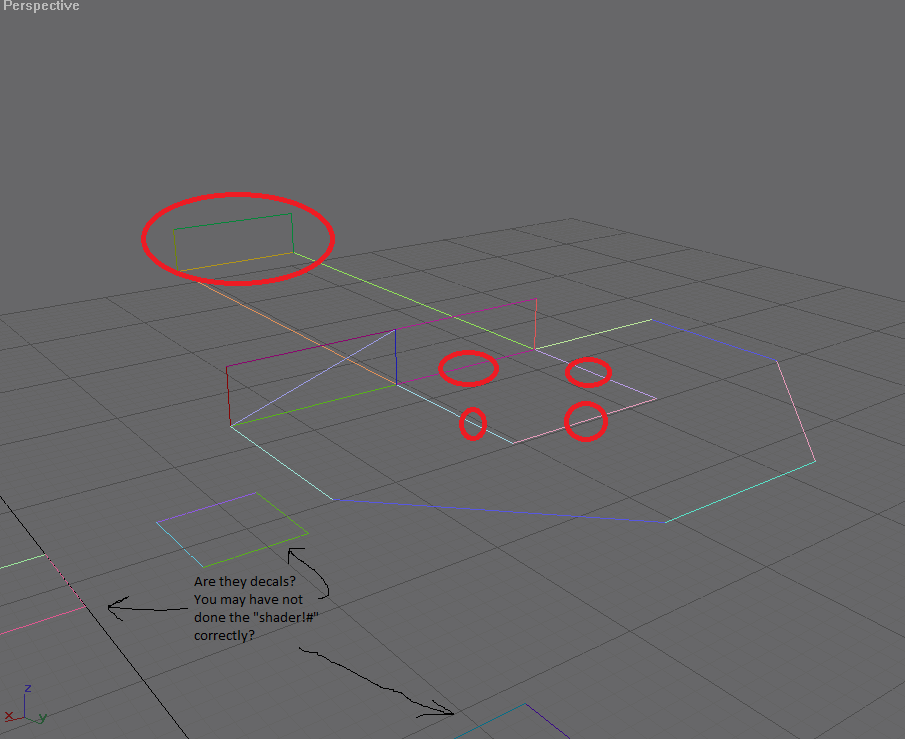 Red circles = maybe the problem? Edited by hobbet360 on Dec 19, 2013 at 09:15 PM |
||||
|
|
|||||
|
Dumb AI Joined: Sep 18, 2011
Dead. |
Posted: Dec 19, 2013 09:36 PM
Msg. 9 of 19
Those aren't decals.
I don't see why the one in the back could be a problem. There is something weird with how I modeled the platform thing there but I don't think that should be a issue. |
||||
|
|
|||||
|
Hobbet360 Joined: Jan 10, 2012
ProTools > ToolPro |
Posted: Dec 19, 2013 09:41 PM
Msg. 10 of 19
By "red" errors, do you mean, "couldn't update edge #" or "open edge #"?
|
||||
|
|
|||||
|
Dumb AI Joined: Sep 18, 2011
Dead. |
Posted: Dec 19, 2013 09:43 PM
Msg. 11 of 19
Quote: --- Original message by: hobbet360 By "red" errors, do you mean, "couldn't update edge #" or "open edge #"? It can't update certain edges. |
||||
|
|
|||||
|
Hobbet360 Joined: Jan 10, 2012
ProTools > ToolPro |
Posted: Dec 19, 2013 09:45 PM
Msg. 12 of 19
coolies, so how did you model the ledge?
extrusion? or modeled it seperately, then attached it to the wall, or something? or the same as the 2nd suggestion, but not attached? |
||||
|
|
|||||
|
Dumb AI Joined: Sep 18, 2011
Dead. |
Posted: Dec 19, 2013 09:48 PM
Msg. 13 of 19
Quote: --- Original message by: hobbet360 coolies, so how did you model the ledge? extrusion? or modeled it seperately, then attached it to the wall, or something? or the same as the 2nd suggestion, but not attached? I started with a plane, with a few dozen vertices. I cloned vertices and then created polygons by connecting them. If you want the max file, I can export it in a gmax-friendly format. Edited by Dumb AI on Dec 19, 2013 at 09:49 PM |
||||
|
|
|||||
|
Hobbet360 Joined: Jan 10, 2012
ProTools > ToolPro |
Posted: Dec 19, 2013 09:59 PM
Msg. 14 of 19
I have 3DSmax 2010, but it could help.
|
||||
|
|
|||||
|
Dumb AI Joined: Sep 18, 2011
Dead. |
Posted: Dec 20, 2013 12:31 AM
Msg. 15 of 19
Quote: --- Original message by: hobbet360 I have 3DSmax 2010, but it could help. Alright, I'll PM you teh model. |
||||
|
|
|||||
|
R93_Sniper Joined: Feb 13, 2011 
When in Doubt, RUN! |
Posted: Dec 20, 2013 01:05 AM
Msg. 16 of 19
i don't understand what you're complaining about not being able to import wrls in 2010. I use 2010 and I import my wrls all the time. I think that you need to just get an extension or plugin for it to accept them though
|
||||
|
|
|||||
|
Jesse Joined: Jan 18, 2009 Discord: Holy Crust#4500 |
Posted: Dec 20, 2013 01:07 AM
Msg. 17 of 19
Sigh. Give me a copy of the model and I'll take a look at it, see if I can do something.
|
||||
|
|
|||||
|
Hobbet360 Joined: Jan 10, 2012
ProTools > ToolPro |
Posted: Dec 20, 2013 03:09 AM
Msg. 18 of 19
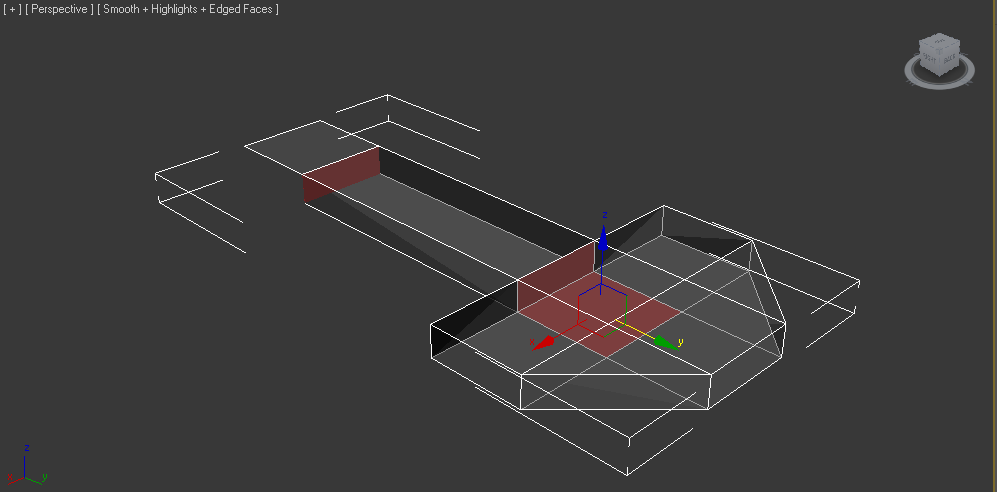 Found the problem. you didn't delete the ends of the boxes. |
||||
|
|
|||||
|
stunt_man Joined: Sep 22, 2009 
GMYF - Now hosting proper MLG gametypes! |
Posted: Dec 22, 2013 02:55 PM
Msg. 19 of 19
About not being able to import .wrl's: this may have to do with the fact you're running a 64-bit version of Max. Some later versions require the 32-bit version for .wrl importing. By the time I had figured this out I'd already given up and just reinstalled max 8 -_-
|
||||
|
|
|||||

|
