A Community discussion forum for Halo Custom Edition, Halo 2 Vista, Portal and Halo Machinima
|
 Home
Home Search
 Register
 Login
Login Member List
 Recent Posts
| »Forums Index »Halo Custom Edition (Bungie/Gearbox) »Halo CE Technical / Map Design »Changing stock spartan biped color via actor_variant | 
|
| Author | Topic: Changing stock spartan biped color via actor_variant (5 messages, Page 1 of 1) | ||||
| Moderators: Dennis | |||||
 game user10 Joined: Dec 9, 2011 
Who is the Overseer? |
Posted: Dec 7, 2013 08:51 AM
Msg. 1 of 5
So I want to change the default spartan biped's color via actor variants. Searching around says that I should change the armor.shader_model "change color" to A, then go to the .biped and change the properties there.
Putting white as lower bound and black as upper bound, with "NONE" in both "darken by" and "scale by", it seems to work, but it blends into different shades of that color. Example: The actor_variant change color value is set to pure blue. 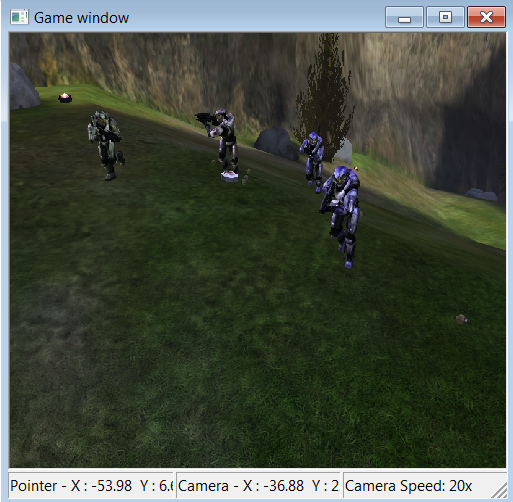 |
||||


|
|||||
|
The Cereal Killer Joined: Mar 18, 2011 
Scripts, AI, cutscenes, ui_widgets, animation. |
Posted: Dec 7, 2013 09:18 AM
Msg. 2 of 5
Set both bounds as the color you want. Why did you only change one?
|
||||
|
|
|||||
|
game user10 Joined: Dec 9, 2011
Who is the Overseer? |
Posted: Dec 7, 2013 10:48 AM
Msg. 3 of 5
I want to be able to set specific colors for actor variants with only one biped.
|
||||
|
|
|||||
|
ZX 707 Joined: Feb 15, 2012 |
Posted: Dec 7, 2013 12:33 PM
Msg. 4 of 5
In the biped tag you want to set Color Change A to "darken by" none, "scale by" none and both lower and upper bound colors to white.
In you actor variant tags at the bottom you select the color you want the biped to be. You can now have multiple actor variants with different colors and only one biped. |
||||
|
|
|||||
|
game user10 Joined: Dec 9, 2011
Who is the Overseer? |
Posted: Dec 7, 2013 07:44 PM
Msg. 5 of 5
Okay it works now, my mistake was only setting the color for lower bound in the actor variant. Thanks.
|
||||
|
|
|||||

|
