A Community discussion forum for Halo Custom Edition, Halo 2 Vista, Portal and Halo Machinima
|
 Home
Home Search
 Register
 Login
Login Member List
 Recent Posts
| »Forums Index »Halo Custom Edition (Bungie/Gearbox) »Halo CE General Discussion »tag help | 
|
| Author | Topic: tag help (7 messages, Page 1 of 1) | ||||
| Moderators: Dennis | |||||
 LS NICOLAS Joined: Mar 25, 2013 
|
Posted: Dec 1, 2013 07:55 PM
Msg. 1 of 7
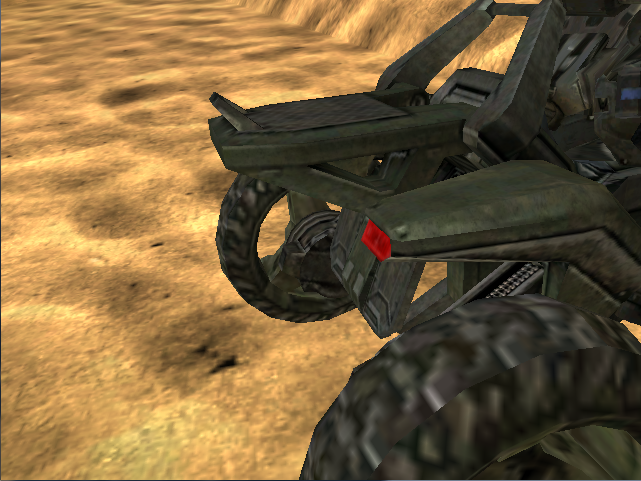
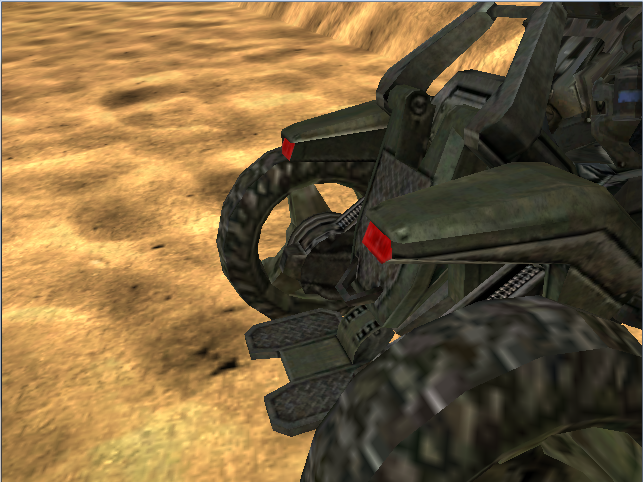
first hello and the next is to ask someone how to save the effect or whatever the map moongose [ODST] upliftreserve ask is that if I leave here some photos
  |
||||


|
|||||
|
H2 Joined: Dec 1, 2013 
Mexicans aren't real people. |
Posted: Dec 1, 2013 08:16 PM
Msg. 2 of 7
Can you say again? I don't understand.
|
||||
|
|
|||||
|
LS NICOLAS Joined: Mar 25, 2013
|
Posted: Dec 1, 2013 08:39 PM
Msg. 3 of 7
in the map [ODST]upliftreserve while it is mounted on the mongoose and if the ctrl key is pressed the back saver as moves would do that to implement it in another vehicle
|
||||
|
|
|||||
|
H2 Joined: Dec 1, 2013
Mexicans aren't real people. |
Posted: Dec 1, 2013 08:43 PM
Msg. 4 of 7
To make it work for another vehicle put the vehicle in 3ds max and animate it. Good luck.
|
||||
|
|
|||||
|
LS NICOLAS Joined: Mar 25, 2013
|
Posted: Dec 1, 2013 08:54 PM
Msg. 5 of 7
but which name do I put animation and as configured to only activate by pressing a keyboard button
|
||||
|
|
|||||
|
H2 Joined: Dec 1, 2013
Mexicans aren't real people. |
Posted: Dec 1, 2013 09:07 PM
Msg. 6 of 7
Get the animation importer extension (idk where to download i forgot) and import the mongoose animations until you find the one you need. Write down the name and put it on your vehicles animations.
|
||||
|
|
|||||
|
LS NICOLAS Joined: Mar 25, 2013
|
Posted: Dec 1, 2013 09:18 PM
Msg. 7 of 7
no pos wow that would have done it myself I just wanted something ams saver in the background and also the map is locked
|
||||
|
|
|||||

|
