A Community discussion forum for Halo Custom Edition, Halo 2 Vista, Portal and Halo Machinima
|
 Home
Home Search
 Register
 Login
Login Member List
 Recent Posts
| »Forums Index »Halo Custom Edition (Bungie/Gearbox) »Halo CE General Discussion »How do i script hud icons to appear? | 
|
| Author | Topic: How do i script hud icons to appear? (9 messages, Page 1 of 1) | ||||
| Moderators: Dennis | |||||
 grunt_eater Joined: Jan 26, 2011 
Everything except biped rigging. |
Posted: Dec 29, 2012 11:53 AM
Msg. 1 of 9
So i have these emoticon icons
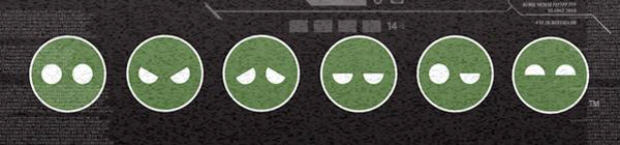 that i cleaned up a little bit, and i wanted to set it up so that i could make them appear, and disappear, on the players screen at my will with a script. Or is that even possible? that i cleaned up a little bit, and i wanted to set it up so that i could make them appear, and disappear, on the players screen at my will with a script. Or is that even possible? If i can get the appearing and disappearing then i can set up the rest so that it switches out the emotions when i need it to. Thanks for anything you can offer, guys :) ~Noms. |
||||


|
|||||
|
kirby_422 Joined: Jan 22, 2006 
Apparently public enemy number 1? |
Posted: Dec 29, 2012 01:16 PM
Msg. 2 of 9
Make it a font, then write it to the screen in anyway you choose (cinematic title, print, sv_say, etc)
I'm assuming you don't want it as a reticle that you toggle on and off, especially since you would only have one, unless you use health as one, shield as another, motion sensor as another, and reticle as last. Then you could have 4.. of course that completely screws with the player *shrug* Otherwise, OpenSauce, and make a postprocess just about writing the bitmap to the screen. |
||||
|
|
|||||
|
MoooseGuy Joined: Aug 10, 2008 
I Approve This Message. |
Posted: Dec 29, 2012 01:56 PM
Msg. 3 of 9
Yeah, if you don't have OS on this map, the best way would be to make those the font characters in place of special symbols (like #%^*+=). Then just use those symbols in a cinematic title.
|
||||
|
|
|||||
|
grunt_eater Joined: Jan 26, 2011
Everything except biped rigging. |
Posted: Dec 29, 2012 08:47 PM
Msg. 4 of 9
awesome, guys. Though i'm having some trouble finding out how to make custom fonts. Could someone hook me up with a tutorial\walk through? Thanks for everything, guys.
|
||||
|
|
|||||
|
Masters1337 Joined: Mar 5, 2006 
halonaminator's unfortunate idol |
Posted: Dec 29, 2012 08:48 PM
Msg. 5 of 9
You wont find any in the HCE community, but there's plenty of them elsewhere. Once you have a font file, you just run it through tool
|
||||
|
|
|||||
|
Btcc22 Joined: Dec 17, 2012 |
Posted: Dec 29, 2012 09:33 PM
Msg. 6 of 9
Cleaned them up...I mean remade them for you. ;)
 Clicky here for the high res PNG (with alpha) versions and PSD. Edited by Btcc22 on Dec 29, 2012 at 09:41 PM |
||||
|
|
|||||
|
grunt_eater Joined: Jan 26, 2011
Everything except biped rigging. |
Posted: Dec 29, 2012 10:35 PM
Msg. 7 of 9
Lol, i'd already done that, but thank you :)
PS: I'm guessing i make a huge long bitmap and separate it by blue lines, then inside of each of the boxes i add a symbol? one for each symbol on the keyboard? Then run it through tool as a font? I've never done this :/ |
||||
|
|
|||||
|
ZX 707 Joined: Feb 15, 2012 |
Posted: Dec 30, 2012 01:14 AM
Msg. 8 of 9
You don't make fonts like you do bitmaps.
You are going to have to make a font file like the ones used for the computer and then use the tool command windows-font, then select the font and size. Look here http://forums.gearboxsoftware.com/showthread.php?p=982187#post982187 |
||||
|
|
|||||
|
grunt_eater Joined: Jan 26, 2011
Everything except biped rigging. |
Posted: Dec 30, 2012 07:50 PM
Msg. 9 of 9
Okay, excellent. Now all i need to be able to do is extract the halo font so i can edit it and re compile it. Can anyone hook me up with that? i've been searching high and low and can't manage to figure this one out either :/
|
||||
|
|
|||||

|
