A Community discussion forum for Halo Custom Edition, Halo 2 Vista, Portal and Halo Machinima
|
 Home
Home Search
 Register
 Login
Login Member List
 Recent Posts
| »Forums Index »Halo Custom Edition (Bungie/Gearbox) »Halo CE General Discussion »A question about model errors. | 
|
| Author | Topic: A question about model errors. (7 messages, Page 1 of 1) | ||||
| Moderators: Dennis | |||||
 Nickster5000 Joined: Dec 11, 2010 
|
Posted: Dec 23, 2012 11:48 PM
Msg. 1 of 7
Hey guys,
I've been trying to get a model in game for quite a while now, but I keep getting this error in different places: "### ERROR couldn't build bsp because of overlapping surfaces (orange). ### ERROR couldn't build bsp2d. ### ERROR couldn't build leaf. ### WARNING found nearly coplanar surfaces (red and green). ### ERROR failed to import collision bsp." I'm currently stuck in one location, and can't seem to fix it. I also checked this handy refrence: 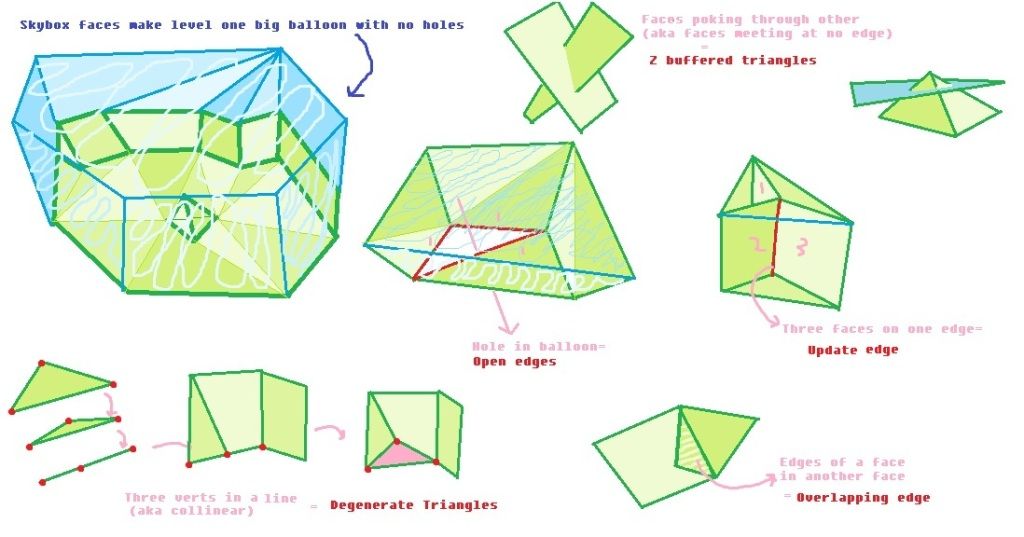 And it doesn't show examples of overlapping surfaces, unless it's called something differently... and I'm just that blind. So, I am asking you guys if you could show / explain examples about overlapping surfaces.... pretty please with a cherry on top? Thanks in advance! Edited by ODST_Nick on Dec 23, 2012 at 11:50 PM |
||||


|
|||||
|
ally Joined: Jun 23, 2010 
Aye Ready |
Posted: Dec 24, 2012 03:43 AM
Msg. 2 of 7
http://videobam.com/gcWEm
in the video watch as the vert is moved, this creates one of the ways an overlapping surface orange is created. also for example a decal touching the geometry can cause this error too. edit: forgot your other error.  that basically shows a coplanar. so that could be 2 sealed areas touching. Edited by ally on Dec 24, 2012 at 04:13 AM |
||||
|
|
|||||
|
Nickster5000 Joined: Dec 11, 2010
|
Posted: Dec 24, 2012 04:38 AM
Msg. 3 of 7
I don't really mind the coplanar error... thanks for that btw.
As for the Orange surfaces... I move all the affected verticies in all directions... I don't get that. I'll take a video later today; Even Hiralis tried to help and he was stumped. Thanks for your reply. |
||||
|
|
|||||
|
eliteslasher Joined: Jun 30, 2008 
Crysis 3!!!!!!! All I have to say. :D |
Posted: Dec 24, 2012 04:50 AM
Msg. 4 of 7
my guess is you cloned a face to an exact point then welded the verts. I have made that mistake a few times and it has caused me some issues have you tried just completely rebuilding the surrounding mesh?
|
||||
|
|
|||||
|
Nickster5000 Joined: Dec 11, 2010
|
Posted: Dec 24, 2012 11:40 AM
Msg. 5 of 7
Quote: --- Original message by: eliteslasher my guess is you cloned a face to an exact point then welded the verts. I have made that mistake a few times and it has caused me some issues have you tried just completely rebuilding the surrounding mesh? Yep. I have a new solution that I am going to try since this model is realitively modular. Thanks for your reply. |
||||
|
|
|||||
|
OpsY Joined: Feb 19, 2007 
Frobisher Bay |
Posted: Dec 24, 2012 11:51 AM
Msg. 6 of 7
have you managed to find exactly where the overlap is? To do so, import your WRL and check/delete 1 by 1 the entries until you stumble on something orange. There are easier methods but I guess you've already attempted these. Once you've found the faulty face, fix it, either by deleting and remodeling. Do something you're sure will work then work your way to something better from there.
|
||||
|
|
|||||
|
Nickster5000 Joined: Dec 11, 2010
|
Posted: Dec 24, 2012 01:15 PM
Msg. 7 of 7
Quote: --- Original message by: OpsY have you managed to find exactly where the overlap is? To do so, import your WRL and check/delete 1 by 1 the entries until you stumble on something orange. There are easier methods but I guess you've already attempted these. Once you've found the faulty face, fix it, either by deleting and remodeling. Do something you're sure will work then work your way to something better from there. I have found the place, and have re-worked the mesh about 10 times. I even scraped it and moved the non-complaining modular mesh to replace it. Thanks for the reply btw. Edited by ODST_Nick on Dec 24, 2012 at 01:15 PM I think I found my problem. I started the original model in max 13, and exported it to 8 in a 3ds format. If I can recall, the last time I did that spawned alot of errors, so I am going to try using obj this time, and see where that leads me. Edited by ODST_Nick on Dec 24, 2012 at 01:37 PM |
||||
|
|
|||||

|
