A Community discussion forum for Halo Custom Edition, Halo 2 Vista, Portal and Halo Machinima
|
 Home
Home Search
 Register
 Login
Login Member List
 Recent Posts
| »Forums Index »Halo Custom Edition (Bungie/Gearbox) »Halo CE General Discussion »To all you people who like to diddle with SP maps and AI.... | 
|
| Author | Topic: To all you people who like to diddle with SP maps and AI.... (29 messages, Page 1 of 1) | ||||
| Moderators: Dennis | |||||
 Masters1337 Joined: Mar 5, 2006 
halonaminator's unfortunate idol |
Posted: Oct 23, 2012 12:09 AM
Msg. 1 of 29
This might be your lucky day.
Earlier today, as what is believe to be a result of this,  this happened,  and then this later, when I tried spawning AI tags that were modified with a new OS feature (don't worry, this is already on it's way to being fixed) 10.22.12 23:36:39 EAX: 0x00000001 10.22.12 23:36:39 EBX: 0x0D3D0001 10.22.12 23:36:39 ECX: 0x00000000 10.22.12 23:36:39 EDX: 0x00000000 10.22.12 23:36:39 EDI: 0x0018E1B8 10.22.12 23:36:39 ESI: 0x00000000 10.22.12 23:36:39 EBP: 0x0018E090 10.22.12 23:36:39 ESP: 0x0018E080 10.22.12 23:36:39 EIP: 0x77600C22, 83 C4 04 C2 ????? 10.22.12 23:36:39 EXCEPTION halt in \halopc\haloce\source\units\units.c,#8284: (grenade_type >= 0) && (grenade_type < NUMBER_OF_UNIT_GRENADE_TYPES) which crashed Sapien. So I reopened Sapien, to find something horrible had happened, which was this.  What we all must determine, is if this  is responsible for firing points being alphabetically marked, and how it was somehow enabled, either by him or me this morning. I realize this thread makes no sense if you've never played with AI in CE..... in that event, you can just comment on my kitten. Edited by Masters1337 on Oct 23, 2012 at 12:11 AM |
||||


|
|||||
|
The Lodeman Joined: Sep 16, 2012 
Hipster Lodeman: Enjoyed goats before it was cool. |
Posted: Oct 23, 2012 12:30 AM
Msg. 2 of 29
Alphabetically marked firing positions. Absolutely astonishing. Amazing!
Can't believe this is possible OMG! |
||||
|
|
|||||
|
Ki11erFTW Joined: Jul 4, 2009 
You've seen nothing yet. |
Posted: Oct 23, 2012 12:44 AM
Msg. 3 of 29
I'm confused.. Alphabetically marked Firing positions are needed in the normal version of Halo, for ai to follow, etc.
Edited by Ki11erFTW on Oct 23, 2012 at 12:47 AM |
||||
|
|
|||||
|
ally Joined: Jun 23, 2010 
Aye Ready |
Posted: Oct 23, 2012 12:51 AM
Msg. 4 of 29
health pack idea for that map:
:) |
||||
|
|
|||||
|
Masters1337 Joined: Mar 5, 2006
halonaminator's unfortunate idol |
Posted: Oct 23, 2012 12:58 AM
Msg. 5 of 29
Quote: --- Original message by: Ki11erFTW I'm confused.. Alphabetically marked Firing positions are needed in the normal version of Halo, for ai to follow, etc. Edited by Ki11erFTW on Oct 23, 2012 at 12:47 AM Yes, but they are never identified in sapien unless you click on them, at best they can sometimes be assigned a color, although for me most of the time they are black squares. Having their assigned Alphabeticle value hovering above them makes things so much easiest, especially for encounters that use a large amount of them. |
||||
|
|
|||||
|
Masters1337 Joined: Mar 5, 2006
halonaminator's unfortunate idol |
Posted: Oct 23, 2012 01:05 AM
Msg. 6 of 29
I don't believe so, if it is it's an accidental one.
|
||||
|
|
|||||
|
The Lodeman Joined: Sep 16, 2012
Hipster Lodeman: Enjoyed goats before it was cool. |
Posted: Oct 23, 2012 01:08 AM
Msg. 7 of 29
Quote: --- Original message by: Masters1337 Quote: --- Original message by: Ki11erFTW I'm confused.. Alphabetically marked Firing positions are needed in the normal version of Halo, for ai to follow, etc. Edited by Ki11erFTW on Oct 23, 2012 at 12:47 AM Yes, but they are never identified in sapien unless you click on them, at best they can sometimes be assigned a color, although for me most of the time they are black squares. Having their assigned Alphabeticle value hovering above them makes things so much easiest, especially for encounters that use a large amount of them. They can ALWAYS be assigned a color. I've used them extensively and have never had identifier problems with them. Hovering letters could be handy for some people that are color blind. But starting a new thread over such a minor "feature" LMAO. It's nothing special. You're thread's are great. |
||||
|
|
|||||
|
Masters1337 Joined: Mar 5, 2006
halonaminator's unfortunate idol |
Posted: Oct 23, 2012 01:12 AM
Msg. 8 of 29
Um, in the viewfinder they don't always display their color, which is why labels would be a breath of fresh air and make things a lot simpler and easier. Do yours always display their assigned color in the viewfinder?
|
||||
|
|
|||||
|
Higuy Joined: Mar 6, 2007 
@lucasgovatos |
Posted: Oct 23, 2012 06:14 AM
Msg. 9 of 29
Unless your retarded it isn't that hard to keep track of what markers are what. Your energy could have easily been put somewhere else.
|
||||
|
|
|||||
|
Kal825B Joined: Jan 16, 2012 
Last son of Krypt... Oh wait, i'm a clone. |
Posted: Oct 23, 2012 07:10 AM
Msg. 10 of 29
Quote: --- Original message by: Higuy Unless your retarded it isn't that hard to keep track of what markers are what. Your energy could have easily been put somewhere else. Maybe, but if your a simpleton like me, wouldn't you need this too... |
||||
|
|
|||||
|
Dumb AI Joined: Sep 18, 2011 
Dead. |
Posted: Oct 23, 2012 10:26 AM
Msg. 11 of 29
I'll never find a use for this,seeing how I just randomly place positions everywhere on the area of combat.
|
||||
|
|
|||||
|
Masters1337 Joined: Mar 5, 2006
halonaminator's unfortunate idol |
Posted: Oct 23, 2012 10:39 AM
Msg. 12 of 29
Well, then you're doing it wrong, and this would be helpful to you >_>.
This is extremely helpful if you are working on complex encounters, where you want strict control over ai movement and migration, especially those for large open environments. |
||||
|
|
|||||
|
The Lodeman Joined: Sep 16, 2012
Hipster Lodeman: Enjoyed goats before it was cool. |
Posted: Oct 23, 2012 11:15 AM
Msg. 13 of 29
Quote: --- Original message by: Masters1337 Well, then you're doing it wrong, and this would be helpful to you >_>. This is extremely helpful if you are working on complex encounters, where you want strict control over ai movement and migration, especially those for large open environments. Another great strategy is to spam brutes over these large open environments. |
||||
|
|
|||||
|
Dennis  Joined: Jan 27, 2005 
"We are made of starstuff.” ― Carl Sagan |
Posted: Oct 23, 2012 12:36 PM
Msg. 14 of 29
Quote: --- Original message by: Masters1337 It has no place in this forum.in that event, you can just comment on my kitten. |
||||
|
|
|||||
|
Dumb AI Joined: Sep 18, 2011
Dead. |
Posted: Oct 23, 2012 06:09 PM
Msg. 15 of 29
Delicon would never find any wrong with it,since he likes chaotic battles so much.
|
||||
|
|
|||||
|
Corvette19 Joined: Feb 27, 2007 
|
Posted: Oct 24, 2012 12:16 AM
Msg. 16 of 29
Quote: --- Original message by: The Lodeman You're thread's are great. Masterz is thread's great so it seems. |
||||
|
|
|||||
|
RecycleBin1337 Joined: Oct 24, 2012 
♥ |
Posted: Oct 24, 2012 09:42 AM
Msg. 17 of 29
Cool I guess
|
||||
|
|
|||||
|
ptowery Joined: Aug 28, 2007 
oify |
Posted: Oct 25, 2012 05:37 PM
Msg. 18 of 29
Try every key combination, it's probably a hotkey.
then try them with ctrl+* then alt+* then shift+* then ctrl+shift+* and so on until they come back. |
||||
|
|
|||||
|
The Cereal Killer Joined: Mar 18, 2011 
Scripts, AI, cutscenes, ui_widgets, animation. |
Posted: Oct 26, 2012 08:37 PM
Msg. 19 of 29
There's probably a console command to activate it. I doubt that a hotkey exists without a concrete command. I've got the full list of commands that sapien will accept, but I haven't had the patience to test every single one. Here it is if you want to take a look for yourself: http://www.mediafire.com/view/?9bf1zc41u6uylw2
Also I'm the one who alphabetized it and cut out all of the garbage phrases that were put in there. Took a good hour and a half, but that was months ago... you're welcome. Higuy/Lode give him a break. I've had the identical problem that he's describing - all firing positions turn black in game view. Edited by The Cereal Killer on Oct 26, 2012 at 08:40 PM |
||||
|
|
|||||
|
ptowery Joined: Aug 28, 2007
oify |
Posted: Oct 26, 2012 09:02 PM
Msg. 20 of 29
Can you put it on pastebin?
|
||||
|
|
|||||
|
Masters1337 Joined: Mar 5, 2006
halonaminator's unfortunate idol |
Posted: Oct 26, 2012 09:23 PM
Msg. 21 of 29
I'm pretty sure it wasn't a command I used, nor that my kitten can script. Useful list though, I've been wanting something like that for a while., so major kudos to you! I'm leaning towards this being a hotkey, hopefully when Kornman returns he will be able to find it, as he has to do some OS upgrades to sapien anyway.
Edited by Masters1337 on Oct 26, 2012 at 09:26 PM |
||||
|
|
|||||
|
The Cereal Killer Joined: Mar 18, 2011
Scripts, AI, cutscenes, ui_widgets, animation. |
Posted: Oct 26, 2012 10:33 PM
Msg. 22 of 29
Mediafire reads text files like Pastebin. Just click the link and you'll see.
Quote: --- Original message by: Masters1337 No, you misunderstand me; I don't mean an ai command list. I'm saying I have a list of all the console commands that Sapien will accept, and there is probably a command to activate what you saw.I'm pretty sure it wasn't a command I used, nor that my kitten can script. Useful list though, I've been wanting something like that for a while., so major kudos to you! I'm leaning towards this being a hotkey, hopefully when Kornman returns he will be able to find it, as he has to do some OS upgrades to sapien anyway. Edited by Masters1337 on Oct 26, 2012 at 09:26 PM |
||||
|
|
|||||
|
Dumb AI Joined: Sep 18, 2011
Dead. |
Posted: Oct 26, 2012 10:36 PM
Msg. 23 of 29
Hm,I'll look into it.
Possible commands ai_render_firing_positions ai_fix_defending_guard_firing_positions render_model_markers Edited by Dumb AI on Oct 26, 2012 at 10:43 PM |
||||
|
|
|||||
|
Masters1337 Joined: Mar 5, 2006
halonaminator's unfortunate idol |
Posted: Oct 26, 2012 10:39 PM
Msg. 24 of 29
I got what you mean, I just never used console to do anything to activate it. My console is partially broken due to a new OS feature korn is currently fixing.
|
||||
|
|
|||||
|
Dumb AI Joined: Sep 18, 2011
Dead. |
Posted: Oct 26, 2012 10:44 PM
Msg. 25 of 29
OK,here's what could be the command to activate that neat labeling.
ai_render_firing_positions ai_fix_defending_guard_firing_positions render_model_markers EDIT:Nope,1st doesn't seem to do much.2nd one updates AI positions and the 3rd shows the markers for lens flares and models. Edited by Dumb AI on Oct 26, 2012 at 10:48 PM |
||||
|
|
|||||
|
XlzQwerty1 Joined: Aug 6, 2009 
|
Posted: Oct 26, 2012 11:26 PM
Msg. 26 of 29
Oh my gawsh, lens flare markers, I'll need that, thanks ofr the command bro
|
||||
|
|
|||||
|
The Cereal Killer Joined: Mar 18, 2011
Scripts, AI, cutscenes, ui_widgets, animation. |
Posted: Oct 27, 2012 12:19 AM
Msg. 27 of 29
Quote: --- Original message by: Masters1337 :|I got what you mean, I just never used console to do anything to activate it. My console is partially broken due to a new OS feature korn is currently fixing. What I'm saying is that, I understand you didn't use the console to activate it and that it was probably a hotkey, but for every hotkey there is usually a regular command. I went through a little of the list myself. Didn't find the one that does what you showed, but I still managed to have some fun. 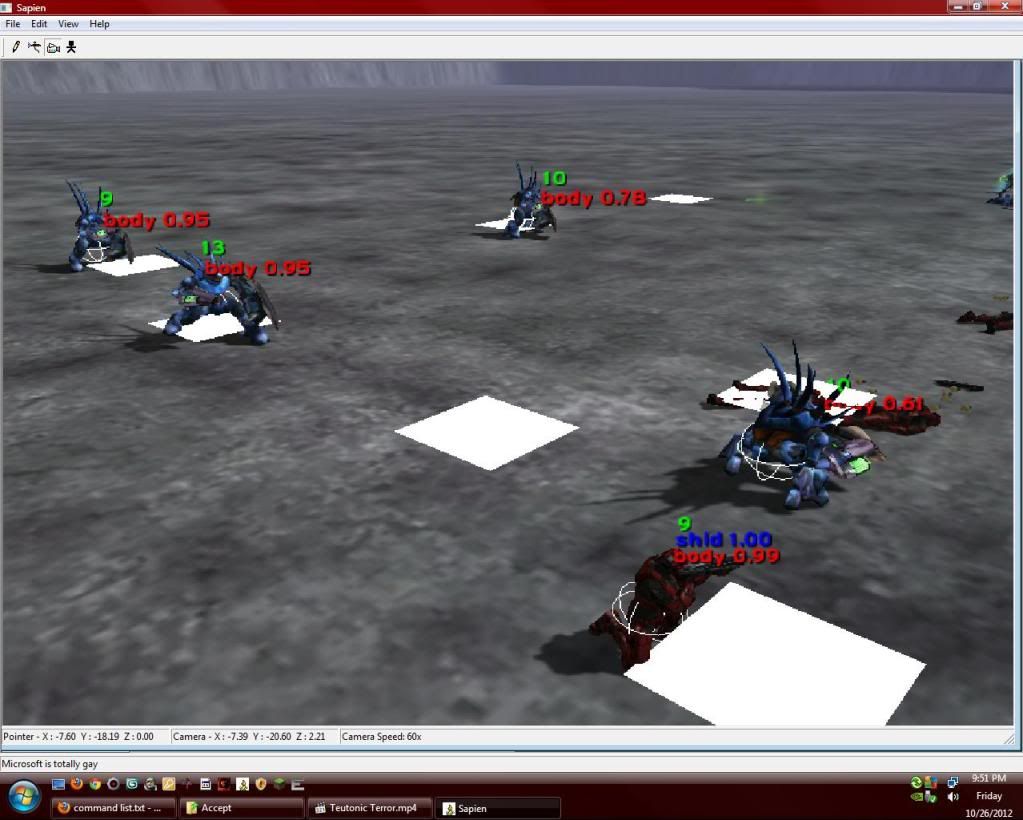 |
||||
|
|
|||||
|
Masters1337 Joined: Mar 5, 2006
halonaminator's unfortunate idol |
Posted: Oct 27, 2012 12:23 AM
Msg. 28 of 29
Oh alright, I get what you mean. That's a cool command above, which one is it? With OS's updates I want to see if that will run ingame.
|
||||
|
|
|||||
|
The Cereal Killer Joined: Mar 18, 2011
Scripts, AI, cutscenes, ui_widgets, animation. |
Posted: Oct 27, 2012 12:31 AM
Msg. 29 of 29
I had about a dozen active at the time, but I'm guessing you mean the one that shows their health/shield. That would be this:
ai_render_vitality You have to select an encounter to get any of those "render" commands to show up. Most only show up for the encounter you've selected. Encounters can be selected with the 'ai_select <encounter>' command in the console, but more commonly using F2 and F3 to cycle forward and backward in the list of encounters. F4 will select individual actors once you have an encounter selected. Edited by The Cereal Killer on Oct 27, 2012 at 12:35 AM |
||||
|
|
|||||

|
