A Community discussion forum for Halo Custom Edition, Halo 2 Vista, Portal and Halo Machinima
|
 Home
Home Search
 Register
 Login
Login Member List
 Recent Posts
| »Forums Index »Halo Custom Edition (Bungie/Gearbox) »Halo CE General Discussion »cinematic help | 
|
| Author | Topic: cinematic help (7 messages, Page 1 of 1) | ||||
| Moderators: Dennis | |||||
 Hobbet360 Joined: Jan 10, 2012 
ProTools > ToolPro |
Posted: Sep 30, 2012 10:37 AM
Msg. 1 of 7
I am working on a single player campaign and im trying to get cutscene animations to run smoothly and make my own but so far its not working so well, any input?
|
||||


|
|||||
|
Higuy Joined: Mar 6, 2007 
@lucasgovatos |
Posted: Sep 30, 2012 10:38 AM
Msg. 2 of 7
What exactly isn't working?
|
||||
|
|
|||||
|
Hobbet360 Joined: Jan 10, 2012
ProTools > ToolPro |
Posted: Sep 30, 2012 10:39 AM
Msg. 3 of 7
custom animations.
Edited by hobbet360 on Sep 13, 2037 at 63:61 pm Edited by hobbet360 on Sep 54, 2098 at 10:40 AM Edited by hobbet360 on Sep 97, 2061 at 10:40 AM Edited by hobbet360 on Sep 30, 2012 at 10:53 AM |
||||
|
|
|||||
|
MatthewDratt Joined: Sep 11, 2010 
TAKEDOWN IS OUT MattDratt.com |
Posted: Sep 30, 2012 11:21 AM
Msg. 4 of 7
You need to be more specific with your problem. Exactly what you are doing, what you expect to happen, what is happening, any debug errors, ect...
Check to see if the nodelist checksum count is the same number in both the model and the animation you're using. If not use Kornman's guerilla to change it |
||||
|
|
|||||
|
Hobbet360 Joined: Jan 10, 2012
ProTools > ToolPro |
Posted: Oct 2, 2012 12:25 AM
Msg. 5 of 7
well, to put in detail, i make an animation for a cutscene (eg. a pelican ride) and when i compile it ingame the pelican will animate on the spot without moving.
im using gmax as seen here 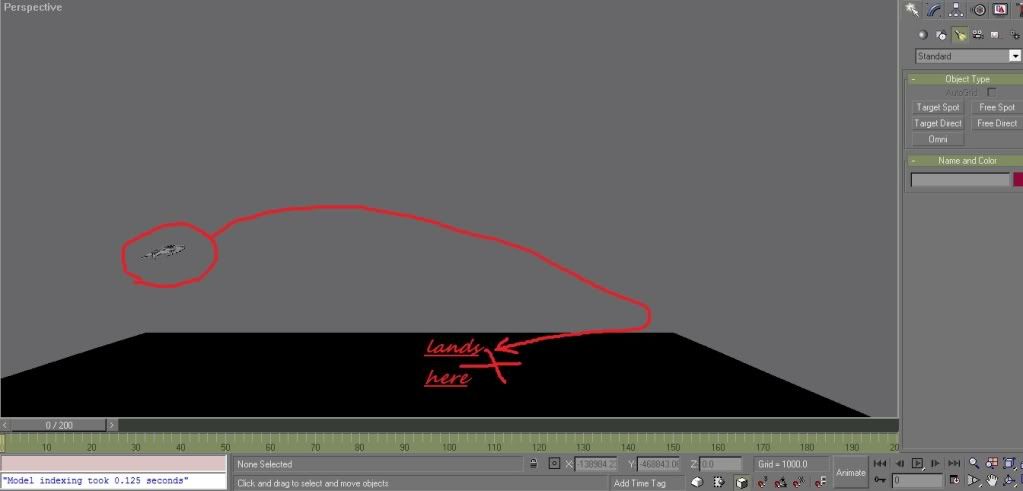 but when i export it (using cad animation exporter), compile it with tool and put it in game the pelican wont move where i mad it move but instead just sit there animating on the spot. |
||||
|
|
|||||
|
MoooseGuy Joined: Aug 10, 2008 
I Approve This Message. |
Posted: Oct 2, 2012 01:42 AM
Msg. 6 of 7
Export the animation as a .jmw (jm-world-relative) and compile it that way.
|
||||
|
|
|||||
|
MatthewDratt Joined: Sep 11, 2010
TAKEDOWN IS OUT MattDratt.com |
Posted: Oct 2, 2012 10:09 PM
Msg. 7 of 7
jmm would also work. You could just go in and check the world relative checkbox
|
||||
|
|
|||||

|
