A Community discussion forum for Halo Custom Edition, Halo 2 Vista, Portal and Halo Machinima
|
 Home
Home Search
 Register
 Login
Login Member List
 Recent Posts
| »Forums Index »Halo Custom Edition (Bungie/Gearbox) »Halo CE Technical / Map Design »to many actors? | 
|
| Author | Topic: to many actors? (10 messages, Page 1 of 1) | ||||
| Moderators: Dennis | |||||
 Recon_Sniper_4 Joined: Jun 2, 2009 
Take down what once was a great power. |
Posted: Jun 11, 2012 04:17 PM
Msg. 1 of 10
ok i forget how to fix the to many actors on scene because i quit using 3ds max and started using gmax and forget how to fix he actors on scene error.
help? Edit: heres a photo to show what i am talking about. 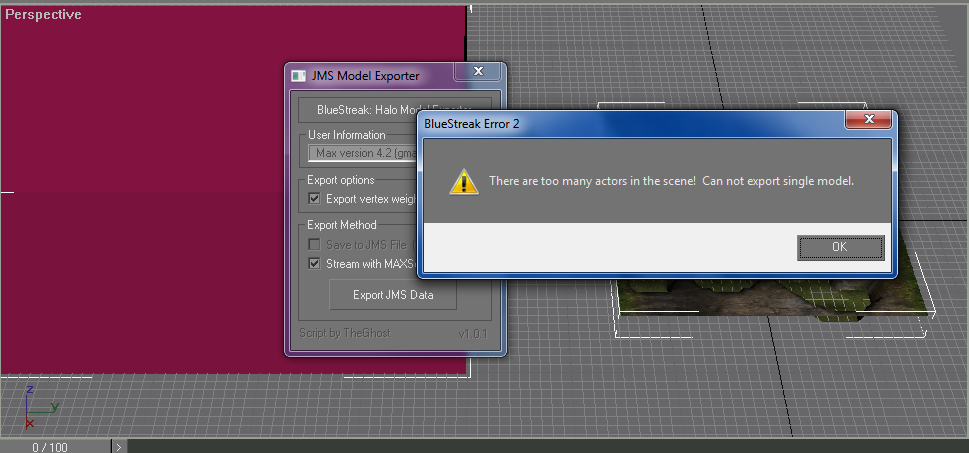 Edited by Recon_Sniper_4 on Jun 11, 2012 at 04:36 PM |
||||


|
|||||
|
ally Joined: Jun 23, 2010 
Aye Ready |
Posted: Jun 11, 2012 04:59 PM
Msg. 2 of 10
has been a while since i had that error so had to google just to be sure,
there is a poly/polys without a material/texture. an old post from kirby, because i don't use bluestreak to retest it lol (Since your using bluestreak, everything needs to be done with a multimaterial). |
||||
|
|
|||||
|
Recon_Sniper_4 Joined: Jun 2, 2009
Take down what once was a great power. |
Posted: Jun 11, 2012 05:03 PM
Msg. 3 of 10
how can i use multi material so i can export because i keep getting the standard material exporting error which i never had the problem before but now im getting it and its driving me crazy because i just want these stupid things exported so i can start working on them.
Edited by Recon_Sniper_4 on Jun 11, 2012 at 08:31 PM |
||||
|
|
|||||
|
ally Joined: Jun 23, 2010
Aye Ready |
Posted: Jun 11, 2012 09:31 PM
Msg. 4 of 10
didn't see your edit earlier.
click on a new sphere, click standard then click on multi sub object and click okay. now you see the list of multi materials. you can add a texture path on each one of them to allow more materials/textures on a single sphere. edit: got your pm, here's the vid. http://www63.zippyshare.com/v/57118565/file.html Edited by ally on Jun 12, 2012 at 04:42 AM |
||||
|
|
|||||
|
Recon_Sniper_4 Joined: Jun 2, 2009
Take down what once was a great power. |
Posted: Jun 18, 2012 09:55 PM
Msg. 5 of 10
hey now i get an no actor thing and now im using 3ds max 8 and i used multi material and still got an error "No actors export failed."
|
||||
|
|
|||||
|
rerout343 Joined: Aug 7, 2010 
Targeted and Firing |
Posted: Jun 18, 2012 10:14 PM
Msg. 6 of 10
Really? No one else picked up on this? Just like with gbxmodels, the bsp has to be linked to a node. Just create a sphere or box somewhere and give it a name like "frame bsp" or something like that. Last just link your bsp to it and it should work unless there are still other problems to fix.
|
||||
|
|
|||||
|
ally Joined: Jun 23, 2010
Aye Ready |
Posted: Jun 19, 2012 02:01 AM
Msg. 7 of 10
i honestly expected the op to have linked the map to the frame object, as the frame box is in the image.
|
||||
|
|
|||||
|
rerout343 Joined: Aug 7, 2010
Targeted and Firing |
Posted: Jun 19, 2012 08:37 AM
Msg. 8 of 10
I didn't even notice that in the screen shot. My guess is that either the model is not linked or the node isn't named right. Another possibility is that the BSP's top modifier is something other than editable mesh but I think that causes a different error, although I'm not 100% sure about that.
|
||||
|
|
|||||
|
Recon_Sniper_4 Joined: Jun 2, 2009
Take down what once was a great power. |
Posted: Jun 27, 2012 11:12 PM
Msg. 9 of 10
i have them linked and everytime now i get a no actor or an to many actor error i havent had this problem before even before i used multi-material.
|
||||
|
|
|||||
|
G_Maverick Joined: Apr 30, 2012 
Half the world has an IQ below 100. |
Posted: Jul 11, 2012 08:02 AM
Msg. 10 of 10
You have to make one of the actors the main actor and set the other actors to be children of it in the hierarchy view. Go to select object by list and click each object to make them children of the same main object.
|
||||
|
|
|||||

|
