A Community discussion forum for Halo Custom Edition, Halo 2 Vista, Portal and Halo Machinima
|
 Home
Home Search
 Register
 Login
Login Member List
 Recent Posts
| »Forums Index »Halo Custom Edition (Bungie/Gearbox) »Halo CE Technical / Map Design »Water wont show correctly | 
|
| Author | Topic: Water wont show correctly (4 messages, Page 1 of 1) | ||||
| Moderators: Dennis | |||||
 jawa Joined: Jun 26, 2011 
Utinni! |
Posted: Feb 5, 2012 06:21 PM
Msg. 1 of 4
I am making a scenery object and using a water shader on it for the ripples animation. However when I export as an editable mesh my texture does not show, only the shader (as in I can only see ripples and reflection). If I export as an editable poly the texture will show but parts of the object are missing. Does any one know what could cause this and a solution for it?
Edited by jawa on Feb 5, 2012 at 06:22 PM |
||||


|
|||||
|
ally Joined: Jun 23, 2010 
Aye Ready |
Posted: Feb 13, 2012 11:05 AM
Msg. 2 of 4
sure mc you need a bitmap to add a shader too, then the shader has the info for the directions etc of the movement for the water effect.
jawa i'm not totally sure why you're seeing areas missing, but as for the ripples that 's all you will really see, the shaders special symbol is to tell the engine that the poly is to be rendered basically as water so the texture isn't as visible as it would be with no symbol added in the material editor nor would the polys be visible that it is on, maybe that's why you have parts missing from view. maybe a picture of it? |
||||
|
|
|||||
|
jawa Joined: Jun 26, 2011
Utinni! |
Posted: Feb 13, 2012 08:41 PM
Msg. 3 of 4
Actually I did not use the water symbol on it. I just used a water shader for transparency and ripple animation. And as I said I can get the texture to show up how I want it, but only when parts are missing.
You can see the problem in the pictures below. Just ignore the background difference. This is when I exported as an editable poly: 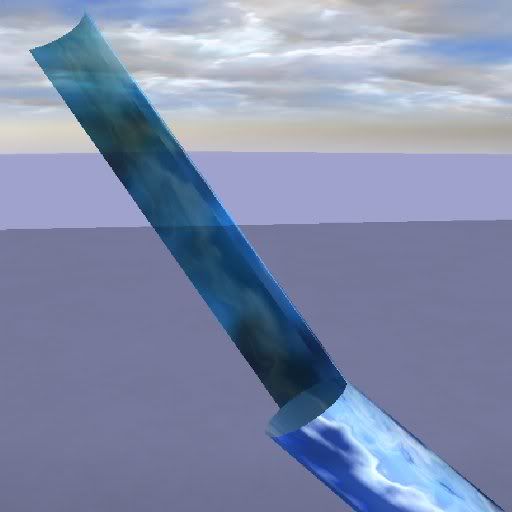 This is when I exported as an editable mesh 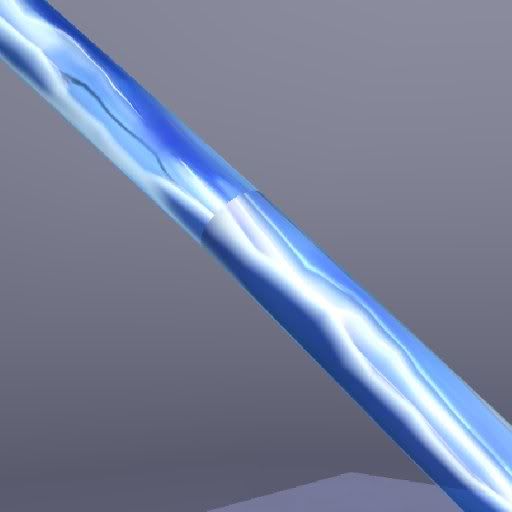 Btw, You don't actually need a base map for water to work. You only need a ripple map and maybe a reflection map. I just remembered the ripples on the mesh are huge for some reason. I can scale them down, but the texture still does not show. Edited by jawa on Feb 13, 2012 at 08:43 PM |
||||
|
|
|||||
|
OpsY Joined: Feb 19, 2007 
Frobisher Bay |
Posted: Feb 14, 2012 03:22 PM
Msg. 4 of 4
If you don't use blitzkrieg you should never export edit poly
|
||||
|
|
|||||

|
