A Community discussion forum for Halo Custom Edition, Halo 2 Vista, Portal and Halo Machinima
|
 Home
Home Search
 Register
 Login
Login Member List
 Recent Posts
| »Forums Index »Halo Custom Edition (Bungie/Gearbox) »Halo CE General Discussion »help please wrl | 
|
| Author | Topic: help please wrl (15 messages, Page 1 of 1) | ||||
| Moderators: Dennis | |||||
 The_Arbiter Joined: Aug 23, 2011 
I feel like having scotch |
Posted: Oct 3, 2011 02:37 AM
Msg. 1 of 15
how to i get the error file to import
|
||||


|
|||||
|
eliteslasher Joined: Jun 30, 2008 
Crysis 3!!!!!!! All I have to say. :D |
Posted: Oct 3, 2011 02:52 AM
Msg. 2 of 15
The 3ds script Chimp can be used as it has a .wrl importer built into it. Search on this site for the script.
|
||||
|
|
|||||
|
The_Arbiter Joined: Aug 23, 2011
I feel like having scotch |
Posted: Oct 3, 2011 02:53 AM
Msg. 3 of 15
thanks but thats not what i mean can moldels have wrl
|
||||
|
|
|||||
|
eliteslasher Joined: Jun 30, 2008
Crysis 3!!!!!!! All I have to say. :D |
Posted: Oct 3, 2011 02:56 AM
Msg. 4 of 15
do you mean when you export them after having gotten the wrl file can they still hold the wrl file? I am not sure what you are asking if that wasn't what you were asking. :/
|
||||
|
|
|||||
|
The_Arbiter Joined: Aug 23, 2011
I feel like having scotch |
Posted: Oct 3, 2011 02:57 AM
Msg. 5 of 15
what i mean can moldels have wrls
i have this error i would like to fix it 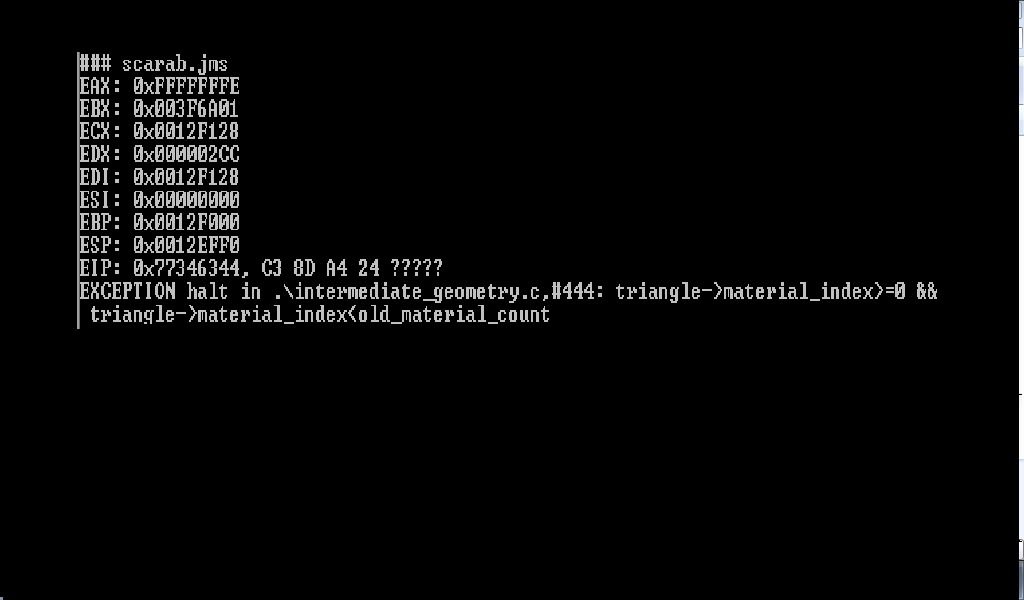 Edited by The_Arbiter on Oct 3, 2011 at 02:57 AM |
||||
|
|
|||||
|
eliteslasher Joined: Jun 30, 2008
Crysis 3!!!!!!! All I have to say. :D |
Posted: Oct 3, 2011 02:59 AM
Msg. 6 of 15
I believe that that means that you have an id in the model that does not correspond with a named texture. For example, you have mesh labeled as a texture id 23 when your number of textures in the map only goes 1 - 22
|
||||
|
|
|||||
|
The_Arbiter Joined: Aug 23, 2011
I feel like having scotch |
Posted: Oct 3, 2011 03:01 AM
Msg. 7 of 15
i will see if that works i am trying to build the halo3 scarab its a rip
|
||||
|
|
|||||
|
eliteslasher Joined: Jun 30, 2008
Crysis 3!!!!!!! All I have to say. :D |
Posted: Oct 3, 2011 03:07 AM
Msg. 8 of 15
Just a word of warning, sometimes you have to be careful with rips. Their collision and materials don't always necessarily import correctly. You will need to look the models over carefully sometimes to find these errors and sometimes they will be so blatant and have many errors.
|
||||
|
|
|||||
|
The_Arbiter Joined: Aug 23, 2011
I feel like having scotch |
Posted: Oct 3, 2011 03:12 AM
Msg. 9 of 15
ok so what should i do to try to get it in
|
||||
|
|
|||||
|
eliteslasher Joined: Jun 30, 2008
Crysis 3!!!!!!! All I have to say. :D |
Posted: Oct 3, 2011 03:26 AM
Msg. 10 of 15
Well my recommendation is do like I said first and look first for un-accounted texture labels then after that, try to see if the model follows the sealed world rule. Sometimes a model is it's own collision as well, but sometimes not. If you don't understand any of these instructions, then I highly recommend not ripping until you do as these are the basis of the rules for which models and maps must follow and you first need to learn more about them. Otherwise, you should know what I am saying and be able to fix the problem most likely unless tool is just deciding to be a b****, which it likes to be sometimes I might add.
It's very hard to explain debugging model errors when a multitude of errors can cause models to not export. It's sort of something that you just end up picking up from custom modeling experience and from watching a very many tutorials over and over. If you have not done a lot of custom modeling, I recommend trying it even on simple models with few textures and progressively challenging yourself to do more and more complex stuff with more detailed mesh and textures. |
||||
|
|
|||||
|
The_Arbiter Joined: Aug 23, 2011
I feel like having scotch |
Posted: Oct 3, 2011 03:28 AM
Msg. 11 of 15
i model alot of custom stuff i just have not seen that error before
|
||||
|
|
|||||
|
eliteslasher Joined: Jun 30, 2008
Crysis 3!!!!!!! All I have to say. :D |
Posted: Oct 3, 2011 03:31 AM
Msg. 12 of 15
kk, well my guess is just check the geometry for errors, but I still think that that error refers to a 3ds issue with the texture coordinates. try selecting by ID and then hide all the mesh from every ID you know is set up in the texture list in 3ds. Any extra mesh you have, if you have any, will be the culprit and you need to find out if it needs to be deleted or changed to another ID.
|
||||
|
|
|||||
|
Spartan314 Joined: Aug 21, 2010 
Former biped rigger & FP animator |
Posted: Oct 3, 2011 03:35 AM
Msg. 13 of 15
Usually it helps to change the texture thingy from Standard to sub-multi, and make sure every one of your faces has a set ID. And good smoothing groups.
|
||||
|
|
|||||
|
The_Arbiter Joined: Aug 23, 2011
I feel like having scotch |
Posted: Oct 3, 2011 03:35 AM
Msg. 14 of 15
thatks for the help and it could be that the model has ever smoothing group selected!
|
||||
|
|
|||||
|
eliteslasher Joined: Jun 30, 2008
Crysis 3!!!!!!! All I have to say. :D |
Posted: Oct 3, 2011 03:37 AM
Msg. 15 of 15
Quote: --- Original message by: Spartan314 Usually it helps to change the texture thingy from Standard to sub-multi, and make sure every one of your faces has a set ID. And good smoothing groups. ^ This, and actually, a word of wisdom... never work in anything BUT multi-sub object. It makes things so much easier in the long run. |
||||
|
|
|||||

|
