A Community discussion forum for Halo Custom Edition, Halo 2 Vista, Portal and Halo Machinima
|
 Home
Home Search
 Register
 Login
Login Member List
 Recent Posts
| »Forums Index »Halo Custom Edition (Bungie/Gearbox) »Halo CE Technical / Map Design »Gmax help | 
|
| Author | Topic: Gmax help (6 messages, Page 1 of 1) | ||||
| Moderators: Dennis | |||||
 Recon_Sniper_4 Joined: Jun 2, 2009 
Take down what once was a great power. |
Posted: Sep 4, 2011 04:52 PM
Msg. 1 of 6
ok so i finished making my map with gmax but since im use to using 3ds max 8 i dont know how to export as a .jms since everytime i use 3ds max it gives me tool errors so what exporter should i use and what links should i use for help?
thanks guys & girls! |
||||


|
|||||
|
SlappyThePirate Joined: Aug 24, 2009 
You are irritating, I'll release nothing |
Posted: Sep 4, 2011 05:06 PM
Msg. 2 of 6
You have to fix the errors tool tells you you have. Import the .wrl file in the halo ce folder into 3ds max on top of your level.
|
||||
|
|
|||||
|
Recon_Sniper_4 Joined: Jun 2, 2009
Take down what once was a great power. |
Posted: Sep 4, 2011 05:40 PM
Msg. 3 of 6
i tried and i get more errors, so i want to just leave it alone and learn to use gmax so i know how to use both so any help?
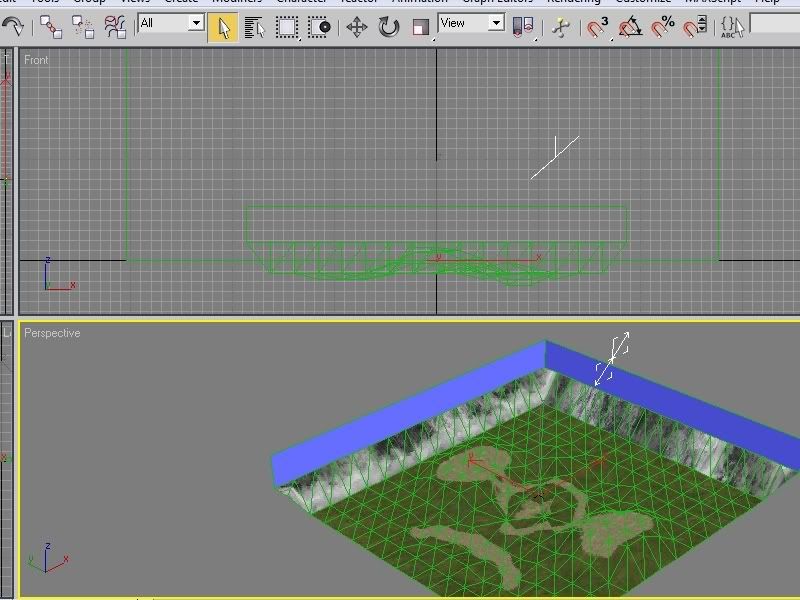 and thats the first error but then idk what to do from here because sometimes i get more errors if you know how to fix it then just say so and ill do it. Edited by Recon_Sniper_4 on Sep 4, 2011 at 06:03 PM |
||||
|
|
|||||
|
SlappyThePirate Joined: Aug 24, 2009
You are irritating, I'll release nothing |
Posted: Sep 4, 2011 06:50 PM
Msg. 4 of 6
Odd. I'm not sure, that error doesn't appear to even be inside the map at all.
Are you sure you're importing the right .wrl? You're supposed to use the one named your map's name. |
||||
|
|
|||||
|
Recon_Sniper_4 Joined: Jun 2, 2009
Take down what once was a great power. |
Posted: Sep 4, 2011 07:17 PM
Msg. 5 of 6
ya man im completely sure its the right wrl because im trying to learn terrain and base adding and everything and this one is for terrain and for some reason thats the error i get and its completely weird.
|
||||
|
|
|||||
|
ally Joined: Jun 23, 2010 
Aye Ready |
Posted: Sep 4, 2011 07:46 PM
Msg. 6 of 6
dk for sure, can't see the image with being so small, maybe go to poly mode and scroll over that area where the error shows and see if there is a small poly sticking out of your bsp.
what does the debug say when you try to export it. also you mented what should you use to export with in gmax, chimp i think is the one that works. for 3ds max 8 use blitzkrieg. |
||||
|
|
|||||

|
