A Community discussion forum for Halo Custom Edition, Halo 2 Vista, Portal and Halo Machinima
|
 Home
Home Search
 Register
 Login
Login Member List
 Recent Posts
| »Forums Index »Halo Custom Edition (Bungie/Gearbox) »Halo CE General Discussion »What qualifies a sealed world? How do I fix Open Edges? | 
|
| Author | Topic: What qualifies a sealed world? How do I fix Open Edges? (12 messages, Page 1 of 1) | ||||
| Moderators: Dennis | |||||
 DarkHalo003 Joined: Mar 10, 2008 
All ARs Need Green Little Buttons. |
Posted: Jun 13, 2011 02:43 PM
Msg. 1 of 12
What exactly qualifies a sealed world? I have a map I've been working on that doesn't meet these requirements and I get a lot of Open Edges due that. Here is a pic of my level from the outside in 3DS:
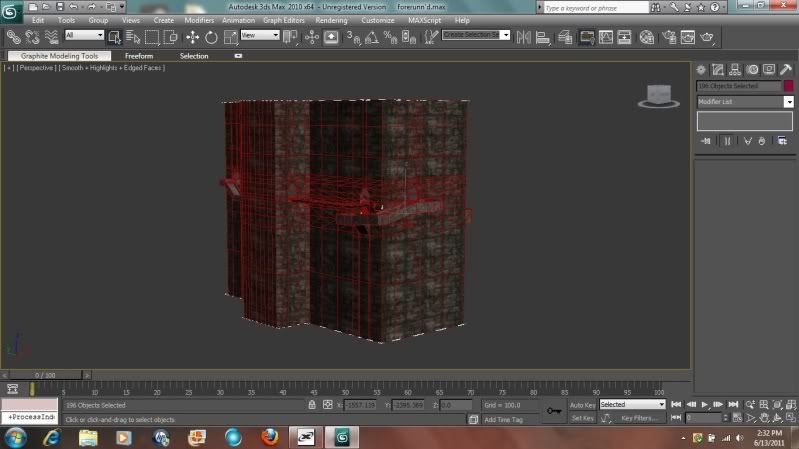 How would I go about make THAT a sealed world? On the topic of Open Edges, as you saw from the last pic, the open edges on the outer levels are primarily from the level's not being sealed. I do have some odd ones though: 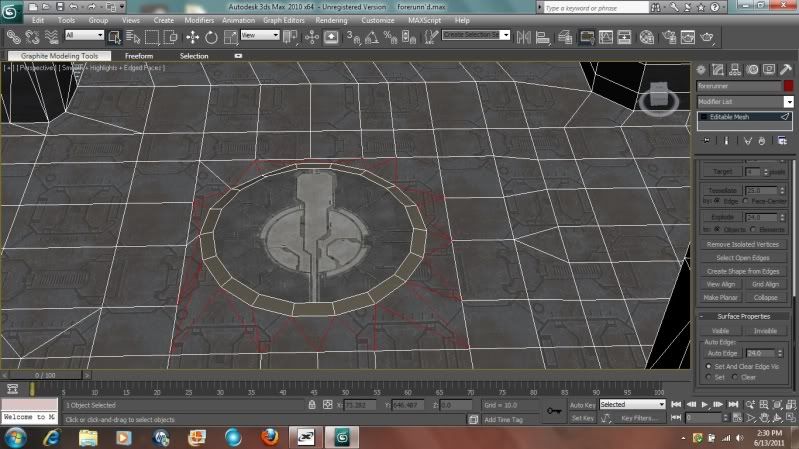 As you can see, these appear to be sealed, but are marked as "Open." Now, this area is the area where I attached a circle to my model to have that center piece. That may have caused it, but there are still some areas that appear sealed but are marked as "Open." Any tips on fixing these kinds of errors? |
||||


|
|||||
|
eliteslasher Joined: Jun 30, 2008 
Crysis 3!!!!!!! All I have to say. :D |
Posted: Jun 13, 2011 03:11 PM
Msg. 2 of 12
Contact me on xfire.
eliteslasher is my username If you have Teamviewer, I may be able to help a bit in this category. and also in the category of cleaning up your model to be less poly because as of now you have many unnecessary polies in that screen alone. I am sure you are aware of them, but I may be able to help you learn to quickly get rid of them and also to not get them in the beginning. |
||||
|
|
|||||
|
DarkHalo003 Joined: Mar 10, 2008
All ARs Need Green Little Buttons. |
Posted: Jun 13, 2011 04:00 PM
Msg. 3 of 12
Quote: --- Original message by: eliteslasher Contact me on xfire. eliteslasher is my username If you have Teamviewer, I may be able to help a bit in this category. and also in the category of cleaning up your model to be less poly because as of now you have many unnecessary polies in that screen alone. I am sure you are aware of them, but I may be able to help you learn to quickly get rid of them and also to not get them in the beginning. I know they're unnecessary, but this is the first map I've modeled decently in a while, so it's not like they haven't helped make it so. It really isn't as many as you think though. I just want an explanation on how to make it a Sealed World. I've used Team Viewer before and I honestly don't trust it. Either way, I have a dilemma and questions that can be answered via posting. Edited by DarkHalo003 on Jun 13, 2011 at 04:05 PM |
||||
|
|
|||||
|
Sprinkle Joined: Jan 3, 2010 
|
Posted: Jun 13, 2011 05:00 PM
Msg. 4 of 12
An easy way to check if it is sealed or not is to click on the face and move it around, if the rest of the mesh isn't following than it is not sealed. The entire area needs to be enclosed just like in the real world you can't have a box and just have 1 side missing.
Also the geometry should look something more along the lines of this:  You are wasting a lot of space with those boxes. An easy way to achieve this would be to go into edge mode, select the edge of the circle. Select the scale tool, while holding shift scale the edges so that it expands. New polygons should be created. This will give you a sealed geometry and now you can go into vertex mode and target weld to the surround geometry. |
||||
|
|
|||||
|
SlappyThePirate Joined: Aug 24, 2009 
You are irritating, I'll release nothing |
Posted: Jun 13, 2011 06:10 PM
Msg. 5 of 12
So in case anyone is confused about tool error definitions...
 Edited by SlappyThePirate on Jun 13, 2011 at 06:12 PM |
||||
|
|
|||||
|
DarkHalo003 Joined: Mar 10, 2008
All ARs Need Green Little Buttons. |
Posted: Jun 13, 2011 06:50 PM
Msg. 6 of 12
It was because I had done major work with that area before and it left some seams open. All fixed now. But I know my topology is horrid in this map.
|
||||
|
|
|||||
|
milkkookie Joined: Aug 10, 2010 
:) |
Posted: Jun 13, 2011 06:55 PM
Msg. 7 of 12
im saving this page
|
||||
|
|
|||||
|
Wesker Joined: Jun 8, 2011 
Your Future Hinges upon This Fight!!! |
Posted: Jun 14, 2011 01:15 AM
Msg. 8 of 12
very useful yes very useful thank you for sharing your problem and those you had take there time to explain in full detail 0:
|
||||
|
|
|||||
|
antiblood Joined: Jul 17, 2010 
Hail satan, smoke mehth |
Posted: Jun 15, 2011 04:44 AM
Msg. 9 of 12
ffa i wanted to rage and make you handicap as soon as i saw how many polys are being wasted, good thing sprinkle pointed it out first :D
|
||||
|
|
|||||
|
TauSigmaNova Joined: Jan 31, 2011 
If love is blind, I guess I'll buy myself a cane |
Posted: Jun 18, 2011 12:22 PM
Msg. 10 of 12
savedd.
|
||||
|
|
|||||
|
Nickster5000 Joined: Dec 11, 2010 
|
Posted: Jun 20, 2011 03:59 PM
Msg. 11 of 12
Quote: --- Original message by: SlappyThePirate So in case anyone is confused about tool error definitions... Edited by SlappyThePirate on Jun 13, 2011 at 06:12 PM Everything else makes sense, but how does the collinar mean, update edge, overlapping edge, and degenerate triangles mean, and how do they effect ingame / tool / how to fix? Thanks for the help, and sorry for going off topic. Edited by ODST_Nick on Jun 20, 2011 at 04:00 PM |
||||
|
|
|||||
|
SlappyThePirate Joined: Aug 24, 2009
You are irritating, I'll release nothing |
Posted: Jun 20, 2011 10:18 PM
Msg. 12 of 12
Collinear is a geometric term for 'in a line'.
Update edge, overlapping edge, and degenerate triangles are what tool named thse kinds of errors. They mean that your structure or lightmaps will not compile, and you don't get a bsp. |
||||
|
|
|||||

|
