A Community discussion forum for Halo Custom Edition, Halo 2 Vista, Portal and Halo Machinima
|
 Home
Home Search
 Register
 Login
Login Member List
 Recent Posts
| »Forums Index »Halo Custom Edition (Bungie/Gearbox) »Halo CE Technical / Map Design »Map from plane---open edges?? | 
|
| Author | Topic: Map from plane---open edges?? (8 messages, Page 1 of 1) | ||||
| Moderators: Dennis | |||||
 Xoronatus Joined: Dec 6, 2010 
Taking a break |
Posted: Apr 23, 2011 12:42 AM
Msg. 1 of 8
So I started with a plane (open edges of course)
 And then I did some random editing to that plane  So of course I would have open edges, how could I fix this? |
||||


|
|||||
|
darkassassin14 Joined: Jul 23, 2007 
El. Psy. Congroo. |
Posted: Apr 23, 2011 01:05 AM
Msg. 2 of 8
yea good luck with that one buddy.
|
||||
|
|
|||||
|
Xoronatus Joined: Dec 6, 2010
Taking a break |
Posted: Apr 23, 2011 01:08 AM
Msg. 3 of 8
Quote: --- Original message by: darkassassin14 yea good luck with that one buddy. Well I was just using it as an example. |
||||
|
|
|||||
|
Xoronatus Joined: Dec 6, 2010
Taking a break |
Posted: Apr 23, 2011 01:34 AM
Msg. 4 of 8
Quote: --- Original message by: Juiceb0xhero First make a box: 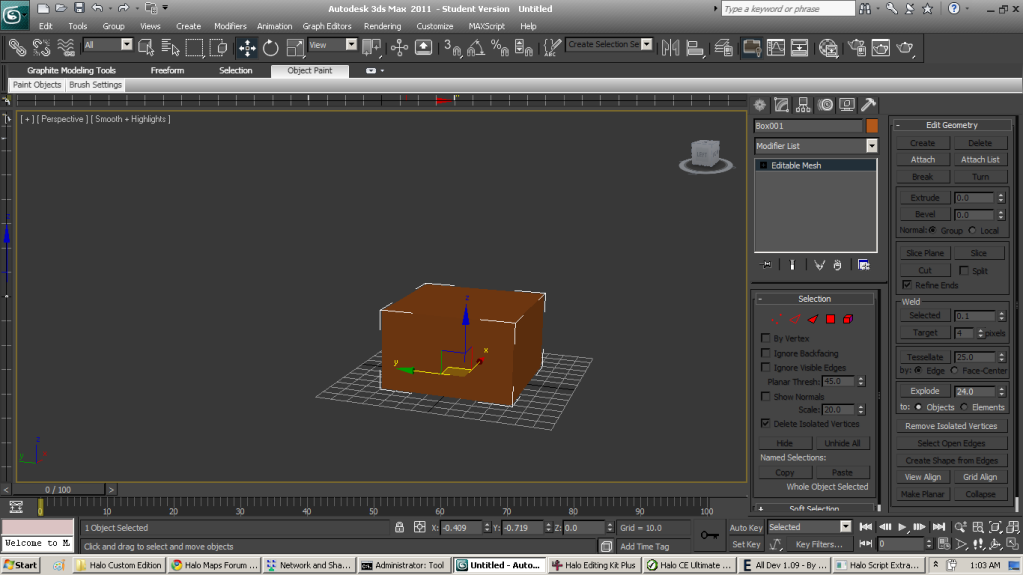 Hide the top portion: 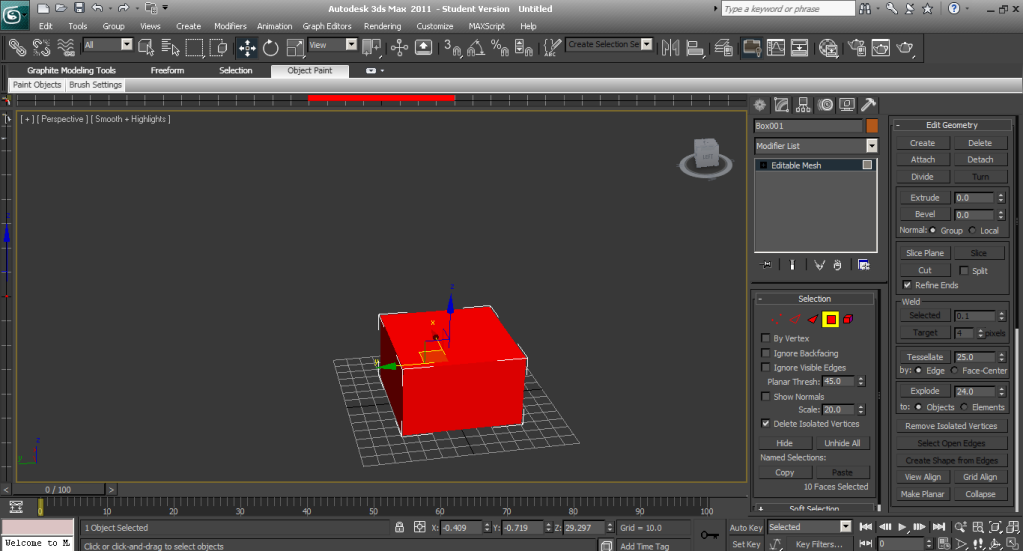 Huzzah! no open edges Oh really, AWESOME, I was hoping for an answer like that. Sweet, just make box hide the top voila. Nice and easy, no crazy vertex welding, polygon connecting blah blah blah. THANKS!!!!!!! Xoronatus |
||||
|
|
|||||
|
Xoronatus Joined: Dec 6, 2010
Taking a break |
Posted: Apr 23, 2011 02:11 AM
Msg. 5 of 8
Quote: --- Original message by: Juiceb0xhero oops forgot to mention that you have to highlight the whole box and click flip then highlight the top portion and hide Oh ok, yay!!!!! YES!!! Now I can model whatever I want!!!! Not limited to editing boxes!!! YES!!!! |
||||
|
|
|||||
|
kirby_422 Joined: Jan 22, 2006 
Apparently public enemy number 1? |
Posted: Apr 23, 2011 11:19 AM
Msg. 6 of 8
if you want to use your actual plane you had made before, you can go into editable poly mode, pick border instead of stuff like face or vertice. pick the outside lines of the model, hold shift, and drag upwards (how ever high you want the sky in the map), then hit the cap button (in edit borders section on the side) then apply +sky to all that you just created.
|
||||
|
|
|||||
|
XlzQwerty1 Joined: Aug 6, 2009 
|
Posted: Apr 23, 2011 12:02 PM
Msg. 7 of 8
Quote: --- Original message by: kirby_422 if you want to use your actual plane you had made before, you can go into editable poly mode, pick border instead of stuff like face or vertice. pick the outside lines of the model, hold shift, and drag upwards (how ever high you want the sky in the map), then hit the cap button (in edit borders section on the side) then apply +sky to all that you just created. Best go. |
||||
|
|
|||||
|
Xoronatus Joined: Dec 6, 2010
Taking a break |
Posted: Apr 23, 2011 12:40 PM
Msg. 8 of 8
Quote: --- Original message by: XlzQwerty1 Quote: --- Original message by: kirby_422 if you want to use your actual plane you had made before, you can go into editable poly mode, pick border instead of stuff like face or vertice. pick the outside lines of the model, hold shift, and drag upwards (how ever high you want the sky in the map), then hit the cap button (in edit borders section on the side) then apply +sky to all that you just created. Best go. Ah, Ok, thanks. Yeah, this way I'm not limited to make box-canyon maps. YES!!!!!! |
||||
|
|
|||||

|
