A Community discussion forum for Halo Custom Edition, Halo 2 Vista, Portal and Halo Machinima
|
 Home
Home Search
 Register
 Login
Login Member List
 Recent Posts
| »Forums Index »Halo Custom Edition (Bungie/Gearbox) »Halo CE General Discussion »Ripping ISO's | 
|
| Author | Topic: Ripping ISO's (11 messages, Page 1 of 1) | ||||
| Moderators: Dennis | |||||
 Slayer117 Joined: Oct 3, 2008 
Host of CE3 2010-forever! |
Posted: Jan 9, 2011 03:13 AM
Msg. 1 of 11
Hi guys it's me again with that one question that I had a while ago. Does anyone know how to rip from an ISO like a game cube ISO for instance. Cause I have a few people who actualy want to make the Pokemon mod for halo. But since I and neither of my friends can model the greatest we decided we should just rip the models. But we need some help with that. We don't know how so if anyone knows a tool that Can or how to would be nice so we can do it.
|
||||


|
|||||
|
YakZSmelk Joined: Apr 3, 2006 
- Environment Artist - robhow.com |
Posted: Jan 9, 2011 04:20 AM
Msg. 2 of 11
I would do a search, I know it's hard to find but I've found quite a few game .ISO's just by digging through the crap Google gives you.
|
||||
|
|
|||||
|
Slayer117 Joined: Oct 3, 2008
Host of CE3 2010-forever! |
Posted: Jan 9, 2011 05:04 AM
Msg. 3 of 11
I dont want the ISO's
I want the files inside. Were trying to rip the pokemon from the GameCube ISO Pokemon Colosseum so we can import the models into halo :D |
||||
|
|
|||||
|
iizahsum Joined: Jun 22, 2008 
Lacks enthusiasm |
Posted: Jan 9, 2011 01:31 PM
Msg. 4 of 11
7zip
|
||||
|
|
|||||
|
Codebrain Joined: Sep 29, 2007 
/meme |
Posted: Jan 9, 2011 02:30 PM
Msg. 5 of 11
Like people have said before, .iso files can be opened by most archive programs (since really all that an .iso file is, is a archive of files into one file (aka the iso)
HOWEVER. Slayer, the files inside ARE NOT going to be .max, .mp3 and what not. Nintendo uses different file types than normal. For example, Twilight Princess's file types are like: .arc (archived file) .map (unknown to me, probably bitmaps) .ast and .aw (Stream and Wave, for audio), etc. However, I have a tutorial for extracting models and what not from wii/gamecube games, do note however this tutorial was for extracting a Super Mario Galaxy 2 model, aka Bowser. Quote: --- Original message by: A post on /v/ Alright, in this short tutorial, I'll try to explain how to extract models from "next-gen" video games. I'll start using wii games but keep in mind gamecube games are based around the same technology so the tutorial will apply to most of them too. This guide resolves around proprietary Nintendo 3d engines which are used in Super Mario Sunshine, Luigi's mansion, Mario kart double dash, Chibi Robo, Super Mario galaxy 1, Super Mario Galaxy 2. I'll be demonstrating using 3ds max. 1- First, rip the ISO from the game you want your models from. For that you'll need a Hitachi drive which can be purchased for about 50 bucks. They are also located in some Xbox 360 consoles, so if you have a broken 360 with a functioning drive, you can hook it up to the computer and it'll work just like a normal drive. I know you wont do that but that's the most "legal" way to obtain the models I can think of. You could just search some torrent sites and download the ISO there too. 2- After that, you must download SZS Tools. http://www.amnoid.de/gc/szstools.zip Working download link. Extract all the files from the zip into a folder, you're going to use it later. 3- Download the Gamecube emulator Dolphin. Keep in mind you do not have to start the emulation so no need for a powerful computer. We're simply exploiting a function which allows us to explore the ISO freely and extracting the files we want. http://dolphin-emulator.com/ Download for your Operating system 4- Open and Set up Dolphin, NO NEED TO RUN THE GAME. Just right click on it and select "Properties". Go under the tab "Filesystem".I'm going to use Mario Galaxy 2. Open Partition 1 and open folder Objectdata. Extract the model You want. I am going to use Bowser (Demo Koopa). The files have codenames so you're most likely going to have to figure out some of them by yourself. Trial and error.... joy! 5- Lets get back to out SZS tools folder we created earlier. After you extracted your arc file (The model), simply drag and drop it into yaz0dec.exe It will create Demo Koopa.arc 0.rarc Drag the newly created file (Demo Koopa.arc 0.rarc) into rarcdump.exe and it will create a new folder with the file's name. 6- We're practically done. Now open the folder and you'll have all the files from the model including texture, models and animations. 7 (Bonus)- http://www.megaupload.com/?d=E7OL48AR I hate using megaupload because the files will die after a prolonged period of time so get it while it's hot. It's basically a way to run the animations on the computer. They're set on loop and you can use the Pan cam to examine it from different perspectives. 8 (kinda)- You can extract more compatible models if you run the main initial file into bmdview2.exe . Simply open the file and click on [file] and export model. Doing this will result in a much more stable/compatible version of the model which you will be able to toy with to your heart's content... I hope this helped. PS: Sorry for any typos, wrote this as fast as I could... Finished result: 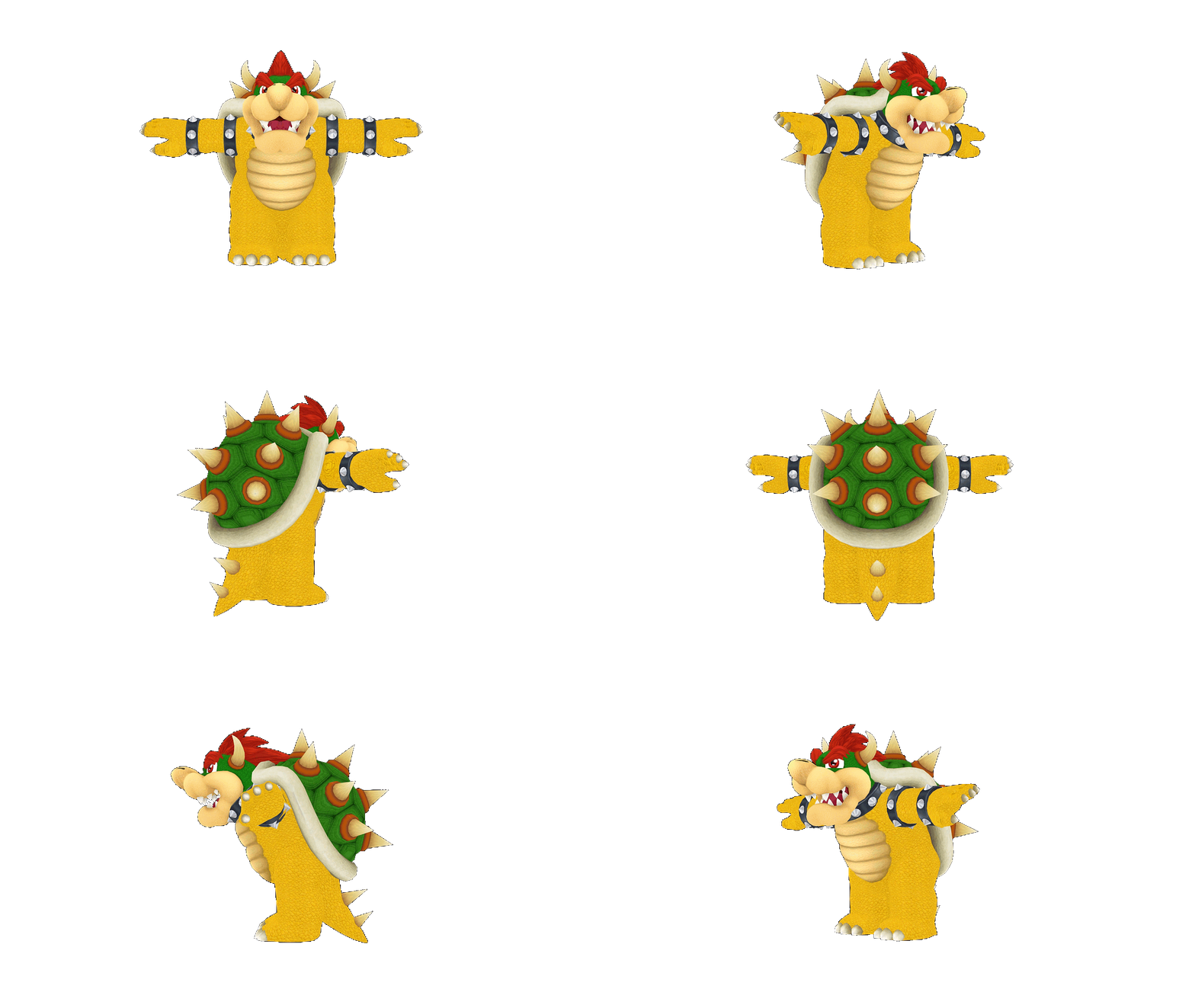 Edited by Codebrain on Jan 9, 2011 at 02:31 PM |
||||
|
|
|||||
|
Slayer117 Joined: Oct 3, 2008
Host of CE3 2010-forever! |
Posted: Jan 9, 2011 03:08 PM
Msg. 6 of 11
Thanks Brian I may have to check it out. oh and another thing would the GameCube game models be to high of polly for CE?
|
||||
|
|
|||||
|
abkarch Joined: Mar 20, 2010 
This account is old. Sorry for inappropriate posts |
Posted: Jan 9, 2011 03:44 PM
Msg. 7 of 11
can that method do animations some how?
|
||||
|
|
|||||
|
Codebrain Joined: Sep 29, 2007
/meme |
Posted: Jan 9, 2011 09:53 PM
Msg. 8 of 11
Quote: --- Original message by: abkarch can that method do animations some how? Quote: --- Original message by: CodeBrain 6- We're practically done. Now open the folder and you'll have all the files from the model including texture, models and animations. 7 (Bonus)- http://www.megaupload.com/?d=E7OL48AR I hate using megaupload because the files will die after a prolonged period of time so get it while it's hot. It's basically a way to run the animations on the computer. They're set on loop and you can use the Pan cam to examine it from different perspectives. Yes. |
||||
|
|
|||||
|
abkarch Joined: Mar 20, 2010
This account is old. Sorry for inappropriate posts |
Posted: Jan 9, 2011 10:03 PM
Msg. 9 of 11
ah i missed that. thanks.
|
||||
|
|
|||||
|
Slayer117 Joined: Oct 3, 2008
Host of CE3 2010-forever! |
Posted: Jan 10, 2011 04:53 PM
Msg. 10 of 11
Does this work for the Wii ISO's also?
|
||||
|
|
|||||
|
Codebrain Joined: Sep 29, 2007
/meme |
Posted: Jan 10, 2011 05:30 PM
Msg. 11 of 11
Quote: --- Original message by: Julian Quote: --- Original message by: Slayer117 Does this work for the Wii ISO's also? Quote: Alright, in this short tutorial, I'll try to explain how to extract models from "next-gen" video games. I'll start using wii games but keep in mind gamecube games are based around the same technology so the tutorial will apply to most of them too. This guide resolves around proprietary Nintendo 3d engines which are used in Super Mario Sunshine, Luigi's mansion, Mario kart double dash, Chibi Robo, Super Mario galaxy 1, Super Mario Galaxy 2. Yes. Well. Looks like I dont need to repost that then :D Edited by Codebrain on Jan 10, 2011 at 05:31 PM |
||||
|
|
|||||

|
