A Community discussion forum for Halo Custom Edition, Halo 2 Vista, Portal and Halo Machinima
|
 Home
Home Search
 Register
 Login
Login Member List
 Recent Posts
| »Forums Index »Halo Custom Edition (Bungie/Gearbox) »Halo CE General Discussion »Collision Model command | 
|
| Author | Topic: Collision Model command (15 messages, Page 1 of 1) | ||||
| Moderators: Dennis | |||||
 disturbed Joined: Jul 31, 2010 
Im a mac, deal with it. I still run PC through emu |
Posted: Sep 23, 2010 07:07 PM
Msg. 1 of 15
Ok so i want to know how to create a collision, for a normal object and a BSP. if anyone can tell me the command/method that would be... uh... cool. lol
|
||||


|
|||||
|
Da Moose Joined: Jan 6, 2008 
"We've got the Holy Hand Grenade of Antioch" |
Posted: Sep 23, 2010 07:19 PM
Msg. 2 of 15
For a collision model for an object (not BSP) put your collision model, which is often just a copy of your model's .jms file., into your "physics" folder. So it should be something like this: weapons/assault_rifle/physics/yourmodelgoesinthephysicsfolder.jms
Then the tool command is this: tool collision-geometry weapons\assault_rifle You don't type in the name of the physics folder, just the path to it. Hope that helped for collision. As for BSP, isn't a BSP its own collision? |
||||
|
|
|||||
|
disturbed Joined: Jul 31, 2010
Im a mac, deal with it. I still run PC through emu |
Posted: Sep 23, 2010 07:23 PM
Msg. 3 of 15
hmm... well will that make a collision identical to the model?
|
||||
|
|
|||||
|
disturbed Joined: Jul 31, 2010
Im a mac, deal with it. I still run PC through emu |
Posted: Sep 23, 2010 08:08 PM
Msg. 4 of 15
really sorry but this is all pretty much gibberish to me... well i understand most of it, i just dont know how to edit JMS and making a collision fit the model
|
||||
|
|
|||||
|
OpsY Joined: Feb 19, 2007 
Frobisher Bay |
Posted: Sep 23, 2010 08:44 PM
Msg. 5 of 15
Simple. If you're making an assault Rifle, you'll want the good looking one exported as your model.jms in your weapon\ar\models\model.jms directory. Then, you'll want to make a simple version of that, in Gmax or 3ds Max and export it as weapon\ar\physics\collision.jms
|
||||
|
|
|||||
|
anonymous_2009 Joined: Jun 13, 2009 
|
Posted: Sep 23, 2010 08:48 PM
Msg. 6 of 15
Please note I have not put anything in-game for a long time. So not 100% correct but I made you a simple guide.
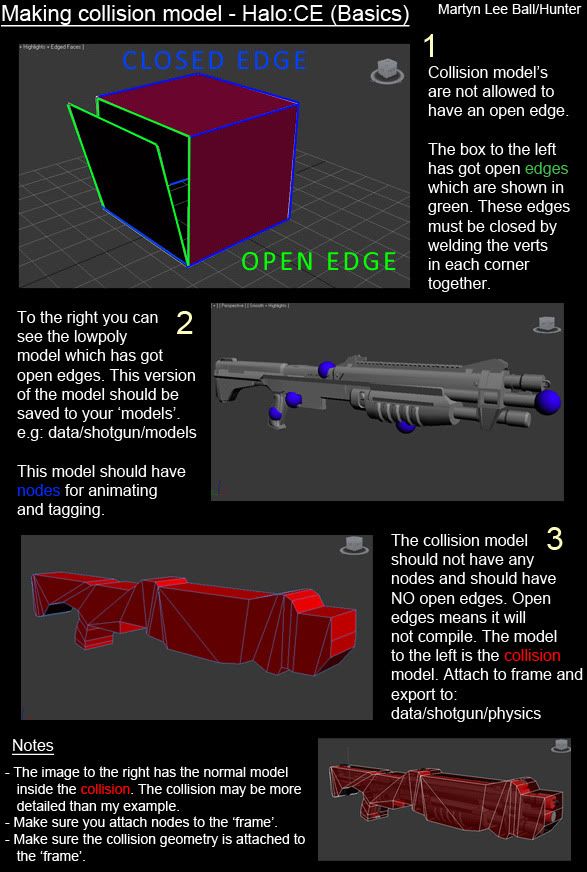 |
||||
|
|
|||||
|
AGLion Joined: Jun 29, 2010 
- Animator... suck it - |
Posted: Sep 23, 2010 08:50 PM
Msg. 7 of 15
SAVED.
Good tut. |
||||
|
|
|||||
|
disturbed Joined: Jul 31, 2010
Im a mac, deal with it. I still run PC through emu |
Posted: Sep 23, 2010 08:51 PM
Msg. 8 of 15
oh ok i see. so is is the same for the bsp too?
also yes, it is a good tut Edited by disturbed on Sep 23, 2010 at 08:52 PM |
||||
|
|
|||||
|
anonymous_2009 Joined: Jun 13, 2009
|
Posted: Sep 23, 2010 09:00 PM
Msg. 9 of 15
I will make a quick explanation of what kind of faces can have open edges in a BSP tomorrow.
But for now I will tell you that BSP must have NO open edges unless the face with open edges is given a material with a special character at the end of the material name which tells tool that it is water/glass ect... I believe the tool command to compile a BSP is 'tool structure data/levels/levelname'. Save the jms file of the level geometry in data/levels/levelname/models. That is the only command you use to make the BSP file for a map. Other than one other which is used to make the scenario I believe. Edit: Change of plan, I will make a BASIC level creation guide tomorrow, similar to the guide above I think. But separate images. Edited by anonymous_2009 on Sep 23, 2010 at 09:03 PM |
||||
|
|
|||||
|
MoooseGuy Joined: Aug 10, 2008 
I Approve This Message. |
Posted: Sep 24, 2010 08:59 AM
Msg. 10 of 15
If you are making a collision for a weapon, just make a box that is the same size of the gun, then export that. You don't need anything more.
|
||||
|
|
|||||
|
OpsY Joined: Feb 19, 2007
Frobisher Bay |
Posted: Sep 24, 2010 11:22 AM
Msg. 11 of 15
Quote: --- Original message by: anonymous_2009 I will make a quick explanation of what kind of faces can have open edges in a BSP tomorrow. But for now I will tell you that BSP must have NO open edges unless the face with open edges is given a material with a special character at the end of the material name which tells tool that it is water/glass ect... I believe the tool command to compile a BSP is 'tool structure levels/levelname bspname'. Save the jms file of the level geometry in data/levels/levelname/models. That is the only command you use to make the BSP file for a map. Other than one other which is used to make the scenario I believe. Edit: Change of plan, I will make a BASIC level creation guide tomorrow, similar to the guide above I think. But separate images. Edited by anonymous_2009 on Sep 23, 2010 at 09:03 PM Fixed;) |
||||
|
|
|||||
|
anonymous_2009 Joined: Jun 13, 2009
|
Posted: Sep 26, 2010 07:52 AM
Msg. 12 of 15
That's the one Lol. Thought I was wrong.
|
||||
|
|
|||||
|
disturbed Joined: Jul 31, 2010
Im a mac, deal with it. I still run PC through emu |
Posted: Sep 26, 2010 09:44 AM
Msg. 13 of 15
so, using tutorial it would be:
tool structure levels/tutorial Mybsp also how do i import the JSP into 3ds max? |
||||
|
|
|||||
|
Skidrow925 Joined: Mar 19, 2010 
"ideological sense of respect and tact of a 5yo" |
Posted: Sep 27, 2010 02:54 PM
Msg. 14 of 15
Quote: --- Original message by: disturbed so, using tutorial it would be: tool structure levels/tutorial Mybsp also how do i import the JSP into 3ds max? Uhhh JSP? You mean JMS? You can't import a JMS into MAX that I know of unless you make it a GBX model then use a GBX model importer. |
||||
|
|
|||||
|
disturbed Joined: Jul 31, 2010
Im a mac, deal with it. I still run PC through emu |
Posted: Sep 27, 2010 05:47 PM
Msg. 15 of 15
yeah thats what i meant. and oh ok. thankks
|
||||
|
|
|||||

|
